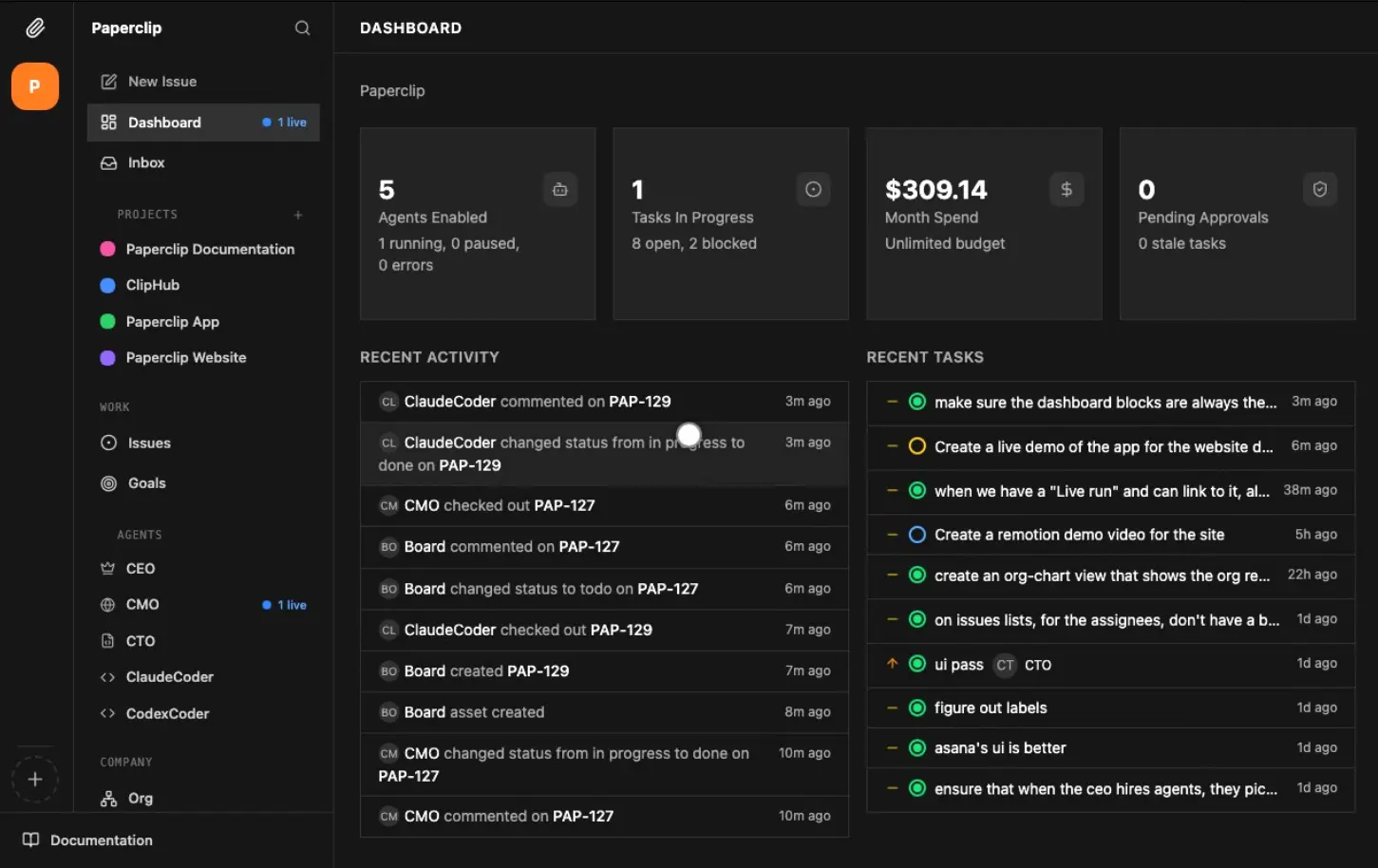
Paperclip is a free, open-source orchestration platform that lets you run entire AI-powered businesses from a single dashboard. It currently supports OpenClaw, Claude Code, Codex, Cursor, Bash scripts, and any agent reachable via HTTP.
The AI Agent orchestration coordinates teams of AI agents, each with a defined role, a budget, and a reporting structure, toward a shared company goal. Define the mission, assign the agents, and Paperclip handles delegation, scheduling, cost tracking, and governance.
Features
- Any AI agent works with Paperclip if it can receive a heartbeat.
- Every task traces back to the company’s mission. Agents know what to do and why through inherited goal context.
- Agents wake on schedules, check assigned work, and take action.
- Set monthly budgets per agent. When an agent hits its limit, it stops working.
- Run unlimited companies from one deployment with complete data isolation between them.
- Every agent conversation gets traced. Tool calls and decisions go into an immutable audit log.
- You act as the board of directors. Approve hires, override strategy, pause, or terminate any agent at any time.
- Agents have hierarchies, roles, and reporting lines.
- Monitor and manage your autonomous businesses from anywhere through the responsive web interface.
Use Cases
- Assign a goal like building an app to a team of coding agents and monitor their progress via the dashboard.
- Set heartbeats for agents to handle tasks like social media updates, customer support, or financial reporting on a schedule.
- Run several different businesses from one Paperclip instance.
- Supervise multiple Claude Code or OpenClaw terminals to ensure they stay on track and within budget.
OpenClaw vs. Paperclip
Many users rely on OpenClaw to run individual tasks. That approach becomes difficult to manage as the number of agents grows. OpenClaw works well as an autonomous worker. It executes instructions, manages local files, and stores persistent memory.
Paperclip sits above those agents. It acts as the management layer. The system coordinates multiple agents, tracks spending limits, and keeps their activity tied to broader business objectives.
| OpenClaw | Paperclip | |
|---|---|---|
| What it is | Personal AI agent / single autonomous worker | Multi-agent orchestration platform |
| Primary interface | Messaging apps (WhatsApp, Telegram, Discord) | Web dashboard + mobile |
| Agent support | Single agent per instance | Any agent (OpenClaw, Claude Code, Codex, Cursor, Bash, HTTP) |
| Org structure | None | Org charts with roles, titles, and reporting lines |
| Goal alignment | No goal hierarchy | Tasks trace back through project to company mission |
| Budget control | None | Per-agent monthly budgets with auto-pause |
| Audit log | Basic conversation history | Immutable, append-only full tool-call trace |
| Governance | None | Board approval for hires and strategy |
| Scheduled jobs | Heartbeat (single agent) | Heartbeat scheduling across entire agent workforce |
| Multi-company | No | Yes, with full data isolation |
| Security posture | Broad system permissions; susceptible to prompt injection; flagged by Cisco as a significant security risk | Governance-gated actions; approval workflows; rollback support |
| Best for | Individual power users automating personal tasks | Founders and teams running multiple autonomous AI operations |
| License | MIT, self-hosted | MIT, self-hosted |
Installation
1. Install the paperclipai package. This command walks you through database setup, authentication, and your first company.
npx paperclipai onboard --yes2. Or install it manually:
git clone https://github.com/paperclipai/paperclip.git
cd paperclip
pnpm install
pnpm dev
3. The API server starts at http://localhost:3100.
Setting Up a Company
1. Log in to the dashboard and create a company. Write a mission statement at the goal level: for example, “Build the #1 AI note-taking app to $1M MRR.” Every task and agent decision traces back to this statement.
2. Add agents to the company. Assign each agent a role (CEO, CTO, Content Writer, SEO Analyst), a reporting line, and a job description.
3. Set the frequency at which each agent wakes and checks for work. Event-based triggers (task assignment, @-mentions) can also wake agents outside their schedule.
4. Assign a monthly token budget to each agent. The system auto-pauses an agent at 100% utilization. You receive a soft warning at 80%. You can override any limit and resume an agent manually as the board.
5. Create a Project under the company goal. Add tasks as tickets. The ticketing system threads every instruction and response and logs every tool call and decision. Sessions persist across reboots, so agents resume their context.
6. Agents submit strategy and hire requests for board approval before executing. You can pause, reassign, adjust budgets, or terminate any agent at any time from the dashboard or mobile interface.
Pros
- You can track all agent activity in one place.
- The platform stops agents automatically when they hit their spending limits.
- Agents retain their task context across reboots.
- You maintain full control over your data and infrastructure.
Cons
- The overhead is unnecessary if you only run one agent.
- You must configure your own agents and runtime environments.
Related Resources
- Paperclip GitHub Repository: Source code, README, development guide, and issue tracker for Paperclip.
- Paperclip Discord: Community server for questions, feature requests, and coordination with the Paperclip team.
- OpenClaw: A popular open-source AI coding agent that integrates directly with Paperclip as a worker node.
FAQs
Q: How is Paperclip different from just using Claude Code or OpenClaw directly?
A: Paperclip uses those agents as worker nodes. It adds the org chart, goal hierarchy, budget enforcement, heartbeat scheduling, and governance layer above them. A Claude Code session handles individual coding tasks. Paperclip handles who assigned the task, why it was assigned, how much it cost, and whether the output got reviewed.
Q: Do I need to rewrite or reconfigure my existing agents?
A: No. Paperclip connects to agents through a heartbeat interface. Any agent that can receive a heartbeat signal can plug into the system. Adapters handle the connection between Paperclip and your existing execution environment.
Q: Can I run more than one company from a single Paperclip install?
A: Yes. A single deployment supports an unlimited number of companies with complete data isolation between them. This is useful for running separate ventures, testing strategies in parallel, or cloning org configs across projects.
Q: Is there a hosted/cloud version?
A: Not currently. Paperclip is self-hosted only. For local access on mobile, the team recommends Tailscale.
Q: What database does Paperclip use?
A: Paperclip runs PostgreSQL. For local setups, the onboarding command spins up an embedded Postgres instance automatically. For production, you need to point the app at your own managed Postgres.