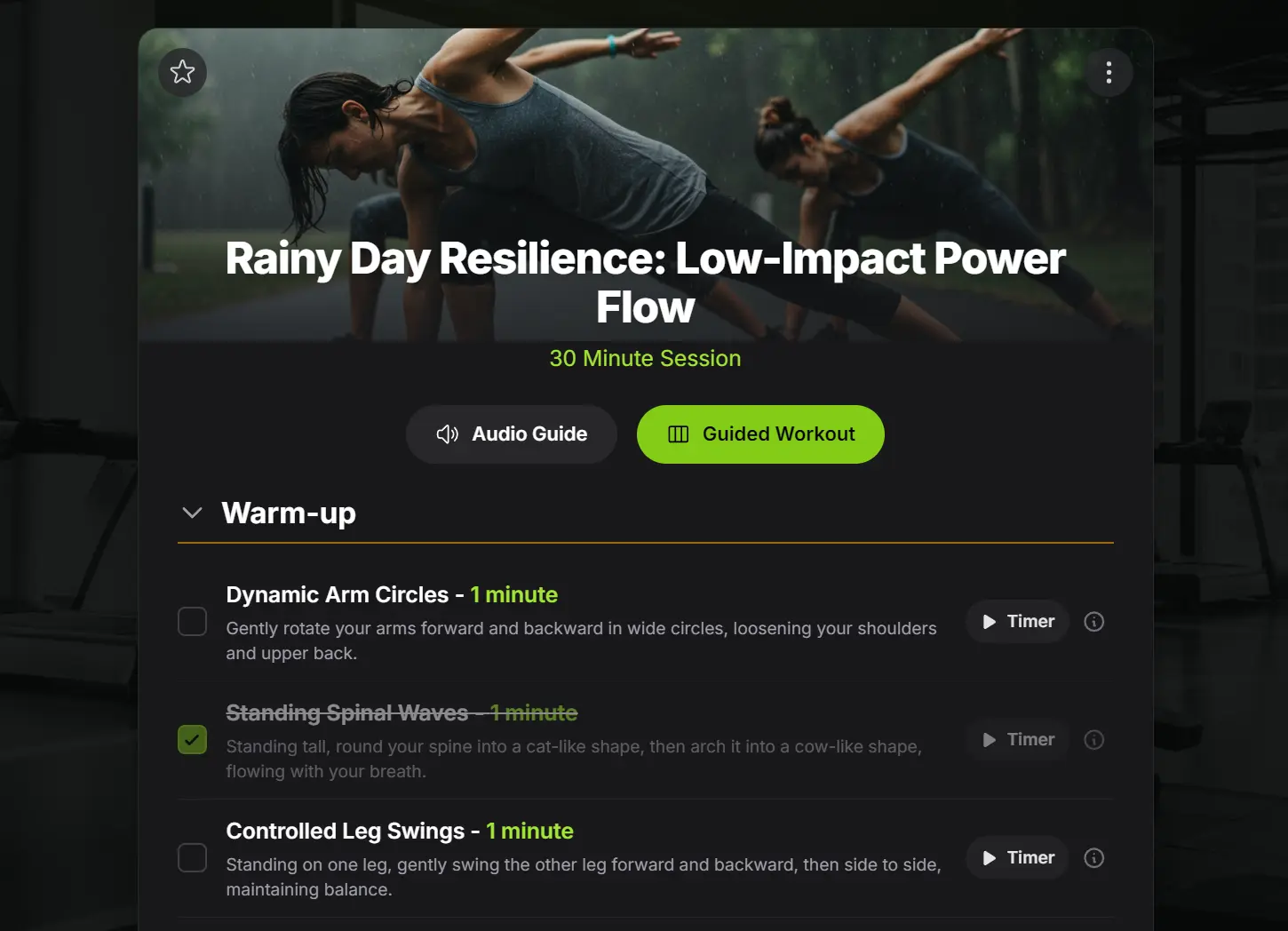
SetGo.ai is a free AI-powered workout generator that creates personalized fitness routines instantly based on your preferences, available time, and equipment.
It’s designed for people who want a solid workout plan without the cost of a personal trainer or a subscription-based fitness app.
If you’re working out at home with minimal gear, you can specify exactly what you have. If you’re at a fully equipped gym but stuck in a rut, it can introduce new exercises.
For anyone short on time, it can build a balanced session that fits your schedule. The AI handles the planning so you can focus on the workout itself.
Features
- Instant Generation: Click one button to receive a complete, balanced workout with warm-up, main routine, and cool-down sections automatically included.
- Deep Customization: Tailor sessions by duration, workout type, difficulty level, available equipment, and text-based requests like “no jumping exercises.”
- Powerful Editing Tools: Regenerate individual exercises, entire sections, or edit text inline like a document with automatic saving.
- Image-to-Workout Conversion: Upload photos of workouts or inspiration images for thematic workout creation based on visual input.
- Save and Track System: All workouts save to private history with starring options for quick access to favorites.
- Community Sharing: Publish workouts to the community, discover routines from other users, and clone any plan to your personal library.
Use Cases
- The “No Equipment, No Problem” Workout: You can tell the AI you have no equipment and need a 30-minute bodyweight HIIT session. It will generate a routine you can do in your living room.
- The “Lunch Break” Routine: If you only have 20 minutes and a pair of dumbbells, you can input those constraints to get a quick and effective strength workout.
- The “Inspired by Social Media” Session: I took a screenshot of a fitness influencer’s workout summary on Instagram and used the Image-to-Workout feature. SetGo.ai analyzed the image and built a surprisingly similar, structured plan for me to follow.
- The “Gym Rut Buster”: For those who go to the gym regularly but do the same exercises, you can ask for a “Push Day” workout with different exercises than you normally do.
How to Use It
1. Create a free account using your email address or Google account login.
2. Create your first workout:
- Generate Workout: Generate a balanced session instantly from prompts.
- I’m Feeling Lucky: A smart, balanced workout for a single session.
- Choose a Theme: Pick a style that matches your focus for today.
- Customize Single Workout: Dial in every detail—duration, focus, equipment, etc.
- Build a Multi-Day Plan: Create a structured program for several days.
- Create from Image: Upload a workout screenshot or a vibe pic to start.
3. Once your workout is generated, use the editing tools to perfect it. Click directly on any exercise title, duration, or description to edit inline. Use the swap icon next to individual exercises for alternatives, or click section headers to regenerate entire warm-up, main, or cool-down portions. The Adjust text box accepts high-level change requests like “make it 10 minutes shorter” or “add more core work.”

3. Follow your workout using the built-in guidance systems. The Audio Guide provides voice coaching and timers for hands-free operation. The Visual Timeline creates a full-screen, step-by-step display showing upcoming exercises. Built-in timers handle work and rest intervals automatically for timed exercises.

4. Your completed workouts save automatically to your private history. Share specific workouts by generating unique public links and QR codes, or publish favorites to the community for others to discover and use.

Pros
- Completely Free Access: All core features, including unlimited workout generation, editing, and history tracking are available without payment.
- Lightning-Fast Generation: Complete workouts appear in seconds.
- Flexible Equipment Options: Works with any equipment setup from bodyweight-only to full commercial gym configurations.
- Intelligent Exercise Selection: AI considers exercise flow, muscle group balance, and progression within each workout structure.
- Community Discovery: Access to workouts created by real users provides inspiration and variety beyond algorithm-generated content.
- Privacy Controls: Personal workout history remains private unless you specifically choose to share individual sessions.
Cons
- No Progressive Overload Tracking: Lacks built-in systems for tracking weights, reps, or progression over time like dedicated fitness apps.
- Basic Nutrition Integration: Focuses solely on exercise without meal planning or nutritional guidance components.
FAQs
Q: Can I use SetGo.ai without creating an account?
A: Account creation is required to access workout generation and save features. However, the registration process is free and takes less than a minute using email or Google login.
Q: How accurate are the AI-generated workouts for my fitness level?
A: The AI considers your specified difficulty level and equipment to create appropriate workouts. However, you should adjust exercises based on your actual capabilities and consult healthcare providers for specific fitness concerns.
Q: What happens to workouts I publish to the community?
A: Published workouts become publicly visible on the community page where other users can view and clone them. Your original workout remains in your private history, and you can unpublish community posts if needed.