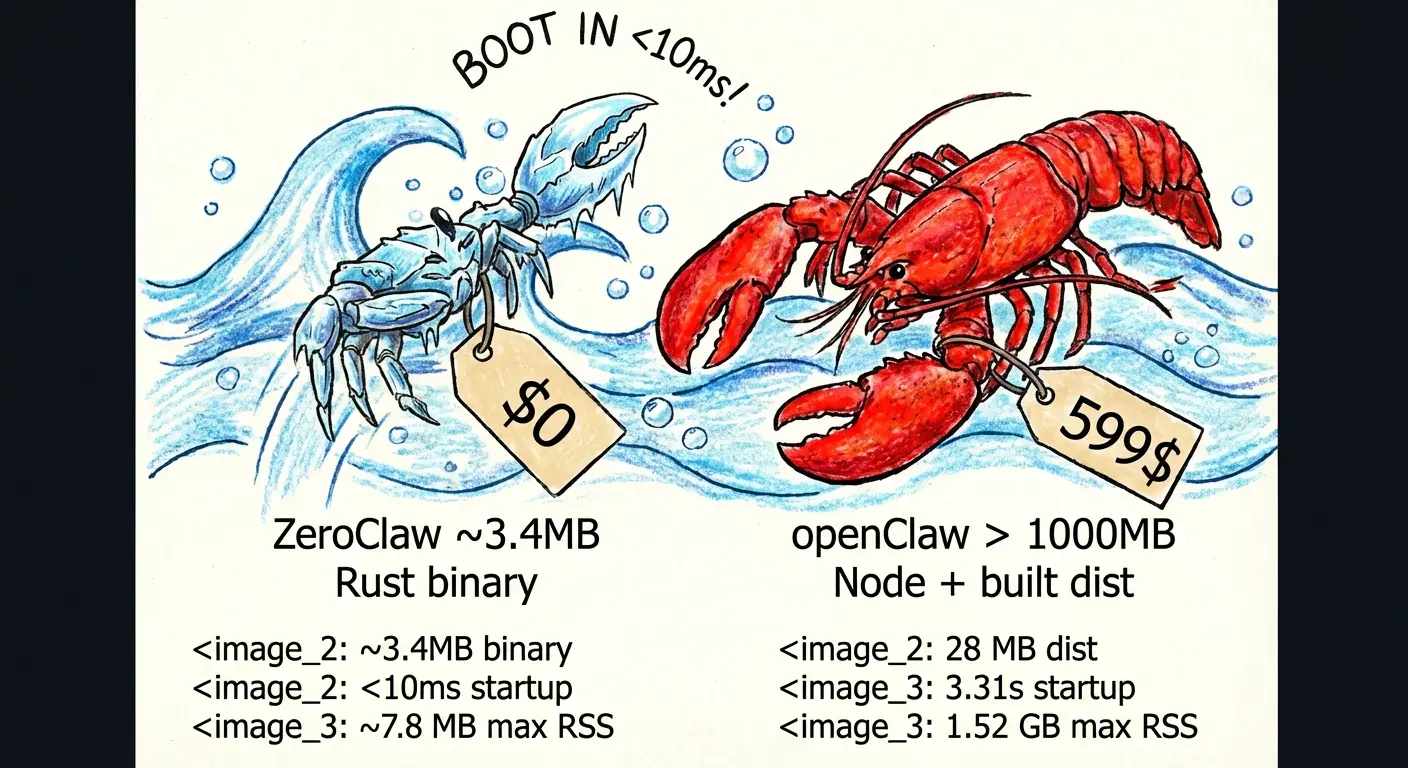
ZeroClaw is a fully autonomous AI assistant built entirely in Rust, designed to replace resource-heavy implementations like OpenClaw. It functions as a self-contained binary that enables you to deploy AI agents on hardware with as little as 5MB of RAM.
OpenClaw pioneered the autonomous AI agent concept but required over 1GB of RAM and took several seconds to start. ZeroClaw addresses these limitations through Rust’s zero-cost abstractions and memory safety guarantees.
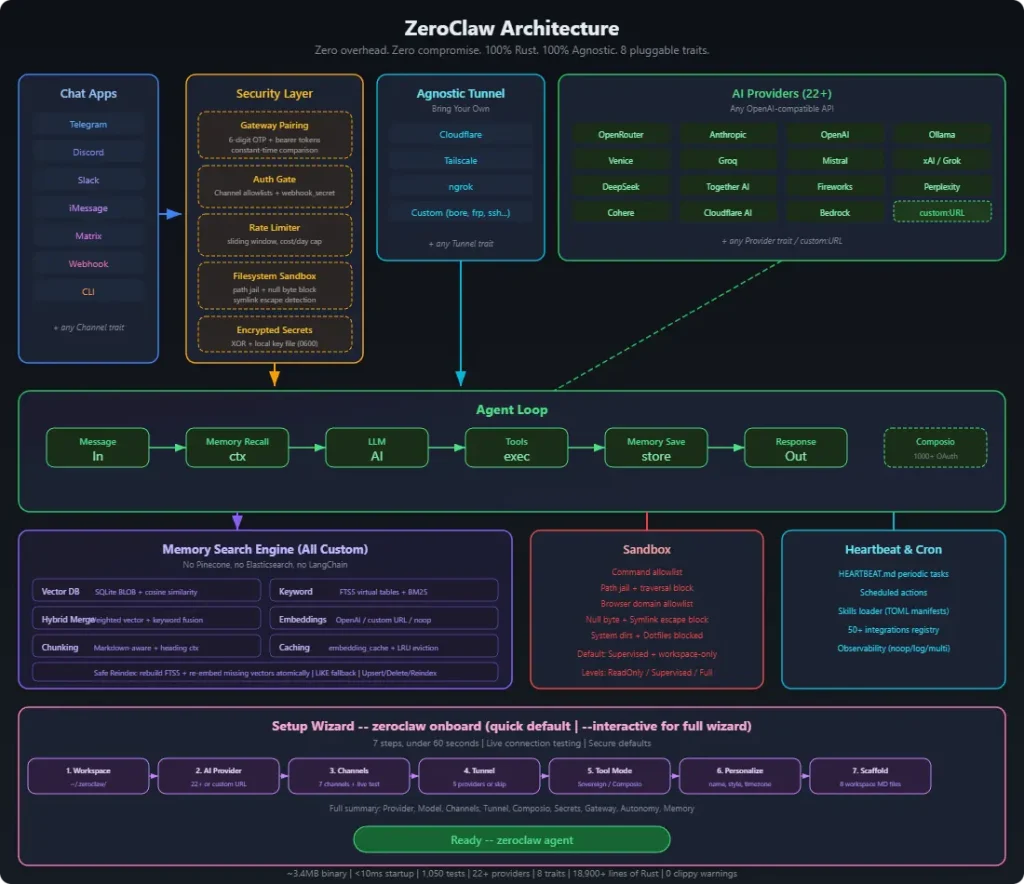
You can deploy ZeroClaw across 22+ AI providers (Claude, OpenAI, Ollama, Groq, Mistral, and more) and connect it to popular messaging platforms (Telegram, Discord, Slack, WhatsApp). It uses trait-based abstractions for every major component. You can swap providers, channels, or tools through configuration changes rather than code modifications.
Features
- Minimal Resource Footprint: The entire runtime compiles to 3.4MB. 99% smaller than OpenClaw’s 1.52GB footprint.
- Multi-Provider AI Support: Connect to 22+ AI providers like OpenRouter, Anthropic, OpenAI, Ollama, Venice, Groq, Mistral, xAI, DeepSeek, Together, Fireworks, Perplexity, Cohere, and AWS Bedrock.
- Trait-Based Architecture: Every subsystem implements a Rust trait. Providers, channels, memory backends, tools, and tunnels are swappable components. Change your AI provider from OpenAI to Anthropic by editing one line in the config file.
- Multi-Channel Communication: Interact through CLI, Telegram, Discord, Slack, iMessage, Matrix, WhatsApp, or webhooks. Each channel runs as a plugin with its own authentication and message handling.
- Built-In Memory System: The framework comes with a custom memory engine built on SQLite. It combines full-text search (FTS5 with BM25 scoring) and vector similarity (cosine distance) in a single hybrid search system. No external dependencies like Pinecone or Elasticsearch are needed.
- Security-First Design: The system binds to localhost by default and refuses public exposure without explicit tunnel configuration. Filesystem access is scoped to a workspace directory. Path traversal attempts (null bytes, symlinks,
..sequences) are blocked. - Runtime Flexibility: Run agents natively or in Docker containers with configurable sandboxing. The Docker runtime supports read-only root filesystems, network isolation, and memory limits.
- AIEOS Identity Support: Load agent identities from AIEOS v1.1 JSON files or traditional markdown files. You define personality traits, communication styles, and behavioral guidelines in portable formats.
- Service Management: Install ZeroClaw as a user-level background service. The daemon mode handles periodic tasks, maintains channel connections, and responds to webhooks.
Use Cases
- Edge AI Deployment: You can deploy fully functional AI agents on Raspberry Pi Zero or similar $10 single-board computers (SBCs) where Node.js runtimes would crash due to memory constraints.
- Secure Corporate Assistants: Security teams can host ZeroClaw internally to manage sensitive workflows. The strict allowlists and “workspace only” filesystem scoping prevent the agent from accessing unauthorized system files.
- Local Development Companion: Developers can run the agent locally to automate git operations, file management, and code refactoring without the latency or cost of cloud-hosted agent frameworks.
- Automated Customer Support: Businesses can integrate the agent with WhatsApp Business or Telegram to handle customer queries autonomously using the built-in message queue and memory recall features.
How To Use It
Table Of Contents
Installation
1. You first need Rust installed on your system. Download it from rust-lang.org or use your package manager.
2. Clone the repository from GitHub:
git clone https://github.com/zeroclaw-labs/zeroclaw.git
cd zeroclaw
3. Build the release binary:
cargo build --release4. Install globally. The binary appears in ~/.cargo/bin/zeroclaw and weighs around 3.4MB.
cargo install --path . --forceInitial Setup
Run the onboarding wizard to configure your AI provider:
zeroclaw onboard --api-key sk-your-api-key --provider openrouterFor a guided setup with all options:
zeroclaw onboard --interactiveThis creates ~/.zeroclaw/config.toml with your settings. The config file stores API keys (encrypted by default), provider selection, channel configurations, and security policies.
Basic Usage
Start a single-turn conversation:
zeroclaw agent -m "Explain quantum entanglement in simple terms"Enter interactive chat mode:
zeroclaw agentCheck system status:
zeroclaw statusRun diagnostics:
zeroclaw doctorRunning as a Service
Install as a background service:
zeroclaw service install
zeroclaw service start
Check service status:
zeroclaw service statusWebhook Server
Start the gateway for external integrations:
zeroclaw gatewayThe server binds to 127.0.0.1:8080 by default. Use port 0 for random port assignment (security hardening):
zeroclaw gateway --port 0The gateway requires pairing. A 6-digit code displays at startup. Exchange it for a bearer token:
curl -X POST http://127.0.0.1:8080/pair \
  -H "X-Pairing-Code: 123456"
Send messages with the token:
curl -X POST http://127.0.0.1:8080/webhook \
  -H "Authorization: Bearer your-token" \
  -H "Content-Type: application/json" \
  -d '{"message": "What is the weather?"}'
Channel Configuration
Update channels without full reconfiguration:
zeroclaw onboard --channels-onlyTest channel health:
zeroclaw channel doctorGet integration setup instructions:
zeroclaw integrations info TelegramMemory Migration
Import memory from OpenClaw installations. Preview changes first:
zeroclaw migrate openclaw --dry-runExecute the migration:
zeroclaw migrate openclawCommand Reference
| Command | Purpose |
|---|---|
onboard | Initial configuration wizard |
onboard --interactive | Full guided setup with all options |
onboard --channels-only | Reconfigure messaging channels only |
agent | Enter interactive chat mode |
agent -m "message" | Send single message and exit |
gateway | Start webhook server on localhost:8080 |
gateway --port 0 | Start webhook server on random port |
daemon | Run long-lived autonomous runtime |
service install | Install user-level background service |
service start | Start background service |
service stop | Stop background service |
service status | Check service status |
service uninstall | Remove service installation |
status | Show system configuration and health |
doctor | Run diagnostic checks |
channel doctor | Test messaging channel connectivity |
integrations info <name> | Display setup details for specific integration |
migrate openclaw | Import memory from OpenClaw |
migrate openclaw --dry-run | Preview migration without changes |
Configuration Options
The config file lives at ~/.zeroclaw/config.toml. Key settings:
AI Provider Settings:
api_key = "sk-your-key"
default_provider = "openrouter"
default_model = "anthropic/claude-sonnet-4-20250514"
default_temperature = 0.7
Memory Configuration:
[memory]
backend = "sqlite"              # Options: "sqlite", "markdown", "none"
auto_save = true
embedding_provider = "openai"   # Options: "openai", "noop"
vector_weight = 0.7
keyword_weight = 0.3
Security Policies:
[autonomy]
level = "supervised"            # Options: "readonly", "supervised", "full"
workspace_only = true
allowed_commands = ["git", "npm", "cargo", "ls", "cat", "grep"]
forbidden_paths = ["/etc", "/root", "/proc", "/sys", "~/.ssh"]
Runtime Options:
[runtime]
kind = "native"                # Options: "native", "docker"
[runtime.docker]
image = "alpine:3.20"
network = "none"               # Docker network mode
memory_limit_mb = 512
cpu_limit = 1.0
read_only_rootfs = true
mount_workspace = true
Gateway Security:
[gateway]
require_pairing = true
allow_public_bind = false      # Refuse 0.0.0.0 without tunnel
Tunnel Configuration:
[tunnel]
provider = "none"              # Options: "none", "cloudflare", "tailscale", "ngrok", "custom"
Browser Tools:
[browser]
enabled = false
allowed_domains = ["docs.rs"]
backend = "agent_browser"      # Options: "agent_browser", "rust_native", "auto"
native_headless = true
native_webdriver_url = "http://127.0.0.1:9515"
Identity Format:
[identity]
format = "openclaw"            # Options: "openclaw" (markdown), "aieos" (JSON)
Encryption:
[secrets]
encrypt = true                 # Encrypt API keys with local key file
Pros
- Extreme Efficiency: You can run ZeroClaw on hardware that can’t handle OpenClaw.
- Fast Iteration Cycles: The sub-second startup time removes friction from development.
- No Vendor Lock-In: You’re never committed to a single AI provider or tool. Swap components through configuration files.
- Production-Ready Security: Ships with filesystem scoping, command allowlisting, gateway pairing, and encrypted secrets by default.
- Zero External Dependencies for Memory: You don’t need to run Pinecone, Elasticsearch, or other heavyweight services.
Cons
- Rust Build Requirement: You need Rust toolchain installed.
- Younger Ecosystem: OpenClaw has more community plugins and integrations due to its earlier launch and JavaScript ecosystem.
- Learning Curve for Customization: Extending ZeroClaw requires writing Rust.
Related Resources
- Rust Programming Language: Learn Rust to extend ZeroClaw or understand its implementation.
- AIEOS Specification: Reference for portable AI identity format supported by ZeroClaw.
- Anthropic API Documentation: Claude integration details and best practices.
- OpenRouter API: Multi-provider API gateway for accessing different AI models.
- Telegram Bot API: Required reading for configuring Telegram channels.
- OpenClaw Alternatives: Discover more curated, open-source alternatives to OpenClaw.
FAQs
Q: Can ZeroClaw replace OpenClaw for existing projects?
A: Yes, the project includes a migration tool that imports OpenClaw memory. You run zeroclaw migrate openclaw --dry-run to preview the migration, then execute it with zeroclaw migrate openclaw.
Q: How does the memory system work without Pinecone or other vector databases?
A: ZeroClaw builds a hybrid search engine on top of SQLite. Vector embeddings are stored as BLOBs. Full-text search uses SQLite’s FTS5 extension with BM25 scoring. The system merges results from both searches using configurable weights (default 70% vector, 30% keyword). An embedding cache table speeds up repeated queries. You can disable embeddings entirely by setting embedding_provider = "noop" for keyword-only search.
Q: What’s the performance difference between native and Docker runtimes?
A: Native runtime executes commands directly on the host with minimal overhead. Docker adds container startup latency (typically 100-300ms per command) but provides stronger isolation. The Docker backend supports read-only root filesystems, network disconnection, and memory limits. Use native runtime for maximum speed on trusted networks. Use Docker runtime for public-facing deployments or when running untrusted code.
Q: How do I configure a custom AI provider that’s not in the 22 built-in options?
A: Any OpenAI-compatible API works through custom endpoints. Add this to your config:
default_provider = "custom:https://your-api.com"The system will send OpenAI-format requests to your endpoint. If your provider uses a different format, you’ll need to implement the Provider trait in Rust. The trait defines methods for sending messages and streaming responses.
Q: How secure is the gateway’s pairing system?
A: The gateway generates a random 6-digit code at startup. You exchange this code once for a bearer token via the /pair endpoint. All subsequent webhook requests require the bearer token in the Authorization header. The pairing code expires after first use. The gateway binds to localhost by default: it refuses 0.0.0.0 binding unless you configure a tunnel or explicitly set allow_public_bind = true.
Q: Can I run ZeroClaw on Windows?
A: Yes, Rust supports Windows targets. You’ll need to build from source (cargo build --release on Windows). The binary will be larger on Windows due to different system dependencies.