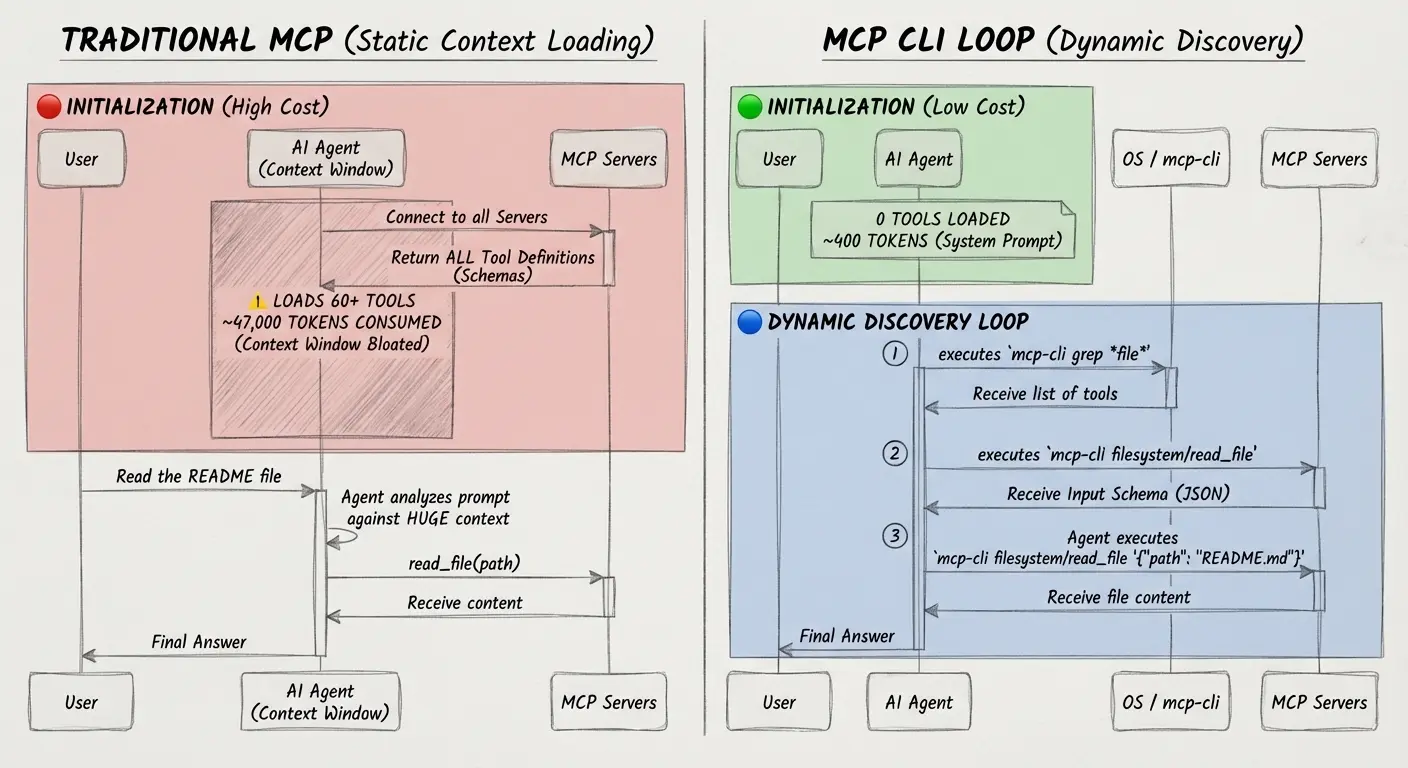
mcp-cli is a free, open-source CLI that allows you to interact with Model Context Protocol (MCP) servers efficiently.
Traditional MCP clients load complete tool schemas into the context window upfront, wasting thousands of tokens before you even start working. mcp-cli addresses by using dynamic discovery to fetch tool definitions only when you need them.
The CLI runs as a single compiled binary and works across all major platforms. You can use it to discover available tools on MCP servers, inspect their schemas, and call them directly from your terminal or through shell scripts.
This can be useful for AI agents like Claude Code, Gemini CLI, CodeX, and other AI coding assistants that need efficient access to external tools and APIs without burning through their token budget.
Features
- Minimal Token Consumption: The cli reduces context bloat by up to 99% compared to traditional static loading.
- Single Binary Distribution: You don’t need to manage dependencies after installation.
- Shell Integration: Outputs JSON by default, which pipes easily into tools like
jqfor complex workflows and automation scripts. - Universal MCP Server Support: Connects to both stdio-based servers (running as local processes) and HTTP/SSE servers (accessed via URL).
- Smart Error Messages: When something fails, you get structured errors with specific recovery suggestions.
- Lazy Connection Strategy: Server connections are established only when needed and closed immediately after use.
- Concurrent Processing: Uses a worker pool to connect to multiple servers in parallel (5 by default), with configurable concurrency limits to avoid overwhelming system resources.
- Automatic Retry: Implements exponential backoff for transient failures like network timeouts or server errors (502, 503, 504, 429).
How to Use It
1. Download and install the mcp-cli.
curl -fsSL https://raw.githubusercontent.com/philschmid/mcp-cli/main/install.sh | bash2. If you prefer to use Bun directly, you can install it globally with Bun:
bun install -g https://github.com/philschmid/mcp-cli3. Create a configuration file named mcp_servers.json. Put this file either in your current directory or in ~/.config/mcp/. The configuration uses the same format as Claude Desktop and VS Code, so you can reuse existing configs.
Here’s an example that configures both a local stdio server and a remote HTTP server:
{
  "mcpServers": {
    "filesystem": {
      "command": "npx",
      "args": ["-y", "@modelcontextprotocol/server-filesystem", "."],
      "env": {
        "API_KEY": "${API_KEY}"
      }
    },
    "deepwiki": {
      "url": "https://mcp.deepwiki.com/mcp",
      "headers": {
        "Authorization": "Bearer ${TOKEN}"
      }
    }
  }
}
The tool supports environment variable substitution using ${VAR_NAME} syntax anywhere in the config. Set MCP_STRICT_ENV=false if you want to allow missing variables (the tool will warn you but continue).
5. List all available servers and their tools:
# List all MCP servers
mcp-cli
# Include descriptions:
mcp-cli -d
# Output
github
  • search_repositories - Search for GitHub repositories
  • get_file_contents - Get contents of a file or directory
filesystem
  • read_file - Read the contents of a file
  • write_file - Write content to a file
6. To search for specific tools across all servers, use grep with glob patterns. This returns matching tools like github/get_file_contents, github/create_or_update_file, filesystem/read_file, and filesystem/write_file.
mcp-cli grep "*file*"7. Before calling a tool, inspect its schema to see what parameters it expects. This displays the JSON input schema with parameter types, descriptions, and which fields are required.
mcp-cli filesystem/read_file8. Call the tool by passing JSON arguments as a string:
mcp-cli filesystem/read_file '{"path": "./README.md"}'9. For complex JSON with quotes or special characters, use stdin instead of inline strings. This avoids shell escaping issues:
mcp-cli server/tool - <<EOF
{"content": "Text with 'single quotes' and \"double quotes\""}
EOF
10. You can also pipe JSON from other commands or files:
echo '{"path": "./README.md"}' | mcp-cli filesystem/read_file -
cat args.json | mcp-cli filesystem/read_file -
11. The tCLI outputs results to stdout and errors to stderr. Add --json to get structured JSON output suitable for piping to other tools:
mcp-cli github/search_repositories '{"query": "mcp"}' --json | jq '.content[0].text'Use --raw to extract just the text content without JSON wrapping.
12. You can chain multiple operations together. This example finds TypeScript files and reads the first one:
mcp-cli filesystem/search_files '{"path": "src/", "pattern": "*.ts"}' --json | jq -r '.content[0].text' | head -1 | xargs -I {} sh -c 'mcp-cli filesystem/read_file "{\"path\": \"{}\"}"'The tool searches for configuration files in this order: MCP_CONFIG_PATH environment variable, -c/--config command line argument, ./mcp_servers.json, ~/.mcp_servers.json, and ~/.config/mcp/mcp_servers.json.
13. You can control behavior with these environment variables:
MCP_CONFIG_PATH: Path to config file
MCP_DEBUG: Enable debug output (default: false)
MCP_TIMEOUT: Request timeout in seconds (default: 1800)
MCP_CONCURRENCY: Parallel server connections (default: 5)
MCP_MAX_RETRIES: Retry attempts for transient errors (default: 3)
MCP_RETRY_DELAY: Base retry delay in milliseconds (default: 1000)
MCP_STRICT_ENV: Error on missing environment variables (default: true)
14. When integrating with AI agents like Claude Code, add this to the agent’s system prompt so it knows how to use mcp-cli:
You have access to MCP (Model Context Protocol) servers via the `mcp-cli` command.
Available Commands:
- mcp-cli: List all servers and tool names
- mcp-cli <server>: Show server tools and parameters
- mcp-cli <server>/<tool>: Get tool JSON schema
- mcp-cli <server>/<tool> '<json>': Call tool with arguments
- mcp-cli grep "<pattern>": Search tools by name
Workflow:
1. Discover: Run `mcp-cli` or `mcp-cli grep "<pattern>"`
2. Inspect: Run `mcp-cli <server>/<tool>` to get the schema
3. Execute: Run `mcp-cli <server>/<tool> '<json>'` with correct arguments
15. For agents that support Agent Skills (like Claude Code, Gemini CLI, or OpenCode), you can use the SKILL.md file instead. Put it in your skills directory as mcp-cli/SKILL.md.
Pros
- Token Efficiency: Dynamic discovery cuts context window consumption by up to 99%.
- Fast Startup: You’re not waiting for package managers or interpreters to spin up.
- Cross-Platform: Works on Linux, macOS, and Windows.
- Shell-Friendly Output: JSON output pipes cleanly into standard Unix tools.
- Error Handling: You get actionable suggestions about what went wrong and how to fix it.
- Flexible Configuration: Reuses the same config format as Claude Desktop and VS Code.
Cons
- Requires Bun for Development: You need Bun installed to build from source or run in development mode.
- Limited to MCP: Only works with servers that implement the Model Context Protocol.
- No Built-in Auth Management: It doesn’t handle OAuth flows or token refresh.
- Manual MCP Server Config: You need to manually edit JSON config files to add MCP servers.
Related Resources
- Model Context Protocol Documentation: Official documentation for the MCP protocol, including specifications for implementing servers and clients.
- MCP Server Filesystem: A reference implementation of an MCP server that provides file system operations.
- Bun Runtime: The JavaScript runtime that mcp-cli is built on. Check this if you want to build from source or contribute to development.
- jq Command-line JSON Processor: Essential tool for working with mcp-cli’s JSON output. Learn jq syntax to build powerful data transformation pipelines.
- MCP Servers: A directory of curated & open-source Model Context Protocol servers.
FAQs
Q: What’s the main difference between mcp-cli and other MCP clients like Claude Code or Cursor?
A: mcp-cli is a lightweight utility for calling and discovering MCP tools, while Claude Code and Cursor are full AI coding environments. Think of mcp-cli as a bridge or testing tool rather than a complete IDE. It uses dynamic discovery to avoid loading all tool schemas into context, which saves up to 99% of tokens compared to traditional approaches.
Q: How do I handle complex JSON arguments that contain quotes or special characters?
A: Use stdin instead of inline strings. The shell interprets quotes and special characters in ways that break JSON syntax. Stdin bypasses shell parsing completely. You can use heredocs (mcp-cli server/tool - <<EOF), echo piping (echo '{}' | mcp-cli server/tool -), or file redirection (cat args.json | mcp-cli server/tool -).
Q: Can I use mcp-cli with servers that require authentication?
A: Yes, but you need to manage the auth tokens yourself. The tool supports passing environment variables in the config file using ${VAR_NAME} syntax. For HTTP servers, you can add headers like "Authorization": "Bearer ${TOKEN}" in the server config. For stdio servers, you can pass environment variables through the env field. The tool doesn’t handle OAuth flows or token refresh automatically.
Q: Why does the tool connect to all servers when I run mcp-cli but only one server when I call a specific tool?
A: This is the lazy connection strategy. Listing all tools requires connecting to every server to see what they offer. Calling a specific tool only needs one connection. The tool uses a worker pool to limit concurrent connections (5 by default) so it doesn’t overwhelm your system when you have many servers configured. You can adjust this with the MCP_CONCURRENCY environment variable.
Q: What happens if a server is slow or unresponsive?
A: The tool has a 30-minute timeout by default (configurable via MCP_TIMEOUT). For transient network errors like connection refused or timeouts, it will retry up to 3 times with exponential backoff starting at 1 second. Set MCP_MAX_RETRIES=0 to disable retries if you want fail-fast behavior. Non-transient errors like authentication failures (401, 403) or validation errors fail immediately without retries.