Anim Lab AI is a free AI-powered tool that generates mathematical animation videos from text descriptions.
The tool runs on HuggingFace and uses the Claude Sonnet model to generate Manim (Mathematical Animation Engine) code, then renders that code into educational videos.
It also functions as a Model Context Protocol server for integration into AI agent workflows, like Claude Code, Cursor AI, Gemini CLI, and more.
Features
- Text-to-Video Generation: Type a concept like “Explain Bubble Sort” or “Pythagorean theorem,” and the AI generates the script and renders the video.
- AI Code Editor: You can refine animations using natural language like “Make the circle red” or “Slow down the transition.”
- Claude Sonnet Backend: Runs on Anthropic’s latest Sonnet model for precision code generation.
- MCP Compliance: Allows you to use any MCP clients for backend video generation.
Use Cases
- Math Education: Teachers create custom animations to explain abstract concepts. A geometry teacher generates a visualization showing how angles in a triangle relate to each other, complete with labels and step-by-step transformations.
- Algorithm Visualization: Computer science instructors build videos demonstrating how sorting algorithms work. The tool can animate each step of quicksort or merge sort.
- Physics Demonstrations: Educators visualize motion, forces, and energy transformations. An animation can show a projectile’s parabolic path while displaying velocity vectors and equations that update frame by frame.
- Study Materials: Students generate personalized explanations for topics they find challenging. Someone stuck on complex numbers can request a visual walkthrough showing how i rotates points in the complex plane.
- Content Creation: YouTubers and online educators produce professional-looking math animations without manual coding.
Case Studies
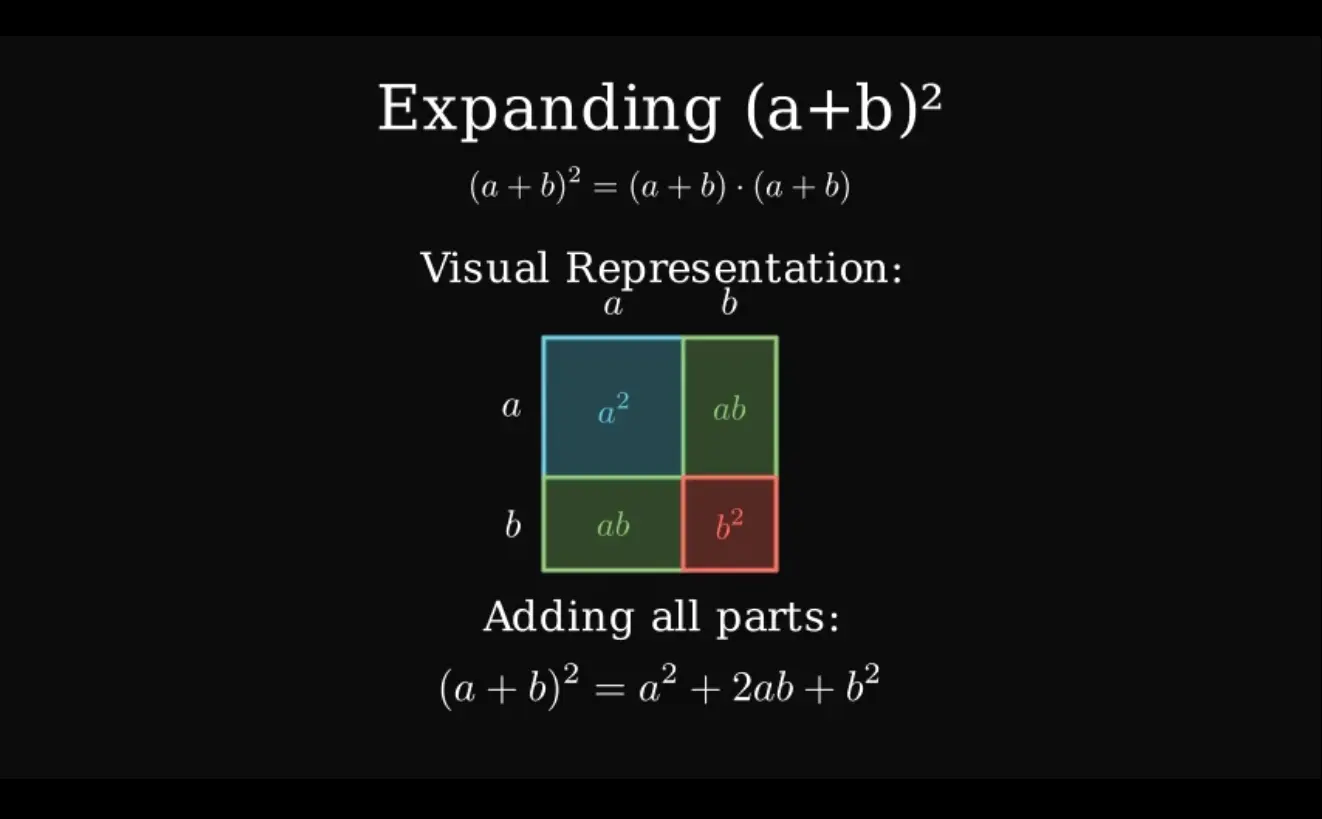
I tested Anim Lab AI to visualize the expansion of the algebraic formula (a+b)^2. I wanted to see if it could connect the abstract math to a geometric proof.
I entered the prompt “explain (a+b)^2” into the description box. The AI generated a Python script using the manim library, and then rendered an animation video within one minute.
First, the video displayed the text title “Expanding (a+b)²”. It then wrote out the equation and transformed it into a multiplication format: (a+b)*(a+b).
The most impressive part was the geometric representation. The code generated a large square and divided it into four distinct rectangles based on variables a and b.
- A blue square represented
a². - A red square represented
b². - Two green rectangles represented the
absections.
The animation shifted these blocks into place and labeled them clearly. Finally, it summed the parts to show the final formula: a² + 2ab + b².
The entire process took about 10 seconds to generate the code and another minute to render the video. I could download the video immediately.
I also had access to the raw Python code, which meant I could change the colors of the squares just by editing the color=BLUE line in the script.
How to Use It
1. Visit the Anim Lab AI space on HuggingFace.
2. Type your prompt in natural language. Be specific about what you want to see. For example, instead of “show an equation,” write “explain (a+b)² using a geometric representation with colored squares.” The more detail you provide, the better the AI understands your vision.
3. Click the “Generate & Render Animation” button. The tool processes your request in two stages. First, it generates the Manim Python code that defines your animation. You can review this code in the output section. Second, it executes that code and renders the actual video file.

4. The rendering process takes time, depending on animation complexity and server load. Simple animations with basic shapes render in seconds. Complex scenes with multiple transformations might take a minute or two. You’ll see progress indicators during rendering.
5. Once complete, your video appears in the preview window. You can play it directly in the browser to verify it matches your expectations. The generated code displays alongside the video so you can learn from it or modify it later.
6. If you want to make changes, you have two options. You can edit the code manually if you know Python and Manim syntax. Or use the AI code editor by typing instructions like “change the color to red” or “slow down the animation” and clicking “Re-render Animation.” The AI modifies the code based on your feedback and generates a new video.
7. For advanced users integrating with MCP clients, add the MCP server configuration to your settings:
{
  "mcpServers": {
    "gradio": {
      "url": "https://mcp-1st-birthday-anim-lab-ai.hf.space/gradio_api/mcp/"
    }
  }
}
Pros
- Zero Setup Required: The tool runs entirely in your browser. You don’t need to install Python, Manim, LaTeX, or any dependencies locally.
- Natural Language: You describe concepts in plain English rather than learning Manim’s Python API.
- Instant Feedback Loop: You can iterate on designs and test different approaches to explaining concepts.
- High-Quality Output: The generated videos work perfectly in presentations, online courses, and YouTube content.
- Free and Open Access: 100% Free. No signup required.
Cons
- Execution Time and Queue Limits: Rendering happens on Hugging Face’s servers. There can be a queue, and complex animations may take a minute or two to process.
- Conceptual Limitations: The AI is best at discrete mathematical, algorithmic, or geometric concepts. It might struggle with highly abstract or narrative-driven prompts that lack a standard visual representation.
- No Audio Generation: The tool produces silent videos. You must add voiceovers or explanations separately if needed for your final content.
Related Resources
- Manim Documentation: The official community guide for the Mathematical Animation Engine.
- Model Context Protocol (MCP) Overview: Learn how MCP works for connecting AI applications like this one to clients like Claude Desktop.
FAQs
Q: What is Manim and why does this tool use it?
A: Manim (Mathematical Animation Engine) is the Python library Grant Sanderson created for his 3Blue1Brown YouTube channel. It’s designed specifically for mathematical visualizations and produces high-quality, programmatic animations. The library excels at rendering equations, geometric transformations, and step-by-step mathematical processes.
Q: Do I need to know Python or Manim?
A: Not at all for basic video generation. The AI handles all the code. However, knowing a little helps if you want to manually tweak the generated code or understand the edit instructions better.
Q: Can I use the videos commercially?
A: You own the output. The videos are yours to use in projects, educational materials, or content.
Q: Why did my video fail to render?
A: The most common cause is the animation exceeding Hugging Face’s resource limits for a free space. Try simplifying your prompt or reducing the complexity (e.g., “explain” vs. “explain in elaborate detail with multiple examples”).