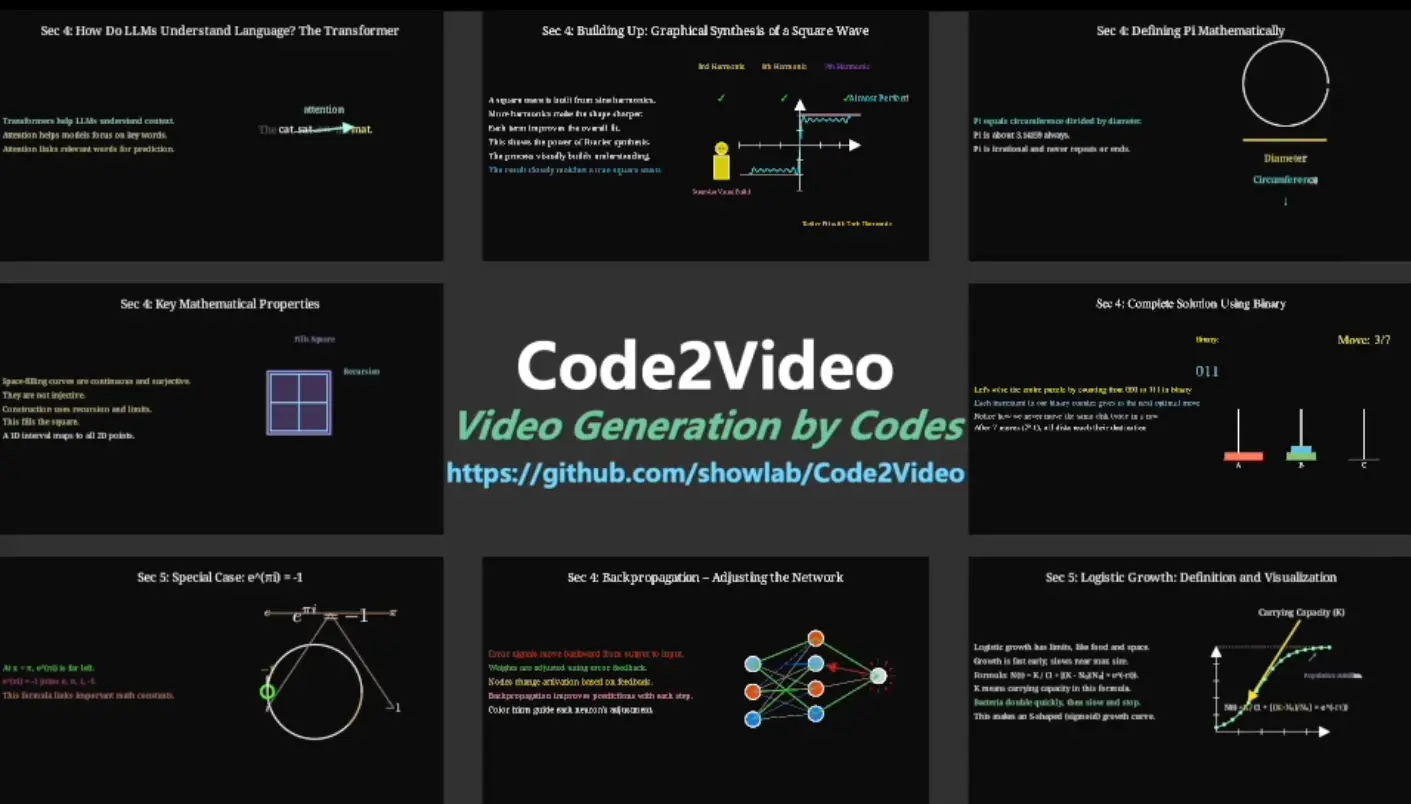
Code2Video is a free, open-source AI agent that generates educational videos from knowledge points using executable Python code, rather than traditional pixel-based video generation.
The core of Code2Video is its multi-agent framework, which breaks down the video creation process into three stages:
- A “Planner” agent first structures the content, creating a storyboard and gathering any necessary visual assets.
- A “Coder” agent then translates these instructions into Manim, a powerful Python library for creating mathematical animations.
- A “Critic” agent, powered by a vision-language model (VLM), reviews the output to refine the layout and ensure everything is clear and easy to understand.
More Features
- MMMC Benchmark: Comes with the first benchmark specifically designed for code-driven video generation, covering 117 curated learning topics inspired by 3Blue1Brown content across mathematics, computer science, and other disciplines.
- Visual Asset Integration: Automatically retrieves and incorporates icons and visual elements through IconFinder API integration to enrich video content beyond pure code animations.
- Scope-Guided Refinement: Implements parallel code synthesis with intelligent debugging that checks code validity before rendering, saving time by catching errors early.
- Multi-Dimensional Evaluation: Includes systematic assessment tools measuring efficiency, aesthetics, and knowledge transfer effectiveness through the TeachQuiz metric.
See It In Action
Use Cases
- Mathematics Education: Create step-by-step visualizations of complex mathematical concepts like linear transformations, Fourier series, or calculus problems. The code-based approach handles precise mathematical notation and smooth transitions between equation states, which text-to-video models often struggle with.
- Computer Science Tutorials: Generate explanatory videos for algorithms, data structures, or machine learning concepts. The Hanoi Problem and Large Language Model examples in the benchmark show how the framework handles both classical CS topics and modern AI concepts with clear visual progression.
- Technical Documentation: Transform written technical documentation into animated walkthroughs. Since the output is code-based, you can version-control your videos just like software.
- Online Course Content: Scale video production for MOOCs or online learning platforms. The modular agent design means you can generate multiple related videos with consistent style and quality, then fine-tune specific sections without regenerating everything.
- Research Presentations: Turn research papers or technical concepts into presentations. The framework’s ability to handle discipline-specific content makes it suitable for academic or professional contexts where accuracy matters more than entertainment value.
How to Use It
1. Clone the Repository from GitHub:
git clone https://github.com/showlab/Code2Video.git2. Install the required Python packages.
cd Code2Video/src/pip install -r requirements.txt
3. Code2Video depends on the Manim Community to generate the animations. If you don’t have it installed, you’ll need to set it up.
4. Code2Video uses large language models (LLMs) and vision-language models (VLMs) to power its agents. You need to provide API keys for these services.
// path/to/src/api_config.json
{
  "gemini": {
    "base_url": "...",
    "api_version": "2024-03-01-preview",
    "api_key": "...",
    "model": "gemini-2.5-pro-preview-05-06"
  },
  "gpt41": {
    "base_url": "...",
    "api_version": "2024-03-01-preview",
    "api_key": "...",
    "model": "gpt-4.1-2025-04-14"
  },
  "gpt5": {
    "base_url": "...",
    "api_version": "...",
    "api_key": "...",
    "model": "gpt-5-chat-2025-08-07"
  },
  "gpto4mini": {
    "base_url": "...",
    "api_version": "...",
    "api_key": "...",
    "model": "o4-mini-2025-04-16"
  },
  "gpt4o": {
    "base_url": "...",
    "api_version": "...",
    "api_key": "...",
    "model": "gpt-4o-2024-11-20"
  },
  "claude": {
    "base_url": "...",
    "api_key": "..."
  },
  "iconfinder": {
    "api_key": "YOUR_ICONFINDER_KEY"
  }
}
5. To generate a Single Video, use the run_agent_single.sh script. You can edit the script to set your parameters or pass them directly.
sh run_agent_single.sh --knowledge_point "Linear transformations and matrices"Inside the script, you can also modify variables like API to specify the LLM and FOLDER_PREFIX to name your output directory.
6. If you want to generate videos for a list of topics, use the run_agent.sh script.
sh run_agent.shYou can edit this script to change the API model, set a FOLDER_PREFIX for the output, limit the number of concepts with MAX_CONCEPTS, or run generations in parallel with PARALLEL_GROUP_NUM.
7. Your generated videos and all associated files (code, assets, etc.) will be saved in the CASES/ directory. The output will be organized into subfolders based on the FOLDER_PREFIX you specified in the scripts.
Pros
- Reproducible Results: Since output is executable code rather than opaque video files, you can regenerate videos with consistent quality, modify specific sections, and track changes through version control systems.
- Superior Accuracy: Code-based generation handles mathematical notation, technical diagrams, and precise animations far better than pixel-based models that often produce blurry or incorrect visual elements.
- Modular Architecture: The three-agent system separates concerns cleanly, making it easier to debug issues or swap out individual components if you need different LLMs or want to customize the pipeline.
- Open Source Freedom: Full access to the codebase means you can adapt it for specific needs, add custom Manim templates, or integrate it into existing content pipelines without licensing restrictions.
- Efficiency Through Auto-Fix: The scope-guided refinement catches code errors before rendering, which saves considerable time compared to trial-and-error approaches with traditional video tools.
Cons
- API Costs Add Up: Running the framework requires multiple API calls to Claude and Gemini. For large-scale video generation, these costs become significant compared to one-time software purchases.
- Limited Visual Styles: The framework inherits Manim’s aesthetic, which works beautifully for technical content but won’t match the variety of styles available in general-purpose video tools. Everything ends up looking somewhat similar to 3Blue1Brown videos.
- Slower Than Real-Time: Generating a complete educational video takes several minutes at minimum, longer for complex topics. This isn’t a tool for quick social media clips or rapid iteration.
Related Resources
- Manim Community Documentation: The official reference for understanding the animation library that powers Code2Video’s output. Essential reading if you want to customize generated code.
- 3Blue1Brown YouTube Channel: The gold standard for educational math videos and the inspiration for Code2Video’s benchmark. Watching these videos helps understand what the framework aims to achieve.
- MMMC Dataset on HuggingFace: The benchmark dataset containing 117 learning topics with evaluation scripts for measuring video quality and knowledge transfer.
- Code2Video Research Paper: The academic paper explaining the framework’s architecture, evaluation methodology, and technical details for those interested in the underlying research.
FAQs
Q: Can I use Code2Video without knowing how to code in Python or Manim?
A: Yes, you can generate videos by just providing knowledge points as text input. The framework handles all the code generation automatically through its agent system. That said, basic Python familiarity helps when you want to make manual adjustments to the generated Manim code or troubleshoot installation issues. You don’t need to know Manim syntax specifically since the Coder agent writes that for you.
Q: How long does it take to generate a typical educational video?
A: Generation time varies based on video complexity and your API response speeds. Simple concepts might take 5-10 minutes, while comprehensive tutorials covering multiple sub-topics can run 20-30 minutes or longer. The framework does parallel processing where possible, but the sequential nature of the three agents (Planner, Coder, Critic) means there’s a baseline time cost. The generated code then needs to render through Manim, which adds a few more minutes depending on video length and resolution.
Q: Can I customize the visual style of generated videos beyond what the agents produce?
A: Absolutely. Since the output is Manim code, you have complete control to modify colors, fonts, animation timing, camera movements, and any other visual parameters. The generated code is clean Python that you can edit directly. You could even create custom Manim templates or style guidelines that you manually apply to the agent-generated code.