Recipe Lens is a free recipe generator that uses AI to generate recipes from a picture of a dish or ingredients. It then gives you a detailed recipe, including ingredients, instructions, nutritional information, notes and even a video tutorial.
This free AI tool also provides customization options. You can add or remove ingredients and adjust the recipe to fit dietary preferences or restrictions. This can be useful for those who want to recreate dishes from images or need inspiration to use up ingredients at home.
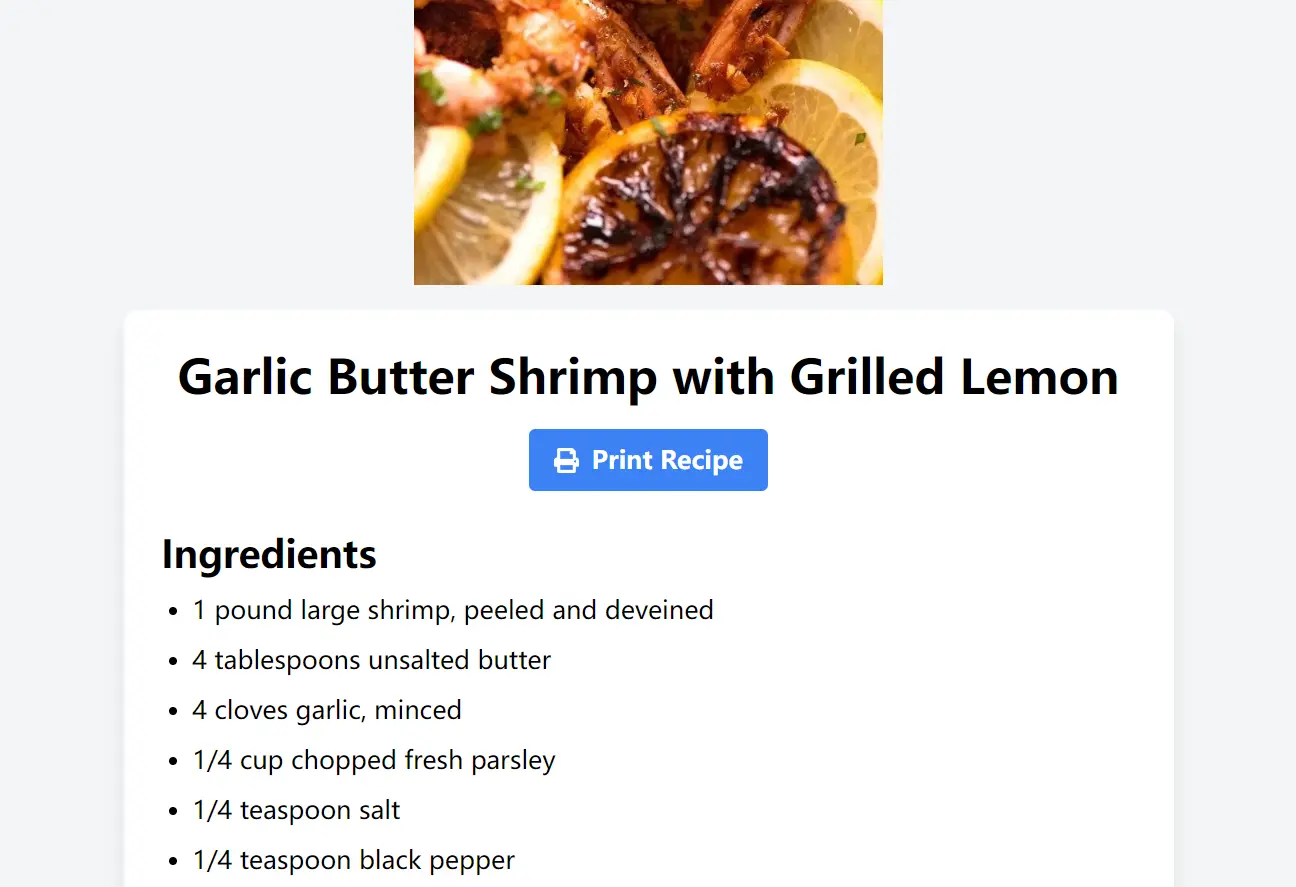
I tested Recipe Lens with a picture of grilled shrimp with garlic butter (from Recipetineats.com). The AI quickly identified the main components and labeled it “Garlic Butter Shrimp with Grilled Lemon.” It then generated a complete recipe. This included:
- A list of ingredients: It accurately listed the shrimp, butter, garlic, parsley, and lemon needed.
- Necessary equipment: It indicated I would need a large skillet and spatula, with a link to shop for kitchen supplies.
- Step-by-step instructions: Each step was clear and concise, with helpful tips like preparing for the next step while the current one was in progress.
- Nutritional information: It provided a breakdown of calories, fat, protein, and carbohydrates.
- Helpful notes: It suggested serving the dish with crusty bread and offered options for adding herbs or spice.
- Video tutorial: It even provides a short Youtube video demonstrating the recipe preparation.
This shows how Recipe Lens can help you recreate dishes from images or build recipes from your available ingredients. It simplifies the cooking process and makes exploring new culinary ideas accessible.
How to use it:
1. Visit Recipe Lens and Upload an Image: Go to the Recipe Lens website and upload a photo of your dish or ingredients. You can also take a photo directly through the website.

2. Add Details (Optional): If you wish, you can provide additional information about the dish. This could include specifying its characteristics (e.g., “spicy,” “vegetarian”) or adding ingredients not visible in the image.
3. AI Analysis and Recipe Generation: Recipe Lens’s AI will then analyze the image. If it’s a known dish, it will identify it and generate the corresponding recipe. If you’ve uploaded ingredients, it will create a custom recipe based on them, considering factors like flavor combinations and your dietary preferences.

4. View the Recipe: You’ll then see the complete recipe. This includes the ingredient list, step-by-step instructions with helpful tips, nutritional information, notes for variations, and a video tutorial, just like in the shrimp example.

5. Share or Print: You can easily share the generated recipe with friends via social media or email. You can also print it out for convenient use while cooking.
FAQs:
Q: How Does Recipe Lens Work?
A: Recipe Lens uses advanced image recognition and AI algorithms. When you upload a picture, it analyzes the image to identify the dish or ingredients. It then uses this information to generate a recipe, including instructions, nutritional details, and even a video tutorial.
Q: Is Recipe Lens Free?
A: Yes, Recipe Lens is 100% free to use.
Q: Can I Use Recipe Lens on My Phone?
A: Yes, Recipe Lens has a responsive design, meaning it works on all devices, including smartphones, tablets, and desktop computers.
Q: Can I Adjust the Serving Size in the Generated Recipes?
A: At this time, Recipe Lens generates recipes with a default serving size. You can manually adjust the ingredient quantities to suit your desired serving size.