Pocket TTS is a free, lightweight text-to-speech tool that runs entirely on your CPU without requiring a GPU.
This 100-million parameter model from Kyutai generates high-quality speech with voice cloning capabilities from just a single command.
You get real-time audio generation at about 6x real-time speed on a MacBook Air M4, using only 2 CPU cores.
Features
- CPU-Only Operation: The model runs on standard CPU hardware and does not require a GPU version of PyTorch.
- Compact Model Size: At 100 million parameters, the model is small enough to run on laptops and consumer hardware.
- Low Latency Streaming: Audio chunks start arriving in approximately 200ms from the initial request.
- Voice Cloning: You can clone any voice by providing a reference audio file in WAV format.
- Multiple Interface Options: Provides a Python API for programmatic integration, a CLI for quick generation, and a web server with HTTP API for testing different voices and prompts.
- Adjustable Generation Parameters: You can control output quality through temperature settings, decode steps, EOS threshold, and post-EOS frame count.
- 24kHz Audio Output: All generated audio uses a 24kHz sample rate with mono channels and 16-bit PCM encoding.
Example Output
Use Cases
- Accessibility Tools: Integrate voice feedback into desktop applications for visually impaired users.
- Content Creation Prototyping: Quickly generate voiceovers for video drafts, podcasts, or presentations during the editing phase.
- Educational Software: Create interactive learning aids or language tools that provide spoken examples directly on school or library computers.
- Embedded & Edge Applications: Develop prototypes for smart devices, kiosks, or robotics where hardware is constrained and cloud connectivity may be unreliable or slow.
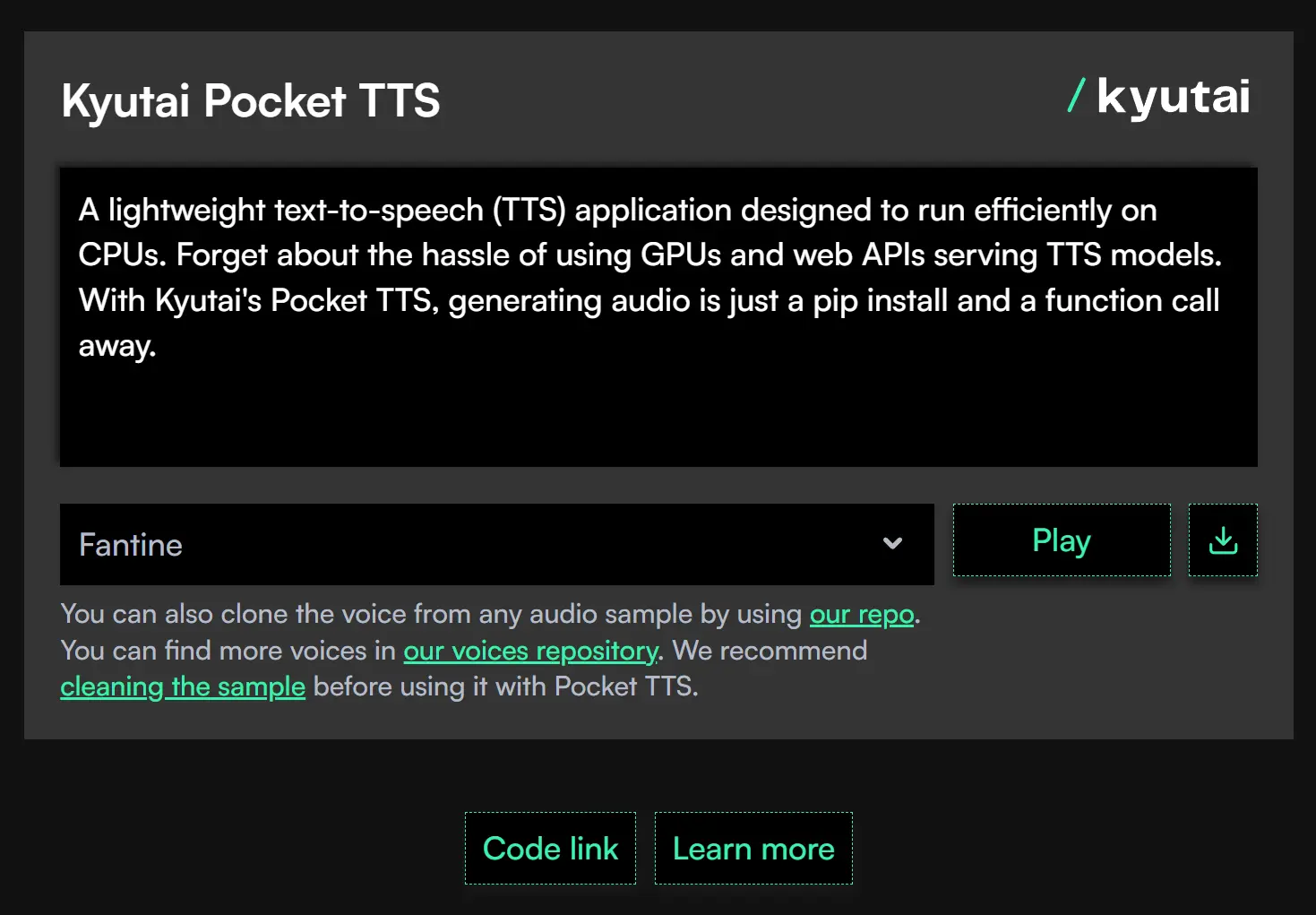
Try It Online
1. Visit Kyutai Pocket TTS’ official website.
2. Input text, select different voices, and generate speech without any installation.
How to Use It
Table Of Contents
Installation
I recommend using uv for a clean environment, but standard pip works fine too.
uvx pocket-tts generateFor manual installation through pip:
pip install pocket-ttsCLI Generation
The simplest usage generates audio with default settings:
pocket-tts generateThis creates a file called tts_output.wav in your current directory. The default text is “Hello world! I am Kyutai Pocket TTS. I’m fast enough to run on small CPUs. I hope you’ll like me.” spoken in the default voice.
You can customize the generation with various options:
pocket-tts generate --text "Your custom text here" --output-path "./my_audio.wav"For voice cloning, provide a reference audio file:
pocket-tts generate --voice "./my_voice.wav" --text "Clone this voice"The model also accepts voices from HuggingFace:
pocket-tts generate --voice "hf://kyutai/tts-voices/jessica-jian/casual.wav"Quality adjustments use decode steps and temperature:
pocket-tts generate --lsd-decode-steps 5 --temperature 0.5Higher decode steps improve quality but slow generation. Lower temperature produces more conservative, consistent output.
Web Server for Rapid Testing
The serve command launches a FastAPI server:
pocket-tts serveNavigate to http://localhost:8000 to access the web interface. The web UI lets you try different voices and text prompts quickly without reloading the model between requests. This is faster than CLI usage because the model stays in memory.
Custom host and port configuration:
pocket-tts serve --host "localhost" --port 8080Python API Integration
For programmatic use, import the TTSModel class:
from pocket_tts import TTSModel
import scipy.io.wavfile
# Load the model once
tts_model = TTSModel.load_model()
# Get voice state from reference audio
voice_state = tts_model.get_state_for_audio_prompt(
    "hf://kyutai/tts-voices/alba-mackenna/casual.wav"
)
# Generate audio
audio = tts_model.generate_audio(voice_state, "Hello world, this is a test.")
# Save to file
scipy.io.wavfile.write("output.wav", tts_model.sample_rate, audio.numpy())
The voice state extraction is a relatively slow operation, so you should keep voice states in memory if you plan to generate multiple audio clips with the same voice.
For streaming generation:
for chunk in tts_model.generate_audio_stream(voice_state, "Long text content..."):
    # Process each chunk as it arrives
    print(f"Generated chunk: {chunk.shape[0]} samples")
You can preload multiple voices to switch between them without reprocessing:
voices = {
    "casual": tts_model.get_state_for_audio_prompt("hf://kyutai/tts-voices/alba-mackenna/casual.wav"),
    "expressive": tts_model.get_state_for_audio_prompt("./my_voice.wav"),
}
# Generate with different voices
casual_audio = tts_model.generate_audio(voices["casual"], "Hey there!")
expressive_audio = tts_model.generate_audio(voices["expressive"], "Good morning.")
Advanced Generation Parameters
The model accepts several parameters that affect output quality and characteristics:
- Temperature (default: 0.7): Controls generation randomness. Lower values produce more consistent output, higher values create more variation. Range is typically 0.5 to 1.0.
- LSD Decode Steps (default: 1): Number of generation iterations. More steps improve quality but reduce speed. Values of 3-5 balance quality and performance.
- EOS Threshold (default: -4.0): Controls when the model decides to stop generating. Lower values cause earlier termination. Adjust if the model cuts off speech too early or extends too long.
- Frames After EOS: Number of 80ms frames to generate after detecting end of speech. The model auto-calculates this based on text length if you don’t specify it. Each frame represents 80 milliseconds of audio.
Pros
- Hardware Accessibility: It runs on almost any modern computer.
- Cost: The tool is completely free to use and open-source.
- Privacy: All processing happens locally on your machine. No data leaves your network.
- Speed: The generation is significantly faster than real-time playback.
- Simplicity: The API is straightforward. You only need a few lines of code to get results.
Cons
- Language Support: The model currently supports English only.
- No GPU Speedup: You won’t see performance gains by throwing a GPU at it.
- Limited Control: You cannot currently insert silence tokens or pauses manually in the text.
Related Resources
- GitHub Repository: Access the source code and installation instructions.
- Research Paper: Read the technical paper explaining the architecture behind the model.
- Voice Catalog: Browse available reference voices with licensing information for each voice sample.
- Kyutai TTS 1.6B: Explore the larger streaming TTS model for server deployments with different capabilities.
FAQs
Q: Can I run Pocket TTS faster with a GPU?
A: No. The developers tested GPU acceleration but found no performance improvement over CPU execution.
Q: How do I improve voice cloning quality?
A: Use clean, high-quality reference audio files without background noise or compression artifacts. Longer reference samples (10-20 seconds) typically produce better results than minimal 3-second clips.
Q: What happens if I input extremely long text?
A: The model handles infinitely long text inputs without memory issues. It processes the text in a streaming fashion, so you can generate audio for entire books or documents in a single call.
Q: Can I use this for commercial applications?
A: The MIT license allows commercial use with proper attribution. You must comply with the prohibited use guidelines, which forbid voice impersonation without consent, misinformation generation, and creation of harmful content. The model cannot be used for fraudulent activities or unauthorized voice cloning.
Q: How does the latency compare to cloud TTS services?
A: The ~200ms latency to first audio chunk is competitive with many cloud services. Total generation time depends on text length, but the 6x real-time speed on a MacBook Air M4 means a 10-second audio clip generates in under 2 seconds.
Q: Why is the model English-only?
A: The current release focuses on English language support. Multilingual versions would require additional training data and increased model complexity. The developers may add language support in future releases, but no timeline is specified.
Q: What audio formats does the voice cloning accept?
A: The system accepts WAV files for voice reference. You can also provide URLs to audio files (HTTP links or HuggingFace repository paths).