Getting AI agents to reliably interact with the modern web is tricky. You can stitch together APIs, maybe wrestle with Selenium or Playwright, but it often feels like you’re fighting the tools rather than building the agent. That’s why Browserable caught my eye – it’s an open-source library designed for building browser agents that can handle real web tasks.
Think navigating sites, filling out login forms, clicking buttons, scraping specific data – the kind of stuff humans do easily but is surprisingly brittle to automate, especially when you throw an LLM into the mix. Browserable aims to simplify this. It’s self-hostable, MIT licensed (so, actually free), and lets you plug in your preferred LLM and browser infrastructure without getting locked in.
So what does Browserable actually give you? Here’s the key features:
- Agent-Focused Browser Automation: This isn’t just a wrapper around clicks and keystrokes. It’s built with the idea that an AI (specifically an LLM) will be driving the interaction logic.
- Web Task Execution: Handles the core actions needed for web interaction: navigating pages, filling forms, clicking elements, and extracting information based on instructions.
- High Benchmark Performance: It scores remarkably well (currently 90.4%) on the Web Voyager benchmarks. This benchmark tests how well an agent can complete complex, multi-step tasks on real websites – a good indicator it can handle more than just trivial interactions.
- Quick Local Setup: You can get a basic instance running with a single
npx browserablecommand. Great for testing or small projects. - Integration Ready: Offers both REST APIs and a JavaScript SDK (
browserable-js) so you can integrate its capabilities into your existing applications or workflows. - Self-Hostable & Flexible: You run it yourself (using Docker). This means you control the data, the scaling, and you’re not tied to any single cloud browser provider, LLM API, or specific infrastructure.
Use Cases
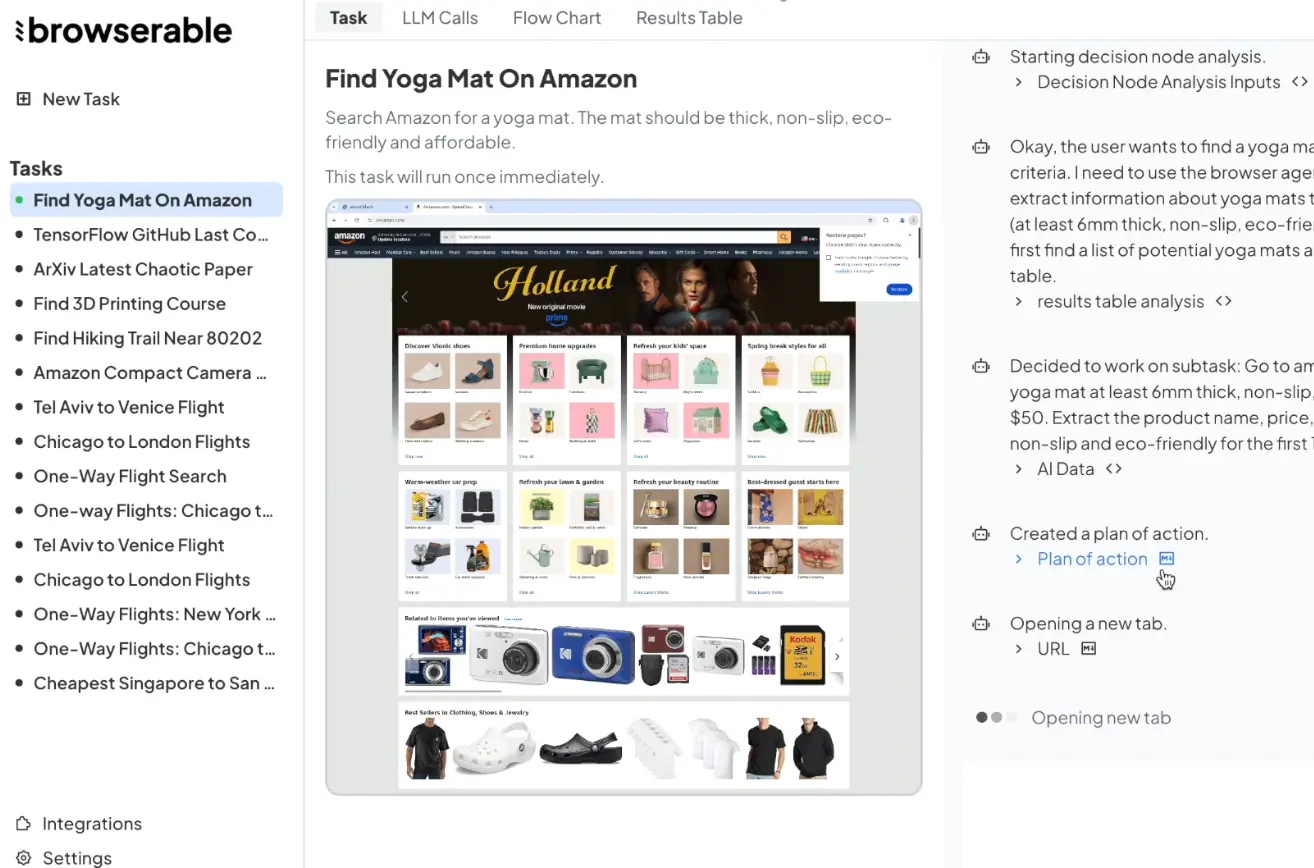
- Smarter Data Extraction: Go beyond simple CSS selectors. Tell an agent: “Find the names and prices of all non-slip yoga mats under $50 on Amazon.” The agent uses the LLM to understand the query and Browserable to interact with the site.
- Automated Research: Set up an agent to monitor specific sources. Example: “Check ArXiv’s ‘Chaotic Dynamics’ category daily, summarize new papers, and log the submission dates.”
- Complex Task Automation: Automate multi-step processes that require navigating different pages and forms, like finding specific online courses based on criteria (subject, duration, provider) on sites like Coursera.
- AI-Powered QA Testing: Instead of scripting exact user flows, describe a user goal and let an agent attempt to achieve it, potentially finding usability issues a rigid script might miss.
- Personalized Information Agents: Build a custom agent that knows your preferences and can perform web tasks for you, like finding local events or comparing product reviews based on your criteria.
Examples
On coursera.com find a beginner-level online course about ‘3d printing’ which lasts 1-3 months, and is provided by a renowned university.
On arxiv.org locate the latest paper within the ‘Nonlinear Sciences – Chaotic Dynamics’ category, summarize the abstract, and note the submission date.
On Amazon.com search for a yoga mat at least 6mm thick, non-slip, eco-friendly, and under $50.
Related Resources
- Official Documentation: docs.browserable.ai – Your main source for comprehensive info.
- GitHub Repository: github.com/browserable/browserable – Check out the source code, report issues, or contribute.
- REST API Reference: docs.browserable.ai/rest-api/introduction – Details for integrating via HTTP requests.
- JS SDK Guide: docs.browserable.ai/js-sdk/introduction – Specifics on using the Node.js package.
FAQs
Q: Is Browserable really free?
A: Yes, the Browserable software itself is free and open-source (MIT license). However, to run it, you need API keys for an external LLM (like OpenAI, Claude, Gemini) and a remote browser service (like Hyperbrowser or Steel). These external services might have costs depending on your usage, although they often have free starting tiers.
Q: Do I absolutely need my own LLM API key?
A: Yes. Browserable uses a Large Language Model to interpret your task instructions (e.g., “find cheap yoga mats”) and decide what actions to take in the browser (e.g., type in search bar, click filter buttons). You need to provide an API key for one of the supported LLMs in the admin settings.
Q: What’s a “remote browser provider” and why is it needed?
A: Browserable orchestrates the logic of the browser agent, but it doesn’t include the actual browser engine itself. A remote browser provider (like Hyperbrowser or Steel) offers browsers running in the cloud that can be controlled via API. Browserable connects to one of these services (using the API key you provide) to execute the clicks, typing, and navigation actions. Using a remote service simplifies setup as you don’t need to manage local browser installations (like ChromeDrivers) within your Docker setup.
Q: How does Browserable compare to Selenium or Playwright?
A: Selenium and Playwright are general-purpose browser automation libraries, fantastic for testing and scripting exact interactions. Browserable is built specifically for AI agents. It integrates an LLM to interpret intent (“find…”) rather than just executing predefined steps. It aims to handle the dynamic nature of websites more robustly in an agent context, while Selenium/Playwright require you to script every explicit action and selector. Browserable kind of sits on top, using a browser backend (potentially even one managed by Playwright/Puppeteer via the remote provider) but adding the LLM-driven decision-making layer.
Q: What does the Web Voyager benchmark score mean?
A: Web Voyager is a benchmark designed to test AI agents on their ability to complete complex tasks across various websites, mimicking human browsing behavior. A high score (like Browserable’s 90.4%) indicates the agent framework is quite capable of navigating real-world sites, understanding instructions, and completing multi-step goals successfully, which is often a major challenge for web agents.