Vision Scout is a free, open-source AI object detection tool that goes beyond simply telling you what’s in a picture. It aims to grasp the entire story that an image is trying to convey.
It mixes the object-spotting capabilities of YOLOv8 with the semantic, contextual understanding of OpenAI’s CLIP. The idea is to not just list objects, but to figure out the scene type (think bustling night market versus a calm bedroom), assess lighting, understand object arrangement, infer activities, and even flag potential safety issues.
Try it Out
Features
- Object Detection with YOLOv8: It uses YOLOv8 (you can choose between ‘n’, ‘m’, or ‘x’ models for a speed/accuracy tradeoff) to find objects. You can also set a confidence threshold and, quite usefully, filter for specific object classes – so if you only care about people or vehicles, it’ll just show those.
- Detection Statistics & Visualization: You get straightforward stats and a bar chart showing what was detected and in what quantities.
- Contextual Understanding via CLIP: This is where it gets more interesting. CLIP helps it understand the overall meaning and “vibe” of an image by comparing it to a wide range of text descriptions covering scene types, lighting, and viewpoints. This adds a layer of understanding that object detection alone can’t provide.
- Hybrid Scene Classification (YOLOv8 + CLIP Fusion): Vision Scout combines YOLO’s object data with CLIP’s contextual insights. It uses a smart weighting system – relying more on YOLO for object-defined scenes (like a kitchen, which has specific appliances) and more on CLIP for atmosphere-defined scenes (like a specific cultural event or an aerial shot).
- Rich Scene Descriptions: Instead of just tags, an
EnhancedSceneDescribermodule generates a detailed paragraph. It pulls together the scene type, objects, lighting, viewpoint, functional areas, and even potential cultural hints. - Spatial Analysis & Functional Zones: The
SpatialAnalyzerlooks at where detected objects are located, maps them to image regions (top-left, center, etc.), and tries to identify functional zones, like recognizing a table and chairs as a ‘dining area’. - Lighting Analysis: The
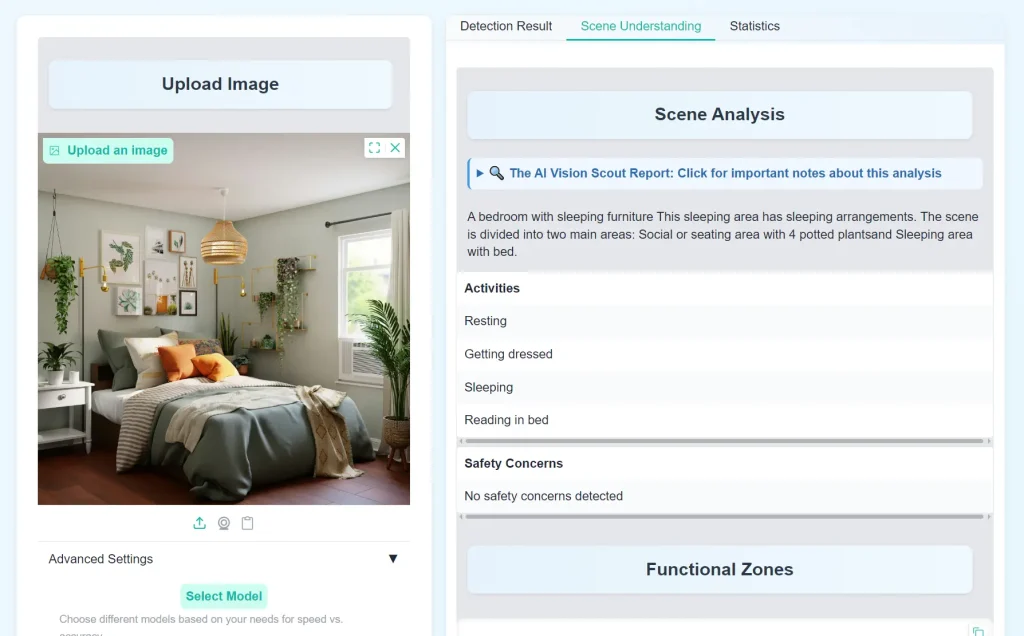
LightingAnalyzerassesses brightness, colors, and contrast to determine if the scene is indoor/outdoor and classify the lighting conditions (e.g., ‘daytime clear’, ‘neon night’). - Activity & Safety Inference: Based on the recognized scene and objects (like people near a busy road or sharp objects in a kitchen), the system suggests likely activities and points out potential safety considerations.
Use Cases
- Smarter Content Tagging/Management: Instead of just tagging an image with “car, person, tree,” you could get “daytime urban street scene with pedestrian activity near parked vehicles.” This is much richer for search and organization.
- Automated Scene Understanding for Robotics/Autonomous Systems: A robot navigating an environment needs to understand more than just object presence. Knowing it’s in a ” cluttered workshop” versus a “clear hallway” has safety and operational implications.
- Assisting Human Analysts: For security personnel monitoring multiple camera feeds, Vision Scout could provide initial scene assessments, flagging unusual activities or contexts for human review. For example, identifying “a lone figure in a restricted warehouse area at night.”
- Enhanced Accessibility Tools: Generating detailed narrative descriptions of images could be a component in systems designed to help visually impaired users understand visual content more fully.
- Initial Data Exploration for Computer Vision Projects: If you’re starting a new CV project and have a large dataset of images, Vision Scout could help you get a quick overview of the types of scenes, common objects, and lighting conditions present before you dive into manual annotation or model training.
How To Use It
1. The simplest way is via the Hugging Face Space: Try Vision Scout Live on HuggingFace Spaces
2. You can upload an image file directly or use your device’s camera. Keep in mind, the quality of the image (clarity, resolution) will impact the detection results.
3. Adjust Settings (Optional):
- Confidence Threshold: This slider (0 to 1) controls how “sure” the model needs to be before it flags an object. A lower threshold means more detections, but potentially more false positives. A higher threshold means fewer, but likely more accurate, detections. I usually start around 0.4-0.5 and adjust from there.
- YOLO Model Size: You can select ‘n’ (nano), ‘m’ (medium), or ‘x’ (extra-large). ‘n’ is fastest but least accurate; ‘x’ is slowest but most accurate. ‘m’ is a balance. For quick tests, ‘n’ or ‘m’ are fine. If you need top accuracy for a specific image, try ‘x’.
4. Filter Object Classes (Optional). If you’re only interested in certain things (e.g., “person”, “car”, “dog”), you can select these from the checklist. The results will then only display these specific object types. This is super useful if an image is very cluttered.
5. Click the “Detect Objects” button. The system will then process the image.
6. Review Results:
- Annotated Image: Your image with bounding boxes around detected objects.
- Statistics: Charts and numbers about the detected objects.
- Full Report: This is where you’ll find the narrative scene description, lighting analysis, functional zones, and potential activities/safety notes.
Pros
- Goes Beyond Basic Tagging: The fusion of YOLOv8’s object detection with CLIP’s semantic understanding provides a more holistic interpretation than many standard object detectors.
- Narrative Descriptions: The attempt to generate human-readable paragraphs describing the scene is a strong point.
- Functional Zone Identification: The spatial analysis that tries to identify areas like ‘dining areas’ or ‘workspaces’ is a neat feature.
- User-Configurable Detection: Being able to choose YOLOv8 models and filter classes gives good control over the core detection task.
- Open Source & Extensible: The project is Apache 2.0 licensed, and its modular design (separate analyzers for lighting, space, etc.) suggests it could be adapted or extended.
- Clear Workflow: The documentation on how the different components interact is well-explained.
Cons
- Dependent on Initial Detection Quality: The richness of the final description heavily relies on how well YOLOv8 initially detects objects. If key objects are missed, the scene interpretation can be off.
- Static Image Focus (Currently): As noted in its future directions, it currently only handles static images, not video.
- Computational Cost for Full Analysis: Running both YOLOv8 and CLIP, plus all the subsequent analysis steps, can be more resource-intensive than simple object detection, especially with larger YOLO models. This is noticeable on the Hugging Face Space at times.
- Generic COCO Classes: YOLOv8, by default, detects the 80 COCO classes. For very specific domains (e.g., identifying particular types of machinery or niche retail products), it would need fine-tuning or replacement with a custom-trained YOLO model.
Related Resources
- Ultralytics YOLOv8: The GitHub repository for the object detection model used. Good for understanding YOLO’s capabilities. Ultralytics YOLOv8 Repository
- OpenAI CLIP Paper: The original research paper explaining CLIP. A bit academic, but foundational for understanding the semantic analysis part. Learning Transferable Visual Models From Natural Language Supervision
- Gradio: The tool used to build the web interface. If you’re interested in creating similar AI demos, Gradio is worth checking out. Gradio Website
FAQs
Q: Can I run Vision Scout locally?
A: Yes—the GitHub repo provides code for local deployment. Requires Python 3.8+ and GPU for best performance.
Q: How accurate is the scene classification?
A: In tests, hybrid (YOLO+CLIP) scoring improved accuracy by ~15% over CLIP alone for object-dense scenes like kitchens.
Q: How accurate is the scene description?
A: It varies. When object detection is good and the scene falls into categories it “knows” (defined in its knowledge base files), the descriptions can be quite insightful. For very unusual scenes or if object detection struggles, the description quality will drop. It’s not perfect, but it’s generally much better than just a list of object tags.
Q: Can I use Vision Scout for commercial purposes?
A: The Apache 2.0 license is permissive and generally allows for commercial use, but you’d need to ensure you comply with its terms, particularly around attribution.
Q: How does the YOLO+CLIP fusion actually improve things?
A: Think of it like this: YOLO might see a “bed,” “table,” and “lamp.” This suggests a bedroom. CLIP might look at the overall colors, textures, and composition and get a “cozy indoor vibe.” If YOLO sees a “stove,” “refrigerator,” and “sink,” it strongly suggests “kitchen.” The fusion logic weighs these different types of evidence. For a kitchen, the objects are key. For something like “a festive outdoor market at night,” the overall atmosphere, lighting (neon signs, crowds) captured by CLIP might be more defining than any single object. The system tries to adaptively decide which clues are more important for a given image.
Q: Can I train Vision Scout on my own custom objects or scene types?
A: To recognize custom objects beyond the standard COCO dataset, you’d need to train/fine-tune a YOLOv8 model on your own data and integrate that. To recognize new scene types or refine existing ones, you’d modify the Python files that make up its “Knowledge Base” (e.g., scene_type.py, clip_prompts.py). So yes, but it requires some development effort.