Ever hit send on an email only to immediately regret how it sounded? Or spent 20 minutes rewriting a simple message because you couldn’t find the right tone?
I’ve been there – especially when responding to client emails late at night. That’s why tools like PolitePulse AI caught my attention.
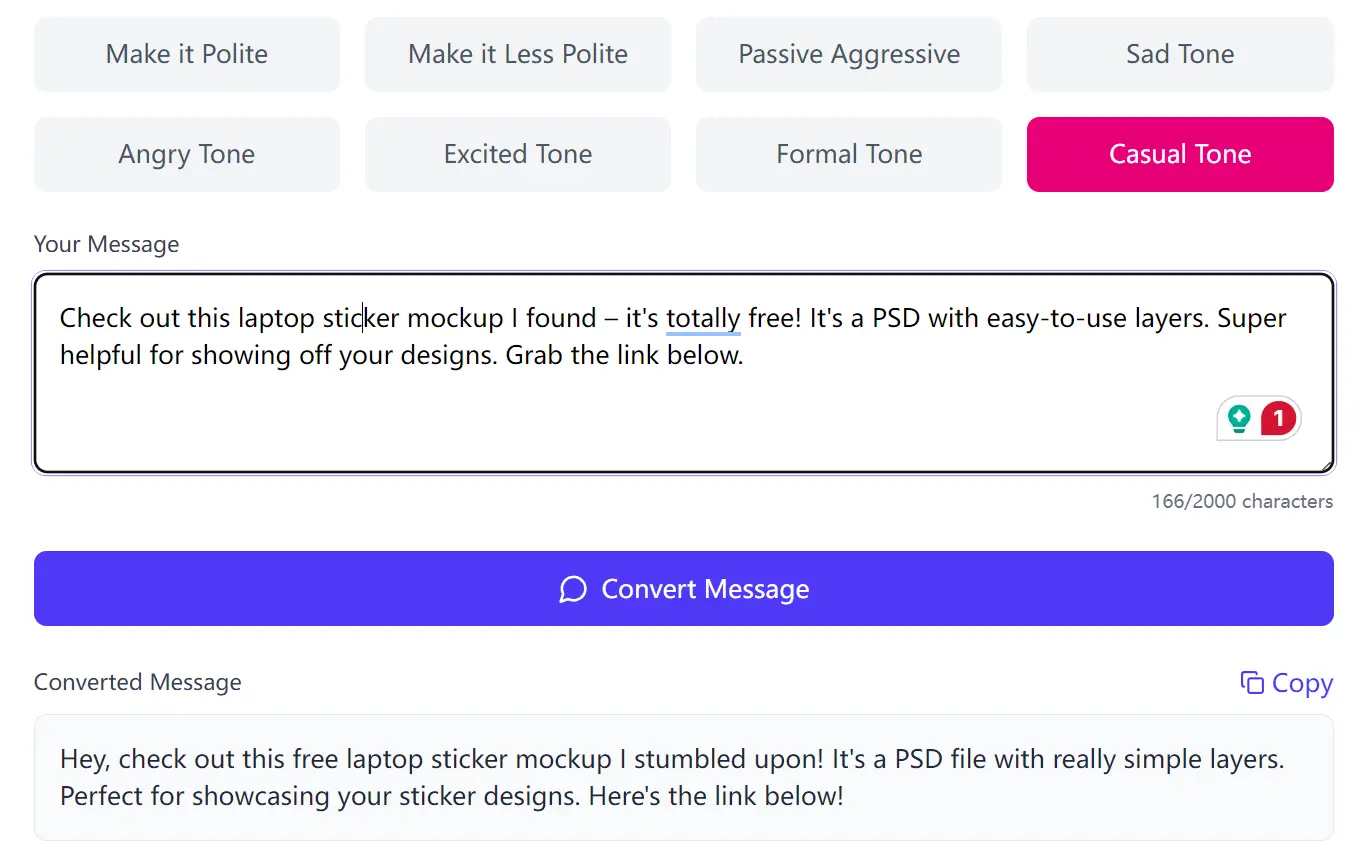
PolitePulse is a free AI tool that rewrites your message in different emotional tones with one click. It’s not trying to be a full writing suite – it does one job well: adjusting tone while keeping your core message intact.
This can be useful for freelancers, customer support folks, and anyone who need to communicate clearly and professionally, but might not always have the time (or patience) to fine-tune every sentence.
Here’s an example of how it handled a simple message:
Original Message:
"Check out this laptop sticker mockup I found – it's totally free! It's a PSD with easy-to-use layers. Super helpful for showing off your designs. Grab the link below."
Polite Tone:
"I wanted to share this laptop sticker mockup I came across; it's available for free. It's a PSD file with well-organized layers, which should be helpful for showcasing your designs. You can find the link below."
Sad Tone:
"Just found this free laptop sticker mockup… a PSD with easy layers. It feels a little bittersweet seeing potential designs showcased, knowing mine might never quite fit. If it helps anyone else, the link's below."
Excited Tone:
"Thrilled to share this find! Check out this laptop sticker mockup – it's available completely free of charge! It's a PSD file featuring easy-to-use layers, making it incredibly helpful for showcasing your designs. You can find the link below."
Angry Tone:
"This laptop sticker mockup I located, available at no cost, is a PSD file with easily manageable layers. It should prove helpful in showcasing design work. The link is provided below."
Notice how the angry tone transformation is a bit…stilted. That’s one of the limitations I’ll touch on later. It is not bad, it just is less useful.
Features
- One-Click Tone Transformation: Quickly change the tone of your text.
- Multiple Tone Options: Choose from polite, formal, casual, excited, angry, sad, and passive-aggressive.
- Simple Interface: Paste your text, select a tone, and get the converted message.
- Free to Use: No hidden costs or subscriptions.
- Gemini API Powered: Utilizes Google’s Gemini for tone analysis and transformation.
- Copy-to-Clipboard: Easy to grab the transformed text and use it.
Use Cases
- Email Tone Adjustment: Quickly switch from a casual draft to a formal request for a client.
- Internal Team Communication: Easily move between a relaxed tone in team chats and a more professional tone for official updates.
- Customer Support: Adjust responses to match customer sentiment (e.g., more empathetic for complaints).
- Social Media Messaging: Quickly tailor a message for different platforms or audiences.
- Code Review Feedback: Deliver constructive criticism in a more diplomatic tone. (We’ve all seen those code reviews…)
How to Use It
1. Go to the PolitePulse AI website.
2. Paste the message you want to modify into the text box.
3. Choose Your Tone:
- Make it Polite
- Make it Less Polite
- Passive Aggressive
- Sad Tone
- Angry Tone
- Excited Tone
- Formal Tone
- Casual Tone
4. Click the ‘Convert Message’ button.
5. Review the transformed text and click the “Copy” button to copy it to your clipboard.
6. Pro Tip: If you’re working with a longer piece of text, break it down into smaller chunks. This usually yields better results, especially with the more nuanced tones.
Pros
- Speed: Transformations are almost instant.
- Ease of Use: The interface is clean and straightforward.
- Free: No cost barrier to entry.
- Variety of Tones: Covers a good range of common communication styles.
- Privacy: Text is processed via Google’s Gemini API, with no permanent storage on PolitePulse’s servers.
Cons
- English Only (For Now): Currently optimized for English text.
- Character Limit: There’s a limit, though it’s reasonably high.
- Nuance Limitations: Some tones (like “Angry”) can sound a bit unnatural, especially with complex sentences.
- Context Dependent: Like any AI, it’s not perfect. You’ll still need to use your judgment.
Related Resources
- Grammarly (for grammar and style checking): A good complement to PolitePulse.
- Hemingway Editor (for clarity and conciseness): Helps to simplify your writing before adjusting the tone.
FAQs
Q: Can it handle technical documentation?
A: Sort of. It maintains technical terms well but may over-simplify complex explanations when going casual.
Q: Why would I need this if I have ChatGPT?
A: Speed and specificity. It’s faster for quick tone adjustments without prompt engineering.
Q: How accurate are the tone conversions?
A: Generally, it’s quite good, especially for common tones like polite and formal. However, the results can vary depending on the complexity of your text. Always review the output.
Worth Trying?
If you regularly stress about message tone (or have been told your emails sound too abrupt), PolitePulse is worth bookmarking. It won’t replace careful writing, but it’s saved me several awkward follow-up “what I meant was…” messages.
Give it a spin with your most problematic recent message and see what it suggests – you might be surprised how differently your words can land.