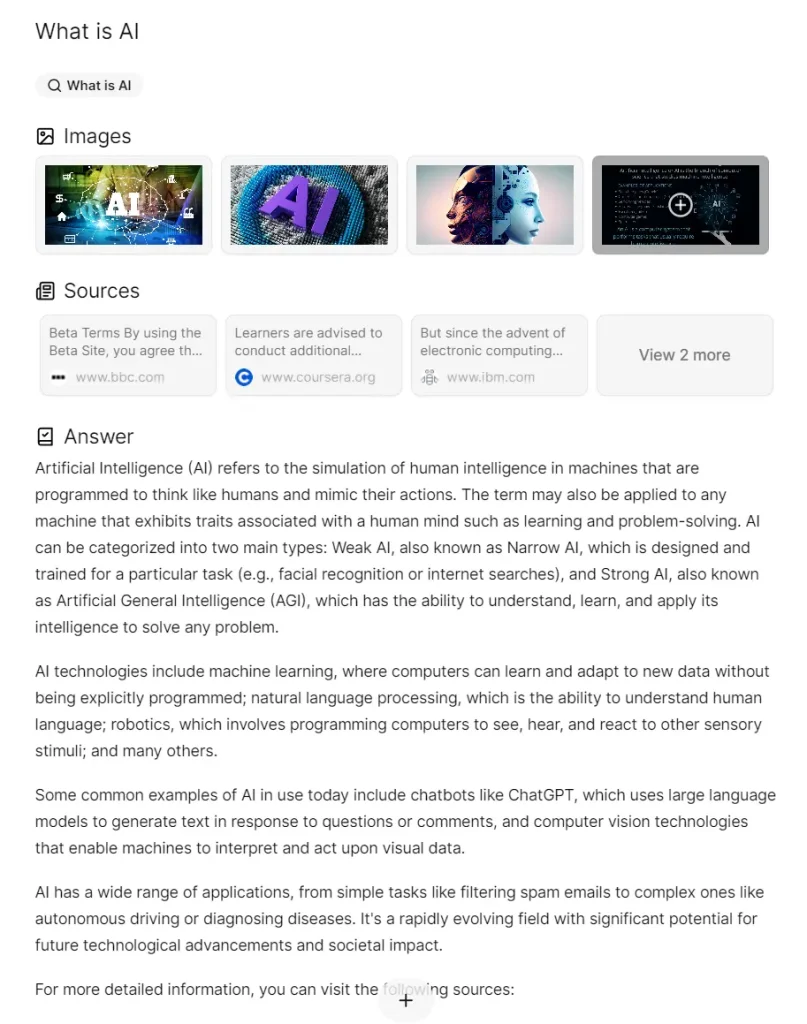
Morphic is an open-source project that combines the power of OpenAI with the flexibility of a generative UI to redefine how we find answers online.
It offers an answer engine where any question can be posed. The AI diligently searches the web to fetch and present the most accurate answer instantly.
Beyond responding directly to queries, Morphic also provides images and credible sources that accompany each answer and related questions to deepen understanding.
If the initial answer doesn’t fully address your query, you can engage in a back-and-forth dialogue with the AI to get a more comprehensive understanding. This interactive approach can be particularly helpful for complex or nuanced topics.
How to deploy it:
1. Start by forking the Morphic repository to your Github account and then clone it to your local machine using the command:
git clone [email protected]:[YOUR_GITHUB_ACCOUNT]/morphic.git
2. Once you’ve cloned the repo, navigate to the Morphic directory and install the necessary dependencies:
cd morphic
bun i
3. Morphic relies on external services like OpenAI and Tavily AI to function. To use it, you’ll need to acquire API keys from these platforms and add them to a file named .env.local within the Morphic project directory. You can find instructions on obtaining API keys on their respective websites:
OpenAI: https://openai.com/
Tavily AI: https://tavily.com/
# Required
# The settings below are essential for the basic functionality of the system.

# OpenAI API key retrieved here: https://platform.openai.com/api-keys
OPENAI_API_KEY=[YOUR_OPENAI_API_KEY]

# Tavily API Key retrieved here: https://app.tavily.com/home
TAVILY_API_KEY=[YOUR_TAVILY_API_KEY]

# Upstash Redis URL and Token retrieved here: https://console.upstash.com/redis
UPSTASH_REDIS_REST_URL=[YOUR_UPSTASH_REDIS_REST_URL]
UPSTASH_REDIS_REST_TOKEN=[YOUR_UPSTASH_REDIS_REST_TOKEN]


# Optional
# The settings below can be used optionally as needed.

# Used to set the base URL path for OpenAI API requests.
# If you need to set a BASE URL, uncomment and set the following:
# OPENAI_API_BASE=

# Used to set the model for OpenAI API requests.
# If not set, the default is gpt-4o.
# OPENAI_API_MODEL=gpt-4o-mini

# If you want to use Google Generative AI instead of OpenAI, enable the following settings.
# Google Generative AI API key retrieved here: https://aistudio.google.com/app/apikey
# GOOGLE_GENERATIVE_AI_API_KEY=[YOUR_GOOGLE_GENERATIVE_AI_API_KEY]

# If you want to use Anthropic instead of OpenAI, enable the following settings.
# ANTHROPIC_API_KEY=[YOUR_ANTHROPIC_API_KEY]

# [Unstable] If you want to use Ollama, enable the following variables.
# OLLAMA_MODEL=[YOUR_OLLAMA_MODEL] # The main model to use. Recommended: mistral or openhermes
# OLLAMA_SUB_MODEL=[YOUR_OLLAMA_SUB_MODEL] # The sub model to use. Recommended: phi3 or llama3
# OLLAMA_BASE_URL=[YOUR_OLLAMA_URL] # The base URL to use. e.g. http://localhost:11434

# Only writers can set a specific model. It must be compatible with the OpenAI API.
# USE_SPECIFIC_API_FOR_WRITER=true
# SPECIFIC_API_BASE=
# SPECIFIC_API_KEY=
# SPECIFIC_API_MODEL=

# enable the share feature
# If you enable this feature, separate account management implementation is required.
# ENABLE_SHARE=true

# enable the video search tool
# Serper API Key retrieved here: https://serper.dev/api-key
# SERPER_API_KEY=[YOUR_SERPER_API_KEY]
4. With the API keys in place, you’re ready to test drive Morphic! Run the following command to start the application locally. This will launch Morphic on your machine, typically accessible at http://localhost:3000.
bun dev
5. If you’d like to share your AI answer engine with the world, Morphic can be easily deployed on Vercel with just one click.
FAQs:
Q: What technologies are used in Morphic?
A: Morphic is built using the Next.js framework, the Vercel AI SDK for the generative UI, OpenAI for the language model, and the Tavily AI search API.
Q: Is Morphic free to use?
A: Yes, Morphic is an open-source project, so it is free to use and modify. However, using the OpenAI and Tavily APIs may require paid subscriptions depending on your usage.
Q: What are the benefits of using Morphic?
A: Morphic can save you time and effort by providing instant, reliable answers to your questions. It also generates related questions and allows for interactive back-and-forth to he
Q: Can I contribute to the Morphic project?
A: Absolutely! Morphic is open-source and welcomes contributions from the community. You can find the project on GitHub and contribute to its development.
Changelog:
09/17/2025
- v0.4.6