Proofly is a free, AI-powered, privacy-first Chrome extension that provides professional-grade proofreading without sending your sensitive data to the cloud.
The browser extension uses Chrome’s built-in Gemini Nano AI model to check spelling, grammar, punctuation, and more entirely on your device.
You get real-time corrections as you type across any input field, textarea, or contenteditable element in your browser.
The extension runs completely offline after the initial AI model download. Your text never leaves your machine. No account signup required, no tracking, no telemetry.
The creators built Proofly from the ground up with privacy as the core principle. Perfect for lawyers, healthcare providers, journalists, and anyone who writes sensitive content in their browser.
Features
- On-Device Processing: Text analysis happens entirely on your machine using Chrome’s native Gemini Nano model.
- Offline Functionality: The extension works without an internet connection after completing the one-time AI model download.
- Real-Time Error Detection: The tool underlines issues as you type. You see spelling, grammar, punctuation, capitalization, prepositions, and missing word errors highlighted instantly.
- Inline Correction Popovers: Click any underlined error to see context-specific suggestions in a clean popover interface.
- Side Panel Interface: A dedicated sidebar that lists all detected issues. You can navigate through problems and fix them in bulk.
- Customizable Correction Types: Toggle specific error categories on or off. Check grammar, but ignore capitalization if you prefer a less aggressive approach.
- Universal Input Support: Works on standard input fields, textareas, and contenteditable elements across all websites.
- Keyboard Shortcuts: Trigger manual text checks on selected content using custom keyboard shortcuts.
Use Cases
Legal Professionals: Lawyers can draft sensitive legal documents and client communications without exposing privileged information to third-party servers. The offline capability means you can work on confidential briefs during flights or in locations with restricted internet access.
Healthcare Providers: Therapists and medical professionals can write patient notes, treatment plans, and HIPAA-protected communications with confidence. The local processing ensures patient data stays on your device.
Journalists and Researchers: You can work on investigative stories, confidential source communications, and unpublished research without the risk of data leaks through cloud-based writing assistants.
Corporate Environments: Companies with strict data security policies can use Proofly on work machines. Many organizations block Grammarly and similar tools because they send data externally. Proofly’s local-only approach bypasses this restriction.
Working reliably offline: If you frequently write on planes, in areas with poor connectivity, or simply prefer to minimize distractions, Proofly’s offline capability makes it a consistently available tool.
How to Use It
Check System Requirements
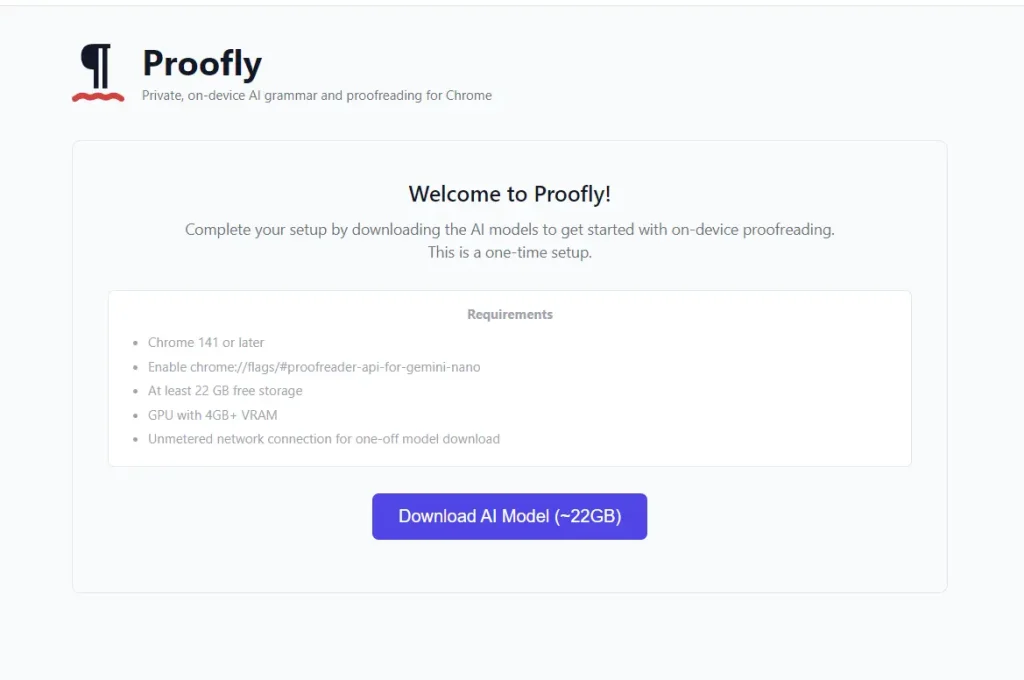
You need Chrome 141 or later. Your device must have at least 22 GB of free storage space for the AI models. You’ll need a GPU with 4GB or more VRAM. You’ll also need an unmetered internet connection for the initial model download (about 20 GB).
Enable Chrome’s Proofreader API
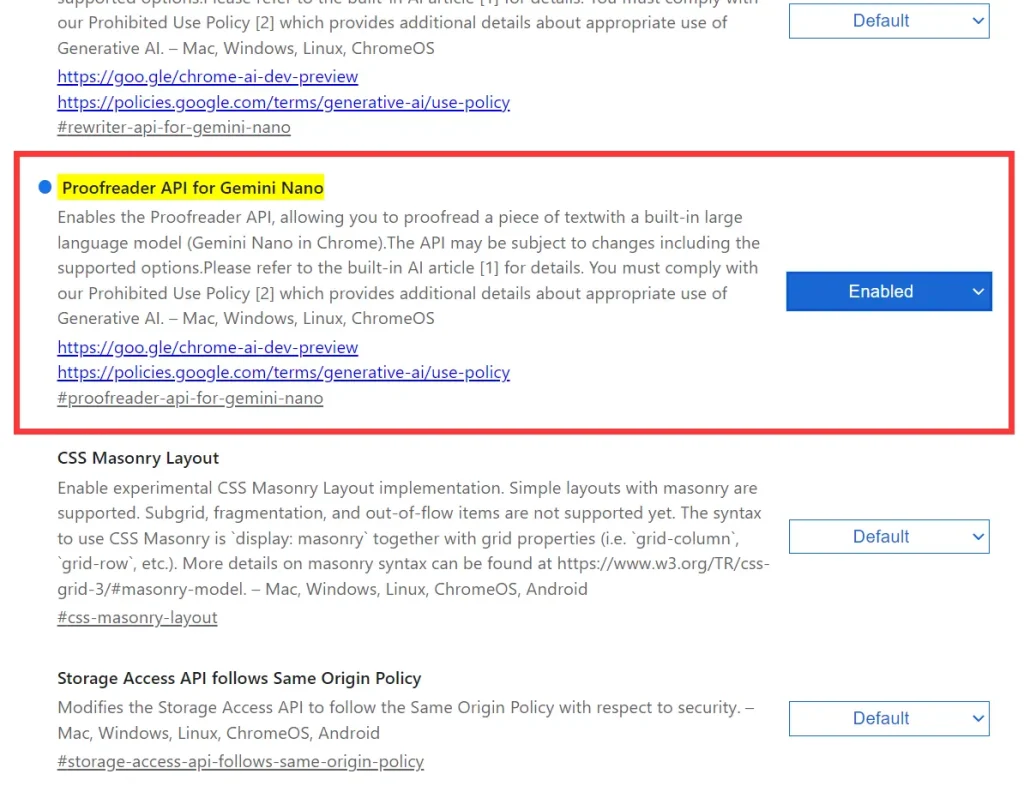
Open Chrome and navigate to chrome://flags/#proofreader-api-for-gemini-nano. Set the flag to “Enabled,” and restart your browser.
Install the Extension
Visit the Chrome Web Store and search for Proofly or use this direct link: Proofly Chrome Extension. Click “Add to Chrome” and confirm the installation.
Download AI Models
Click the Proofly icon in your toolbar. The extension will prompt you to download Chrome’s built-in AI models. This is a one-time download that takes 15-30 minutes, depending on your connection speed. You need about 20 GB of available bandwidth.
Start Writing
Once the model download completes, Proofly automatically activates on all supported input fields. Type in any text box, email composer, or content editor. The extension underlines errors in real time.

Review and Apply Corrections
Click any underlined text to see correction suggestions in a popover. Click a suggestion to apply it. You can also open the side panel by clicking the Proofly icon to see a complete list of all detected issues on the current page.
Customize Settings
Open the extension settings through the toolbar icon. Toggle specific error types on or off based on your preferences. Set up keyboard shortcuts for manual text checking. Choose between auto-correct mode (corrections apply as you type) and manual mode (you review each suggestion).

Pros
- Uncompromised data privacy: Your text is never transmitted. This is its core benefit for security-conscious users.
- Genuine offline functionality: Once set up, it works anywhere without an internet connection, a feature most competitors lack .
- Zero cost and no account: The extension is completely free and doesn’t require you to create a login or profile.
Cons
- Stringent system requirements: The need for a recent Chrome version, substantial storage, and a capable GPU will exclude users on older or less powerful devices.
- Dependency on Chrome’s AI: The proofreading quality is tied to the capabilities of Chrome’s built-in Gemini Nano model.
Related Resources
- Chrome Built-in AI Documentation: Official documentation for Chrome’s on-device AI capabilities. Learn how Gemini Nano works in the browser.
- Proofly GitHub Repository: The complete source code for the extension. You can review the code, report issues, or contribute to development.
FAQs
Q: Can I use Proofly on Chrome versions earlier than 141?
A: No. Proofly requires Chrome 141 or later because it depends on Chrome’s built-in AI APIs that were introduced in recent versions.
Q: How much storage space do I need permanently?
A: The AI models require about 22 GB of storage space. This is a permanent requirement. The models stay on your device so Proofly can work offline. You can’t delete them and keep using the extension.
Q: Can I use Proofly on my work computer with limited permissions?
A: You need administrator access to install Chrome extensions and enable Chrome flags. If your company restricts extension installations or flag modifications, you’ll need IT approval. However, many organizations that block cloud-based tools like Grammarly are more open to Proofly because it keeps data local.
Q: What happens if I’m offline and the extension doesn’t work?
A: Once you complete the initial setup and AI model download, Proofly works completely offline. If you’re experiencing issues offline, check that the models downloaded correctly and that the proofreader API flag is still enabled in chrome://flags.
Q: How do I know my data isn’t being sent anywhere?
A: The entire extension code is open source on GitHub. Security researchers and developers can audit the code to verify that no data leaves your machine. You can also use browser developer tools to monitor network traffic and confirm that Proofly makes no external requests during operation.
Q: What’s the difference between auto-correct mode and manual mode?
A: Auto-correct mode applies suggested corrections automatically as you type. Manual mode requires you to review and click each suggestion before it’s applied. You can switch between these modes in the extension settings based on how much control you want over the correction process.