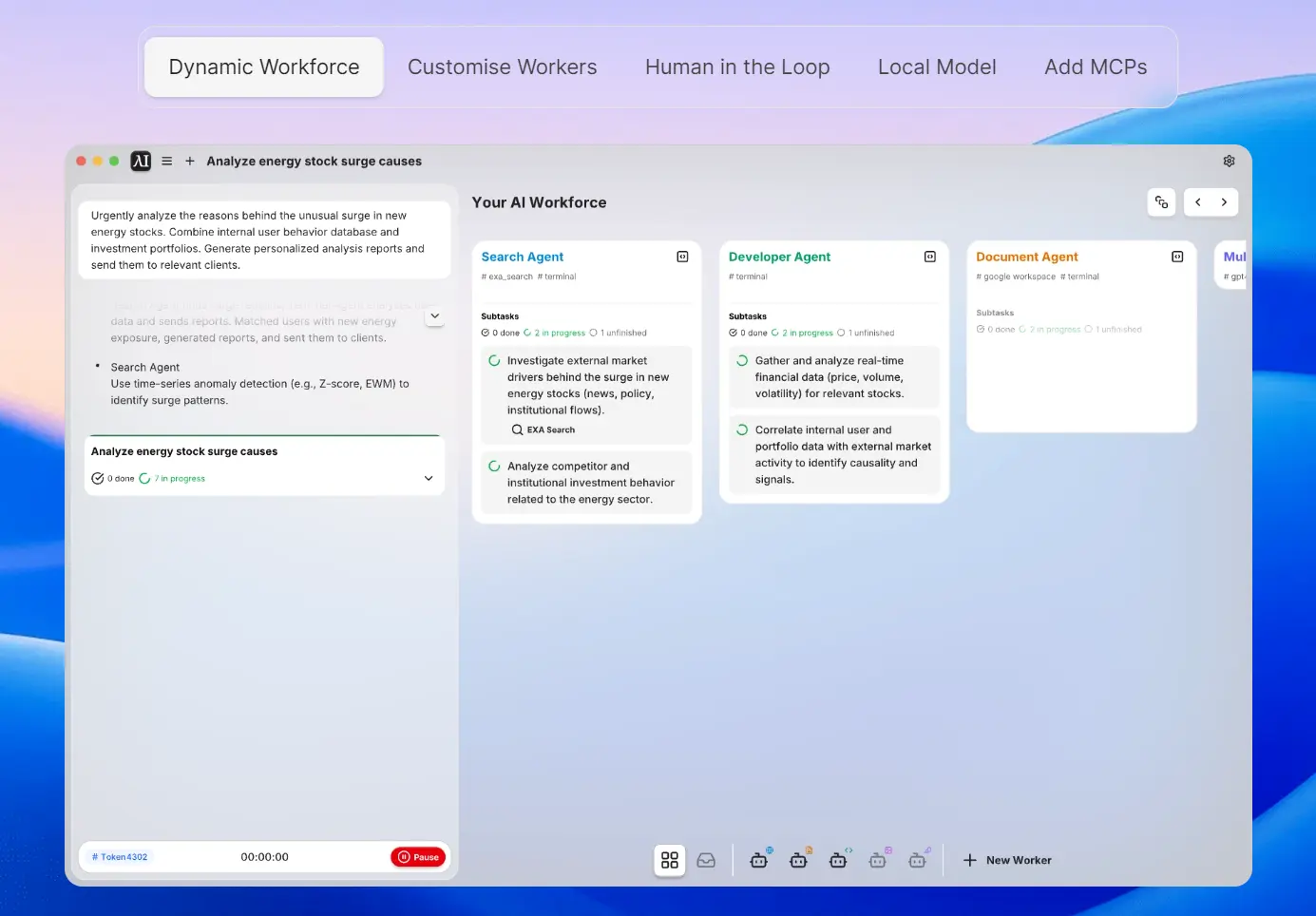
Eigent is an open-source multi-agent workforce desktop application that lets you build, manage, and deploy a team of custom AI agents to automate your most complex workflows.
It’s built on the open-source CAMEL-AI project and focuses on boosting productivity through parallel task execution, customization, and data privacy.
You can give it a high-level goal, and Eigent’s system breaks it down, assigning different parts of the job to different AI agents who then work simultaneously.
This parallel approach means a market research project that might take hours with traditional tools can be completed in minutes, with different agents handling web research, document creation, data analysis, and report generation concurrently.
Features
- Multi-Agent Workforce: Deploy teams of specialized AI agents, including Developer Agents for coding tasks, Search Agents for web research, Document Agents for content creation, and Multi-Modal Agents for processing images and audio files.
- Parallel Task Execution: Break down complex workflows into subtasks that multiple agents handle simultaneously.
- 100% Open Source with Local Deployment: Full access to source code with the ability to run entirely on your local machine.
- MCP Support: Built-in Model Context Protocol servers for web browsing, code execution, Notion integration, Google Workspace connectivity, Slack communication, and support for custom tool installation.
- Human-in-the-Loop Processing: Automatic pause and request for human input when agents encounter uncertainty or require decision-making guidance during task execution.
- Full Model Support: Compatible with various AI models. This allows you to deploy your preferred language models locally rather than being locked into specific cloud services.
- Zero-Setup Configuration: Ready-to-use installation without technical configuration requirements, though advanced users can customize extensively through the open-source codebase.
- Enterprise Features: Single Sign-On (SSO) integration, access control mechanisms, and scalable deployment options for organizational use.
Use Cases
- Market Research and Analysis: Agents simultaneously gather industry data, analyze competitor information, generate comprehensive reports, and distribute findings to team communication channels like Slack.
- Financial Reporting and Data Processing: Process CSV files, bank transaction records, and financial data to create detailed quarterly reports with charts and visualizations for stakeholder presentation.
- Content Creation and SEO Optimization: Conduct website audits, analyze SEO performance, research keywords, and generate optimization recommendations with actionable implementation steps.
- Travel and Event Planning: Research destinations, compare flight options, book accommodations, create detailed itineraries with costs and reservations, and share plans with relevant team members or family.
- Business Feasibility Studies: Analyze market opportunities in specific regions, research regulations and compliance requirements, evaluate distribution channels, and produce comprehensive market entry reports.
- Document Management and Processing: Scan file systems for duplicates, organize documents by similarity, add signatures to PDFs, and maintain file structure consistency across large document collections.
- Technical Documentation and Code Management: Analyze codebases, generate documentation, perform code reviews, and create technical reports for development teams.
How to Use It
1. Cloud Version: This is the quickest option. You sign up on the website, and you can start building workflows immediately without any setup. The infrastructure is managed for you, and it comes with premium support.
2. Self-Hosting (Community Edition): This is the path I took. It’s ideal if you want full control, data privacy, and customization. You just need to have Node.js and npm installed on your system. After that, you run these commands in your terminal:
git clone https://github.com/eigent-ai/eigent.gitcd eigentnpm installnpm run dev
3. Enterprise Version: For large organizations that need maximum security, scalability, and features like Single Sign-On (SSO). This version comes with a commercial license and dedicated support.
Pros
- Parallel Processing Speed: Multiple agents working simultaneously complete complex tasks in minutes rather than hours.
- Complete Data Privacy: Local deployment options ensure sensitive business data never leaves your infrastructure.
- Open Source Transparency: Full access to source code allows security auditing, custom modifications, and independence from vendor lock-in situations.
- Tool Integration: Built-in MCP support provides immediate access to web browsing, document processing, communication tools, and custom integration capabilities.
- Zero Vendor Lock-in: Multiple model support and local deployment prevent dependency on specific AI service providers or ongoing subscription requirements.
- Real-World Task Completion: Agents handle actual file processing, web research, document creation, and communication rather than simply generating text responses.
- Scalable Architecture: Handles both individual productivity tasks and enterprise-level workflow automation through the same underlying system.
- Active Development Community: Open-source foundation with backing from established AI research organizations ensures continued development and improvement.
Cons
- Technical Complexity for Advanced Use: While basic usage requires minimal setup, maximizing the platform’s potential through custom agents and tool integration demands technical expertise.
- Resource-Intensive Local Deployment: Running multiple AI agents simultaneously requires substantial computational resources.
- Learning Curve for Workflow Design: Understanding how to structure tasks for optimal multi-agent coordination takes time and experimentation to master effectively.
- Debugging Multi-Agent Interactions: When workflows fail or produce unexpected results, identifying which agent or interaction caused the issue can be challenging compared to single-agent systems.
Related Resources
- CAMEL-AI Documentation (https://docs.camel-ai.org/): Comprehensive documentation for the underlying framework that powers Eigent’s multi-agent capabilities.
- Model Context Protocol Specification (https://modelcontextprotocol.io/): Official documentation for understanding and creating custom MCP tools for agent integration.
- Eigent Community Discord (https://discord.gg/D2e3rBWD): Active community for troubleshooting, sharing workflows, and accessing development updates.
FAQs
Q: Is Eigent really free?
A: Yes, the core product is open-source and free to use if you self-host it. You can run it locally with your own models or API keys. The cloud version offers a free trial with daily credits, with paid subscriptions for more advanced use.
Q: How does Eigent differ from other AI automation tools like Zapier or Make?
A: Eigent deploys multiple AI agents that work simultaneously on different aspects of complex tasks, while traditional automation tools typically process workflows sequentially. This parallel approach significantly reduces completion time for comprehensive projects like market research or financial reporting that require multiple types of analysis and content creation.
Q: What happens to my data when using Eigent?
A: With local deployment, all data processing occurs on your machine and never leaves your infrastructure. The cloud version processes data on Eigent’s servers, but the open-source nature allows you to audit exactly how data is handled and switch to local deployment if privacy is a primary concern.