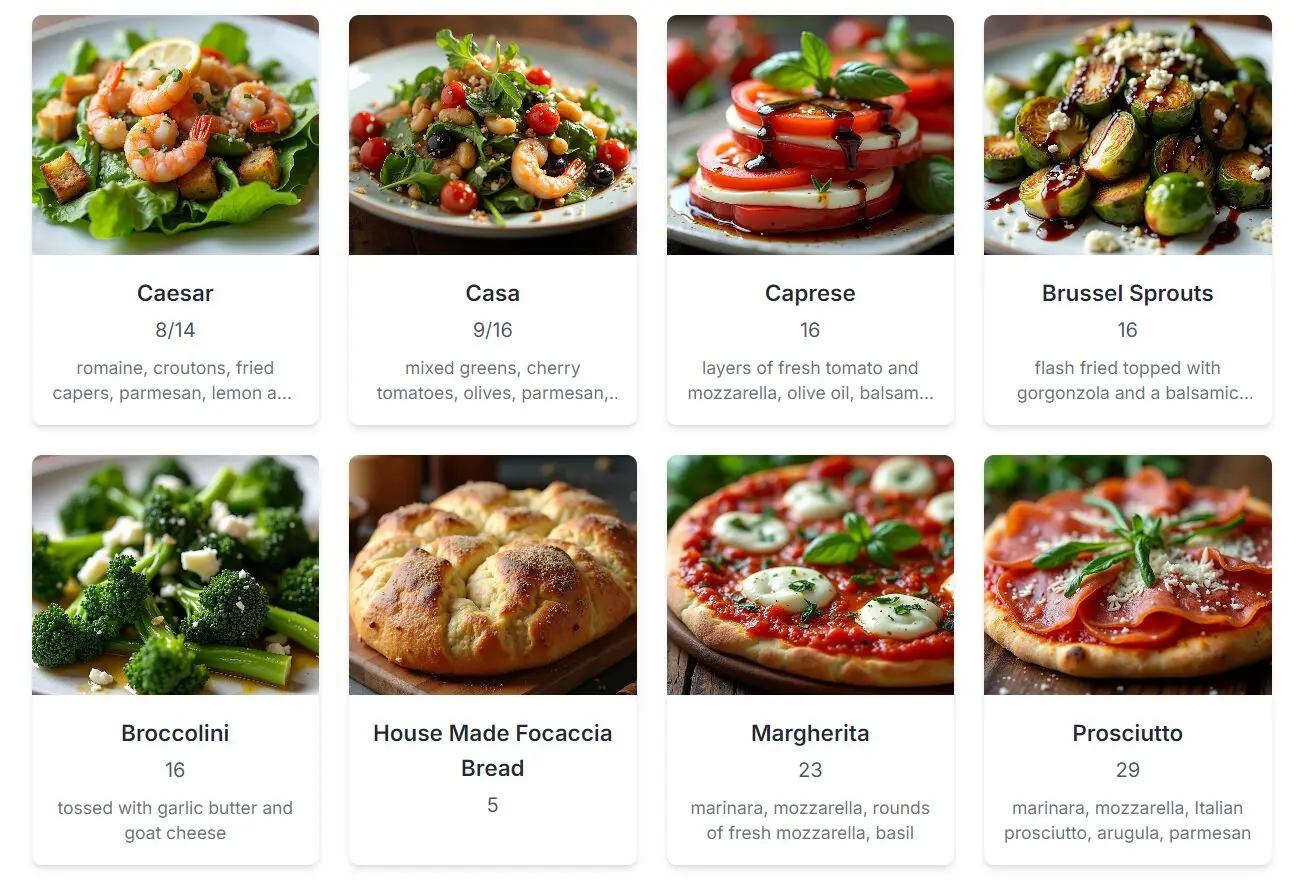
PicMenu is an open-source AI tool that instantly generates images of dishes from a restaurant menu photo. You upload a photo of a physical restaurant menu, and the tool provides a visual representation of each item.
Food lovers often struggle to visualize dishes when reading text-only menus. picMenu addresses this by generating visual representations of menu items. This helps customers preview meals before ordering, eliminating guesswork and enhancing the dining experience.
Features
- Menu Image Analysis: Uses Llama 3.2 Vision 90B to extract menu items from photos.
- Automatic Dish Image Creation: Generates unique visuals for each menu item using Flux Schnell AI.
- Rich Dish Information: Extracts and displays dish names, descriptions, and prices.
- Quick Search: Locate specific dishes within the analyzed menu.
- Open Source & 100% Free: Full TypeScript codebase available on GitHub.
- Mobile-Friendly: Access via any device with a camera and internet connection.
Use Cases
- Travelers: Tourists in foreign countries can understand menus in different languages by visualizing the dishes.
- Dietary Restrictions: Individuals with allergies or specific dietary needs can visually confirm ingredients and avoid unsuitable meals.
- First-Time Diners: Customers trying a new cuisine can see what the dishes look like before ordering.
- Online Ordering: Enhances digital menus on restaurant websites, providing a better customer experience.
- Social Media Marketing: Restaurants can use the generated images to promote their dishes online.
How to Use It
1. Visit the PicMenu web app, which is 100% and supported by Together AI.
2. Take a clear photo of the restaurant menu.

3. Upload the photo to the PicMenu platform.
4. The AI analyzes the menu using the Llama 3.2 Vision model to identify the dishes.
5. Llama 3.1 and Flux Schnell then work together to produce a picture, name, summary, and price for each dish as listed on the uploaded menu.

6. Use the search feature to find specific dishes rapidly.
How to Deploy It
1. Clone the repo from Github:
git clone https://github.com/Nutlope/picmenu2. Create a .env file and add your Together AI API key:
TOGETHER_API_KEY=Your API KEY3. Set up an S3 bucket and input the credentials into your .env file. Consult the .env.example file for necessary values.
4. Install dependencies and run the local server with:
npm installnpm run dev
Pros
- Free to use
- No registration required
- Powered by advanced AI models
- Simple upload process
- Built with modern tech stack
- Works with various menu formats
Cons
- Can take up to 60 seconds for menus with many items
- Limited handling of large menus
- May crash with complex menus
- Currently lacks dietary tags
- Generated images need realism improvements
Related Resources
- GitHub: Picmenu’s official GitHub repo.
- Together AI: Required for API access.
- S3 Storage: Needed for local deployment
FAQs
Q: Can picMenu work with handwritten menus?
A: The tool works best with printed menus. Handwritten text recognition may vary in accuracy.
Q: Does picMenu store the menu images?
A: Yes, images are stored in S3 storage for processing purposes.
Q: What languages does picMenu support?
A: The tool can process menus in multiple languages, though English yields best results.
Q: Is internet connection required?
A: Yes, picMenu needs internet access to process images and generate dish visuals.