Quotio is a free native macOS menu bar application that manages multiple AI coding assistant subscriptions through a unified interface.
The app runs CLIProxyAPI, a local proxy server that consolidates your accounts with Claude, Gemini, OpenAI, Qwen, Antigravity, and other AI providers into a single control panel.
Quotio allows you to track real-time quota usage across all your AI subscriptions and automatically route requests to available accounts when one hits its limit.
The app lives in your menu bar and provides instant visibility into quota status across every AI provider you’ve connected.
Features
- Multi-Provider Support: Connects to Google Gemini, Anthropic Claude, OpenAI Codex, Qwen Code, Vertex AI, iFlow, Antigravity, Kiro, Trae, and GitHub Copilot via OAuth authentication or service account credentials.
- Standalone Quota Mode: Tracks quota usage and displays account information without running the proxy server.
- One-Click Agent Configuration: Auto-detects installed AI coding agents like Claude Code, OpenCode, Gemini CLI, Amp CLI, Codex CLI, and Factory Droid, then configures them to use your centralized proxy with a single click.
- Real-Time Dashboard: Displays live request traffic, token consumption, and success rates across all connected providers.
- Smart Quota Management: Each provider shows visual quota tracking with color-coded indicators (green above 50%, orange between 20-50%, red below 20%).
- API Key Management: You can generate and manage API keys for your local proxy server directly within the app.
- Notifications: The app sends alerts when quotas drop below specified thresholds, when accounts enter cooling periods, or when service issues occur.

Use Cases
Managing Multiple AI Subscriptions During Development: Developers who subscribe to Claude Pro, GitHub Copilot, and Gemini Advanced can use Quotio to see all quotas in one place. When your Claude Code hits its daily limit mid-afternoon, Quotio automatically routes subsequent requests to your Gemini or OpenAI accounts without manual intervention.
Team Quota Distribution: Development teams with shared AI subscription accounts across different providers can configure Quotio with multiple accounts per provider. This enables intelligent load distribution during peak coding hours and prevents individual team members from exhausting shared quotas.
Subscription Usage Optimization: Quotio’s detailed usage statistics help you understand consumption patterns across different AI providers. You can identify which tools consume the most tokens and make informed decisions about upgrading to higher-tier subscriptions or adjusting your usage patterns.
Command Line Tool Consolidation: Developers who use various CLI tools (Claude Code, Codex CLI, OpenCode) can configure all of them through Quotio’s proxy. This creates a single point of configuration instead of managing separate authentication for each tool.
Quota Monitoring Without Proxy: Users who want quota visibility but prefer to keep their existing CLI configurations can run Quotio in Quota-Only Mode. The app reads authentication files from installed providers and displays usage data without intercepting any requests.
How to Use It
Download and Install
Download the latest .dmg file from the Quotio GitHub releases page. Open the downloaded file and drag the Quotio icon into your Applications folder. Eject the disk image after installation completes.
The app is not signed with an Apple Developer certificate. macOS will block the app from running the first time you open it. Run this command in Terminal to bypass the security restriction:
xattr -cr /Applications/Quotio.appLaunch and Choose Your Mode
Open Quotio from your Applications folder or Spotlight search. The onboarding wizard appears on first launch. Choose between Full Mode (runs proxy server and configures CLI tools) or Quota-Only Mode (tracks quota without proxy).

Full Mode is appropriate for most users who want automated failover and centralized configuration. Quota-Only Mode works for users who just want visibility into their quota usage without changing their current setup.
Connect Your First Provider
Click the Quotio icon in your menu bar and select Open App (⌘O). Go to the Providers tab and click the Add Provider button (plus icon). Choose your AI provider from the list.

For OAuth providers (Gemini, Claude, OpenAI, etc.), follow the authentication flow that opens in your browser. Log in to your provider account and authorize Quotio to access your subscription.
For Vertex AI, import your service account JSON file when prompted. The app stores credentials securely in your macOS keychain.
Quotio begins tracking quota usage immediately after you connect a provider. The menu bar icon updates to show your current quota status.
Enable Quota Monitoring
In Quota-Only Mode, quota tracking starts automatically once you add providers. The app reads authentication data from existing provider installations and displays usage information.
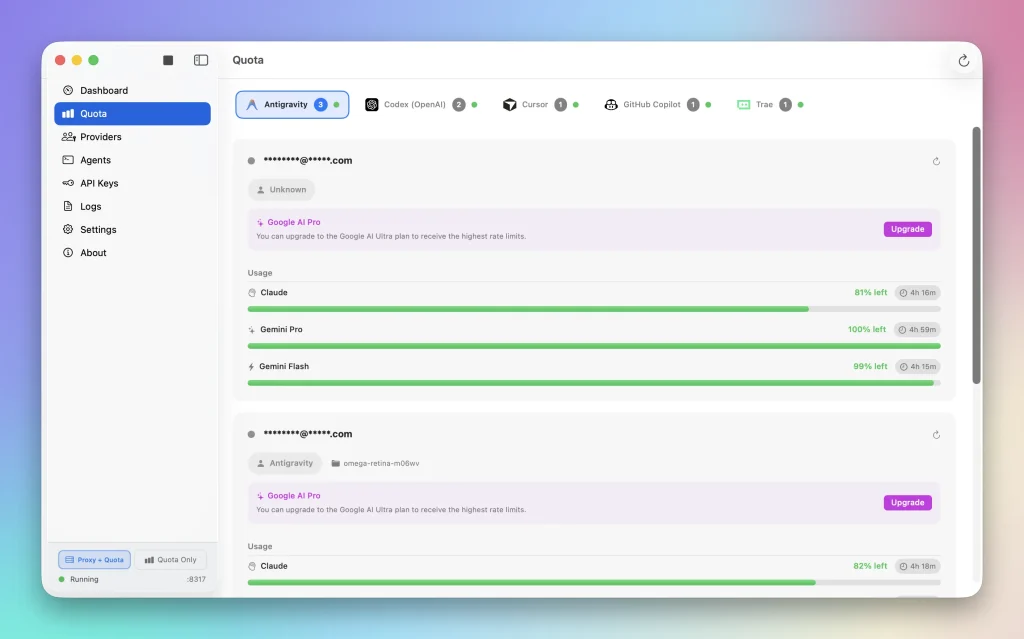
In Full Mode, go to the Providers tab and verify your providers show “Connected” status with green indicators. Quota data appears in the menu bar dropdown. The menu bar icon displays your lowest quota percentage across all connected providers.
Configure CLI Tools (Full Mode Only)
This step applies only to Full Mode users who want to route CLI tool requests through Quotio’s proxy.
Go to the Agents tab in the main application window. Quotio displays a list of detected CLI tools installed on your system. Select a CLI tool from the list and click Configure. Choose Automatic mode to let Quotio modify the tool’s configuration file, or choose Manual mode to see the configuration values you need to enter yourself.
For Claude Code, Quotio updates the settings.json file with the proxy endpoint URL. For other tools, the app modifies the appropriate configuration files based on each tool’s requirements.
Start using your CLI tools normally. They now route requests through Quotio’s proxy instead of connecting directly to AI providers. Quotio handles authentication and quota management transparently.
Customize Your Experience
Click the Quotio menu bar icon to access quick actions. Press ⌘R to manually refresh quota data. Press ⌘O to open the main app window for detailed configuration. Press ⌘Q to quit the application.
Go to Settings to configure failover strategies (Round Robin distributes requests evenly, Fill First exhausts one account before moving to the next). Adjust notification thresholds to receive alerts at your preferred quota levels.
Configure custom provider icons in the menu bar settings if you want different visual indicators. Toggle between light and dark mode based on your system appearance or set a manual preference.
Pros
- Native Performance: The app runs natively on Apple Silicon (M1/M2/M3/M4) for minimal resource usage.
- Automatic Failover: It handles account switching automatically so your code generation doesn’t fail mid-stream.
- Unified Interface: You see all your AI subscriptions and limits in one place.
- Privacy Focused: The proxy runs locally on your machine.
Cons
- Hardware Restrictions: Support is limited to Apple Silicon Macs.
- Security Warnings: The binary is currently unsigned. You must run a terminal command to bypass macOS security checks.
Related Resources
- CLIProxyAPI GitHub Repository: The underlying proxy server that powers Quotio’s request routing and multi-account management.
- Quotio Documentation: Official documentation covering installation, configuration, and troubleshooting.
- Claude Code Documentation: Learn how to install and configure Claude’s command-line coding assistant.
- Gemini CLI Setup Guide: Instructions for installing Google’s Gemini command-line interface.
- GitHub Copilot CLI: Documentation for GitHub’s command-line AI assistant.
FAQs
Q: Can I use Quotio with a free-tier AI subscription?
A: Yes. Quotio works with any subscription tier that provides API access or CLI tool support.
Q: Does Quotio send my code or API requests to external servers?
A: No. Quotio runs entirely on your local machine. The proxy server operates at localhost (127.0.0.1) and routes requests directly from your CLI tools to AI provider APIs.
Q: What happens when all my connected accounts hit their quota limits?
A: Your CLI tools will receive quota exhausted errors from the AI providers, just as they would without Quotio.
Q: How often does Quotio check quota usage?
A: The app refreshes quota data every 15 seconds by default. You can manually trigger a refresh by pressing ⌘R in the menu bar dropdown.
Q: Does Quotio store my API keys?
A: Quotio manages API keys locally for the proxy. It uses these keys to authenticate requests with providers like OpenAI and Anthropic directly from your machine.