Crucix is a free, self-hosted open-source intelligence dashboard that aggregates 26 real-time public data feeds into a single browser-based interface.
It pulls satellite fire detections, live flight tracking, radiation monitoring, armed conflict events, economic indicators, market prices, sanctions data, and social sentiment, all updated every 15 minutes, all running on your own machine.
Pair it with an LLM, and it acts as a two-way intelligence assistant. It pushes tiered alerts to Telegram or Discord when conditions shift, responds to commands like /brief and /sweep from your phone, and generates trade ideas grounded in live cross-domain data.
Features
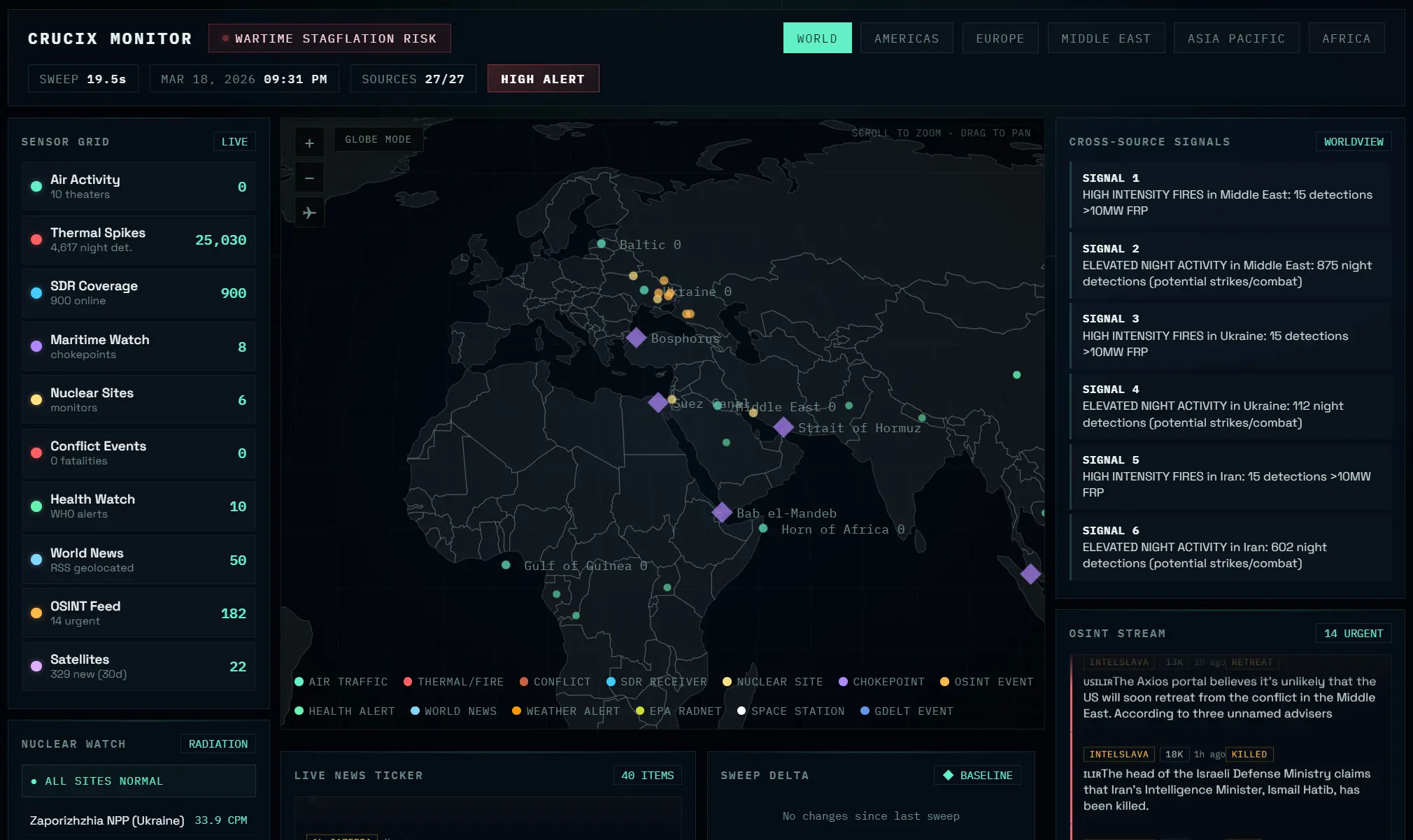
- Generates a Jarvis-style HUD with a D3 world map displaying 7 marker types: fire detections, air traffic, radiation sites, maritime chokepoints, SDR receivers, OSINT events, and health alerts.
- Queries all 26 sources in parallel and completes each sweep in approximately 30 seconds.
- Displays live market prices for SPY, QQQ, BTC, Gold, WTI, VIX, and 9 additional tickers via Yahoo Finance.
- Tracks risk gauges for VIX, high-yield spread, and the NY Fed Global Supply Chain Pressure Index.
- Aggregates English-language posts from 17 curated OSINT and conflict Telegram channels into a live feed.
- Delivers a merged news ticker from RSS, GDELT headlines, and Telegram posts with auto-scroll.
- Computes a sweep delta after each cycle that surfaces new signals, escalations, and de-escalations with severity scores.
- Correlates signals across satellite, economic, conflict, and social domains into a cross-source intelligence panel.
- Monitors real-time radiation readings from Safecast citizen-science sensors and EPA RadNet government stations.
- Supports six region filters (World, Americas, Europe, Middle East, Asia Pacific, Africa) with smooth map zoom.
- Sends multi-tier alerts (FLASH, PRIORITY, ROUTINE) to Telegram and Discord with semantic deduplication.
- Accepts two-way commands from Telegram and Discord bots.
- Generates AI trade ideas from an optional LLM layer supporting Anthropic Claude, OpenAI, Google Gemini, and OpenAI Codex.
- Falls back to a deterministic rule-based engine for alert evaluation when no LLM is configured.
Use Cases
- Monitor global conflict zones using merged satellite fire data and social media sentiment.
- Track supply chain disruptions through maritime vessel tracking and economic indicator updates.
- Generate quantitative trade ideas based on real-time commodity prices and geopolitical events.
- Receive instant Telegram alerts upon radiation level spikes near monitored nuclear facilities.
- Analyze military aircraft movements alongside breaking news reports in specific geographic regions.
- Correlate market movements with geopolitical events by viewing Yahoo Finance prices alongside OSINT feeds and conflict data.
Data Sources
Tier 1: Core OSINT & Geopolitical (11)
| Source | Data Type | Auth |
|---|---|---|
| GDELT | Global news events, conflict mapping | None |
| OpenSky | Real-time ADS-B flight tracking across 6 regions | None |
| NASA FIRMS | Satellite fire/thermal anomaly detection | Free key |
| Maritime/AIS | Vessel tracking, dark ships, sanctions evasion | Free key |
| Safecast | Citizen-science radiation monitoring near nuclear sites | None |
| ACLED | Armed conflict events: battles, explosions, protests | Free (OAuth2) |
| ReliefWeb | UN humanitarian crisis tracking | None |
| WHO | Disease outbreaks and health emergencies | None |
| OFAC | US Treasury sanctions (SDN list) | None |
| OpenSanctions | Aggregated global sanctions from 30+ sources | Partial |
| ADS-B Exchange | Unfiltered flight tracking including military | Paid |
Tier 2: Economic & Financial (7)
| Source | Data Type | Auth |
|---|---|---|
| FRED | Yield curve, CPI, VIX, fed funds, M2, 18 more indicators | Free key |
| US Treasury | National debt, yields, fiscal data | None |
| BLS | CPI, unemployment, nonfarm payrolls, PPI | None |
| EIA | WTI/Brent crude, natural gas, inventories | Free key |
| GSCPI | NY Fed Global Supply Chain Pressure Index | None |
| USAspending | Federal spending and defense contracts | None |
| UN Comtrade | Strategic commodity trade flows between major powers | None |
Tier 3: Weather, Environment, Tech, Social, SIGINT (7)
| Source | Data Type | Auth |
|---|---|---|
| NOAA/NWS | Active US weather alerts | None |
| EPA RadNet | US government radiation monitoring | None |
| USPTO Patents | Patent filings in 7 strategic tech areas | None |
| Bluesky | Social sentiment on geopolitical/market topics | None |
| Social sentiment from key subreddits | OAuth | |
| Telegram | 17 curated OSINT/conflict/finance channels (web scraping) | None |
| KiwiSDR | Global HF radio receiver network (~600 receivers) | None |
Tier 4: Space & Satellites (1)
| Source | Data Type | Auth |
|---|---|---|
| CelesTrak | Satellite launches, ISS tracking, military constellations, Starlink/OneWeb counts | None |
Tier 5: Live Market Data (1)
| Source | Data Type | Auth |
|---|---|---|
| Yahoo Finance | Real-time prices: SPY, QQQ, BTC, Gold, WTI, VIX + 9 more | None |
How to Use It
Table Of Contents
Quick Start (Local Installation)
git clone https://github.com/calesthio/Crucix.git
cd Crucix
npm install
cp .env.example .env
Edit the .env file to add your API keys (optional but recommended for full data). Then start the server:
npm run devThe dashboard opens at http://localhost:3117. The first sweep takes 30–60 seconds to query all sources. After that, it auto-refreshes every 15 minutes.
If npm run dev exits silently, run Node directly to see errors:
node --trace-warnings server.mjsOr run the diagnostic script:
node diag.mjsDocker Setup
git clone https://github.com/calesthio/Crucix.git
cd Crucix
cp .env.example .env
# Add your API keys to .env
docker compose up -d
The dashboard runs at http://localhost:3117. Sweep data persists in ./runs/ via volume mount.
Required API Keys (Free, Recommended)
| Key | Source | What It Unlocks |
|---|---|---|
FRED_API_KEY | Federal Reserve Economic Data | 22 economic indicators including yield curve, CPI, VIX, M2 |
FIRMS_MAP_KEY | NASA FIRMS | Satellite fire and thermal anomaly detection |
EIA_API_KEY | US Energy Information Administration | WTI/Brent crude, natural gas, inventories |
Optional API Keys
| Key | Source | What It Unlocks |
|---|---|---|
ACLED_EMAIL + ACLED_PASSWORD | Armed Conflict Location & Event Data | Battle, explosion, and protest data |
AISSTREAM_API_KEY | AISstream.io | Maritime vessel tracking, dark ship detection |
ADSB_API_KEY | ADS-B Exchange | Unfiltered flight tracking including military aircraft |
LLM Provider Configuration (Optional)
Set LLM_PROVIDER in .env to one of these values:
| Provider | Key Required | Default Model |
|---|---|---|
anthropic | LLM_API_KEY | claude-sonnet-4-6 |
openai | LLM_API_KEY | gpt-5.4 |
gemini | LLM_API_KEY | gemini-3.1-pro |
openrouter | LLM_API_KEY | openrouter/auto |
codex | None (uses ~/.codex/auth.json) | gpt-5.3-codex |
minimax | LLM_API_KEY | MiniMax-M2.5 |
For Codex, run npx @openai/codex login to authenticate via your ChatGPT subscription.
Telegram Bot Setup
| Variable | How to Get |
|---|---|
TELEGRAM_BOT_TOKEN | Create a bot via @BotFather on Telegram |
TELEGRAM_CHAT_ID | Get your chat ID via @userinfobot |
TELEGRAM_CHANNELS | Optional: comma-separated extra channel IDs to monitor |
TELEGRAM_POLL_INTERVAL | Optional: bot command polling interval in ms (default: 5000) |
The bot responds to these commands from your configured chat ID:
| Command | Function |
|---|---|
/status | Shows system health, last sweep time, source status, LLM status |
/sweep | Triggers a manual sweep cycle |
/brief | Shows system health, last sweep time, source status, and LLM status |
/portfolio | Shows portfolio status if Alpaca is connected |
/alerts | Displays recent alert history with tiers |
/mute | Silences alerts for 1 hour |
/mute 2h | Silences alerts for a custom duration |
/unmute | Resumes alerts |
/help | Shows all available commands |
Discord Bot Setup
| Variable | How to Get |
|---|---|
DISCORD_BOT_TOKEN | Create at Discord Developer Portal → Bot → Token |
DISCORD_CHANNEL_ID | Right-click channel (Developer Mode on) → Copy Channel ID |
DISCORD_GUILD_ID | Optional: right-click server → Copy Server ID for instant slash command registration |
DISCORD_WEBHOOK_URL | Optional: channel settings → Integrations → Webhooks → New Webhook (alert-only mode) |
Install the Discord dependency:
npm install discord.jsThe bot supports these slash commands:
| Command | Function |
|---|---|
/status | System health, last sweep time, source status, LLM status |
/sweep | Trigger a manual sweep cycle |
/brief | Compact text summary of latest intelligence |
/portfolio | Portfolio status (if Alpaca connected) |
Alerts appear as rich embeds with color-coded sidebars: red for FLASH, yellow for PRIORITY, blue for ROUTINE.
Environment Variables Reference
| Variable | Default | Description |
|---|---|---|
PORT | 3117 | Dashboard server port |
REFRESH_INTERVAL_MINUTES | 15 | Auto-refresh interval |
LLM_PROVIDER | disabled | anthropic, openai, gemini, codex, openrouter, or minimax |
LLM_API_KEY | — | API key (not needed for codex) |
LLM_MODEL | per-provider default | Override model selection |
TELEGRAM_BOT_TOKEN | disabled | For Telegram alerts + bot commands |
TELEGRAM_CHAT_ID | — | Your Telegram chat ID |
TELEGRAM_CHANNELS | — | Extra channel IDs to monitor (comma-separated) |
TELEGRAM_POLL_INTERVAL | 5000 | Bot command polling interval (ms) |
DISCORD_BOT_TOKEN | disabled | For Discord alerts + slash commands |
DISCORD_CHANNEL_ID | — | Discord channel for alerts |
DISCORD_GUILD_ID | — | Server ID (instant slash command registration) |
DISCORD_WEBHOOK_URL | — | Webhook URL (alert-only fallback, no bot needed) |
npm Scripts
| Script | Command | Function |
|---|---|---|
npm run dev | node --trace-warnings server.mjs | Start dashboard with auto-refresh |
npm run sweep | node apis/briefing.mjs | Run a single sweep, output JSON to stdout |
npm run inject | node dashboard/inject.mjs | Inject latest data into static HTML |
npm run brief:save | node apis/save-briefing.mjs | Run sweep + save timestamped JSON |
npm run diag | node diag.mjs | Run diagnostics (Node version, imports, port check) |
API Endpoints (When Running)
| Endpoint | Description |
|---|---|
GET / | Jarvis HUD dashboard |
GET /api/data | Current synthesized intelligence data (JSON) |
GET /api/health | Server status, uptime, source count, LLM status |
GET /events | SSE stream for live push updates |
Pros
- Runs entirely locally with no cloud dependencies or subscription fees.
- Updates every 15 minutes automatically with parallel queries to all sources.
- Works with zero API keys out of the box for 18+ sources.
- Includes both Telegram and Discord integrations with two-way command support.
- Provides delta tracking so you see exactly what changed between sweeps.
- Each source module runs standalone for easy testing and debugging.
Cons
- Initial setup requires Node.js 22+ and some comfort with the command line.
- The three most valuable free keys (FRED, FIRMS, EIA) require separate registration.
- Military flight tracking via ADS-B Exchange requires a paid RapidAPI subscription.
Related Resources
- CelesTrak: The source for satellite tracking data used in Crucix.
- GDELT Project: The global news event database that powers the conflict monitoring.
- Safecast: The citizen-science radiation monitoring network integrated into the dashboard.
- NASA FIRMS: The satellite fire detection system that provides thermal anomaly data.
- FRED Economic Data: The Federal Reserve database supplying 22 economic indicators.
- Node.js Official Site: Download the required runtime environment for the server.
- Docker Documentation: Learn containerization basics for the alternative setup method.
- Discord Developer Portal: Create bot tokens for the notification system.
- Federal Reserve Economic Data: Register for a free API key to access economic indicators.
FAQs
Q: What happens if I don’t add any API keys?
A: Crucix still runs and pulls data from the 18+ sources that require no authentication. Sources that need keys return structured errors, and the rest of the sweep continues normally.
Q: Can I run this on a Raspberry Pi or low-power server?
A: Yes. The tool has minimal dependencies (just Express) and runs fine on low-power hardware. The Docker image makes deployment straightforward.
Q: How do I add more Telegram channels to monitor?
A: Add them to the TELEGRAM_CHANNELS variable in your .env file as a comma-separated list of channel IDs. The bot will include them in its monitoring.
Q: Does Crucix send my data anywhere?
A: No. There’s no telemetry, no cloud sync, and no external calls except to the 27 data sources you configure. Everything stays on your machine in the ./runs/ directory.
Q: Why does the dashboard show empty panels on first start?
A: The first sweep takes 30–60 seconds to query all sources in parallel. The dashboard populates automatically once the sweep completes. Check the terminal for progress logs.
Q: Can I use this for trading?
A: The dashboard includes Yahoo Finance data and economic indicators. It’s not financial advice, but the data is there if you want to correlate events with markets.
Q: What’s the difference between the Telegram bot and Discord integration?
A: Both provide alerts and respond to commands. Telegram uses a simple text interface. Discord supports rich embeds with color-coded alerts and native slash commands. You can run both simultaneously or just one.