SynCD is a unique encoder-based text-to-image model that allows you to generate new compositions of a reference object, guided by your text prompts. Unlike some other tools, SynCD supports multiple input images—up to three—of the same object, using these as references.
Developed by Carnegie Mellon University, SynCD uses synthetic multi-image datasets to improve visual accuracy without requiring test-time fine-tuning. This capability allows for customized results in various lighting, backgrounds, and poses, all driven by text descriptions.
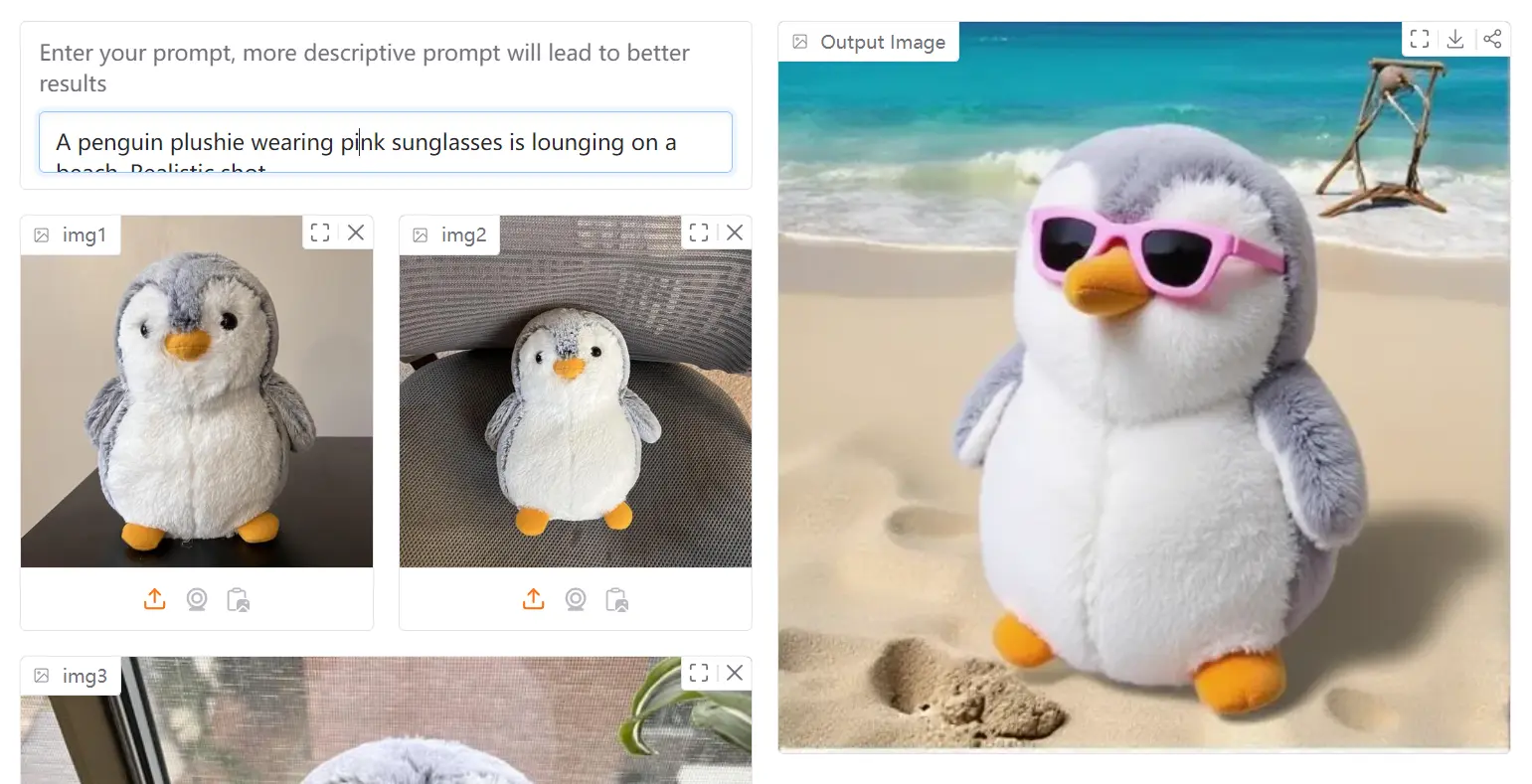
I uploaded three different pictures of penguins and entered the prompt “A penguin plushie wearing pink sunglasses is lounging on a beach. Realistic shot.” The tool processed my reference images and generated a completely new image following my description.
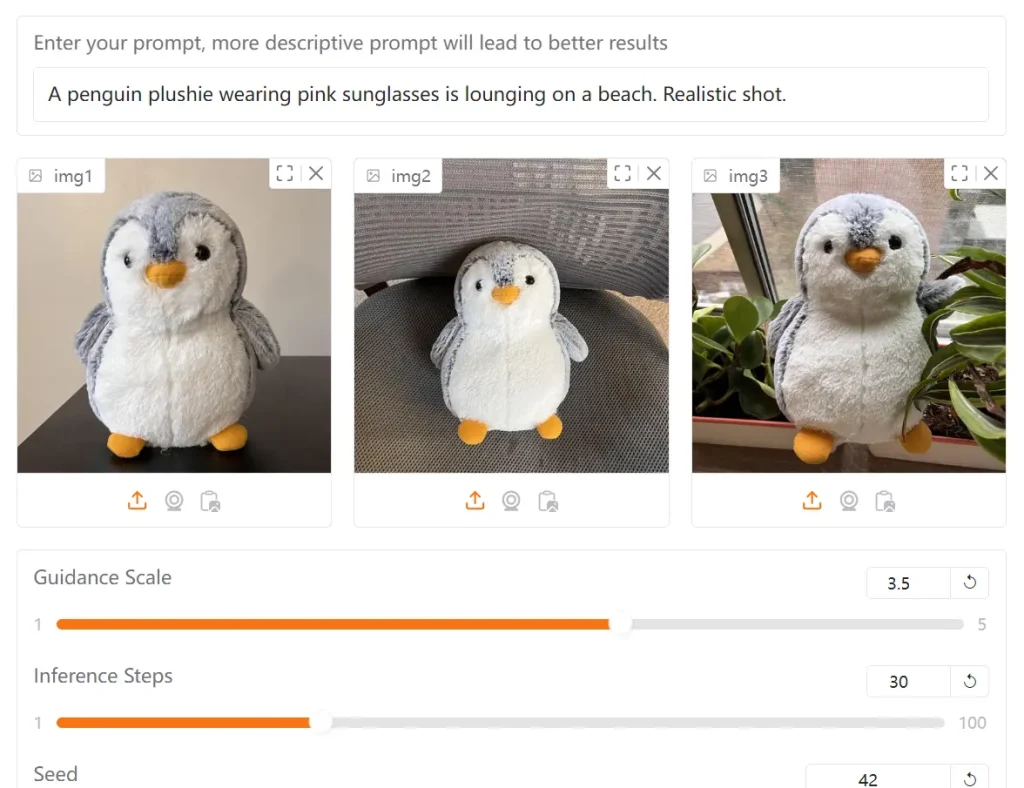
The result showed a penguin plushie character that maintained the distinctive visual characteristics from my reference images, but transformed into a plush toy version wearing pink sunglasses on a beach setting. What impressed me was how the model preserved the penguin’s key features while adapting it to match my prompt specifications.
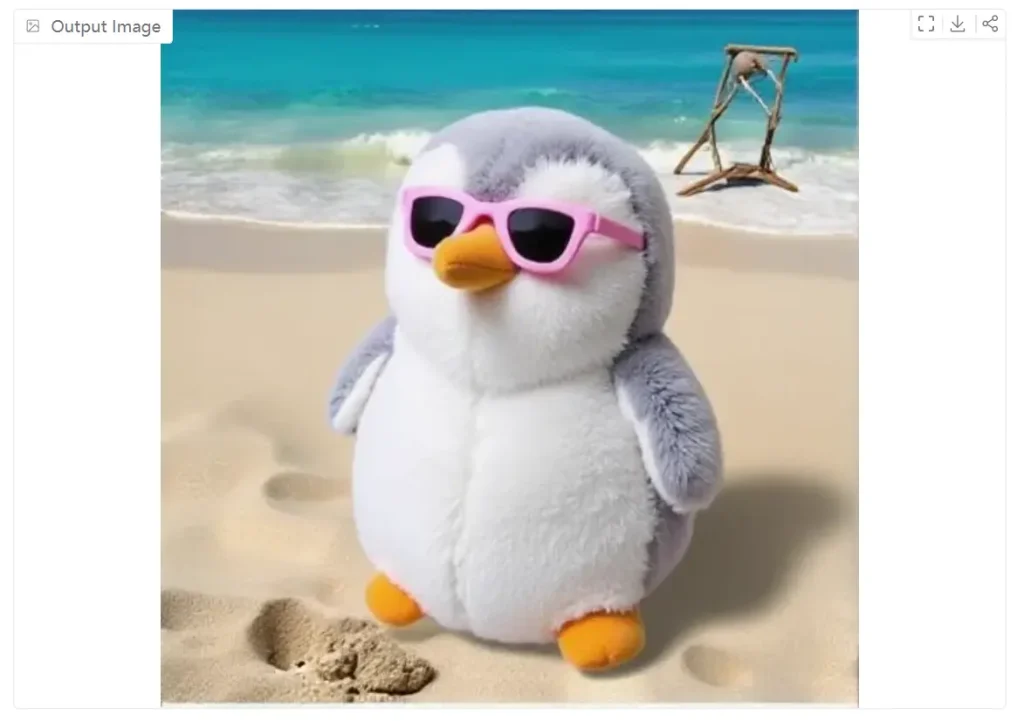
This demonstrates SynCD’s ability to extract the essence of an object from multiple viewpoints and then apply it to new contexts. The beach background and sunglasses were never present in my original images, yet the generated image incorporated them naturally while maintaining the penguin’s recognizable features.
Features
- Multiple Image Input: Upload up to three images of an object for better reference quality.
- Text-Prompt Guidance: Direct the AI with descriptive text prompts to generate images.
- Encoder-Based Model: Uses an advanced encoder architecture for refined visual detail incorporation.
- Shared Attention Mechanisms: Enhances the model’s ability to capture fine-grained visual details from your input images.
- Inference Technique: A special technique normalizes text and image guidance vectors to mitigate overexposure issues during image generation.
- Parameter Adjustment: Fine-tune settings like Guidance Scale, Inference Steps, and Seed.
- Rigid/Deformable Object Toggle: Indicate whether the reference object is rigid or deformable.
Use Cases
- Product Mockups: Generate varied product shots for e-commerce, showing items in different settings and angles.
- Customized Marketing Materials: Create unique visuals for ad campaigns featuring specific objects or characters in novel situations.
- Concept Art Development: Visualize characters or objects in various poses and environments.
- Educational Content: Produce illustrative images that depict objects in different scenarios.
- Personalized Storytelling: Develop visuals for blogs or social media, showing a favorite item or character in unique, engaging settings.
Try It Out
How To Use It
1. Visit the SynCD Demo Page or use the playground embedded in this post.
2. Upload your reference images (up to 3 images of the same object). For best results, use images showing the object from different angles.
3. Enter your text prompt describing the image you want to generate. Be specific and descriptive—more detailed prompts lead to better results.
4. Adjust the available parameters:
- Guidance Scale: Controls how closely the generation follows your text prompt
- Inference Steps: Higher values produce more refined results but take longer
- Seed: Set a specific seed value to make results reproducible
- Rigid Object Toggle: Select whether your subject is rigid or deformable
- CPU Offload: Enable if you encounter memory issues
5. Click “Generate Image” to create your customized image.
6. If the results aren’t satisfactory, try adjusting your prompt to be more specific or modify the parameters before generating again.
Pros
- Enhanced Customization: Generates new compositions of objects from multiple reference images.
- Superior Image Quality: Outperforms some other tuning-free methods on customization benchmarks.
- Free Access The tool is completely free.
Cons
- Limited Image Uploads: Only a maximum of three reference images can be used at once.
- Dependence on Prompt Quality: The output quality relies heavily on the specificity and clarity of the text prompt.
Related Resources
- Research Paper: “Generating Multi-Image Synthetic Data for Text-to-Image Customization” from Carnegie Mellon University provides technical details about the approach.
- SynCD Dataset: The synthetic dataset created for training the model may be of interest to researchers and developers.
FAQs
Q: How does SynCD differ from other text-to-image models?
A: SynCD specifically excels at customization using multiple reference images of the same object, while most text-to-image models either require fine-tuning or only support single-image references.
Q: Why should I use multiple reference images instead of just one?
A: Multiple images provide the model with different viewpoints and lighting conditions of your object, resulting in better understanding of its 3D structure and more accurate generation in new contexts.