HuggingChat is a free, web-based AI chatbot that gives you instant access to over 115 open-source large language models without any coding or complex setup.
Instead of forcing you to pick a single model and hope it works for your task, HuggingChat uses an intelligent routing system called Omni that automatically selects the best model for each prompt you send.
It’s great for developers who want to test different open-source models and for AI enthusiasts who want to experiment with the latest technology for free.
Features
- Open-source model access: You can interact with over 115 different models spanning 15 providers, including OpenAI, Qwen, Llama, DeepSeek, and more.
- Automatic model routing with Omni: The default mode analyzes your query and picks the optimal model automatically based on task requirements like reasoning complexity, code generation, or creative writing.
- Manual model selection: You’re not locked into automatic routing. Click the Models sidebar to browse the full catalog and pick any specific model to experiment with or compare performance directly.
- Customizable system prompts: For each model, you can modify the system prompt to adjust behavior, set up role-playing scenarios, or guide the model toward specific response styles.
- Multimodal support options: Many models support image input, allowing you to describe images, analyze visual content, or work with diagrams directly in the chat.
Use Cases
- Code Generation: Ask HuggingChat to write a script in Python, create a website layout in HTML, or debug a piece of code. The Omni router will identify your request as a coding task and select a model optimized for it, like Qwen/Qwen3-Coder.
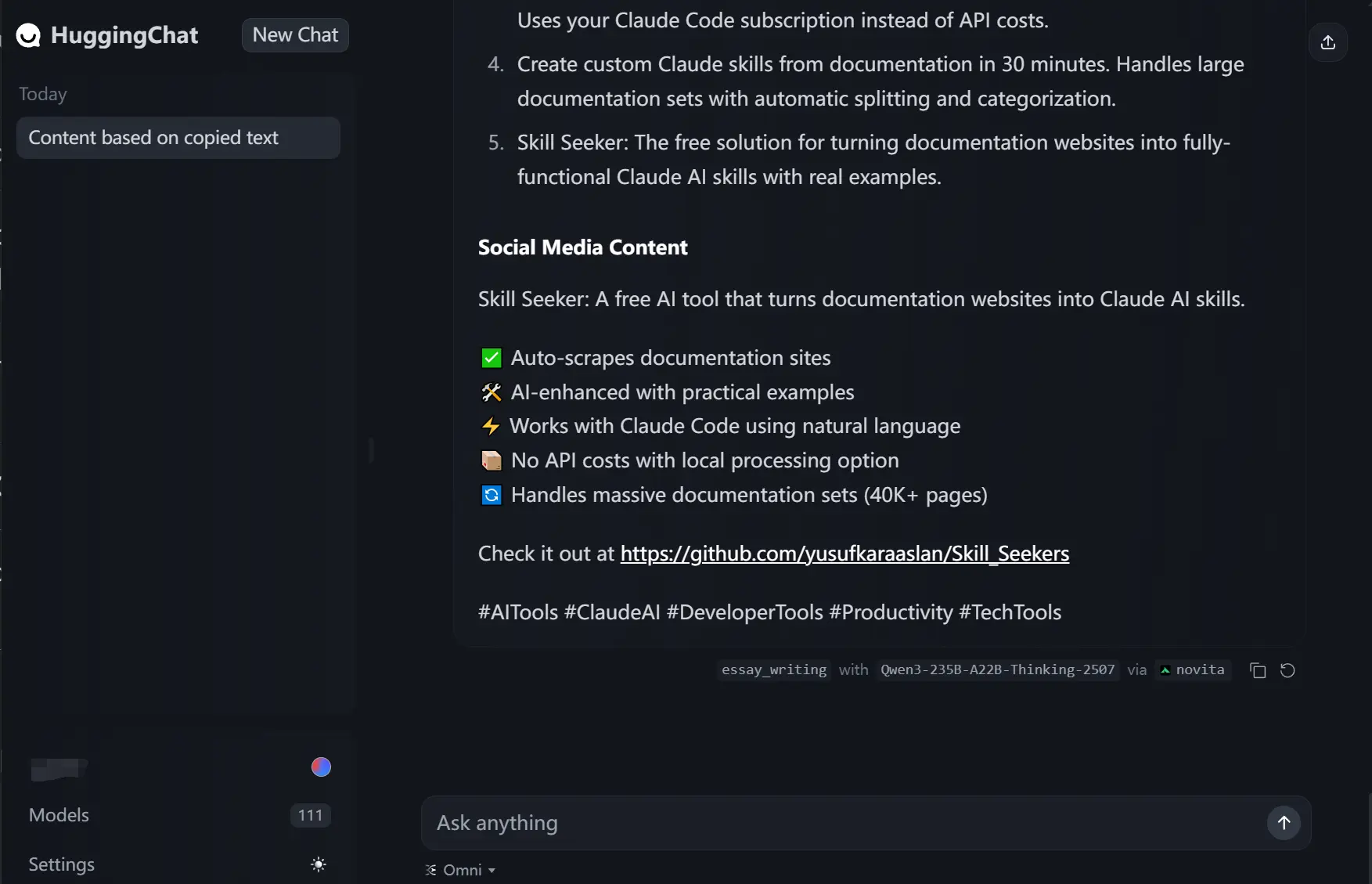
- Content Creation: Use it to draft blog posts, write marketing copy, or generate creative text. For these tasks, it might route your prompt to a model like Qwen3-235B-A22B-Thinking-2507.
- Model Comparison: For developers and AI researchers, HuggingChat is an efficient platform for comparing the performance of different open-source models on the same prompt without setting up multiple environments.
How to Use It
1. Go to the HuggingChat website. You will need a free Hugging Face account to use it, so sign in or create one.
2. The chat interface opens with the Omni model selected by default. You can start typing your prompts directly into the chat box. The system will automatically route your message to the best model.
3. To manually select a model, click on “Models” in the sidebar. This will show you the full list of over 115 available models from 15 different providers.
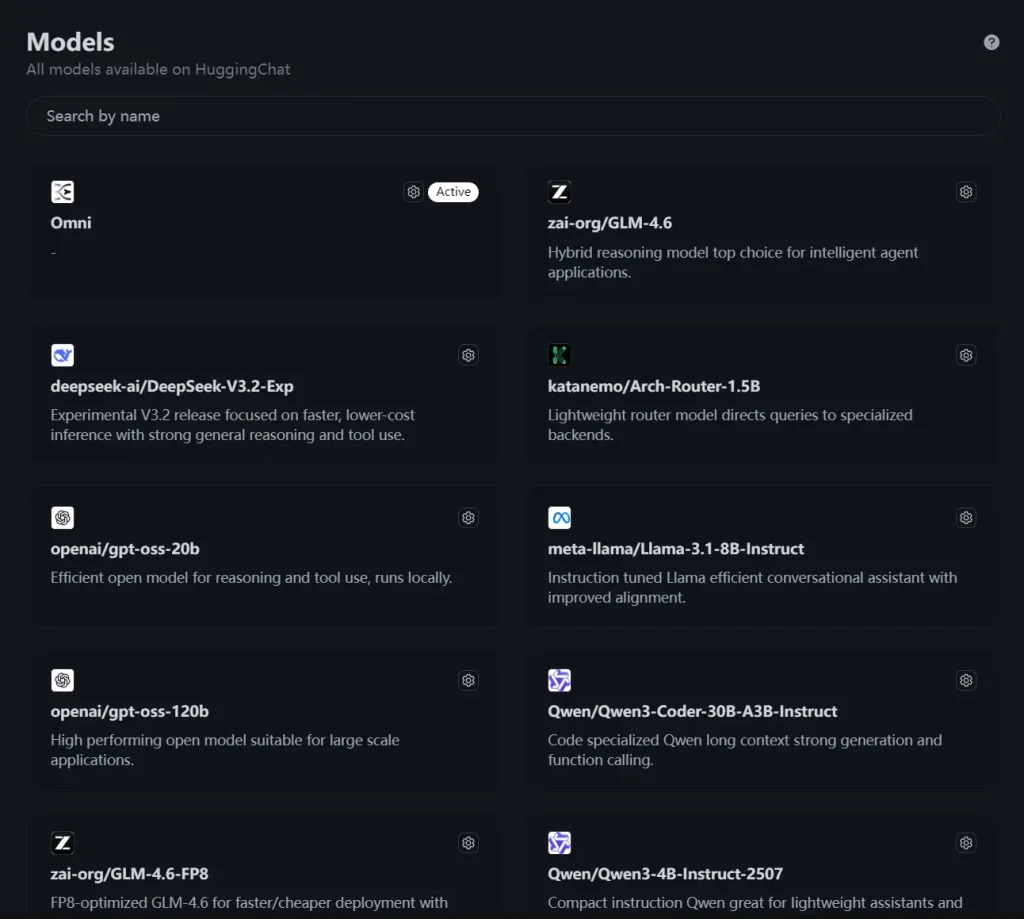
4. Within each model’s card, you can click the Settings icon to customize its behavior. Here, you can edit the System Prompt, enable multimodal support if available, and see which providers are serving the model.

Pros
- Access to Variety: It provides a single interface to test and use a massive collection of open-source models.
- Ease of Use: The platform is incredibly user-friendly and requires no technical setup.
- Completely Free: There is no cost to use HuggingChat.
- Smart Automation: The Omni router is a genuinely useful feature that simplifies the process of choosing the right AI for the task.
- Open Source: The entire project is open source, which aligns with the community-driven ethos of Hugging Face.
Cons
- Inconsistent Performance: The quality of the responses can vary since it relies on many different models, some of which may not be as polished as leading proprietary options.
- Requires an Account: While it’s free, you do need to have a Hugging Face account to use the service.
- Limited Customization: While you can set a system prompt, deep customization of model parameters like temperature is not as straightforward as in previous versions.
Related Resources
- Hugging Face: The main platform where the open-source AI community shares models, datasets, and applications.
- Open Assistant: The project behind one of the models that helped power the initial version of HuggingChat.
- GitHub Repository: The open-source code for the HuggingChat user interface for those interested in the technical details.
FAQs
Q: How does HuggingChat choose the best model?
A: This Omini classifies your prompt by topic and intent (e.g., coding, text generation) and routes it to the most appropriate LLM from its list of supported models.
Q: What’s the difference between Omni and manually selecting a model?
A: Omni automatically routes each prompt to what it considers the best model for the job. When you manually select a model, every prompt goes to that same model regardless of what you’re asking. Omni is convenient for variety; manual selection is better when you’ve found a model you like or want to test a specific model’s capabilities.
Q: What kind of models can I access through HuggingChat?
A: You can access a wide range of popular and cutting-edge open-source models, including various versions of Meta’s Llama, Qwen’s models, DeepSeek, Google’s Gemma, OpenAI’s gpt-oss, and many others. The list is constantly updated as new models are added to the platform.
Q: Can I see which model Omni selected for my prompt?
A: Yes. When you send a message, the interface shows which model was selected to handle that response.
Q: What happens if the model Omni selected doesn’t work well for my task?
A: You can immediately switch to a different model through the Models sidebar. Send the same prompt again, and you’ll see how another model responds. This comparison is quick and useful for finding which model works best for your specific needs.