GrowthTrackAI is a free diagnostic platform for website performance and revenue optimization. It helps entrepreneurs, business owners, and marketers maximize their website’s revenue potential.
This free AI tool identifies technical weaknesses, conversion barriers, and missed revenue opportunities through automated audits. This can help anyone solve common problems faced by online businesses: slow page speeds causing lost visitors, unclear paths to higher search rankings, potential customers lost in the conversion funnel, and more.
Case Study: ScriptByAI.com
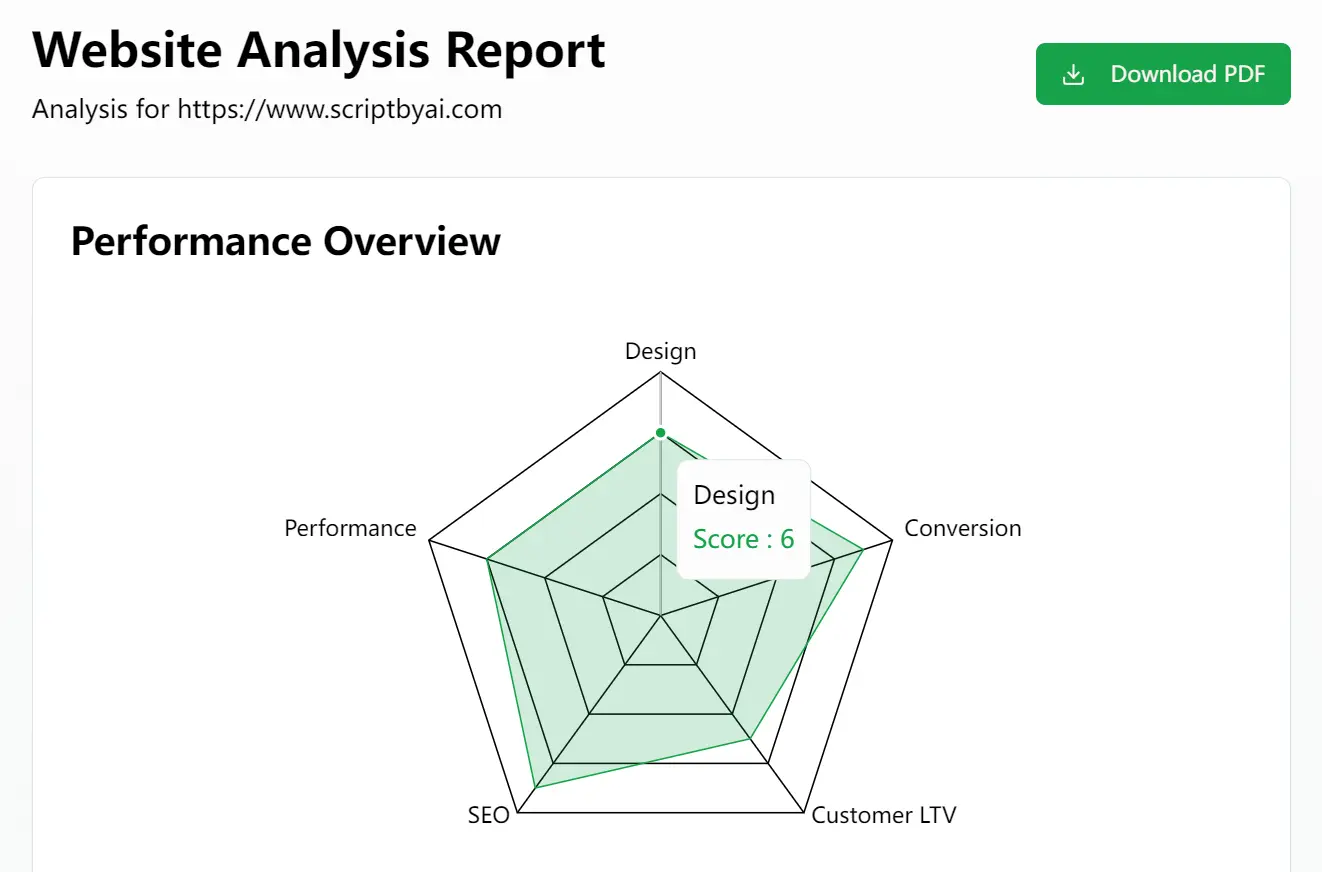
Let’s explore a real-world test of GrowthTrackAI using the website ScriptByAI.com. The results provide clear insights into various aspects of the site’s performance.
The analysis generated a radar chart that showed scores across several key areas: Design (6/10), Performance (6/10), SEO Performance (7/10), Conversions (7/10), and Customer LTV (5/10). These scores provide a quick overview of areas that need attention.
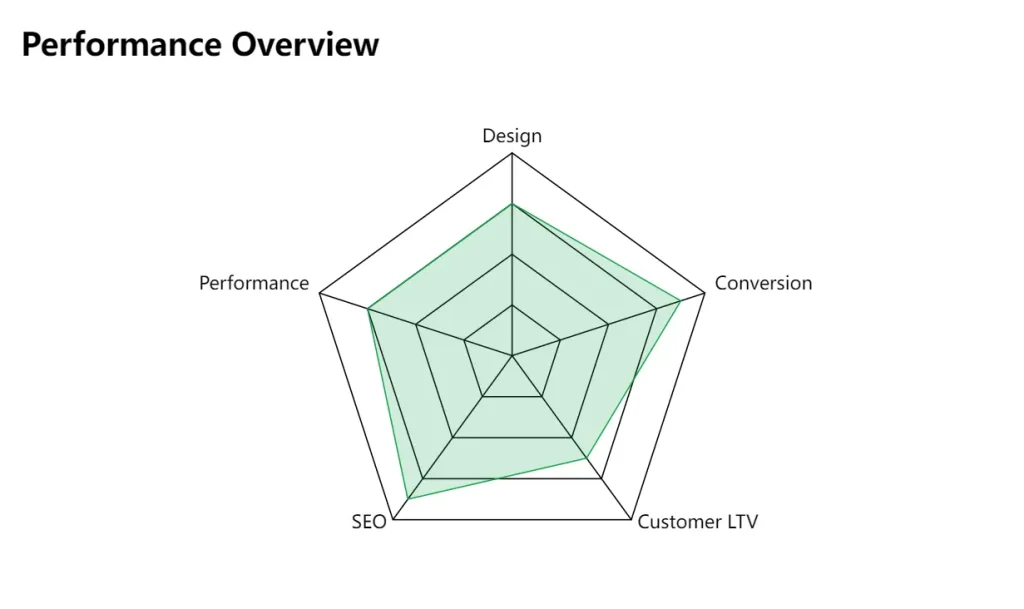
The detailed score breakdown gave specific recommendations. For example, under Design (6/10), it suggested simplifying the homepage and improving visual hierarchy. For Conversion Rate (7/10), adding a clear call-to-action button was recommended. For Customer Lifetime Value (5/10), it advised introducing a subscription model.

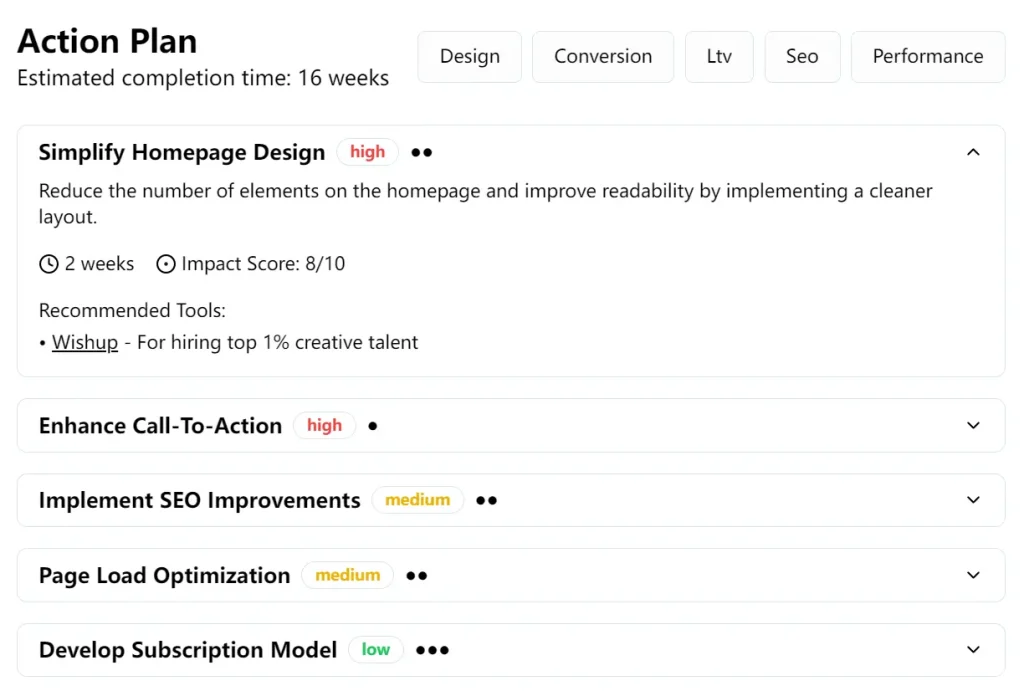
The Action Plan provided an estimated completion time of 16 weeks, prioritizing tasks by impact (high, medium, low). Recommended tools included Google Analytics, Hotjar, GTmetrix, Nitropack, Reply.io, and AISDR.
Features
- Conversion Optimization: Receive clear, actionable steps to convert more website visitors into customers. This feature uses AI-powered funnel analysis to identify and address bottlenecks.
- Revenue Growth: Find strategies to enhance customer lifetime value and overall revenue.
- SEO Improvements: Identify opportunities to improve your search engine rankings and attract more organic traffic.
- Performance Boost: Analyze your website’s speed and receive specific advice for achieving faster loading times.
- Tool Recommendations: Discover tools that can automate and scale your business operations.
- AI-Powered Analysis: Uncover hidden opportunities within your website data using advanced AI algorithms.
Use Cases
- E-commerce Store Owner: You’re getting decent traffic, but your cart abandonment rate is high. GrowthTrackAI can analyze your checkout process and suggest improvements to reduce abandonment.
- SaaS Founder: You want to increase customer lifetime value. GrowthTrackAI can recommend strategies, like upselling or subscription models.
- Service Business Provider: You need more leads. GrowthTrackAI can analyze your website and suggest changes to improve lead generation.
- Blogger: You’re struggling to monetize your blog. GrowthTrackAI might recommend strategies for affiliate marketing or digital product creation.
- Digital Product Seller: You are looking to maximize revenue from digital downloads. GrowthTrackAI can suggest ways to optimize your sales pages and promote your products.
How To Use It
- Visit the GrowthTrackAI website.
- Enter the URL of the website you want to analyze.
- Select your website category and provide your email address.
- Click the “Analyze Website” button.
- Review the AI-generated Website Analysis Report.
- Implement the action plan to improve your website, focusing on one step at a time.
Pros
- Completely free to use
- No signup required
- AI-powered insights
- Covers multiple business types
- Actionable recommendations
- Comprehensive performance analysis
Cons
- Requires manual implementation of recommendations
- Limited to website performance insights
- May not cover extremely niche business models
FAQs
Q: Does GrowthTrackAI work with Shopify/Wix sites?
A: Yes. The tool analyzes any public URL regardless of CMS.
Q: Do I need technical skills to use GrowthTrackAI?
A: No, the platform provides clear, actionable recommendations suitable for users with varying technical expertise.
Q: What types of websites is GrowthTrackAI best suited for?
A: GrowthTrackAI is beneficial for SaaS, e-commerce, service businesses, blogs, and corporate sites.
Q: How long does the analysis take?
A: The website analysis typically takes a few minutes to complete.