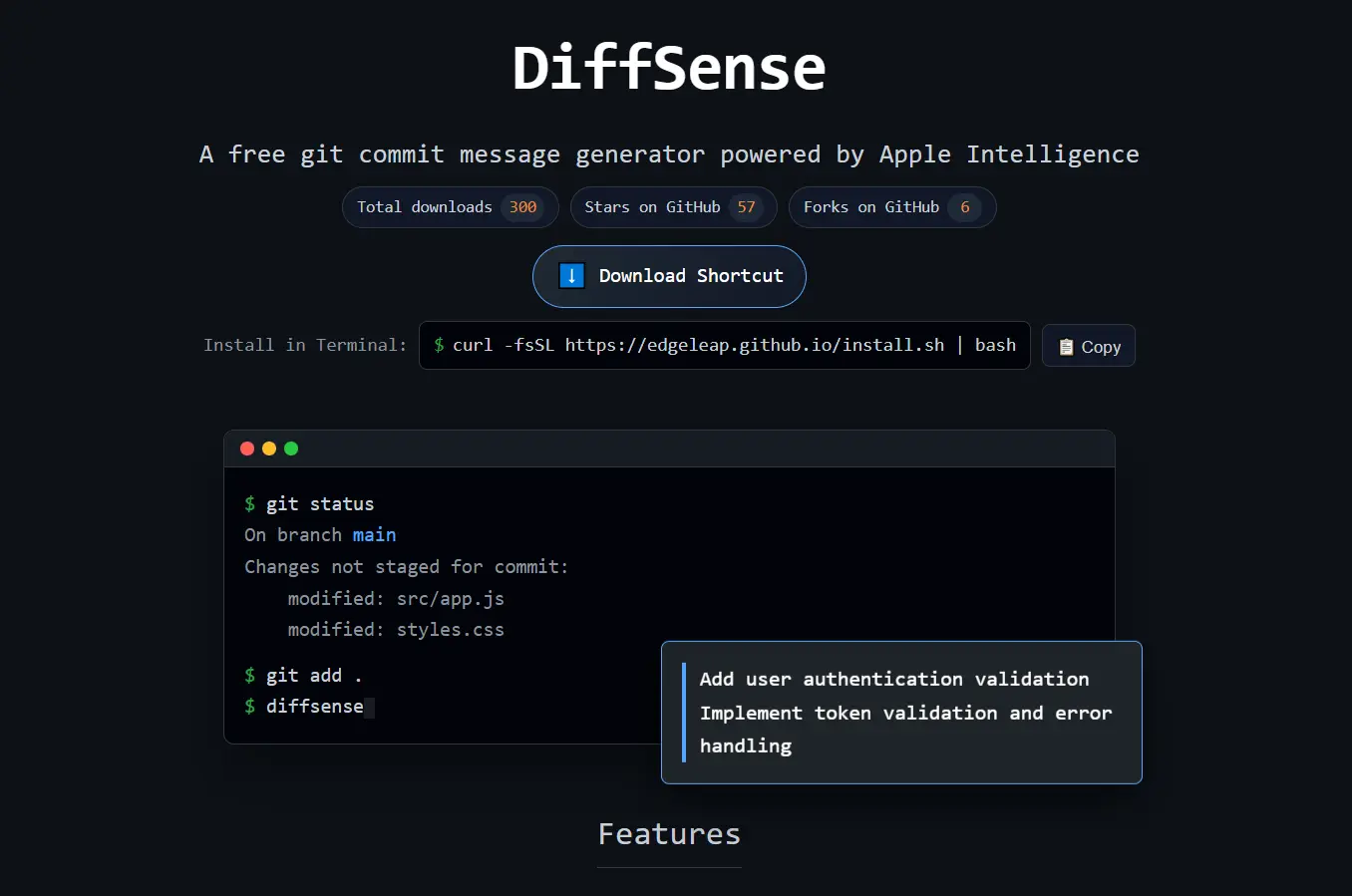
DiffSense is a free, open-source git commit message generator that runs entirely on Apple Silicon using Apple Intelligence.
The tool processes your git diffs locally on your Mac and generates commit messages in seconds without sending your code to any external server. You get zero-latency performance, complete privacy, and no API costs.
Features
- On-Device AI Processing: Runs Apple’s AFM 3B model directly on your Mac.
- Multiple AI Model Options: You can choose between three AI models: AFM 3B (default, runs locally), Private Cloud Compute (more capable, still private), or GPT (highest quality, requires API quota).
- Customizable Message Styles: Generate messages in balanced (default), verbose (detailed explanations), or minimal (brief descriptions) styles.
- Custom Prompt Instructions: The –byo flag lets you provide custom commit message rules from a file.
- Terminal Macros: Built-in aliases let you streamline your workflow.
- Large Diff Support: The tool handles changes from single-file modifications to 100+ file refactors.
- Interactive Editing: DiffSense shows you the generated message in a popup before committing. You can edit the message directly or use –nopopup to skip the dialog for automated workflows.
Installation
1. You must meet specific system requirements before installation. Your machine needs macOS Tahoe 26 or later and an Apple Silicon chip (M1 through M5). Git version 2.50.1 or later is also required.
2. Open your terminal and run the installation script:
curl -fsSL https://edgeleap.github.io/install.sh | bash3. You need the companion shortcut for the tool to interface with Apple Intelligence. Download the Diffsense.shortcut and add it to your Shortcuts app.
4. Restart your terminal or run source ~/.zshrc to reload your shell configuration.
5. Type diffsense --help in your terminal. This confirms the tool is active and shows available options.
Usage
Basic Usage:
Navigate to any git repository on your machine. Stage your changes using git add:
git add .Run DiffSense to generate a commit message:
diffsenseThe tool analyzes your staged changes and generates a message. A popup appears showing the generated message. Edit it if needed, then click commit. DiffSense executes the commit with your message.
Using Different Message Styles:
Generate verbose messages with detailed explanations:
diffsense --verboseCreate brief, minimal messages:
diffsense --minimalThe balanced style (default) sits between verbose and minimal. Most developers find this style works well for typical commits.
Switching AI Models:
Use Private Cloud Compute for more capable processing:
diffsense --pccSwitch to ChatGPT 4o for the highest quality (requires API quota):
diffsense --gptThe default AFM model works well for most cases. Switch models when you need higher fidelity for complex refactors.
Custom Commit Rules:
Create a markdown file with your team’s commit message conventions. Save it as team_rules.md in your project root:
# Team Commit Rules
- Start with action verb (Add, Fix, Update, Remove)
- Reference ticket numbers in format [JIRA-123]
- Explain why the change was needed
Generate messages using your custom rules:
diffsense --byo=team_rules.mdYou can combine custom rules with message styles:
diffsense --byo=team_rules.md --verboseSetting Up Terminal Macros:
Install the “upload” macro to stage, commit, and push in one command:
echo "alias upload='git add . && diffsense && git push'" >> ~/.zshrcInstall the “commit” macro to stage and commit without pushing:
echo "alias commit='git add . && diffsense'" >> ~/.zshrcReload your shell, then use the macros:
upload  # Stages, commits, and pushes
commit  # Stages and commits only
Skipping the Popup Dialog:
Use the –nopopup flag for automated workflows:
diffsense --verbose --nopopupThis commits immediately without showing the edit dialog. It works well for CI/CD scripts or automated processes.
Pros
- Privacy: Code analysis happens locally.
- Speed: No network latency delays the output.
- Economy: It eliminates monthly AI subscription costs.
- Integration: Feels like a native part of the macOS terminal environment.
Cons
- Hardware Lock: It works only on Apple Silicon Macs.
- OS Dependency: Requires macOS Tahoe 26.
- Model Size: The local 3B model is less capable than massive cloud models like GPT for extremely complex logic.
Related Resources
- Apple Intelligence Documentation: Learn about Apple’s on-device AI capabilities and the AFM model architecture.
- DiffSense GitHub Repository: View the source code, report issues, and contribute to the project.
More AI Tools for Git Commits
- Roborev: Free AI Code Review Tool for Git Commits.
- git-rewrite-commits: Auto-Generate Better Git Commit Messages with AI.
- lazycommit: Automate Git Commit Messages with Free AI.
FAQs
Q: Can I use DiffSense on an Intel-based Mac?
A: No. DiffSense requires Apple Silicon (M1, M2, M3, M4, or M5 chips) to run the AFM 3B model. Intel-based Macs lack the Neural Engine that processes the AI model locally.
Q: Does DiffSense work offline?
A: Yes. The default AFM model runs entirely on your Mac without any network connection. The –pcc and –gpt flags require internet access because they use cloud-based models.
Q: Can I use DiffSense with GitLab, Bitbucket, or other git platforms?
A: Yes. DiffSense works with any git repository regardless of where it’s hosted. The tool analyzes local git diffs and doesn’t interact with remote platforms directly.
Q: What happens if I don’t like the generated message?
A: The popup dialog lets you edit the message before committing. Change any part of the generated text or rewrite it completely. Press commit when you’re satisfied with the message.
Q: How do custom prompt rules work with the –byo flag?
A: Create a markdown file with your commit message rules and conventions. Pass the file path to –byo. DiffSense includes your rules in the prompt to the AI model, so the generated messages follow your specifications.
Q: Does DiffSense support monorepos or large codebases?
A: Yes. The tool handles diffs with 100+ files. Use –pcc or –gpt for very large refactors if the default model struggles.