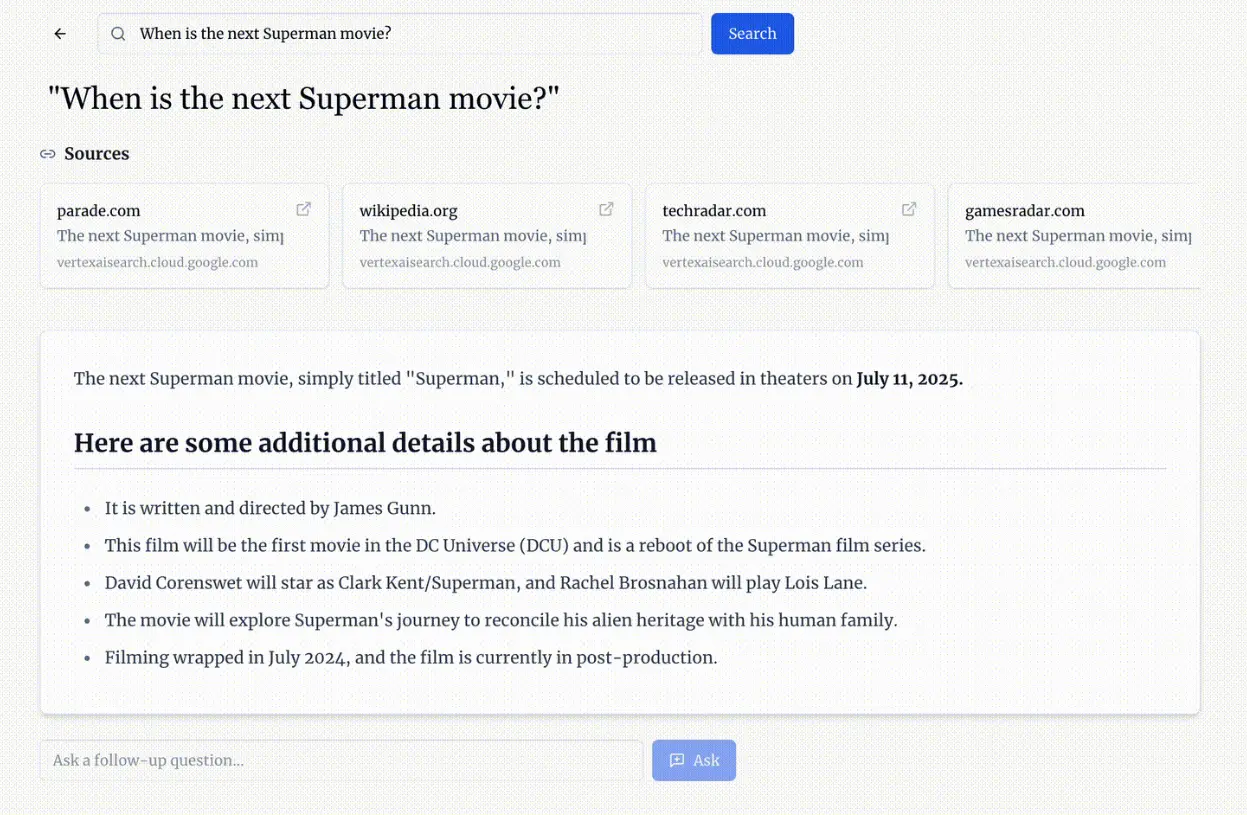
Gemini Search is an advanced, open-source AI search engine inspired by Perplexity AI. It provides AI-powered answers by leveraging Google’s Gemini 2.0 Flash model and real-time web data from Google Search.
Built for researchers, students, and professionals who need reliable information quickly, Gemini Search eliminates the need to cross-reference multiple sources manually. The integration with Google Search ensures that responses draw from up-to-date online content, while the Gemini 2.0 Flash model processes and synthesizes this information into clear, coherent answers.
Features
- Real-time Web Integration: Pulls current information directly from Google Search to ground responses in accurate, up-to-date sources.
- Gemini 2.0 Flash Model: Uses Google’s latest language model to process search results and generate comprehensive answers.
- Source Citations: Provides references for all information, letting you verify facts and explore topics further.
- Interactive Sessions: Supports follow-up questions within the same chat session for deeper exploration of topics.
- Modern Interface: Features a clean, intuitive design inspired by Perplexity for smooth user experience.
- Quick Response Times: Delivers answers rapidly through optimized processing.
Use Cases
- Content Creation: Writers can quickly find reliable sources and references for their articles, ensuring accuracy and credibility.
- Design Projects: Designers can gather inspiration and data from the latest trends and sources, enhancing their creative process.
- Development Tasks: Developers can access up-to-date documentation and solutions to coding problems, speeding up their work.
- Research: Students and researchers can find verified information quickly, making their research process more efficient.
- Personal Learning: Individuals can use Gemini Search to learn new topics, with reliable sources to back up the information.
Deploy It Locally
1. Clone the repo from GitHub and navigate to the Gemini-Search directory.
git clone https://github.com/ammaarreshi/Gemini-Search.git
cd Gemini-Search
2. Use npm or yarn to install the necessary dependencies.
npm install3. You’ll need a Google API key with access to the Gemini API. Add it to a .env file.
GOOGLE_API_KEY=your_api_key_here4. Start the server to begin using the tool locally.
npm run dev5. Open your browser and navigate to http://localhost:3000 to start searching.
Pros
- Speed: Generates comprehensive answers faster than manual research
- Accuracy: Grounds responses in current web sources
- Transparency: Provides clear source citations
- Technical Foundation: Built with modern tech stack (React, TypeScript, Express.js)
- Open Source: Free to use and modify
Cons
- API Key Required: Users need their own Google API key
- Technical Setup: Requires development knowledge to deploy
FAQs
Q: Is Gemini Search free to use?
A: Yes, Gemini Search is completely free, but you’ll need an API key from Google to set it up.
Q: How does Gemini Search differ from traditional search engines?
A: Gemini Search combines AI processing with web search, providing synthesized answers rather than just links to sources.
Q: Can I customize the search parameters?
A: Yes, the open-source nature allows full customization of search parameters and UI elements.