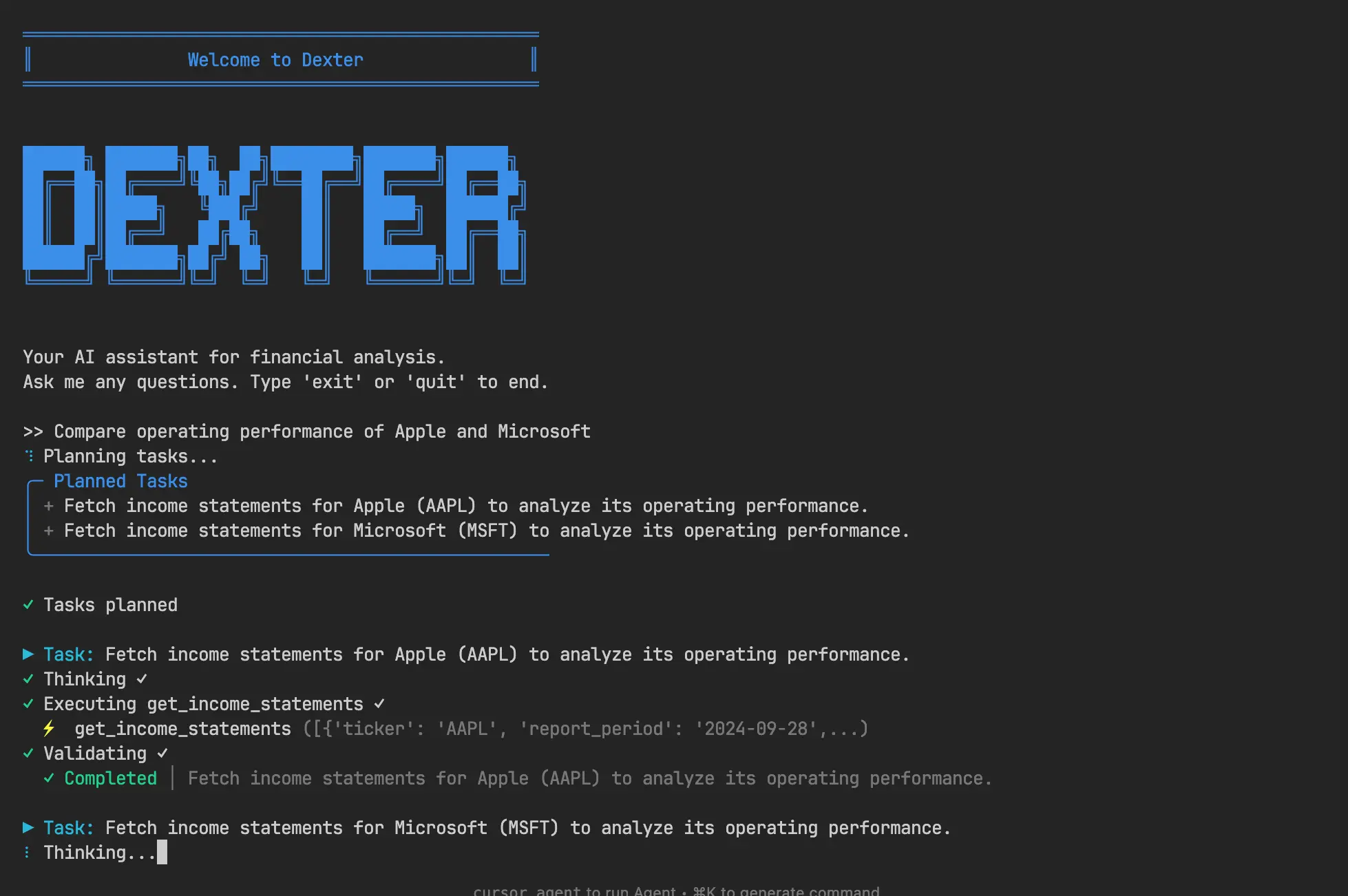
Dexter is an open-source, command-line, autonomous financial research agent that performs deep company analysis using real-time market data.
It breaks down complex financial questions into structured research plans, executes them with live data, and validates its own work before delivering data-backed answers.
This AI agent can help investors, financial analysts, and researchers who need quick access to company financials without manually gathering data from multiple sources.
Ask Dexter about revenue growth, operating margins, cash flow trends, or debt ratios, and it will fetch the data, perform calculations, and give you a complete analysis in minutes.
Features
- Intelligent Task Planning: Takes your financial question and automatically breaks it down into specific, actionable research steps that can be executed sequentially.
- Autonomous Execution: Selects the right data retrieval tools and executes tasks independently without requiring you to specify which financial statements or metrics to pull.
- Self-Validation System: Checks its own work after each task, verifies data completeness, and iterates until the research objectives are fully met.
- Real-Time Financial Data Access: Pulls live income statements, balance sheets, and cash flow statements directly from the Financial Datasets API.
- Built-In Safety Features: Includes loop detection and configurable step limits (max 20 steps globally, 5 per task) to prevent runaway execution and keep costs under control.
- Multi-Period Analysis: Supports annual, quarterly, and trailing twelve-month (TTM) financial data, with customizable date range filters for historical comparisons.
- Open-Source and Extensible: Written in clean Python with a modular architecture that makes it easy to add new data sources or custom analysis functions.
Use Cases
- Investment Research: Quickly compare financial metrics across multiple companies before making investment decisions. Ask Dexter to analyze Microsoft and Google’s operating margins side-by-side, or check Tesla’s cash flow trends over the past year.
- Due Diligence: Automate the tedious parts of company research when evaluating potential acquisitions or partnerships. Get debt-to-equity ratios, revenue growth patterns, and profitability metrics without opening a dozen browser tabs.
- Financial Education: Students and self-taught investors can use Dexter to learn how financial statements connect. Ask it to explain Apple’s revenue growth calculation, and it will show you exactly which data points it used.
- Portfolio Monitoring: Track key metrics for your holdings on a regular schedule. Run Dexter weekly to check if any company in your portfolio shows concerning cash flow changes or margin compression.
- Research Automation: Financial advisors and analysts can script Dexter to generate regular reports on specific companies or sectors.
How To Use It
1. Make sure you have Python 3.10 or higher and the uv package manager installed. You’ll also need API keys from OpenAI and Financial Datasets (financialdatasets.ai).
2. Clone the repository from GitHub:
git clone https://github.com/virattt/dexter.git
cd dexter
3. Install the dependencies using uv:
uv sync4. Create a .env file for your API keys. You can copy the example file to get started:
cp env.example .env5. Open the .env file and add your OpenAI and Financial Datasets API keys.
# LLM API Keys
OPENAI_API_KEY=your-openai-api-key

# Stock Market API Key
FINANCIAL_DATASETS_API_KEY=your-financial-datasets-api-key
6. Run Dexter in interactive mode. The system initializes its multi-agent architecture and awaits your financial questions.
uv run dexter-agent7. Type questions like “What was Apple’s revenue growth over the last 4 quarters?” or “Compare Amazon and Walmart’s operating margins for 2023.” Dexter will show you its research plan, execute each step, and display the final analysis with supporting data.
8. If you’re getting timeout errors or want more thorough analysis, you can modify the step limits in the configuration. Open the dexter/src/dexter/agent.py file and change max_steps or max_steps_per_task values based on your needs.
Pros
- Completely Free and Open Source: No subscription fees or usage charges beyond your own API costs, with full access to modify and extend the codebase.
- Authentic Planning Capability: Actually reasons through financial questions rather than just retrieving pre-formulated answers.
- Real-Time Data Access: Connects to current financial datasets rather than relying on static or outdated information.
- Transparent Process: Shows each step of its research methodology so you can verify the analysis approach.
- Self-Correcting Architecture: Identifies incomplete or insufficient answers and iterates to improve results.
- Professional-Grade Financial Analysis: Handles complex comparative analysis and multi-quarter trend identification.
- Local Execution: Runs on your own infrastructure, keeping your financial queries and data private.
Cons
- Requires Multiple API Keys: You need both OpenAI and Financial Datasets accounts before you can run anything.
- Command-Line Interface Only: There’s no web UI or desktop app.
- Limited to US Stock Market Data: The Financial Datasets API primarily covers US-listed companies.
- Token Costs Add Up: Every research query uses OpenAI API credits across four different agent prompts. Heavy users should monitor their spending, as complex questions can consume several thousand tokens per analysis.
Related Resources
- Financial Datasets API Documentation: Official docs for the data source Dexter uses. Check this if you want to understand what financial metrics are available or need to troubleshoot API errors.
- LangChain Documentation: Dexter is built on LangChain for managing LLM interactions and agent orchestration. Their guides on agents and tools are helpful if you want to extend Dexter’s capabilities.
- OpenAI API Reference: Reference documentation for the OpenAI models that power Dexter’s reasoning. Useful if you want to switch models or optimize token usage.
- uv Package Manager: Documentation for the Python package manager Dexter requires. It’s faster than pip and handles dependencies more reliably.
- Financial Statement Analysis Guide: Investopedia’s overview of financial statements helps you understand what Dexter is analyzing when it pulls income statements, balance sheets, and cash flow data.
FAQs
Q: How much does it cost to run Dexter for typical research tasks?
A: The Financial Datasets API is free for moderate use. OpenAI costs vary based on which model you choose and how complex your questions are. A typical analysis using GPT-4 might cost $0.10 to $0.50 per query because of the multi-agent architecture. If you use GPT-3.5-turbo instead, costs drop to a few cents per query.
Q: Is the financial data accurate and up-to-date?
A: Dexter pulls data directly from the Financial Datasets API, which aggregates information from official SEC filings. The data is as accurate as what companies report in their 10-K and 10-Q forms.
Q: Can I run Dexter on historical data for backtesting strategies?
A: Yes, the tools include date range filters that let you specify report periods.
Q: What happens if Dexter gets stuck in a loop or gives wrong answers?
A: The built-in loop detection and step limits prevent infinite loops. If Dexter reaches the maximum steps without completing a task, it stops and reports what it was able to find. For wrong answers, the validation agent catches many errors, but you should still verify critical findings against source data.
Q: Can I add my own data sources or custom analysis functions?
A: Absolutely. The tools.py file shows how to register new tools that the agents can use. You could add connections to Bloomberg, Yahoo Finance, or proprietary databases. The agent will automatically learn to use new tools based on their descriptions, though you might need to adjust the planning prompts for better tool selection.