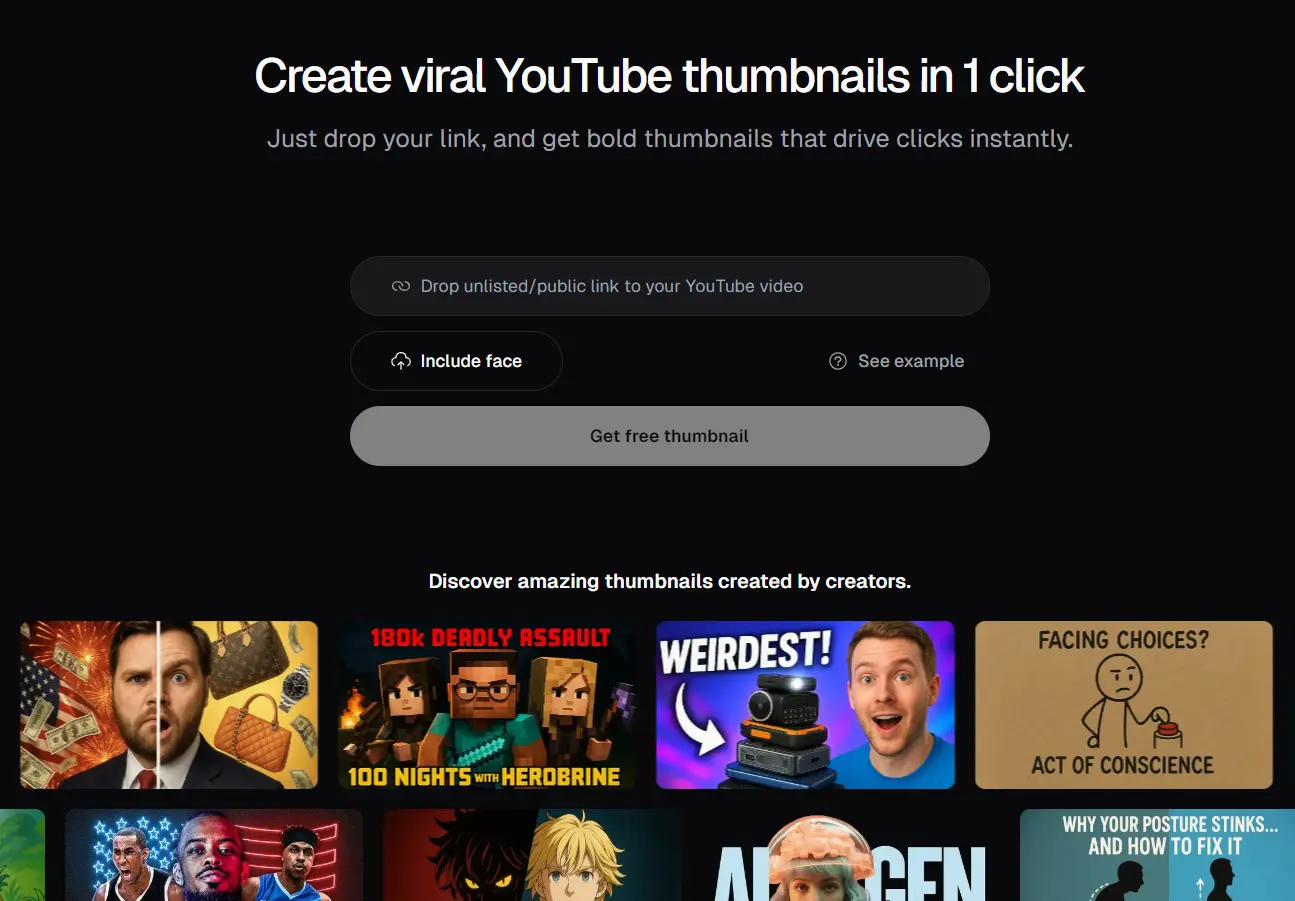
OpusClip Thumbnail is a free AI-powered YouTube thumbnail generator that creates virtual thumbnails from video links with a single click.
Paste a YouTube URL, and the AI analyzes your video content to automatically generate multiple high-performing thumbnail variations.
The tool runs on OpenAI’s GPT-4o image generation model and has been trained on successful thumbnail formats from top YouTube creators. It understands video content contextually rather than relying on generic templates or manual prompts.
Features
- One-click generation – Drop in a YouTube link and get thumbnails without prompts or descriptions
- Content analysis – AI watches your video to understand key moments and themes
- Multiple variations – Creates several thumbnail options for A/B testing
- Face upload option – Add your own face to thumbnails for personal branding
- Viral format training – Uses successful thumbnail patterns from top creators
- No signup required – Completely free with no account creation needed
- High-resolution output – Generates thumbnails at proper YouTube dimensions
Use Cases
- Quickly Enhancing Old Videos: Got some older videos with lackluster thumbnails? Paste the link and see if the AI can spit out something more compelling to refresh that content.
- A/B Testing Thumbnail Ideas: If you’re serious about optimizing click-through rates (CTRs), you need to A/B test. This tool gives you multiple options quickly to feed into YouTube’s own testing feature or third-party tools.
- Beating Creative Block: Sometimes you just stare at a blank canvas (or your video editor) with no clue what kind of thumbnail to make. This can generate a few starting points or ideas to get your own creativity flowing.
- Non-Designers Needing Decent Thumbnails: If Photoshop or Canva feel like a foreign language, this gives you a way to create something that looks reasonably professional without the learning curve.
- Fast Turnaround Content: For channels that publish frequently, like news updates or timely commentary, speeding up the thumbnail process is a big win.
How To Use It
1. Visit the OpusClip Thumbnail website, and paste your YouTube video link. This can be a public or unlisted video.
2. If you want your face, or someone else’s, to be prominently featured, you can upload an image file. The AI will try to incorporate this into the generated thumbnails.
3. Click the “Get free thumbnail” button and the AI will analyze your video and generate thumbnail options.
4. You’ll be presented with several thumbnails. Pick the one(s) you like and download them.
Pros
- User-Friendly: No design skills or prompts needed.
- Fast Processing: Generates thumbnails quickly.
- Free Access: No cost or signup required.
- Multiple Options: Offers various thumbnail designs for selection.
- Personalization: Allows face uploads for customized thumbnails.
Cons
- Limited Customization: Users cannot manually edit the generated thumbnails.
- Dependent on Video Content: The quality of thumbnails varies based on the input video.
- No Batch Processing: Cannot generate thumbnails for multiple videos simultaneously.
Related Resources
- Canva – For custom thumbnail design when you need specific brand elements or advanced editing capabilities after AI generation.
- YouTube Creator Academy – Free educational resource covering thumbnail best practices and performance optimization strategies.
- Figma – Design tool for creating thumbnail templates and brand guidelines that complement AI-generated options.
FAQs
Q: Can I use this tool for videos that aren’t on YouTube yet?
A: No, the tool requires a live YouTube URL to analyze content. You need to upload your video to YouTube first, even as an unlisted video, before generating thumbnails.
Q: How does the AI determine which moments to highlight in thumbnails?
A: The system analyzes visual elements, audio peaks, scene changes, and text overlays to identify the most engaging or informative moments. It looks for facial expressions, action sequences, and key visual elements that typically perform well in thumbnails.
Q: Can I edit the thumbnails OpusClip Thumbnail creates?
A: You can download the generated images and then edit them using any standard image editing software (like Canva, Photoshop, GIMP, etc.) if you need further customization. The tool itself is focused on generation.
Q: Is the image quality good enough for YouTube?
A: Yes, the generated thumbnails are standard image files suitable for uploading to YouTube. It leverages OpenAI’s GPT-4o for visual generation, aiming for high quality.
Q: What if I don’t like any of the thumbnails it generates?
A: Since it’s free and quick, you can always try generating again. Sometimes, a second pass might yield different results, or it might give you an idea you can then develop manually.