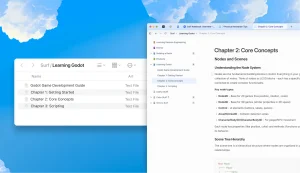
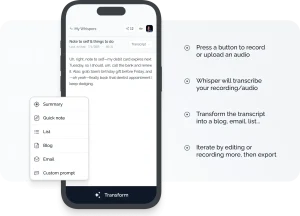
Ever wasted hours pausing a lecture video to jot down notes or struggled to extract key points from a dense PDF? AI For Notes does the heavy lifting—converting video lectures and documents into structured study materials in seconds.
In addition, it bundles an AI chatbot that helps you understand the material better or clarify confusing bits. This can be useful for students drowning in lecture recordings, researchers trying to digest papers quickly, or even professionals needing summaries of training materials.
Features
- AI Note Generation: This is the main event. Feed it a public YouTube link or upload a PDF, and it uses AI to create detailed, structured notes from the content.
- Course Organization: Allows you to create distinct “courses” to keep notes from different subjects or projects separate. Simple, but necessary.
- PDF Export: You can download the generated notes as PDF files. Standard feature, but essential for offline use or sharing.
- AI Chatbot Assistance: An integrated chatbot you can query about the notes. Ask it questions, request explanations –an AI tutor focused on your specific material.
Use Cases
- Students: Obvious one. Turning long video lectures or textbook chapter PDFs into structured notes quickly. Use the chatbot to quiz yourself or clarify concepts before an exam.
- Self-Learners: Processing online course videos (from YouTube) or supplementary PDF readings without getting bogged down in manual note-taking. Helps focus on understanding rather than just transcribing.
- Researchers: Getting quick summaries or outlines of academic papers (PDFs) to decide which ones warrant a deeper read. The chatbot could potentially help define specific terms or methodologies mentioned.
- Professionals: Summarizing recorded webinars, training videos (if public on YouTube), or lengthy specification documents (PDFs). Useful for catching up or extracting key action items.
- Content Creators: Maybe analyzing competitor videos or research material to pull out key themes and structure points for their own content.
How to Use It
1. Go to the AI for Notes site and sign up a free account.
2. Add Your Material by pasting a YouTube video URL or uploading a PDF file. Note that YouTube videos must be public.

3. Hit the button to start the AI processing. This might take a short while depending on the content length and complexity. Grab a coffee maybe.
4. Once done, the notes appear in the interface. You can read them there, see the structure, and use the download button to get a PDF version for offline access.

5. If anything’s unclear or you want to dig deeper, use the integrated chat feature. Type your questions related to the notes you just generated.
Pros
- Free (for now): No paywall during my tests.
- No Login Required: Unlike some tools, you can use it without signing up.
- Handles Long Videos: Processed a 45-minute lecture without crashing.
Cons
- No Timestamps in PDFs: Video notes mark sections by time; PDFs don’t show page numbers.
- Chatbot Limits: The tutor won’t answer unrelated questions (e.g., “Solve this math problem” if it’s not in the notes).
FAQs
Q: How accurate are the AI notes really?
A: Based on my tests, they are quite accurate for capturing key points, definitions, and structure from clear lectures and well-formatted PDFs. The source material states “highly accurate,” and for straightforward content, it gets close. However, nuance in complex arguments or subtle points in dense text can sometimes be missed or simplified.
Q: Can I use any public YouTube video?
A: Yes, as long as it’s publicly accessible. Private or unlisted videos won’t work. Content type matters too – lectures, tutorials, documentaries generally work well. Music videos or vlogs with little spoken educational content probably won’t yield useful notes.
Q: How well does the handwritten PDF conversion work?
A: It works, but it’s dependent on the handwriting’s legibility and the scan quality. Clear, printed handwriting on a clean scan gives the best chance. Messy cursive or notes with lots of diagrams/doodles will likely confuse the OCR process, leading to less accurate notes. Think of it as a bonus feature with limitations.