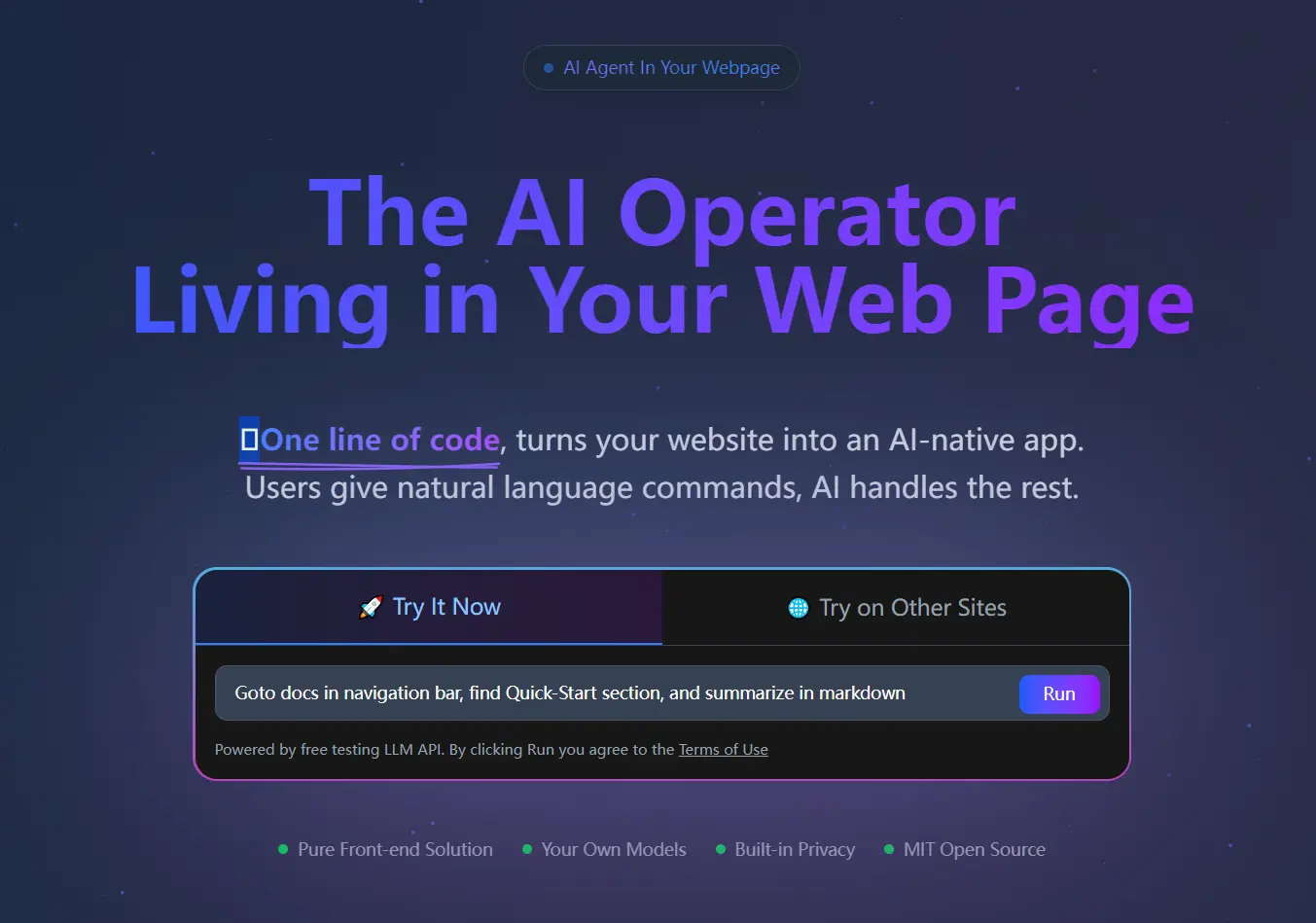
Page Agent is a free, open-source JavaScript-powered, in-page GUI agent from Alibaba that turns any website into an AI native web application.
Add one script tag or npm package to your site, and the library reads the page through the DOM structure and maps natural language instructions to actual click, input, scroll, and submit actions.
Your users can then type commands like “Click the login button” or “Fill out the form with my details” to interact with your web page.
Page Agent works with any LLM that supports OpenAI-compatible API specs and tool calls, from hosted models like GPT-5.3 and Claude Sonnet 4.6 to self-hosted Ollama instances running locally.
Features
- Runs entirely within your web page as pure JavaScript.
- Manipulates the Document Object Model directly through text-based commands.
- Supports custom Large Language Models from public cloud services or private deployments.
- Accepts developer-registered tools via Zod schemas to extend agent capabilities with business-specific actions.
- Includes a user interface with human-in-the-loop capabilities.
- Exposes a function-calling interface so external agents or support bots can invoke Page Agent as an action tool.
- Provides an optional Chrome extension for multiple page task execution.
See It In Action
Use Cases
- Build an AI copilot inside your SaaS product using a few lines of code.
- Automatically fill out complex forms in ERP and CRM systems.
- Control web applications using voice commands and screen readers.
- Execute multiple tab browser workflows via the optional extension.
How to Use It
Table Of Contents
- Quick Start
- NPM Installation
- Connecting to a local Model via Ollama
- Production Authentication with a Backend Proxy
- Supported Models
- Free Testing API Credentials
- Adding Custom Tools
- Configuring Agent Instructions
- Data Masking
- PageAgent.js vs. PageAgentExt
- Interaction Capabilities Reference
- Third-Party Agent Integration
- Chrome Extension: Multi-Page Tasks
Quick Start
The fastest way to test Page Agent requires one script tag. Add this to your HTML file:
<script src="https://cdn.jsdelivr.net/npm/page-agent/dist/iife/page-agent.demo.js" crossorigin="true"></script>The demo CDN connects to a free Qwen testing endpoint. It is for technical evaluation only. Do not input personal or sensitive data through this endpoint.
NPM Installation
npm install page-agentimport { PageAgent } from 'page-agent'
const agent = new PageAgent({
model: 'qwen3.5-plus',
baseURL: 'https://dashscope.aliyuncs.com/compatible-mode/v1',
apiKey: 'YOUR_API_KEY',
language: 'en-US',
})
await agent.execute('Click the login button')Connecting to a local Model via Ollama
const pageAgent = new PageAgent({
    baseURL: 'http://localhost:11434/v1',
    apiKey: 'NA',
    model: 'qwen3:14b',
})
Start Ollama with a larger context window and cross-origin access enabled. On macOS or Linux:
OLLAMA_CONTEXT_LENGTH=64000 OLLAMA_HOST=0.0.0.0:11434 OLLAMA_ORIGINS="*" ollama serveOn Windows (PowerShell):
$env:OLLAMA_CONTEXT_LENGTH=64000; $env:OLLAMA_HOST="0.0.0.0:11434"; $env:OLLAMA_ORIGINS="*"; ollama serveOllama notes: models under 10B parameters generally do not perform reliably. The model must support tool calls. A typical page consumes around 15,000 tokens, and that count grows with each step, so Ollama’s default 4,096-token context length will not work. Set context to at least 64,000.
Production Authentication with a Backend Proxy
Never commit LLM API keys to frontend code. Use a backend proxy and the customFetch option to authenticate requests via cookies or other server-side methods:
const agent = new PageAgent({
    baseURL: '/api/llm-proxy',
    apiKey: 'NA',
    model: 'gpt-5.1',
    customFetch: (url, init) => fetch(url, { ...init, credentials: 'include' }),
})
Supported Models
Page Agent works with any model that supports OpenAI-compatible API specs and tool calls. Recommended models (marked ⭐) offer the best balance of speed and tool call reliability.
| Provider | Model | Notes |
|---|---|---|
| Qwen | qwen3.5-plus ⭐ | Recommended |
| Qwen | qwen3.5-flash ⭐ | Lightweight |
| Qwen | qwen3-coder-next | |
| Qwen | qwen-3-max | |
| Qwen | qwen-3-plus | |
| Qwen | qwen3:14b (Ollama) | Local |
| OpenAI | gpt-5.4 | |
| OpenAI | gpt-5.2 | |
| OpenAI | gpt-5.1 ⭐ | Recommended |
| OpenAI | gpt-5 | |
| OpenAI | gpt-5-mini | |
| OpenAI | gpt-4.1 | |
| OpenAI | gpt-4.1-mini | |
| DeepSeek | deepseek-3.2 ⭐ | Recommended |
| gemini-3-pro | ||
| gemini-3-flash ⭐ | Recommended | |
| gemini-2.5 | ||
| Anthropic | claude-opus-4.6 | |
| Anthropic | claude-opus-4.5 | |
| Anthropic | claude-sonnet-4.5 | |
| Anthropic | claude-haiku-4.5 ⭐ | Recommended |
| Anthropic | claude-sonnet-3.5 | |
| xAI | grok-4.1-fast | |
| xAI | grok-4 | |
| xAI | grok-code-fast | |
| MoonshotAI | kimi-k2.5 | |
| Z.AI | glm-5 | |
| Z.AI | glm-4.7 |
Models with weaker tool call implementations may return malformed responses. Page Agent auto-recovers from common format errors, and a higher temperature setting generally helps with these models.
Free Testing API Credentials
LLM_BASE_URL="https://page-ag-testing-ohftxirgbn.cn-shanghai.fcapp.run"
LLM_MODEL_NAME="qwen3.5-plus"
LLM_API_KEY="NA"
Use qwen3.5-flash as the model name for a lighter option.
Adding Custom Tools
Page Agent accepts custom tools defined with Zod schemas. Import from the zod/v4 subpath regardless of whether you use Zod 3 (>=3.25.0) or Zod 4. Zod Mini is not supported.
import { z } from 'zod/v4'
import { PageAgent, tool } from 'page-agent'
const pageAgent = new PageAgent({
    customTools: {
        add_to_cart: tool({
            description: 'Add a product to the shopping cart by its product ID.',
            inputSchema: z.object({
                productId: z.string(),
                quantity: z.number().min(1).default(1),
            }),
            execute: async function (input) {
                await fetch('/api/cart', {
                    method: 'POST',
                    body: JSON.stringify(input),
                })
                return `Added ${input.quantity}x ${input.productId} to cart.`
            },
        }),
        search_knowledge_base: tool({
            description: 'Search the internal knowledge base and return relevant articles.',
            inputSchema: z.object({
                query: z.string(),
                limit: z.number().max(10).default(3),
            }),
            execute: async function (input) {
                const res = await fetch(
                    `/api/kb?q=${encodeURIComponent(input.query)}&limit=${input.limit}`
                )
                const articles = await res.json()
                return JSON.stringify(articles)
            },
        }),
    },
})
To remove a built-in tool entirely, set its key to null:
const pageAgent = new PageAgent({
    customTools: {
        scroll: null,
        execute_javascript: null,
    },
})
Configuring Agent Instructions
Set global system instructions and per-URL page instructions through the instructions config:
const agent = new PageAgent({
    instructions: {
        system: `
You are a professional e-commerce assistant.
Guidelines:
- Always confirm before submitting orders
- Double-check prices and quantities
- Report errors immediately instead of retrying blindly
`,
        getPageInstructions: (url) => {
            if (url.includes('/checkout')) {
                return `
This is the checkout page.
- Verify shipping address before proceeding
- Check if any discounts are applied
- Confirm the total amount with the user
`
            }
            if (url.includes('/products')) {
                return `
This is the product listing page.
- Use filters to narrow down search results
- Check stock availability before adding to cart
`
            }
            return undefined
        }
    }
})
The system string applies to every task. getPageInstructions runs before each step and returns context specific to the current URL. Both are optional.
Data Masking
Use transformPageContent to scrub sensitive data from the DOM content before the LLM sees it:
const agent = new PageAgent({
    transformPageContent: async (content) => {
        // China phone number (11 digits starting with 1)
        content = content.replace(/\b(1[3-9]\d)(\d{4})(\d{4})\b/g, '$1****$3')
        // Email address
        content = content.replace(
            /\b([a-zA-Z0-9._%+-])[^@]*(@[a-zA-Z0-9.-]+\.[a-zA-Z]{2,})\b/g,
            '$1***$2'
        )
        // China ID card number (18 digits)
        content = content.replace(
            /\b(\d{6})(19|20\d{2})(0[1-9]|1[0-2])(0[1-9]|[12]\d|3[01])(\d{3}[\dXx])\b/g,
            '$1********$5'
        )
        // Bank card number (16–19 digits)
        content = content.replace(/\b(\d{4})\d{8,11}(\d{4})\b/g, '$1********$2')
        return content
    },
})
PageAgent.js vs. PageAgentExt
| Feature | PageAgent.js | PageAgentExt (Chrome Extension) |
|---|---|---|
| Integration | Site developer adds the library | User installs the browser extension |
| Scope | Current page (best for SPAs) | Any web page, multi-tab |
| Extra capabilities | None | Open, switch, and close tabs |
Interaction Capabilities Reference
Supported actions:
| Action | Supported |
|---|---|
| Click | ✓ |
| Text input | ✓ |
| Select (dropdowns) | ✓ |
| Scroll (vertical and horizontal) | ✓ |
| Form submit | ✓ |
| Focus | ✓ |
| Execute JavaScript (opt-in) | ✓ |
Not supported:
| Action | Notes |
|---|---|
| Hover | Not supported |
| Drag and drop | Not supported |
| Right-click | Not supported |
| Keyboard shortcuts | Not supported |
| Position-based control | Not supported |
| Drawing | Not supported |
| Monaco / CodeMirror editors | Require JS instance access |
Third-Party Agent Integration
Wrap pageAgent.execute() as a function-calling tool in an external agent or support bot:
const pageAgentTool = {
    name: "page_agent",
    description: "Execute web page operations",
    parameters: {
        type: "object",
        properties: {
            instruction: {
                type: "string",
                description: "Operation instruction"
            }
        },
        required: ["instruction"]
    },
    execute: async (params) => {
        const result = await pageAgent.execute(params.instruction)
        return { success: result.success, message: result.data }
    }
}
Chrome Extension: Multi-Page Tasks
Install the Page Agent Chrome extension from the Chrome Web Store or grab faster updates from GitHub Releases.
After installation, trigger multi-page tasks from page JavaScript via window.PAGE_AGENT_EXT:
// 1. Get the auth token from the extension side panel
// 2. Store it in trusted apps only
localStorage.setItem('PageAgentExtUserAuthToken', '<your-token-from-extension>')
// Execute a multi-page task
const result = await window.PAGE_AGENT_EXT.execute(
    'Search for "page-agent" on GitHub and open the first result',
    {
        baseURL: 'https://api.openai.com/v1',
        apiKey: 'your-api-key',
        model: 'gpt-5.2',
        onStatusChange: status => console.log('Status change:', status),
        onActivity: activity => console.log('Activity:', activity),
        onHistoryUpdate: history => console.log('History update:', history)
    }
)
// Stop the current task
window.PAGE_AGENT_EXT.stop()
Pros
- Works with any LLM that supports tool calls.
- The human-in-the-loop UI prevents automated mistakes.
- One-line integration is genuinely that simple for testing.
- Custom tools let you extend functionality deep into your business logic.
Cons
- Cannot see images, canvas, or SVG content.
- No hover, drag-drop, right-click, or keyboard shortcut support.
- Page accessibility and semantic HTML quality directly impact accuracy.
Related Resources
- Page Agent GitHub Repository: Source code, releases, and contribution guidelines for the project.
- Page Agent Chrome Extension: The optional extension for multi-tab task execution.
- browser-use: The open-source project that Page Agent’s DOM processing and prompt logic builds on.
- Alibaba Cloud Bailian (DashScope): OpenAI-compatible API hosting Qwen models, used in Page Agent’s quick-start examples.
- Ollama: Run LLMs locally to power Page Agent with self-hosted models.
- Zod: TypeScript-first schema library used to define custom tool inputs in Page Agent.
FAQs
Q: Does Page Agent work on any website?
A: Page Agent works on any site where the developer has added the library. It is a client-side tool, not a browser extension that operates on third-party sites by default.
Q: Do I need to pay to use Page Agent?
A: The library itself is free and open source. A free Qwen-backed testing API ships with the demo build for evaluation purposes. For production use, you supply your own API key from any supported LLM provider.
Q: Which LLM returns the best results?
A: Based on the project’s own testing, qwen3.5-plus, qwen3.5-flash, gpt-5.1, deepseek-3.2, gemini-3-flash, and claude-haiku-4.5 are the recommended options.
Q: Can Page Agent see what is on the screen visually?
A: No. Page Agent does not use multimodal models and takes no screenshots. It reads page structure entirely through the DOM.
Q: What happens when Page Agent encounters an unsupported action like hover or drag?
A: Those actions fall outside Page Agent’s capability boundary and the agent will not attempt them. Workflows that require hover-triggered menus, drag-and-drop reordering, or right-click context menus need the target app’s HTML to expose equivalent accessible alternatives.
Q: Can I run Page Agent with a completely private, local model?
A: Yes. Ollama integration is supported and tested with qwen3:14b on an RTX 3090. Set context length to at least 64,000 tokens, allow cross-origin access via OLLAMA_ORIGINS="*", and use a tool-call-capable model of at least 10B parameters.