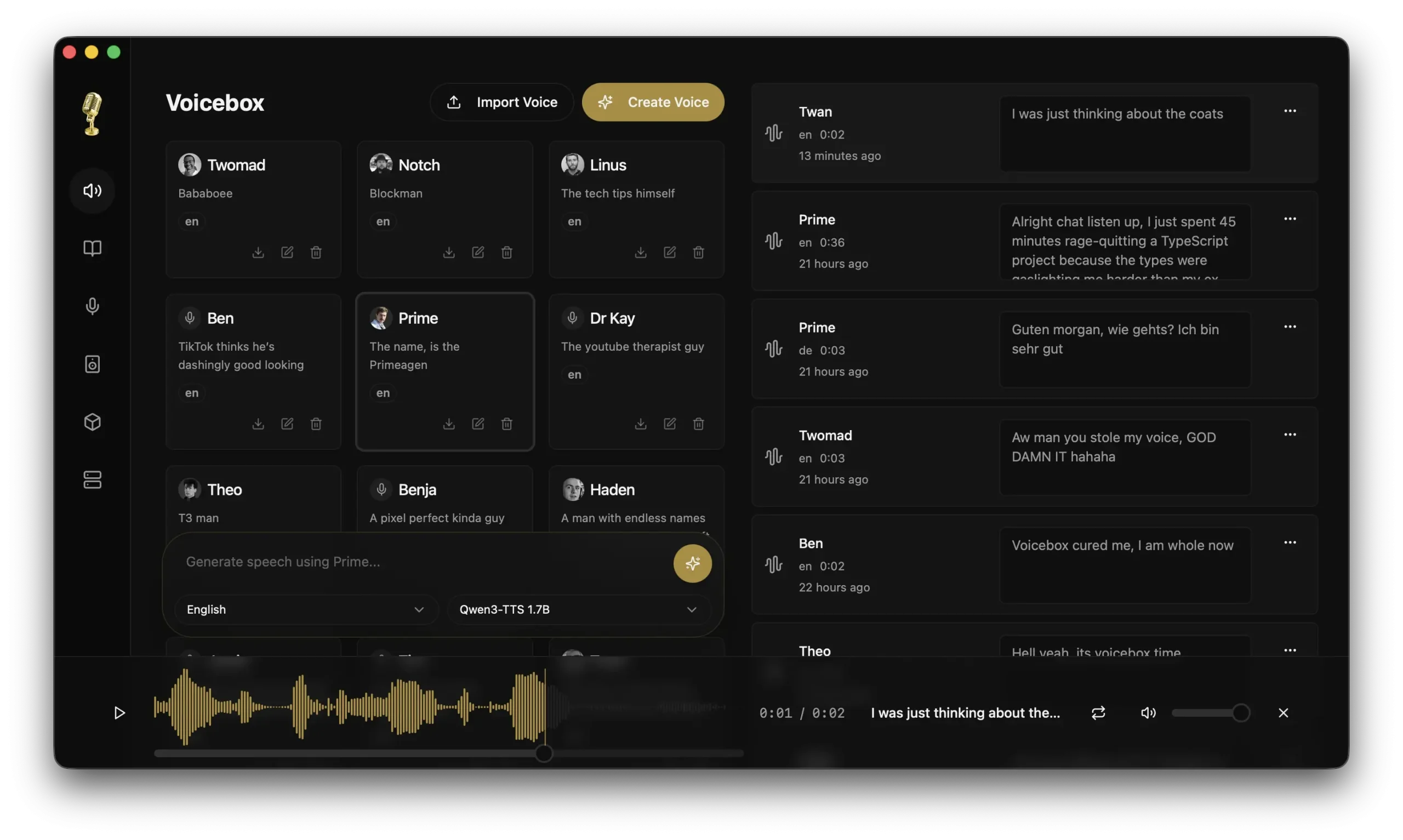
Voicebox is a free, open-source, AI-powered, local-first voice-cloning app built on Alibaba’s Qwen TTS model. It lets you clone a voice from a few seconds of audio, generate text-to-speech output, and compose multi-voice audio projects.
The app is a free, self-hosted alternative to ElevenLabs. Your voice data, audio files, and model weights never leave your machine. Developers can also skip the desktop UI entirely and drive everything through a built-in REST API, which makes Voicebox useful as a backend component in larger pipelines.
At the time of writing, Voicebox is at v0.1.12 and available for macOS (both Apple Silicon and Intel) and Windows. Linux support is listed as coming soon, currently blocked by GitHub runner disk space constraints.
Features
- Instant Cloning: Generates near-perfect voice replications from just a few seconds of reference audio.
- MLX backend for Apple Silicon: Uses Metal acceleration on M1/M2/M3 chips for 4–5x faster inference compared to the PyTorch path.
- Voice profile management: Creates, imports, exports, and organizes voice profiles with support for multiple audio samples per profile to improve clone quality.
- Text-to-speech generation: Produces speech from any cloned voice with support for batch generation and smart prompt caching for instant regeneration.
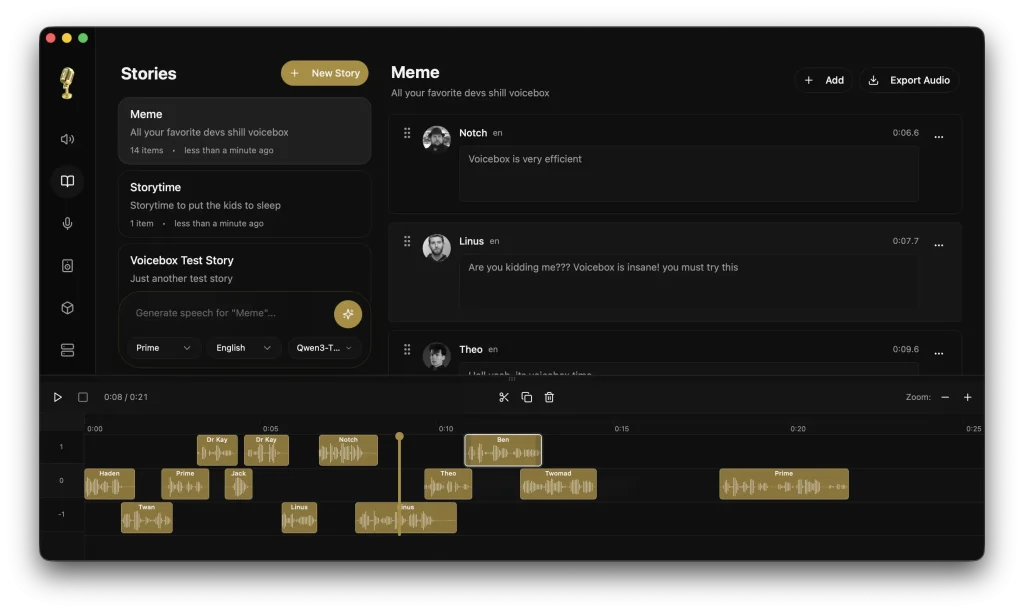
- Stories editor: Provides a multi-track, timeline-based editor for composing multi-voice narratives, podcasts, and conversations with inline clip trimming and splitting.
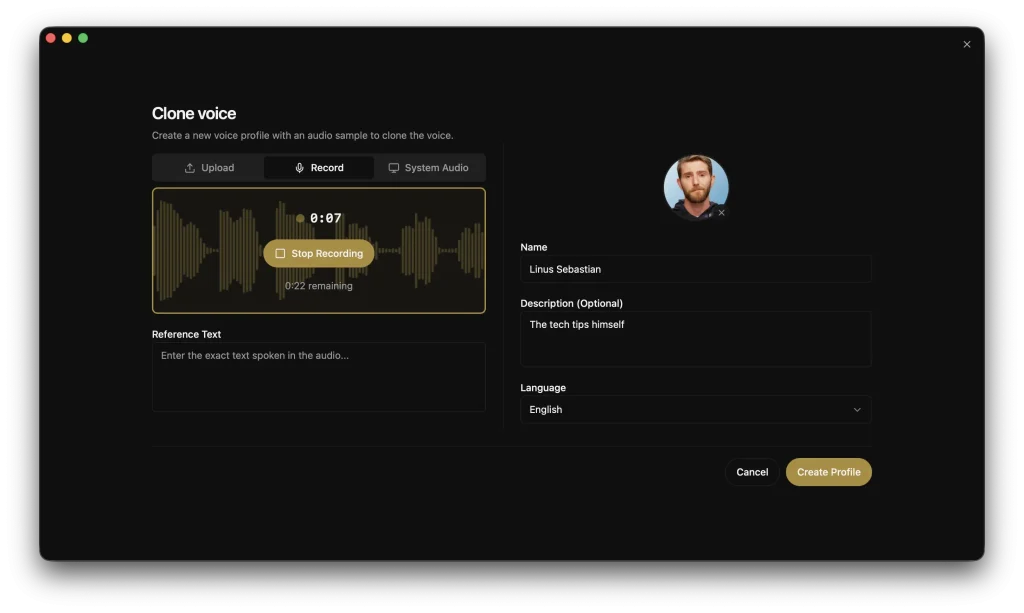
- In-app recording and transcription: Records microphone or system audio, visualizes waveforms in real time, and automatically transcribes recordings via Whisper.
- Generation history: Stores a full searchable log of all generated audio, filterable by voice, text content, or date, with one-click regeneration.
- Remote mode: Connects the desktop client to a GPU server on your local network, so you can offload inference without a cloud dependency.
Use Cases
- Content creators and podcasters: Generate voiceovers for videos, create multi-voice podcasts without coordinating multiple speakers, or produce narration for long-form content in batches.
- Game developers: Implement dynamic dialogue systems where characters can speak generated text with consistent voices.
- Accessibility tools: Build applications that convert text to speech using specific voices familiar to users.
- Video production pipelines: Automate voiceover generation for explainer videos, training materials, or advertisements. The timeline editor helps sync audio with visuals.
- Voice assistant development: Prototype and test voice interactions with custom synthesized voices before recording with voice actors.
How to Use It
1. Grab the right installer for your platform from the Voicebox GitHub releases page:
| Platform | File |
|---|---|
| macOS Apple Silicon | voicebox_aarch64.app.tar.gz |
| macOS Intel | voicebox_x64.app.tar.gz |
| Windows (MSI) | voicebox_0.1.12_x64_en-US.msi |
| Windows (Installer) | voicebox_0.1.12_x64-setup.exe |
2. On first launch, Voicebox will prompt you to download Qwen3-TTS model. This is a one-time step. The model weights download directly to your machine. Nothing is fetched at generation time after this.
3. Go to the Voice Profiles section and create a new profile. You can upload an existing audio file (a few seconds is enough) or record directly in the app. Add a name, assign a language tag, and save. For noticeably better quality, upload multiple samples for the same profile.
4. Open the generation panel, select your voice profile, type or paste your text, and click generate. The output appears in your generation history. You can regenerate the same text instantly from history without reprocessing the voice prompt, thanks to prompt caching.
5. Open the Stories editor to place multiple voice tracks on a timeline. Trim and split clips inline, arrange the order, and preview playback with the synchronized playhead. Export the finished composition as an audio file.
6. When Voicebox is running, its API is available at http://localhost:8000.
Generate speech:
curl -X POST http://localhost:8000/generate \
  -H "Content-Type: application/json" \
  -d '{"text": "Hello world", "profile_id": "abc123", "language": "en"}'
List all voice profiles:
curl http://localhost:8000/profilesCreate a new profile:
curl -X POST http://localhost:8000/profiles \
  -H "Content-Type: application/json" \
  -d '{"name": "My Voice", "language": "en"}'
7. Run as a Remote Server (OPTIONAL). On any machine you want to use as a GPU server, launch Voicebox in server mode. Point your desktop client at that machine’s IP address on your local network. This lets you keep inference on a powerful workstation while controlling it from a laptop.
Pros
- Data Privacy: Your voice data never leaves your computer.
- Native Speed: Apple Silicon users get native Metal acceleration.
- No Subscriptions: The software is free and open source.
- Professional Editor: The multi-track timeline allows for complex audio mixing.
Cons
- Early release (v0.1.12): The project is new and some planned features, like real-time synthesis, conversation mode, XTTS/Bark support, and voice effects, are not yet available.
- No Linux support yet: Linux builds are blocked pending a GitHub Actions disk space fix. Linux users currently have to build from source.
- Windows/Intel performance: The PyTorch backend on Windows and Intel Macs is significantly slower than the MLX path on Apple Silicon. A CUDA-capable GPU helps, but CPU-only inference is slow.
- Single TTS model for now: Qwen3-TTS is the only supported model in v0.1.0. XTTS, Bark, and other models are on the roadmap but not yet available.
Related Resources
- Voicebox GitHub Repository: Source code, issue tracker, releases, and contribution guidelines.
- Qwen3-TTS (Alibaba): The underlying voice synthesis model powering Voicebox’s cloning capability.
- MLX Framework (Apple): Apple’s machine learning framework that enables the Metal-accelerated backend on Apple Silicon.
- Whisper (OpenAI): The transcription model integrated into Voicebox for in-app audio-to-text conversion.
FAQs
Q: Does Voicebox send my voice data to any external server?
A: No. Voicebox runs the model and all processing locally on your machine. After the one-time model download, no network connection is required for generation. Your audio files and voice profiles stay on your hardware.
Q: What languages does Voicebox support?
A: The current Qwen3-TTS model supports English and Chinese. The team lists additional languages as part of the roadmap.
Q: How does Voicebox perform on a Windows PC without a dedicated GPU?
A: CPU-only inference on Windows uses the PyTorch backend and is noticeably slow. A CUDA-capable NVIDIA GPU is recommended for reasonable generation speed on Windows. Apple Silicon Macs with the MLX backend are considerably faster.