AudioToText is a free, powerful, high accuracy, and multilingual audio transcription service powered by AI.
It transforms audio files you upload or record into text while providing timestamps, summaries, and AI-powered insights. Perfect for professionals who need quick, accurate transcripts with the added benefit of AI analysis.
I tested AudioToText with a professional podcast about the Porsche Macan.
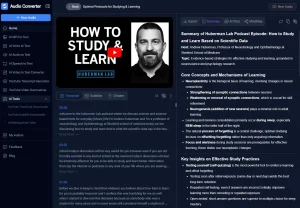
The tool produced a detailed transcript with timestamps, marking speaker changes and maintaining proper punctuation. The AI then created a concise summary highlighting key points about the vehicle’s performance and practicality.

What stood out was the ability to chat with the transcription. This interactive feature allowed me to delve deeper into specific details and gain additional insights.
Features
- Timestamps: AudioToText.xyz generates transcriptions that include timestamps. This allows you to quickly locate specific parts of your audio.
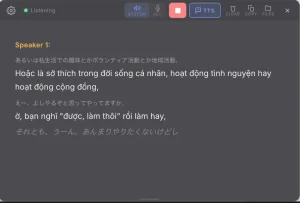
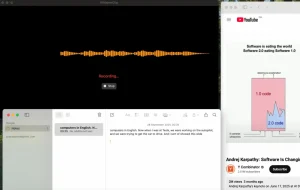
- Real-Time Recording: You can record audio directly within your browser. The tool ensures high-quality capture.
- Multiple Languages: It supports multiple languages, including English, Spanish, French, Hindi, and Japanese.
- Fast Processing: Benefit from quick and accurate transcriptions, thanks to advanced AI technology.
- File Upload: Upload existing audio files in various formats for quick transcription. The site supports formats like MP3, WAV, AAC, FLAC, and M4A.
- AI Insights: Get smart summaries and key insights extracted from your transcriptions. This feature helps you quickly grasp the main points of your audio.
- Export Options: Download your completed transcriptions in multiple formats, such as TXT, DOCX, and SRT.
- Chat with transcription: Get more insights of your audio transcription.
Use Cases
- Podcast Transcription: Convert podcast episodes into blog posts or show notes.
- Meeting Minutes: Quickly transcribe business meetings to create accurate records.
- Lecture Notes: Students can record and transcribe lectures for easier studying.
- Journalism: Journalists can transcribe interviews, saving valuable time.
- Content Creation: Transform video content into written articles or social media posts.
How To Use It
- Visit the AudioToText website. Upload your audio file or start recording directly.
- Choose your transcription language from the dropdown menu. Options include English, Hindi, Japanese, Spanish, and French.
- After uploading, the AI automatically begins transcribing.
- Once transcription is finished, the AI generates a summary and insights. You can then chat with the AI to explore your transcription further.
- Download your transcript in TXT, SRT, or DOCX format. You also have the option to copy the text directly to your clipboard.
Pros
- High Accuracy: Delivers precise transcriptions.
- Multi-Language Support: Works with various languages.
- Free to Use: No cost for transcription services.
- AI-Powered Insights: offer a summary and quick insights.
- Chat with AI: Obtain more information.
Cons
- Internet Dependent: Requires an internet connection.
- Processing speed varies with file size
- Language options limited to major languages
FAQs
Q: How accurate is the transcription?
A: The AI provides high accuracy, though occasional errors may occur depending on audio quality.
Q: Is there a limit to the audio file size I can upload?
A: The website does not specify a file size limit, but larger files may take longer to process.
Ready to transform your audio into text? Try AudioToText.xyz today! Share your experiences and feedback in the comments below. If you found this tool helpful, share this post on your social media!