OpenSpace is a free, open-source self-evolving skill engine that plugs into existing AI agents (Claude Code, Codex, Cursor, Nanobot, OpenClaw etc), and enables them to accumulate, repair, and share reusable skills across tasks.
Each time an agent completes or fails a task, OpenSpace analyzes what happened, updates the relevant skill, and stores the improved version for every future run. The result is an agent that gets measurably better and cheaper to operate as it processes more work.
Today’s agents reason from scratch on every task. Successful patterns disappear after execution, failed approaches repeat without correction, and separate agents have no way to share what they’ve learned.
OpenSpace adds a persistent skill layer between the agent and its work, turning accumulated execution history into a live, searchable library of battle-tested workflows.
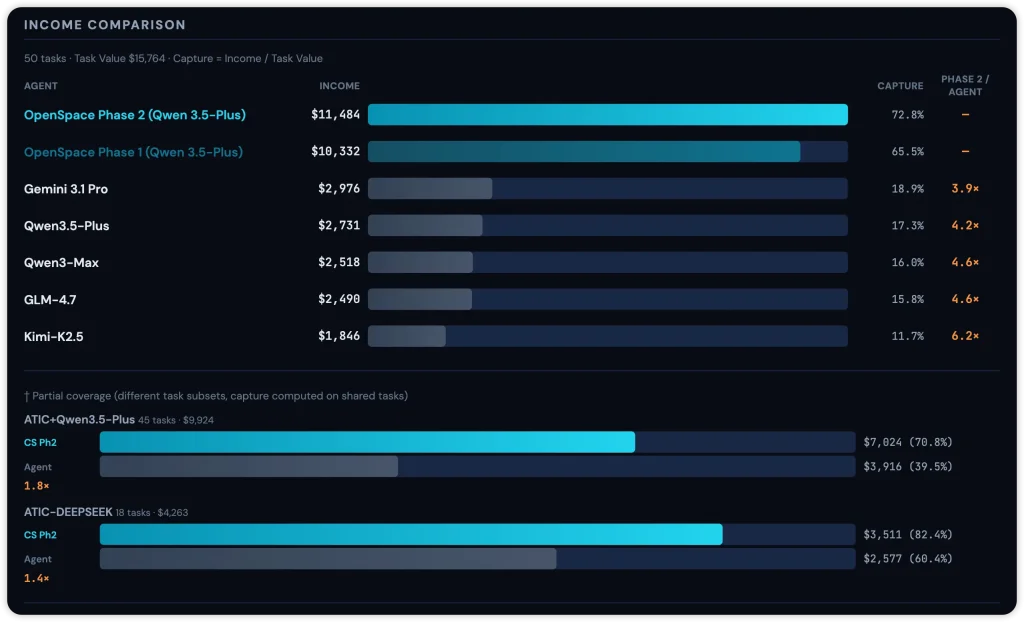
On the GDPVal benchmark, a set of 50 real professional tasks spanning six industries, OpenSpace-powered agents earned 4.2 times more income than baseline agents running the same LLM, captured $11,484 of $15,764 in total task value, and used 46% fewer tokens in the second run than the first.
Features
- Three-mode self-evolution cycle: FIX repairs broken skill instructions in place, DERIVED creates specialized versions from parent skills, and CAPTURED extracts novel reusable patterns from successful executions.
- Tracks skill health metrics across every run.
- Monitors individual tool calls for success rate, latency, and flagged issues.
- Any MCP-compatible agent can connect in a single config block.
- Two host skills,
delegate-taskandskill-discovery, teach a connected agent when and how to use OpenSpace. - Auto-detects credentials and model configuration from the host agent’s existing setup.
- Stores every skill version in a SQLite-backed directed acyclic graph with full lineage, diffs, and quality metrics.
- Supports public, private, and team-only access control on every skill shared to the cloud community at open-space.cloud.
- Local React dashboard with four views: skill class browser, cloud skill records, version lineage graph, and workflow session history.
- A Python async API for integrating OpenSpace execution directly into scripts and applications.
- Built-in safeguards: confirmation gates, anti-loop guards, and safety checks.
- Uses BM25 plus embedding hybrid search for skill retrieval.
Use Cases
- Read a union contract and build a payroll calculator that handles tiered rates, overtime rules, and shift differentials.
- Pull data from 15 scattered PDF documents and prepare a complete tax return with supporting schedules.
- Draft a legal memorandum on California privacy regulations that cites specific statutes and case law.
- Generate compliance forms with embedded validation logic that catches errors before submission.
- Build engineering specifications with CAD drawings, bill of materials, and assembly instructions.
- Create a real-time monitoring dashboard that tracks system processes, API health, news feeds, and email.
- Analyze competitor pricing data from multiple sources and produce a pricing model with scenario comparisons.
- Write browser automation scripts that extract data from JavaScript-heavy pages with dynamic content.
How to Use OpenSpace
Table Of Contents
Installation
1. Clone the repository and install the package:
git clone https://github.com/HKUDS/OpenSpace.git && cd OpenSpace
pip install -e .
openspace-mcp --help
2. If the default clone is slow due to the assets/ folder (~50 MB of images), use the sparse checkout alternative:
git clone --filter=blob:none --sparse https://github.com/HKUDS/OpenSpace.git
cd OpenSpace
git sparse-checkout set '/*' '!assets/'
pip install -e .
Plug OpenSpace Into Your Agent
penSpace works with any AI agent that supports Agent Skills (SKILL.md files), including Claude Code, Codex, OpenClaw, and Nanobot.
1. Add the following block to your agent’s MCP configuration file:
{
  "mcpServers": {
    "openspace": {
      "command": "openspace-mcp",
      "toolTimeout": 600,
      "env": {
        "OPENSPACE_HOST_SKILL_DIRS": "/path/to/your/agent/skills",
        "OPENSPACE_WORKSPACE": "/path/to/OpenSpace",
        "OPENSPACE_API_KEY": "sk-xxx (optional, for cloud)"
      }
    }
  }
}
2. Copy the two host skills into your agent’s skills directory:
cp -r OpenSpace/openspace/host_skills/delegate-task/ /path/to/your/agent/skills/
cp -r OpenSpace/openspace/host_skills/skill-discovery/ /path/to/your/agent/skills/
3. For per-agent configuration details covering OpenClaw and nanobot specifically, consult openspace/host_skills/README.md in the repository.
Use OpenSpace as a Standalone Co-Worker
1. Create a .env file in the repository root with your LLM API key.
# ============================================
# OpenSpace Environment Variables
# Copy this file to .env and fill in your keys
# ============================================

# ---- LLM API Keys ----
# At least one LLM API key is required for OpenSpace to function.
# OpenSpace uses LiteLLM for model routing, so the key you need depends on your chosen model.
# See https://docs.litellm.ai/docs/providers for supported providers.

# Anthropic (for anthropic/claude-* models)
# ANTHROPIC_API_KEY=

# OpenAI (for openai/gpt-* models)
# OPENAI_API_KEY=

# OpenRouter (for openrouter/* models, e.g. openrouter/anthropic/claude-sonnet-4.5)
OPENROUTER_API_KEY=

# ── OpenSpace Cloud (optional) ──────────────────────────────
# Register at https://open-space.cloud to get your key.
# Enables cloud skill search & upload; local features work without it.

OPENSPACE_API_KEY=sk_xxxxxxxxxxxxxxxx

# ---- GUI Backend (Anthropic Computer Use) ----
# Required only if using the GUI backend. Uses the same ANTHROPIC_API_KEY above.
# Optional backup key for rate limit fallback:
# ANTHROPIC_API_KEY_BACKUP=

# ---- Web Backend (Deep Research) ----
# Required only if using the Web backend for deep research.
# Uses OpenRouter API by default:
# OPENROUTER_API_KEY=

# ---- Embedding (Optional) ----
# For remote embedding API instead of local model.
# If not set, OpenSpace uses a local embedding model (BAAI/bge-small-en-v1.5).
# EMBEDDING_BASE_URL=
# EMBEDDING_API_KEY=
# EMBEDDING_MODEL= "openai/text-embedding-3-small"

# ---- E2B Sandbox (Optional) ----
# Required only if sandbox mode is enabled in security config.
# E2B_API_KEY=

# ---- Local Server (Optional) ----
# Override the default local server URL (default: http://127.0.0.1:5000)
# Useful for remote VM integration (e.g., OSWorld).
# LOCAL_SERVER_URL=http://127.0.0.1:5000

# ---- Debug (Optional) ----
# OPENSPACE_DEBUG=true
2. Launch interactive mode or run a specific task:
# Interactive mode
openspace
# Execute a single task with a specified model
openspace --model "anthropic/claude-sonnet-4-5" --query "Create a monitoring dashboard for my Docker containers"
Available CLI Commands
| Command | Description |
|---|---|
openspace | Launch interactive co-worker mode |
openspace --model <model_string> --query <task> | Execute a single task with a specified LLM |
openspace-mcp --help | Verify MCP server installation and view options |
openspace-dashboard --port <port> | Start the local dashboard backend API |
openspace-download-skill <skill_id> | Download a skill from the cloud community |
openspace-upload-skill /path/to/skill/dir | Upload a local evolved skill to the cloud community |
MCP Server Environment Variables
| Variable | Required | Description |
|---|---|---|
OPENSPACE_HOST_SKILL_DIRS | Yes (Path A) | Path to the host agent’s skills directory |
OPENSPACE_WORKSPACE | Yes (Path A) | Path to the OpenSpace repository root |
OPENSPACE_API_KEY | Optional | API key from open-space.cloud for cloud community access |
Local Dashboard
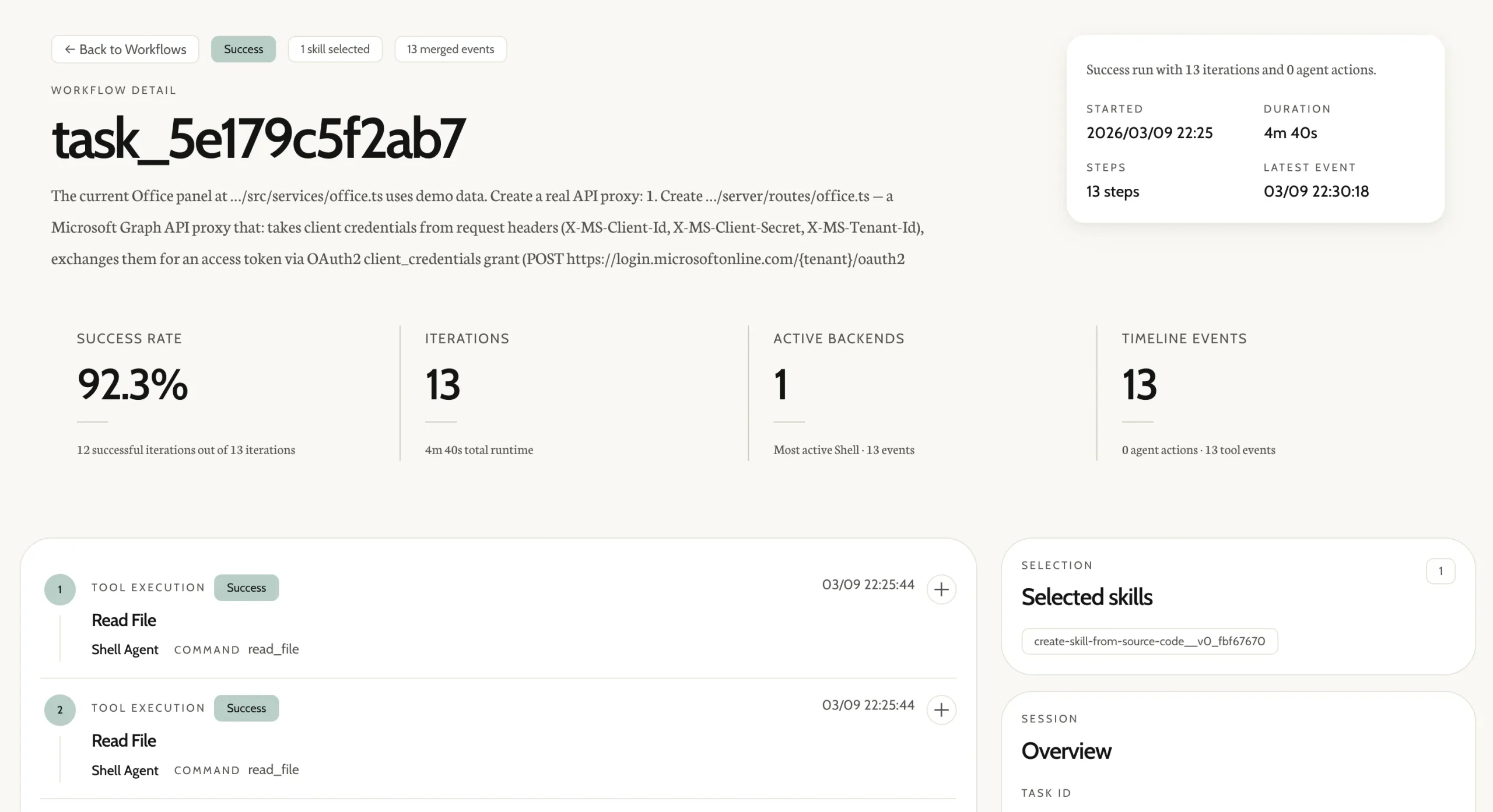
The dashboard exposes four views: Skill Classes (browse, search, and sort local skills), Cloud Skill Records (browse community contributions), Version Lineage (visual evolution graph per skill), and Workflow Sessions (execution history with metrics).
# Terminal 1: start the backend API
openspace-dashboard --port 7788
# Terminal 2: start the frontend dev server
cd frontend
npm install
npm run dev
Python API
The evolved_skills list in the result object contains each skill that OpenSpace created or updated during the run, along with its evolution origin type: FIX, DERIVED, or CAPTURED.
import asyncio
from openspace import OpenSpace
async def main():
    async with OpenSpace() as cs:
        result = await cs.execute("Analyze GitHub trending repos and create a report")
        print(result["response"])
        for skill in result.get("evolved_skills", []):
            print(f"  Evolved: {skill['name']} ({skill['origin']})")
asyncio.run(main())
Cloud Community
Register at open-space.cloud to get an API key, browse the community skill library, and manage team access groups.
All local capabilities, including task execution, skill evolution, and local skill search, work without registration.
Pros
- Cuts token usage by 46% on real-world tasks while improving results.
- Automatically fixes broken skills when tools or APIs change.
- Shares improvements across all connected agents instantly.
- Provides full SQLite storage with version DAG and lineage tracking.
- Supports public, private, or team-only skill sharing.
- Implements safety checks to prevent prompt injection and credential exfiltration.
Cons
- Cloud registry requires registration for an API key.
- Evolution can produce many skill variants that need management.
Related Resources
- Nanobot: A compatible agent from the same HKUDS lab.
- Model Context Protocol: Reference documentation for MCP, the protocol OpenSpace uses to connect to host agents.
- LiteLLM: The LLM abstraction layer OpenSpace uses internally.
- Claude Cowork Alternatives: The 7 Best & Open-source Claude Cowork Alternatives.
- The Ultimate Claude Code Resource List: A curated list of 100+ free agents, skills, plugins, and more.
- Best AI Agents: The 7 Best CLI AI Coding Agents.
- Open-source MCP Servers: A directory of curated & open-source Model Context Protocol servers.
FAQs
Q: Does OpenSpace replace the AI agent, or does it work alongside it?
A: OpenSpace works alongside the agent as an MCP server. The agent continues to handle reasoning and task execution. OpenSpace manages the skill library, runs post-execution analysis, and evolves skills in the background.
Q: Can I use OpenSpace with a proprietary or self-hosted LLM?
A: Yes. OpenSpace uses LiteLLM internally, which supports models from Anthropic, OpenAI, and other OpenAI API-compatible providers.
Q: How does the token efficiency work?
A: OpenSpace reuses successful solutions instead of reasoning from scratch each time. When a skill evolves, it captures the working pattern. Future tasks use that pattern directly. The agent also makes small targeted diffs when fixing broken skills.
Q: How do I see the evolution history of a skill?
A: OpenSpace stores every skill version in a SQLite database with full lineage tracking. The web dashboard shows the version DAG, diffs between versions, and quality metrics for each version. You can also browse openspace.db directly with any SQLite browser.