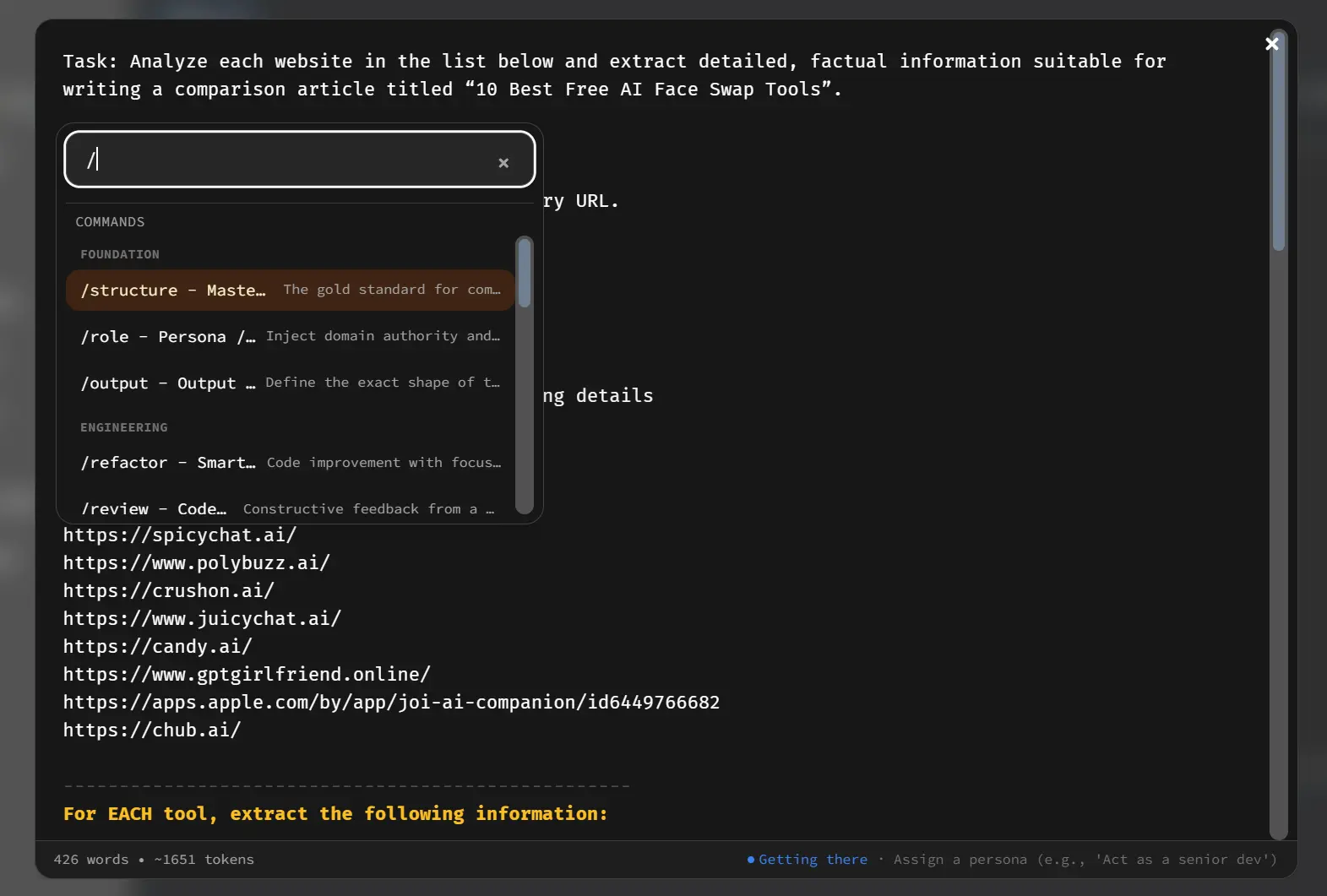
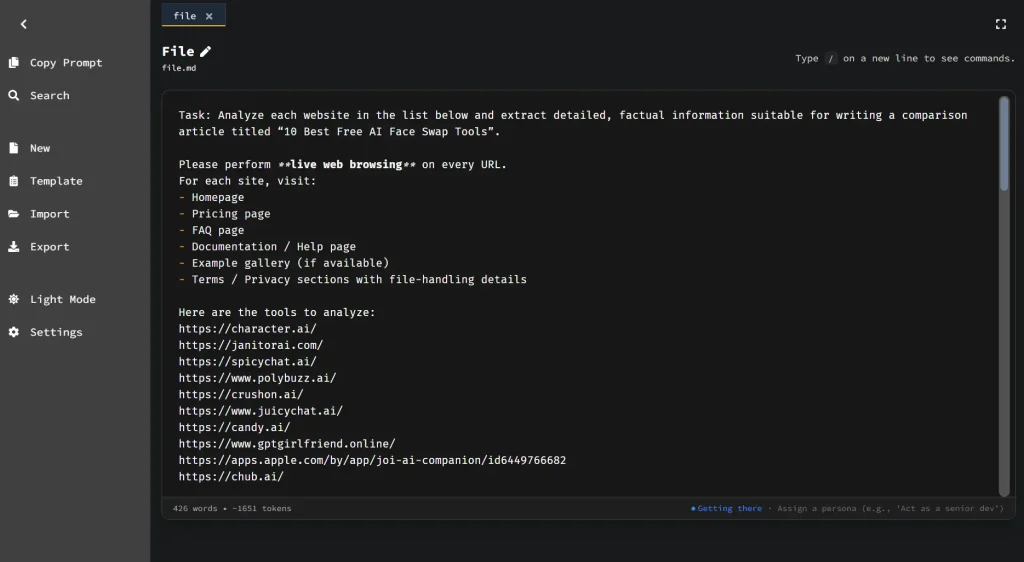
Hermes Markdown is a free, privacy-first markdown editor built for prompt engineering.
It allows you to draft, test, and refine AI prompts with 35+ slash-command templates, real-time token estimation, and a Flesch-based clarity score that tells you how well an LLM is likely to parse your instructions.
The editor runs entirely in your browser’s local storage. No account, no cloud sync, no server uploads.
Most people write prompts in a plain text box inside ChatGPT or Claude, iterate through trial-and-error, and have no systematic way to catch ambiguity before sending.
Hermes Markdown treats prompt-writing as a craft worth tooling around.
You get structured templates that enforce good prompt architecture (Role, Context, Task, Constraints, Output), plus quality metrics that flag when your instructions are getting murky.
It can be useful for anyone building system prompts, few-shot examples, or reusable prompt libraries that need to work reliably across different models.
Features
- Slash Command Palette: Type
/anywhere in the editor to open a Notion-style command palette with 35+ prompt engineering templates, filterable by name. - Logic Guard (Clarity Metrics): Displays a real-time Flesch Reading Ease score and complexity rating to measure how unambiguous your prompt is.
- Token Estimation: Calculates an approximate token count using the formula
word count × 1.35, updated live as you type. - Clean Copy: Copies your prompt text to the clipboard with YAML frontmatter stripped out, so you can paste clean instructions directly into any LLM interface.
- Live Markdown Preview: Renders your markdown in a side-by-side or tabbed view as you write.
- Document Templates: Provides full-document prompt structures (accessible via
⌘/Ctrl + Shift + M) for complex tasks like system contracts, security red teams, and decision records. - Table Editor: Lets you build and edit markdown tables visually without writing raw table syntax (
⌘/Ctrl + Shift + T). - Zen Mode: Hides all UI chrome and centers the editor for distraction-free writing sessions.
- Built-in Timer: Tracks focused writing sessions with configurable duration, notifications, and a minimize option.
- Find & Replace: Provides a floating FindBar (
⌘/Ctrl + F) with match navigation and replace functionality. - Export Options: Exports to PDF (
⌘/Ctrl + Shift + E) or Markdown (⌘/Ctrl + Shift + Y), with YAML frontmatter preserved in.mdexports. - Import Support: Imports
.mdand.txtfiles with full frontmatter preservation. - Font & Theme Customization: Offers six monospace fonts (JetBrains Mono, Fira Code, Source Code Pro, IBM Plex Mono, Roboto Mono, Cascadia Code) and light/dark themes.
- Autosave: Saves work automatically to browser local storage, with unsaved-change indicators in the UI.
- Offline & PWA Support: Works fully offline after first load and installs as a standalone app via browser prompt or “Add to Home Screen.”
- YAML Frontmatter: Reads and writes frontmatter metadata (title, description, tags) on import and export.
- Responsive Design: Collapses the sidebar for mobile use.
- Open Source: Source code is publicly available on GitHub.
Use Cases
Building reusable system prompts for AI assistants: Use /structure to scaffold the full Role → Context → Task → Constraints → Output format, then check the reading ease score before saving. Teams can export the .md file and version-control it in Git so the prompt evolves trackably.
Writing few-shot examples for custom models: The /examples command inserts a structured block for 1–3 input/output pairs. The token counter keeps you from blowing past context limits before you realize it.
Security and code review prompts for developer workflows: The Security Red Team document template and /security slash command give you a pre-built checklist scaffold. Developers writing prompts for automated code review can fill in the constraint block with MUST/SHOULD/MUST NOT priorities and copy a clean version directly into their LLM interface.
Drafting business communication prompts: Templates like /email, /meeting, /stakeholder-brief, and /status-update cover the most common professional writing scenarios. A product manager can build a library of tested prompts for weekly reports, incident postmortems, and customer updates, then share the .md files with the team.
Freelancers protecting client prompt IP: A consultant who builds prompt libraries for clients has no good reason to run those prompts through a cloud editor that logs content. Hermes Markdown keeps everything local. The PDF export gives clients a shareable artifact without exposing the raw markdown.
How to Use It
Table Of Contents
Getting Started
Open hermesmarkdown.com and click Launch Editor.
Create a new file with ⌘/Ctrl + Shift + U, or start from a template with ⌘/Ctrl + Shift + M. You can also import an existing .md or .txt file with ⌘/Ctrl + Shift + I.
Using Slash Commands
Type / on any empty line in the editor. The command palette opens immediately. Start typing to filter by name (e.g., type /ref to find /refactor), then press Enter or click to insert the template at your cursor.
Templates drop in with placeholder text like {task}, {audience}, and {constraints} that you replace with your actual content.
Reading the Quality Metrics
The metrics bar at the bottom of the editor updates in real time:
- Word Count: Total words in the document.
- Token Estimate:
word count × 1.35. Use this to stay within your target LLM’s context window. - Reading Ease Score: Flesch-based. Aim for 60+ for general clarity. System prompts benefit most from higher scores — ambiguous phrasing at the instruction level causes compounding problems in model output.
Copying a Clean Prompt
Click Copy Prompt (not the standard clipboard copy). This strips all YAML frontmatter and metadata from the clipboard output.
You get pure instruction text ready to paste into ChatGPT, Claude, or any other LLM interface without editing.
Exporting Your Work
Export to .md with ⌘/Ctrl + Shift + Y — frontmatter travels with the file. Export to PDF with ⌘/Ctrl + Shift + E for stakeholder-friendly sharing. For team collaboration, the .md format works directly in Git.
Slash Command Reference
Prompt Foundation
| Command | What It Inserts |
|---|---|
/structure | Complete prompt scaffold: Role, Context, Task, Constraints, Output format |
/success | Definition of done and evaluation criteria |
/plan | Steps, milestones, and verification checkpoints |
/constraints | Scope, assumptions, exclusions, uncertainty handling |
/inputs | Minimum context requirements and required data sources |
/output | Format, length, tone, and required section specifications |
Prompt Refinement
| Command | What It Inserts |
|---|---|
/verify | Quality-gate checklist for common prompt failures |
/examples | Structured 1–3 input/output few-shot example block |
/iterate | Clarifying questions and alternative proposal block |
/critique | Gap analysis for logic and clarity issues |
Content Transformation
| Command | What It Inserts |
|---|---|
/summarize | Condensation into short bullets |
/extract | Actionable items with assigned owners |
/outline | Structured outline with headings |
/explain | Explanation scaffold for a target audience with examples |
/rewrite | Tone and audience adaptation block |
/fix | Grammar and clarity improvement (meaning-preserving) |
/translate | Translation with key-term preservation |
/compare | Side-by-side comparison by criteria |
Content Generation
| Command | What It Inserts |
|---|---|
/idea | Multiple ideas with constraints |
/steps | Ordered step breakdown |
/email | Email draft with tone and subject |
/spec | Product or feature spec outline |
/meeting | Meeting summary with decisions, actions, and questions |
/todo | Actionable task list from content |
Technical
| Command | What It Inserts |
|---|---|
/documentation | User or developer documentation scaffold |
/refactor | Safe code/component refactor template |
/code | Code generation with language and style hints |
/unit-test | Unit test scaffold for a component |
/test | Test scenarios and expected results |
/sql | SQL draft with tables and constraints |
/bug | Bug report scaffold |
/issue | Research-first, spec-first issue prompt |
Specialized
| Command | What It Inserts |
|---|---|
/qa | Question and answer pair generation |
/rubric | Criteria-based scoring rubric |
/generic | Goals, constraints, and output structure |
Document Template Reference
Access via ⌘/Ctrl + Shift + M or the sidebar:
| Category | Templates |
|---|---|
| General | Generic Task, Task Prompt Generator |
| Architecture & Design | System Contract, Component Refactor, Database Schema |
| Testing & Security | Security Red Team, Unit Test Suite |
| Analysis & Logic | Balanced Decision, Step-by-Step Reasoning, Structural Critique, Legacy Modernization |
| Communication | PR Description, Release Notes, Post Mortem, Incident Update, Stakeholder Brief, Status Update, Meeting Summary, Decision Record, Roadmap Brief, Customer Update |
Keyboard Shortcut Reference
| Shortcut | Action |
|---|---|
⌘/Ctrl + Shift + U | New File |
⌘/Ctrl + Shift + I | Import File |
⌘/Ctrl + Shift + Y | Export to Markdown |
⌘/Ctrl + Shift + E | Export to PDF |
⌘/Ctrl + Shift + M | Select Template |
⌘/Ctrl + Shift + T | Table Editor |
⌘/Ctrl + Shift + H | Go to Dashboard |
⌘/Ctrl + F | Open FindBar |
/ | Open Slash Command Palette |
Esc | Close Dialogs / Exit Zen Mode |
Pros
- Total Privacy: Your data never leaves your local hard drive.
- Zero Cost: The tool requires no subscription fees or premium upgrades.
- Immediate Access: You can start writing immediately without creating an account.
- Offline Capability: The application functions completely without an internet connection.
Cons
- Browser Dependency: Clearing your browser data deletes your saved prompts.
- No Cloud Sync: You must manually export files to share them across different devices.
Related Resources
- Anthropic Prompt Engineering Guide: Anthropic’s official documentation on writing effective prompts for Claude, covering role definition, chain-of-thought, and output formatting.
- OpenAI Prompt Engineering Guide: OpenAI’s reference on strategies like few-shot prompting, instruction clarity, and system message design.
- Learn Prompting: A free, open-source course covering prompt engineering concepts from beginner to advanced, with practical examples.
- MarkdownHTMLGen: Free, privacy-first, AI content-friendly Markdown to HTML converter with real-time preview, advanced customization, and clean, semantic output.
FAQs
Q: What happens to my prompts if I close the browser tab?
A: Hermes Markdown autosaves to browser local storage as you type, so closing the tab doesn’t lose your work.
Q: How accurate is the token estimation?
A: The formula (word count × 1.35) is a reasonable approximation for standard English prose. It tends to undercount for code-heavy prompts and can vary for other languages. If you’re working close to a model’s context limit, verify the actual token count in your LLM’s interface before sending.
Q: Can I share my prompt library with a team?
A: Export your prompts as .md files and add them to a shared Git repository. Since each file carries YAML frontmatter metadata (title, description, tags), the library stays organized.
Q: What’s the difference between Zen Mode and just hiding the browser UI?
A: Zen Mode centers the editor column, hides the sidebar and toolbar elements, and gives you a clean writing environment within the app itself. It’s faster than fiddling with browser full-screen, and pressing Esc exits immediately without losing your place.