Promptate is a free AI prompt engineering platform that supports multiple AI models.
It generates optimized prompts to help you get better results from AI tools like ChatGPT, Claude, and other language models.
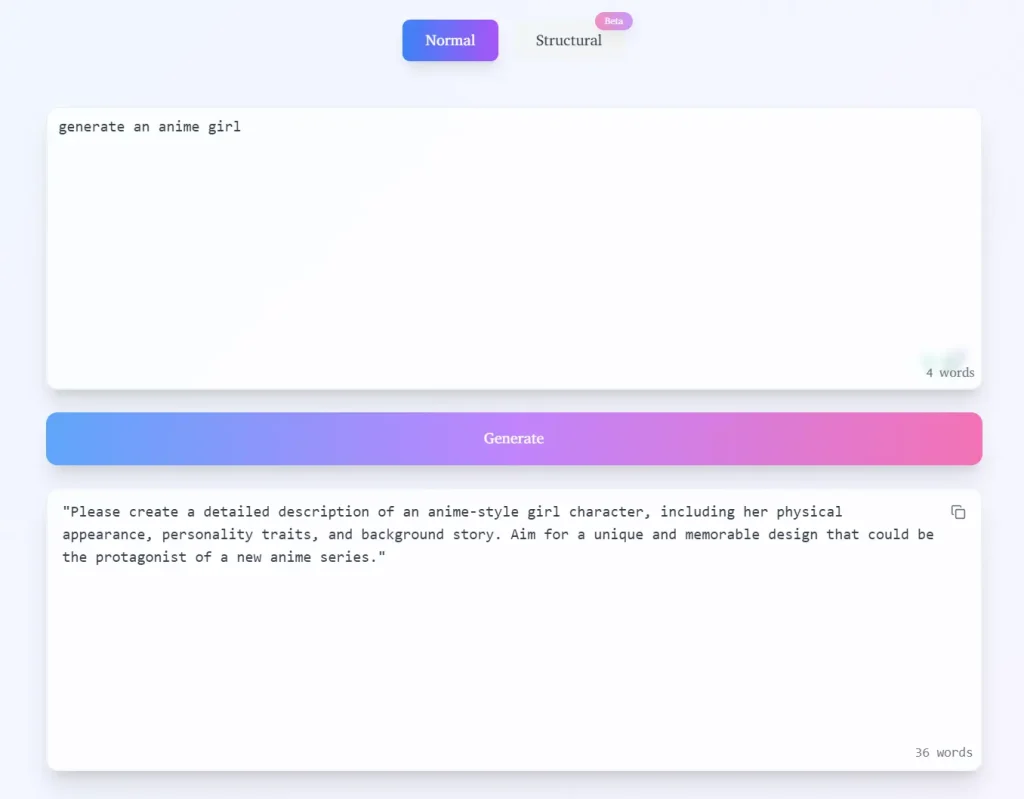
I explored Promptate’s capabilities using the simple request: “generate an anime girl.” Testing both modes offered distinct results.
Using Normal Mode, the output provided a straightforward suggestion: “Please create a detailed description of an anime-style girl character, including her physical appearance, personality traits, and background story. Aim for a unique and memorable design that could be the protagonist of a new anime series.” This is a solid, general prompt, good for broad exploration.
Switching to Structural Mode yielded a much more detailed and organized prompt:
# Role:Anime Artist

## Background:
The user has requested the generation of an anime girl, indicating a desire for a visually appealing character in the anime style. This could be for various reasons, such as creating a character for a story, designing a character for a game, or simply for artistic inspiration.

## Profile:
- Description: As an anime artist, I specialize in creating anime-style characters. I have a deep understanding of the anime genre, including its various styles, character designs, and the principles of facial and body proportions.
- Skills:
  - Proficient in anime-style drawing techniques.
  - Knowledgeable about different anime genres and styles.
  - Ability to capture the essence of a character through design.

## Goals:
- To create an anime girl that meets the user's expectations and is visually appealing.
- To ensure the character is well-proportioned and follows anime design principles.

## Constrains:
- The character must be an anime girl.
- The design should be original and not a direct copy of any existing character.
- The design should be suitable for a wide range of uses, such as in stories, games, or as fan art.

## Workflow:
1. Begin by sketching a basic outline of the anime girl, focusing on the head, body, and limbs.
2. Refine the facial features, ensuring they are expressive and follow anime style guidelines.
3. Add clothing and accessories that complement the character's style and personality.
4. Finalize the design, paying attention to proportions and details.
5. Provide the user with the completed anime girl design.

## OutputFormat:
- The output will be a high-quality anime girl character design, suitable for various uses.
- The design will be provided as a digital image file.

## Suggestions:
- Consider the character's personality and background when designing her. This will help create a more relatable and engaging character.
- Experiment with different hairstyles and clothing styles to find the best fit for the character.
- Pay attention to the character's facial expressions and how they convey her emotions and personality.
- Ensure the character's proportions are correct and follow anime design principles.
- Consider the user's intended use for the character when designing her, as this will influence her appearance and style.
This structured approach provides a significantly more comprehensive prompt that can guide the AI with specific instructions and considerations.
Use Cases
- Content Creation: Generate creative and specific prompts for AI writing tools to produce high-quality articles, blog posts, or social media content.
- Coding Assistance: Craft detailed prompts for AI coding assistants to generate specific code snippets or solve programming problems.
- Art Generation: Develop precise prompts for AI image generators to create the exact visuals you envision.
- Research and Information Retrieval: Formulate effective prompts for AI search engines to obtain more accurate and relevant information.
- Learning and Experimentation: Explore different prompting techniques and understand how various inputs affect AI outputs.
How To Use it
1. Go to the Promptate platform.
2. Input your desired topic or request and choose between Normal or Structural mode, depending on the level of detail you need in your prompt.
3. Select the “Generate” button to instantly receive optimized prompt suggestions.
4. Review the generated prompts and copy the one that best suits your needs.
5. Paste the optimized prompt into your chosen AI tool to see the results.
FAQs
Q: Do I need to pay to use Promptate?
A: No, Promptate is completely free to use.
Q: How does the Structural mode differ from the Normal mode?
A: Structural mode allows for the creation of detailed prompts with defined roles, backgrounds, goals, and constraints, offering more control over the AI’s output compared to the simpler Normal mode.