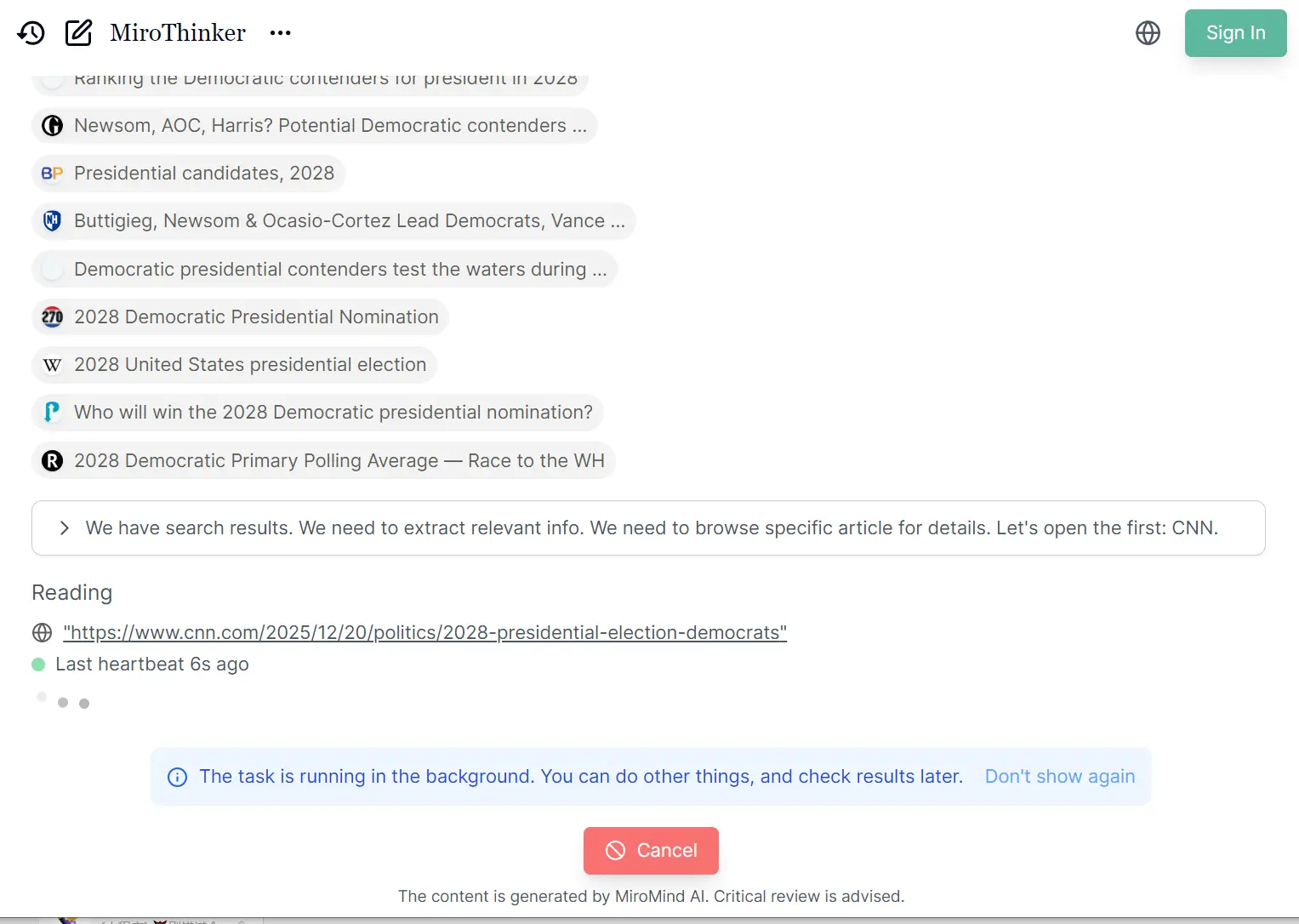
MiroThinker is an open-source deep research AI agent that performs tool-augmented reasoning and complex information-seeking tasks. It handles multi-step analysis workflows across diverse real-world challenges, from academic research to technical documentation analysis.
The agent works through interactive scaling, a concept that extends beyond traditional model size and context length improvements. MiroThinker trains models to handle deeper and more frequent interactions with external environments as a third dimension of performance enhancement.
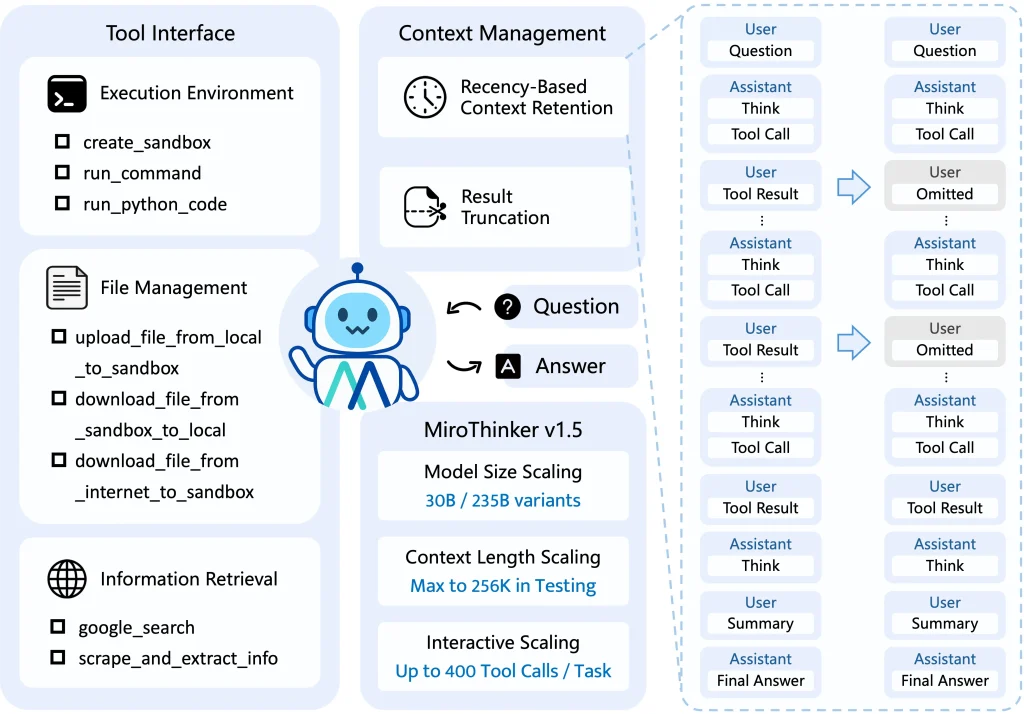
The latest release supports 256K context windows and executes up to 400 tool calls per task. This architecture allows the model to search, extract, analyze, and verify information across multiple sources before reaching conclusions.
MiroMind’s philosophy diverges from conventional approaches that attempt to encode all knowledge into model parameters. MiroThinker acts more like a scientist who actively verifies information, identifies uncertainties, and self-corrects through evidence gathering.
Features
- Interactive Scaling Architecture: The model performs up to 400 tool calls per task.
- Extended Context Management: Maintains long-horizon reasoning across extensive document sets.
- Tool Integration: Native support for web search (Serper API), content extraction (Jina), code execution (E2B sandbox), and LLM-based summarization.
- Multi-Scale Model Options: Available in 30B and 235B parameter configurations.
- Benchmark Performance: Achieves 39.2% on HLE-Text, 69.8% on BrowseComp, 71.5% on BrowseComp-ZH, and 80.8% on GAIA-Val-165. These results surpass previous open-source agents and establish new standards for BrowseComp evaluation.
- Open Training Infrastructure: Includes MiroVerse dataset (147k samples), MiroTrain training framework, and MiroRL reinforcement learning components.
- Memory Management System: Implements keep_tool_result parameter for context optimization. Retains only K most recent tool responses while preserving complete action sequences.
Use Cases
- Academic Literature Review: Researchers use MiroThinker to survey recent papers across multiple databases. The agent searches arXiv, extracts abstracts, performs text clustering analysis, cross-references citations, and generates structured summaries with paper identifiers. This process replaces weeks of manual literature review with automated, comprehensive analysis.
- Technical Documentation Synthesis: Development teams deploy the system to aggregate information from scattered API documentation, GitHub issues, and Stack Overflow discussions. MiroThinker crawls multiple sources, executes code examples to verify accuracy, and produces unified technical guides with working code samples.
- Market Intelligence Gathering: Business analysts leverage the tool for competitive research. The agent searches company websites, analyzes product specifications, scrapes pricing data, and compiles comparative reports with sourced evidence. The verification loop ensures data accuracy across multiple information sources.
- Regulatory Compliance Research: Legal teams utilize MiroThinker to track regulatory changes across jurisdictions. The system monitors government websites, extracts relevant policy updates, identifies contradictions between sources, and maintains audit trails with original document references.
- Scientific Data Analysis: Researchers in computational fields use the code execution capabilities to process datasets. MiroThinker retrieves raw data, writes analysis scripts, executes statistical computations, identifies anomalies, and generates reports with reproducible methodology documentation.
How to Use MiroThinker
1. To get started, make sure you have Python 3.10+ installed. You also need the uv package manager for dependency handling.
2. Clone the Repository from GitHub.
git clone https://github.com/MiroMindAI/MiroThinker
cd MiroThinker/apps/miroflow-agent
uv sync
3. MiroThinker relies on external tools. You must obtain API keys for the services you intend to use. Rename the example environment file:
cp .env.example .envEdit the .env file and add your keys:
# API for Google Search (recommend)
SERPER_API_KEY=your_serper_key
SERPER_BASE_URL="https://google.serper.dev"

# API for Web Scraping (recommend)
JINA_API_KEY=your_jina_key
JINA_BASE_URL="https://r.jina.ai"

# API for Linux Sandbox (recommend)
E2B_API_KEY=your_e2b_key

# API for LLM-as-Judge (for benchmark testing)
OPENAI_API_KEY=your_openai_key
OPENAI_BASE_URL=https://api.openai.com/v1

# API for Open-Source Audio Transcription Tool (for benchmark testing)
WHISPER_MODEL_NAME="openai/whisper-large-v3-turbo"
WHISPER_API_KEY=your_whisper_key
WHISPER_BASE_URL="https://your_whisper_base_url/v1"

# API for Open-Source VQA Tool (for benchmark testing)
VISION_MODEL_NAME="Qwen/Qwen2.5-VL-72B-Instruct"
VISION_API_KEY=your_vision_key
VISION_BASE_URL="https://your_vision_base_url/v1/chat/completions"

# API for Open-Source Reasoning Tool (for benchmark testing)
REASONING_MODEL_NAME="Qwen/Qwen3-235B-A22B-Thinking-2507"
REASONING_API_KEY=your_reasoning_key
REASONING_BASE_URL="https://your_reasoning_base_url/v1/chat/completions"

# API for Claude Sonnet 3.7 as Commercial Tools (optional)
ANTHROPIC_API_KEY=your_anthropic_key
ANTHROPIC_BASE_URL=https://api.anthropic.com

# API for Sougou Search (optional)
TENCENTCLOUD_SECRET_ID=your_tencent_cloud_secret_id
TENCENTCLOUD_SECRET_KEY=your_tencent_cloud_secret_key

# API for Summary LLM (optional)
SUMMARY_LLM_BASE_URL="https://your_summary_llm_base_url/v1/chat/completions"
SUMMARY_LLM_MODEL_NAME=your_summary_llm_model_name
SUMMARY_LLM_API_KEY=your_summary_llm_api_key
4. You need to host the LLM itself. The recommended method uses SGLang.
# Example for the 30B model
python3 -m sglang.launch_server --model-path miromind-ai/MiroThinker-v1.5-30B --port 61002
5. Once the server is running, you can execute the agent script. The agent will now accept your task description in the main.py file and begin its research loop.
uv run python main.py llm=qwen-3 agent=mirothinker_v1.5_keep5_max200 llm.base_url=http://localhost:61002/v1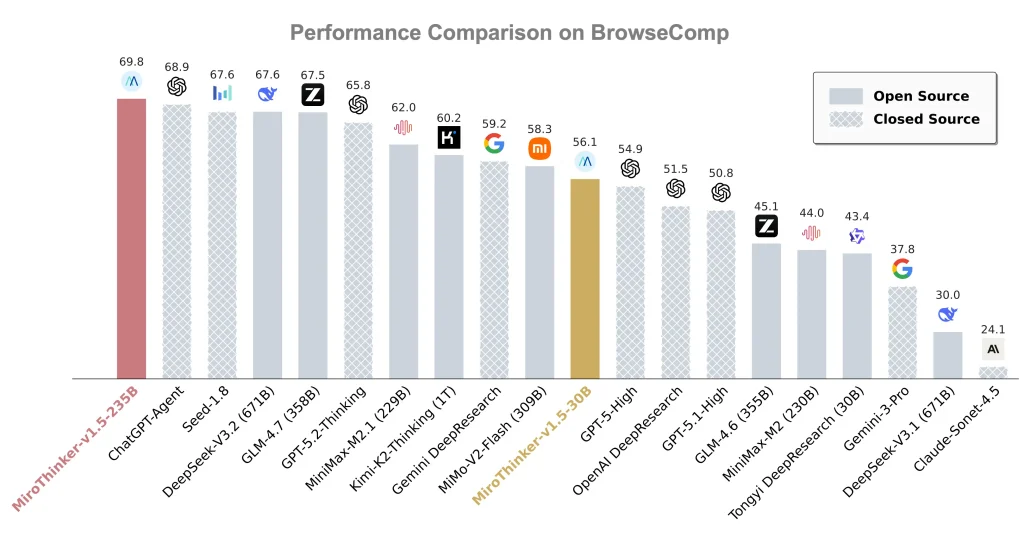
Pros
- Transparency: You can see exactly how the agent reaches its conclusions.
- High Performance: The v1.5-30B model outperforms larger models on benchmarks like BrowseComp-ZH and achieves state-of-the-art results on GAIA-Val-165.
- Cost Efficiency: It runs on consumer-grade hardware configurations (multi-GPU).
- Context Management: The “recency-based context retention” keeps the agent focused.
Cons
- Setup Complexity: This is not a “one-click” install. You need to manage multiple API keys (Serper, Jina, E2B) and set up a local model server.
- Hardware Requirements: Running the 30B or 235B models locally requires significant GPU VRAM.
- Execution Speed: The agent might take several minutes to complete a task as it iterates through searches and code execution.
Related Resources
- MiroFlow Agent Framework: Access the reproducible research agent framework that delivers state-of-the-art performance across multiple benchmarks.
- MiroVerse Training Dataset: Download the premium open-source dataset containing 147k samples for training research agents.
- MiroTrain Infrastructure: Deploy the training infrastructure that supports stable and efficient model development.
- MiroRL Reinforcement Learning: Implement reinforcement learning components for advanced agent optimization.
- SGLang Documentation: Learn model serving techniques for deploying large language models.
- Model Weight Repository: Access pre-trained model weights for all MiroThinker versions on HuggingFace.
- Technical Report: Read the academic paper detailing MiroThinker architecture and evaluation methodology.
FAQs
Q: Which MiroThinker version should I deploy for production use?
A: Version 1.5 with the mirothinker_v1.5_keep5_max200 configuration serves most production scenarios. For tasks requiring extensive web navigation like BrowseComp benchmarks, switch to mirothinker_v1.5_keep5_max400.
Q: Can MiroThinker operate without commercial API dependencies?
A: The minimal configuration requires three services: Serper for search, Jina for scraping, and E2B for code execution. The framework supports local deployment of vision processing (Qwen2.5-VL), audio transcription (Whisper), and reasoning engines (Qwen3-235B) to reduce commercial dependencies.
Q: How does interactive scaling differ from standard scaling approaches?
A: Traditional scaling increases model parameters or context length. Interactive scaling adds a third dimension by training models to execute deeper environment interactions. MiroThinker performs multiple rounds of search, analysis, code execution, and verification within a single task. This approach mirrors human research methodology, where initial findings prompt additional investigation.
Q: What hardware specifications support MiroThinker-v1.5-30B deployment?
A: The 30B model requires four GPUs with sufficient VRAM for tensor parallelism.
Q: How does MiroThinker handle hallucination compared to standard LLMs?
A: The tool-augmented reasoning architecture reduces hallucination through external verification. When the model generates claims, it searches for supporting evidence, scrapes source documents, and cross-references information across multiple sources.
Q: What differentiates MiroThinker from OpenAI Deep Research?
A: MiroThinker provides full transparency with open-source weights, training data, and framework code under MIT license. Teams can audit decision processes, customize implementations, and deploy without API dependencies.
Q: How do I monitor long-running research tasks?
A: The framework includes progress monitoring scripts in benchmarks/check_progress/ that display completion status, elapsed time, and estimated remaining duration. Console logs show real-time tool calls and reasoning steps.