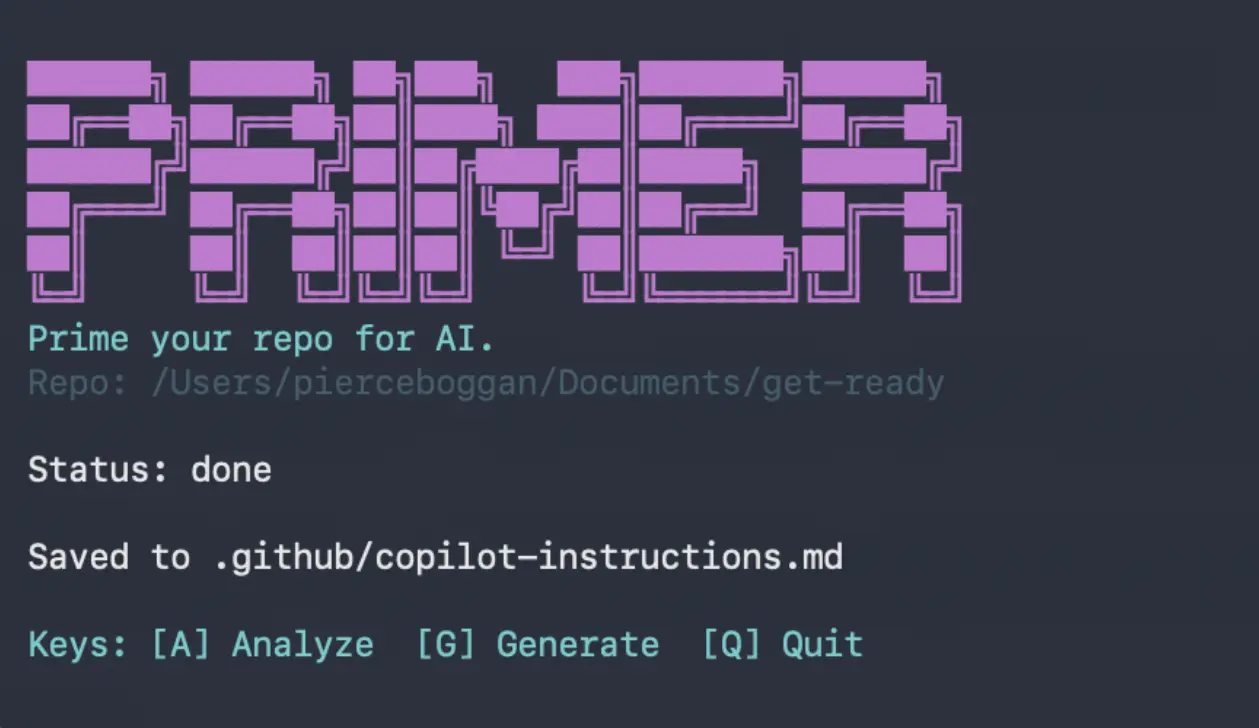
Primer is a free, open-source CLI tool that analyzes your GitHub repository and generates instruction files(.github/copilot-instructions.md) for AI coding agents like GitHub Copilot.
The CLI works by scanning your files for languages, frameworks, and package managers. It then uses the Copilot SDK to generate context-aware instructions that make AI pair programming more accurate.
Primer supports batch processing across multiple repositories and includes an evaluation framework to measure whether the generated instructions actually improve AI responses.
Features
- Repository Analysis: Scans your project to detect language files (
.ts,.js,.py,.go), framework indicators (package.json,tsconfig.json), and package manager lock files. - AI-Powered Generation: Uses the Copilot SDK to start a CLI session where an AI agent explores your codebase using tools like
glob,view, andgrep. - Batch Processing: Process dozens or hundreds of repositories across organizations with a single command.
- Evaluation Framework: Runs prompts with and without instructions, uses a judge model to score responses, and generates comparison reports.
- Interactive TUI: Navigate through analysis, generation, and preview steps with keyboard shortcuts.
Use Cases
- Standardizing Code Style: Teams use Primer to make sure AI assistants follow specific linting rules and architectural patterns.
- Onboarding New Developers: You can generate instructions that explain the project entry points to help new hires use AI tools more effectively.
- Managing Large Organizations: DevOps engineers use the batch processing feature to apply AI instructions to hundreds of repos at once.
- Testing AI Accuracy: Developers can use the evaluation framework to compare AI responses with and without custom instructions.
How to Use It
You need Node.js 18 or higher installed on your system. You also need the GitHub Copilot CLI, which comes bundled with VS Code’s Copilot Chat extension. Open your terminal and authenticate your account:
copilot
/login
For batch processing and PR creation features, install and authenticate GitHub CLI:
brew install gh && gh auth loginClone the Primer repository and install its dependencies:
git clone https://github.com/pierceboggan/primer.git
cd primer
npm install
The quickest way to start is with the init command. Run the interactive setup for your current directory:
npx tsx src/index.ts initIf you want to accept all defaults and generate instructions automatically without prompts, add the yes flag:
npx tsx src/index.ts init --yesTo work with a GitHub repository instead of a local path, use the github flag:
npx tsx src/index.ts init --githubFor a visual interface, launch the TUI (terminal user interface):
npx tsx src/index.ts tuiThe TUI provides keyboard shortcuts for common operations. Press [A] to analyze your repository and detect languages and frameworks. Press [G] to generate instructions using the Copilot SDK. Press [S] to save generated instructions when in preview mode, or [D] to discard them. Press [Q] to quit the application.
You can run the TUI on a specific repository by providing a path:
npx tsx src/index.ts tui --repo /path/to/repoTo skip the animated intro screen, add the no-animation flag:
npx tsx src/index.ts tui --no-animationTo generate instructions without the TUI interface, run the instructions command for your current directory:
npx tsx src/index.ts instructionsYou can specify a different repository and custom output location:
npx tsx src/index.ts instructions --repo /path/to/repo --output ./instructions.mdIf you want to use a specific AI model for generation, add the model flag:
npx tsx src/index.ts instructions --model gpt-5Batch processing works through an interactive TUI that handles multiple repositories across organizations. Launch it with:
npx tsx src/index.ts batchThe batch interface displays all your GitHub organizations and their repositories.
- Press [Space] to toggle selection on individual repositories.
- Press [A] to select all repos at once.
- Press [Enter] to confirm your selection and move to the processing confirmation screen.
- Press [Y] to confirm processing or [N] to cancel.
- Press [Q] to quit the batch interface at any time.
Primer automatically handles cloning, branching, generating instructions, committing changes, pushing to remote, and creating pull requests for each selected repository.
You can save the batch processing results to a file:
npx tsx src/index.ts batch --output results.jsonIf you want to see what Primer detects in your repository without generating instructions, use the analyze command:
npx tsx src/index.ts analyzeTo analyze a specific directory, provide the path as an argument:
npx tsx src/index.ts analyze /path/to/repoFor machine-readable output, add the json flag:
npx tsx src/index.ts analyze /path/to/repo --jsonThe config generation feature creates various configuration files for your repository. Generate an MCP configuration:
npx tsx src/index.ts generate mcpGenerate VS Code settings (the force flag overwrites existing files):
npx tsx src/index.ts generate vscode --forceGenerate custom prompts:
npx tsx src/index.ts generate promptsGenerate agent configurations:
npx tsx src/index.ts generate agentsGenerate an AI ignore file:
npx tsx src/index.ts generate aiignoreYou can create pull requests automatically for any GitHub repository. Replace “owner” and “repo-name” with the actual repository details:
npx tsx src/index.ts pr owner/repo-nameTo specify a custom branch name instead of the default, add the branch flag:
npx tsx src/index.ts pr owner/repo-name --branch primer/custom-branchThe evaluation framework tests whether your instructions improve AI responses. Start by creating a starter evaluation configuration:
npx tsx src/index.ts eval --initThis generates a primer.eval.json file where you define test cases. Each case requires an ID, a prompt (the question you want the AI to answer), and an expectation (what a good answer should include). Run the evaluation by providing the config file and repository path:
npx tsx src/index.ts eval primer.eval.json --repo /path/to/repoYou can save evaluation results to a file:
npx tsx src/index.ts eval --output results.jsonTo specify which models to use for generation and judging responses, add the model flags:
npx tsx src/index.ts eval --output results.json --model gpt-5 --judge-model gpt-5Available Commands
Here’s a complete list of commands available in Primer:
| Command | Description | Common Options |
|---|---|---|
init | Interactive setup for current directory | --yes (accept defaults), --github (work with GitHub repo) |
tui | Launch interactive terminal UI | --repo /path/to/repo, --no-animation |
instructions | Generate instruction file | --repo /path/to/repo, --output ./file.md, --model gpt-5 |
batch | Process multiple repositories | --output results.json |
analyze | Analyze repository structure | /path/to/repo, --json |
generate mcp | Generate MCP configuration | none |
generate vscode | Generate VS Code settings | --force (overwrite existing) |
generate prompts | Generate custom prompts | none |
generate agents | Generate agent configs | none |
generate aiignore | Generate AI ignore file | none |
templates | View available templates | none |
config | View Primer configuration | none |
update | Check for updates | none |
pr | Create pull request | owner/repo-name, --branch custom-branch |
eval | Run evaluation framework | --init, --output results.json, --model, --judge-model |
Pros
- Local Execution: TheCLI runs in the local and you havefull control over the output.
- Organization Wide: The batch mode saves hours of manual work for large teams.
- Evaluation Tools: The built-in judge model helps you verify if the instructions actually work.
- Customizable: You can choose specific models like GPT or experimental versions for generation.
Cons
- Complex Setup: You have to clone the repo and install dependencies.
- CLI Dependencies: The CLI requires the GitHub Copilot CLI to be authenticated and active.
Related Resources
- GitHub Copilot Extension: Install this to get the required Copilot CLI.
- GitHub CLI Documentation: Learn how to set up the
ghtool for pull request automation. - Free AI Tools for GitHub: Discover more free AI tools for GitHub developers.
FAQs
Q: Does Primer work with private repositories?
A: Yes, the tool works with any repository you can access locally or via the GitHub CLI. It clones the repo to your machine to perform the analysis.
Q: Can I use this without a GitHub Copilot subscription?
A: No, you need an active subscription. The tool relies on the Copilot SDK to explore your codebase and generate the instructions.
Q: Where does the tool save the instructions?
A: The tool saves the output to .github/copilot-instructions.md. You can change this path using the --output flag during the generation command.
Q: What happens if the generation hangs?
A: Run copilot /login again to refresh your credentials and try the command once more.
Q: Can I use Primer with other AI coding assistants besides GitHub Copilot?
A: The instruction files Primer generates follow GitHub’s .github/copilot-instructions.md convention, which is currently specific to GitHub Copilot. Other AI assistants might not read these files. However, you could adapt the generated content for other tools that support custom instructions or context files.