What The Food is a free AI-powered food detection and calorie counter tool that identifies meals from photos and provides detailed nutritional breakdowns within seconds.
Upload any food image, and the AI scanner delivers calorie counts, macronutrient data, serving sizes, and recipe suggestions.
Features
- Instant Food Detection – Advanced AI technology identifies food items and calculates nutritional content in seconds
- Comprehensive Nutritional Analysis – Complete breakdown of calories, protein, carbohydrates, fat, fiber, and serving sizes
- Multi-Item Recognition – Analyzes complex meals with multiple food components in a single image
- Recipe Generation – Provides step-by-step cooking instructions to recreate identified dishes
- Zero Cost Access – Completely free with no registration, credit cards, or hidden fees required
Case Studies
I tested What The Food with a photo of a plated steak dinner to evaluate its accuracy and detail level. The image contained sliced steak, mixed vegetables (broccoli, cauliflower, carrots, green beans, tomatoes), and a creamy pepper sauce.
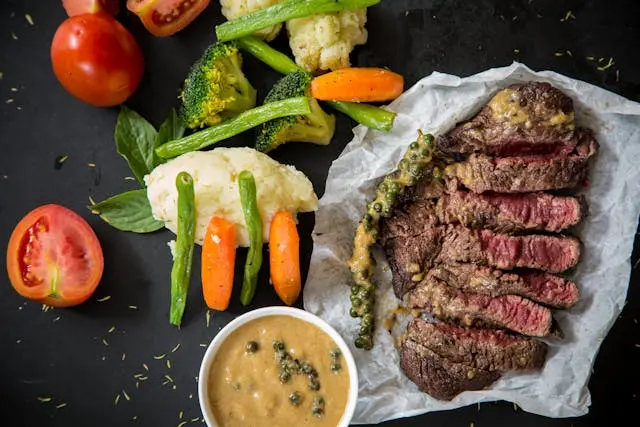
The AI analyzed the complete meal and returned detailed results within 3 seconds. It identified the dish as “Steak with Vegetables and Pepper Sauce” and provided comprehensive nutritional data:
Nutritional Breakdown:
- 550 total calories
- 45g protein
- 30g carbohydrates
- 30g fat
- 8g fiber
- 10g sugar
Serving Size Estimates:
- 200g steak portion
- 150g mixed vegetables
- 50g pepper sauce
The tool went beyond basic nutrition facts by providing a complete recipe reconstruction. It outlined the cooking process step-by-step: seasoning and searing the steak for 3-4 minutes per side, steaming the vegetables until tender-crisp, and creating the pepper sauce with shallots, beef broth, cream, and green peppercorns.

This level of detail exceeded my expectations for a free tool. The accuracy appeared solid for portion sizes and ingredient identification, though I couldn’t verify exact nutritional values without laboratory testing.
Use Cases
- Fitness Enthusiasts – Track macros accurately for bodybuilding, weight loss, or athletic performance goals without manual logging
- Busy Professionals – Quick nutritional assessment of restaurant meals, takeout, or home-cooked dishes during hectic schedules
- Health-Conscious Individuals – Monitor daily caloric intake and nutritional balance for general wellness and dietary awareness
- Cooking Enthusiasts – Reverse-engineer recipes from photos of appealing dishes seen online or at restaurants
- Diabetic Management – Estimate carbohydrate content in meals for better blood sugar control and insulin planning
How To Use It
1. Take a clear photo of your meal from directly above or at a slight angle. Good lighting produces better results than dim restaurant lighting. The entire dish should be visible without shadows covering food items.
2. Visit whatthefood.io and drag your image into the upload area, or click to browse files from your device.
3. Click the Analyze Food button, and the AI starts processing your image.
4. The AI displays identified food items with individual nutritional breakdowns. Scroll through the complete analysis, including calories, macros, serving sizes, and recipe suggestions. Results appear in an organized format that’s easy to screenshot or reference later.
Pro Tips:
- Higher resolution images (at least 1080p) improve accuracy significantly
- Separate overlapping foods when possible for better individual identification
- Include any sauces or dressings in the frame since they contribute substantial calories
- Test the same meal from different angles if initial results seem inaccurate
Pros
- Completely Free Access – No subscription fees, trials, or premium tiers to unlock all functionality
- Fast Processing Speed – Results appear in under 5 seconds for most image uploads
- Multi-Food Recognition – Handles complex plates with numerous ingredients and components accurately
- Recipe Recreation – Bonus cooking instructions help reproduce dishes you enjoy
Cons
- 85-90% Accuracy Limitation – Estimates can vary based on preparation methods, portion sizes, and ingredient variations
- Image Quality Dependency – Poor lighting, blurry photos, or unusual angles reduce identification accuracy
- No Historical Tracking – Results aren’t saved automatically for long-term dietary monitoring
FAQs
Q: Can the AI analyze homemade or complex dishes?
A: Yes, the AI handles multi-component meals and can identify individual ingredients in complex dishes like casseroles, stir-fries, and layered foods. However, accuracy decreases with heavily mixed or processed foods where individual components aren’t clearly visible.
Q: What happens if the AI misidentifies my food?
A: The tool doesn’t include manual correction features for misidentified items. If results seem inaccurate, try uploading a clearer image from a different angle or with better lighting.