BusinessCardGen is a free AI-powered business card generator that creates digital business cards from your professional details.
Enter your profile, and the AI analyzes your information to design business cards that accurately represent your brand and style.
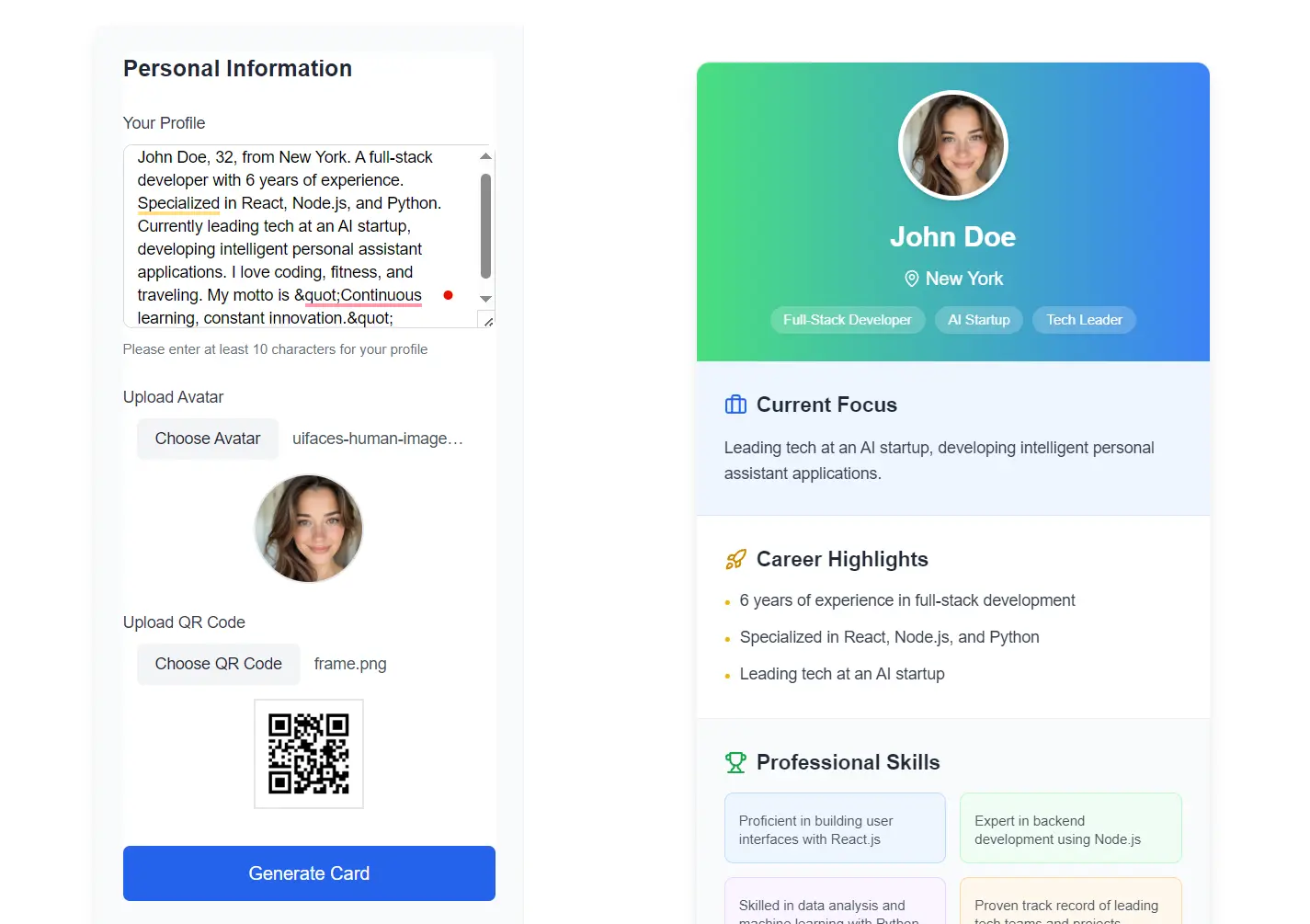
I used BusinessCardGen to create a business card for a developer profile. Here’s what I entered:
‘John Doe, 32, from New York. A full-stack developer with 6 years of experience. Specialized in React, Node.js, and Python. Currently leading tech at an AI startup, developing intelligent personal assistant applications. I love coding, fitness, and traveling. My motto is “Continuous learning, constant innovation.”‘
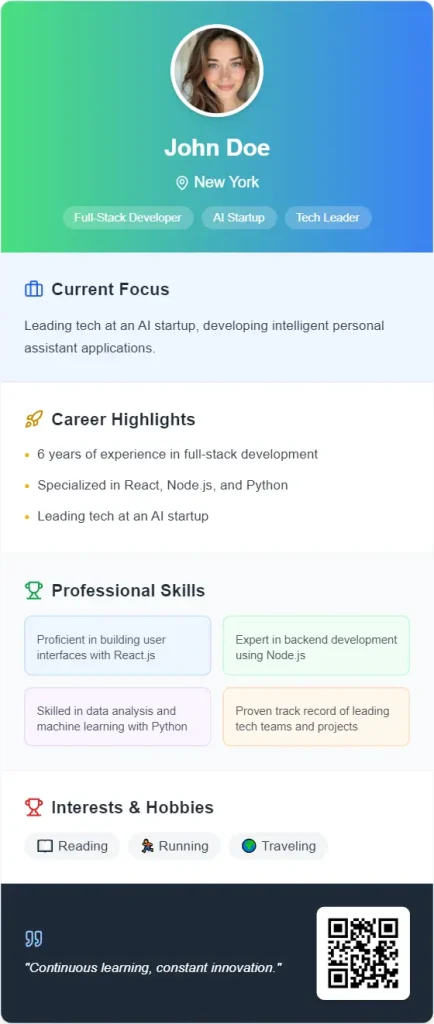
After entering this profile information along with a profile picture and QR code, the tool generated a professional digital business card. The card featured a clean design with a gradient background transitioning from green to blue. It organized John’s information into clear sections:
- Personal identification (name and location)
- Professional roles (Full-Stack Developer, AI Startup, Tech Leader)
- Current focus (leading tech at an AI startup)
- Career highlights (experience, specializations)
- Professional skills (detailed breakdown of technical abilities)
- Personal interests (reading, running, traveling)
The card also included John’s professional motto at the bottom: “Continuous learning, constant innovation.”
Features
- Personalized Design: Algorithms process user-provided career details to produce branded layouts matching industry aesthetics.
- QR Code Sharing: Generate scannable codes for instant contact sharing at events or in email signatures.
- Cross-Platform Export: Download cards as PNG files or share links via X, Facebook, or LinkedIn.
Use Cases
- Conference Networking: Share digital cards via QR codes during events to avoid carrying physical copies.
- Freelance Portfolios: Link digital cards to online portfolios for cohesive personal branding.
- Team Onboarding: Generate uniform cards for new employees with company-approved templates.
- Remote Job Applications: Include digital card links in resumes for recruiter accessibility.
How To Use It
- Visit the AI-Powered Business Card Generator website.
- Enter your profile using natural language. Include your name, title, skills, experience, and any other professional details you want to highlight. The AI works best when you provide comprehensive information.
- Upload your profile picture to personalize your card. This helps create a more professional and memorable impression.
- Upload or generate a QR code. This can link to your website, LinkedIn profile, or contain your contact information for easy scanning.
- Click the “Generate Card” button and wait a few seconds while the AI analyzes your information and creates your personalized business card.
- Review the generated card. The AI will organize your information into relevant sections based on your profile.
- Export your card as a PNG file for digital use or sharing, or share it directly to social platforms like LinkedIn, Twitter, or Facebook.
- Save your card design for future updates. You can return to modify your information as your career progresses.
Pros
- Reduces design time from hours to seconds
- QR codes enable contactless sharing
- No graphic design expertise required
Cons
- No multi-user bulk generation for large teams
- Limited style variety compared to professional design services
- Dependent on AI suggestions
- Less control over fine-tuned elements
Try BusinessCardGen, share it with your network, and leave a comment on your experience. Your feedback can help others decide if it’s the right fit.