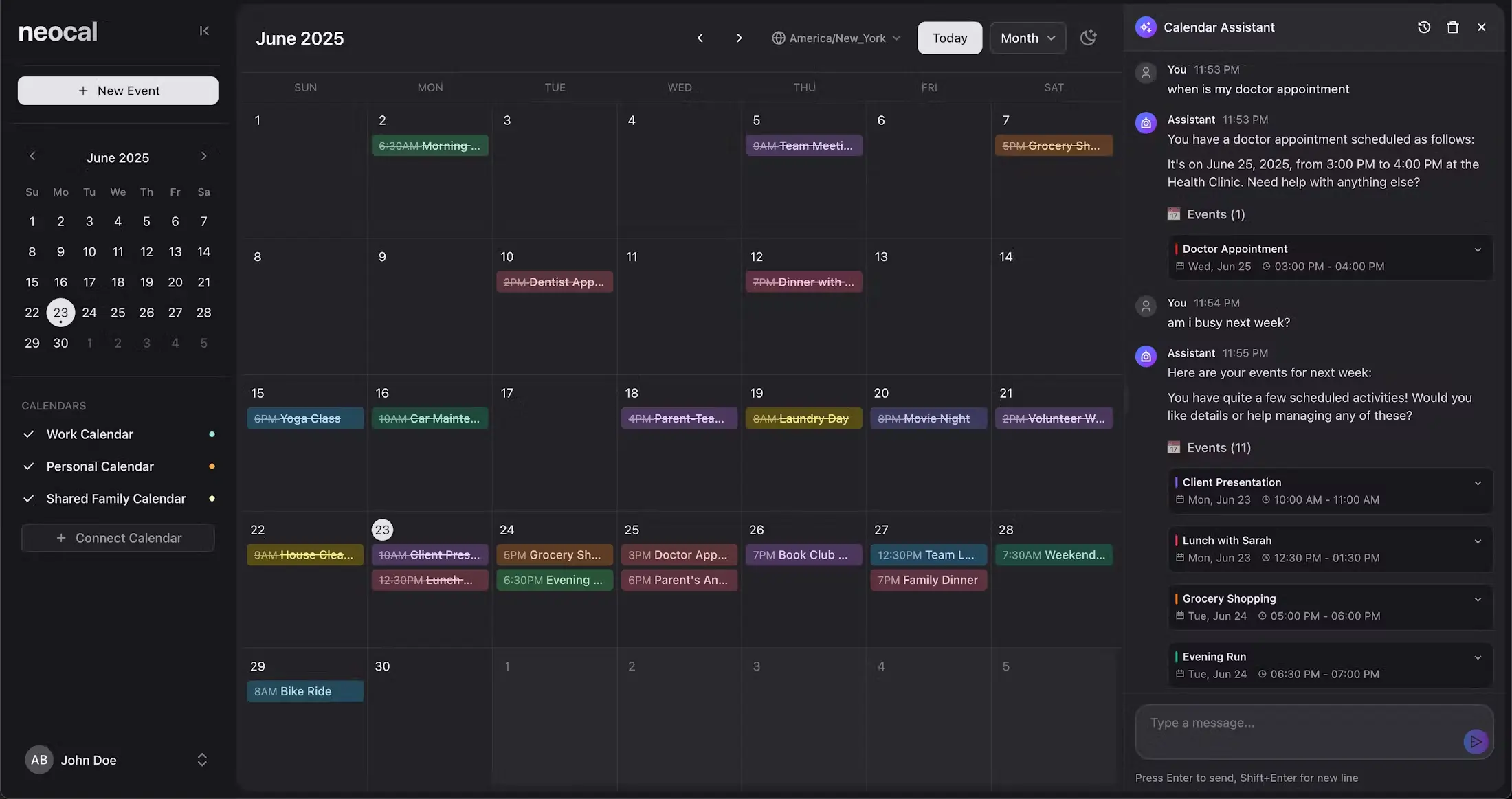
Neocal is a free AI-powered calendar management tool that enables you to schedule, update, and manage events using natural language.
Instead of clicking through multiple screens to create appointments, you can tell Neocal “Schedule lunch with Sarah next Tuesday” and watch it handle the scheduling automatically.
This tool integrates directly with Google Calendar and syncs across all your devices, so changes made in either Neocal or your existing calendar appear everywhere instantly.
This means you can keep using your current workflow while adding AI-powered scheduling capabilities on top.
Features
- Natural Language: Tell the app what to do, like “Schedule lunch with Mark next Monday,” and it creates the event.
- Smart Scheduling: The AI looks for the best meeting times that work for everyone, avoiding conflicts in your schedule.
- Intelligent Queries: You can ask questions about your schedule, such as “When is my next meeting?” and get an immediate answer.
- Time Zone Intelligence: It automatically manages time zones for meetings with people in different parts of the world.
- Quick Actions: Use simple commands to move, cancel, or change events without manual adjustments.
- Context Awareness: The tool learns your habits and preferences to anticipate your scheduling needs, like setting up a “usual weekly review.”
How To Use It
Initial Setup
- Visit neocal.ai and create your account
- Connect your Google Calendar with one click authorization
- Grant permissions for Neocal to read and modify your calendar events
- Complete the brief setup wizard to configure your preferences
Daily Usage
- Open Neocal through your web browser or mobile app
- Type or speak your scheduling request in the main input field
- Review Neocal’s suggested time slots and event details
- Confirm the suggestion or request modifications
- Watch as the event automatically appears in both Neocal and Google Calendar
Advanced Commands
- Use specific time references: “Schedule client call for 2 PM EST next Monday”
- Set recurring events: “Weekly team standup every Tuesday at 9 AM”
- Modify existing events: “Change tomorrow’s presentation to 3 PM”
- Query your schedule: “What meetings do I have with clients this week?”
Pros
- Zero Learning Curve – Start scheduling immediately using natural language without learning complex interfaces or shortcuts
- Genuine Time Savings – Eliminates the back-and-forth typically required for scheduling, especially for complex multi-person meetings
- Existing Workflow Integration – Works with Google Calendar so you don’t need to abandon your current tools or convince colleagues to switch platforms
- Free Access – Full functionality available at no cost, making it accessible for individuals and small teams
- Cross-Device Synchronization – Changes sync instantly across all your devices and calendar applications
- Time Zone Intelligence – Automatically handles international scheduling without manual calculations
Cons
- Limited Calendar Platform Support – Currently only integrates with Google Calendar, excluding Outlook and Apple Calendar users
- Internet Dependency – Requires consistent internet connection for AI processing and real-time synchronization
- Privacy Considerations – AI system needs access to your calendar data to function, which some users might find concerning
- Natural Language Limitations – Complex scheduling scenarios with multiple constraints might still require manual intervention
- No Mobile App Yet – Currently web-based only, though it works on mobile browsers
FAQs
Q: Can I use Neocal with multiple Google Calendar accounts?
A: Yes, Neocal supports connecting and managing multiple Google Calendar accounts from a single interface, making it useful for people who maintain separate personal and professional calendars.
Q: What happens if I delete an event in Google Calendar?
A: Changes sync bidirectionally, so events deleted in Google Calendar will also disappear from Neocal, and vice versa. This maintains consistency across all your calendar applications.
Q: How does Neocal handle different time zones?
A: The tool automatically detects and adjusts for different time zones when you schedule meetings with people in other locations. For example, you can tell it to schedule a call at 10 AM in their time zone, and it will convert it correctly for your calendar.