Cerebellum is an open-source browser automation system built with TypeScript.
It uses AI (Claude 3.5 Sonnet) and the Selenium browser automation library to achieve user-defined goals within web pages using simulated keyboard and mouse actions. Think of it as an open-source version of Claude’s Computer Use.
Features
- Browser Compatibility: Works with any Selenium-supported browser
- AI-Powered Navigation: Uses Claude 3.5 Sonnet for intelligent decision-making
- Form Automation: Fills forms using JSON data
- Dynamic Instructions: Accepts runtime commands to adjust browsing behavior
- Visual Processing: Captures and analyzes screenshots for navigation
- State Management: Tracks browsing history and navigation paths
Use Cases
- Automated Data Extraction: Extract product information, pricing, or other structured data from e-commerce websites for market research or price comparison tools.
- Web Application Testing: Automate repetitive testing procedures, like form submissions and UI interactions, across different browsers for efficient quality assurance. Test login flows, user registration, or checkout processes with ease.
- Content Aggregation: Collect specific information from various news sites or blogs based on keywords or topics. Automatically gather relevant articles or data points for research or content curation.
- Automated Workflow Execution: Automate routine tasks like filling out online forms, scheduling meetings, or making online purchases. Free up your time by automating repetitive web interactions.
How It Works
Cerebellum represents web browsing as navigation through a directed graph. Each webpage is a node containing visible elements and data. User actions (clicks, typing) are edges connecting these nodes.
Starting on an initial webpage, Cerebellum strives to reach a target node representing the completed goal. An LLM (Claude 3.5 Sonnet) analyzes page content and interactive elements to discover new nodes, determining the next action based on the current state and past actions.
Cerebellum executes this planned action, and the resulting new state feeds back into the LLM for the subsequent step. This cycle repeats until the goal is achieved or deemed unattainable.
Pros
- Open-source and free to use.
- Leverages the power of a large language model for intelligent automation.
- Compatible with a wide range of browsers.
- Handles complex web interactions.
Cons
- Requires an Anthropic API key for the LLM.
- Reliance on a third-party API can introduce potential points of failure.
- Still under active development, so some features are in progress.
Pricing
Cerebellum is open-source and free to use. However, using the Anthropic Claude model requires an Anthropic API key, which might have associated costs.
How to use it
1. Sign up for an account with Anthropic and obtain your API key. This key is necessary for accessing their AI capabilities.
2. Use npm to install the necessary packages. Open your terminal and run the following command:
npm install cerebellum-ai selenium-webdriver3. Install the appropriate WebDriver for the browser you intend to automate.
For macOS:
- For Chrome:
brew install chromedriver- For Firefox:
brew install geckodriverFor Linux/Windows:
Follow the instructions on the Selenium package page: Selenium WebDriver.
4. Set the ANTHROPIC_API_KEY environment variable with your Anthropic API key. This allows Cerebellum to authenticate requests.
For macOS/Linux:
You can set the variable in your terminal:
export ANTHROPIC_API_KEY='your_api_key_here'For Windows:
Use the following command in Command Prompt:
set ANTHROPIC_API_KEY=your_api_key_here5. Create a WebDriver instance to use with Cerebellum. Below is an example for initializing a Chrome browser:
import { Builder, Browser } from 'selenium-webdriver';
const browser = await new Builder()
  .forBrowser(Browser.CHROME)
  .build();
6. Initialize the AnthropicPlanner and BrowserAgent as follows:
import { AnthropicPlanner, BrowserAgent } from 'cerebellum-ai';
// Define your goal
const goal = 'Show me the Wikipedia page of the creator of Bitcoin';
// Set your Anthropic API key
const anthropicApiKey = process.env.ANTHROPIC_API_KEY;
// Initialize ActionPlanner with LLM
const planner = new AnthropicPlanner({ apiKey: anthropicApiKey });
// Initialize BrowserAgent to tie together the browser, planner, and goal
const agent = new BrowserAgent(browser, planner, goal);
// Start the automated navigation process
await agent.start();
7. As Cerebellum executes the automation tasks, you can monitor the actions being performed. If needed, you can adjust your goal or provide additional instructions to refine the behavior of the automation.
Example Use Case
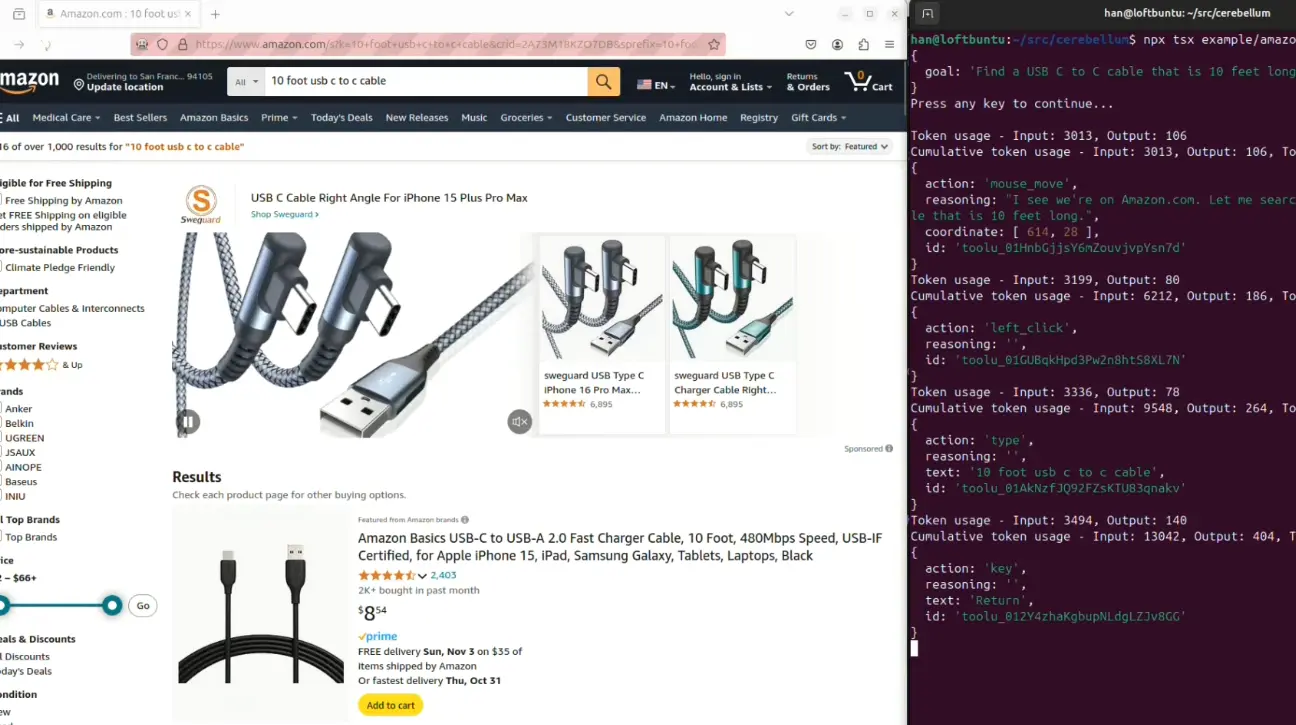
To see practical examples of using Cerebellum, check the /example folder in the project. It includes various scenarios, such as form filling and prompt instruction tuning.
Here is a video showcasing how to perform the goal: ‘Find a USB C to C cable that is 10 feet long and add it to cart’.
Download Cerebellum: https://github.com/theredsix/cerebellum