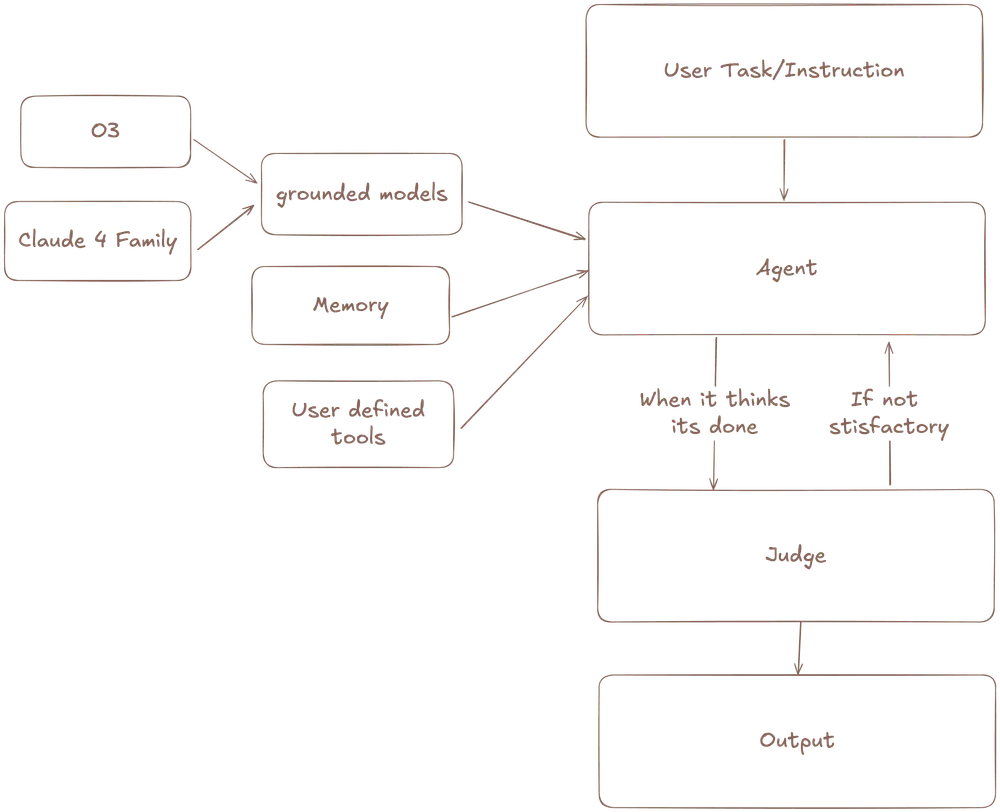
Meka Agent is an open-source, autonomous AI agent that uses computer vision to browse the web and complete tasks.
It “sees” a webpage just like a person does, unlike traditional automation tools that rely on a website’s underlying code.
This vision-first approach allows it to handle dynamic content and complex interfaces that often break other automation scripts.
Features
Meka Agent includes several key capabilities that make it practical for real-world automation:
- Vision-Based Navigation: Uses computer vision to interact with any application or website, just like a human would view and click elements.
- Multi-Model Support: Works with OpenAI o3, Claude Sonnet 4, Claude Opus 4, and other vision models through flexible provider architecture.
- System-Level Control: Operates beyond browser limitations, accessing OS-level controls for complete desktop automation.
- TypeScript Framework: Built with type safety and extensibility, making it easy to customize and integrate into existing workflows.
- Structured Output: Can return results in predefined schemas, perfect for data extraction and processing tasks.
- Session Management: Handles long-running tasks with proper session initialization and cleanup.
- Error Handling: Built-in retry logic and error recovery for robust automation workflows.
WebArena Benchmark
The real test of an AI agent is how it performs on standardized, difficult tasks. Meka Agent was evaluated using the WebArena benchmark, a suite of 651 diverse and challenging web tasks across sites for shopping, content administration, and social media.
Meka achieved an impressive 72.7% success rate. This score represents a significant improvement over the previous state-of-the-art performance of 65.4% and approaches the human benchmark of 78.2%.
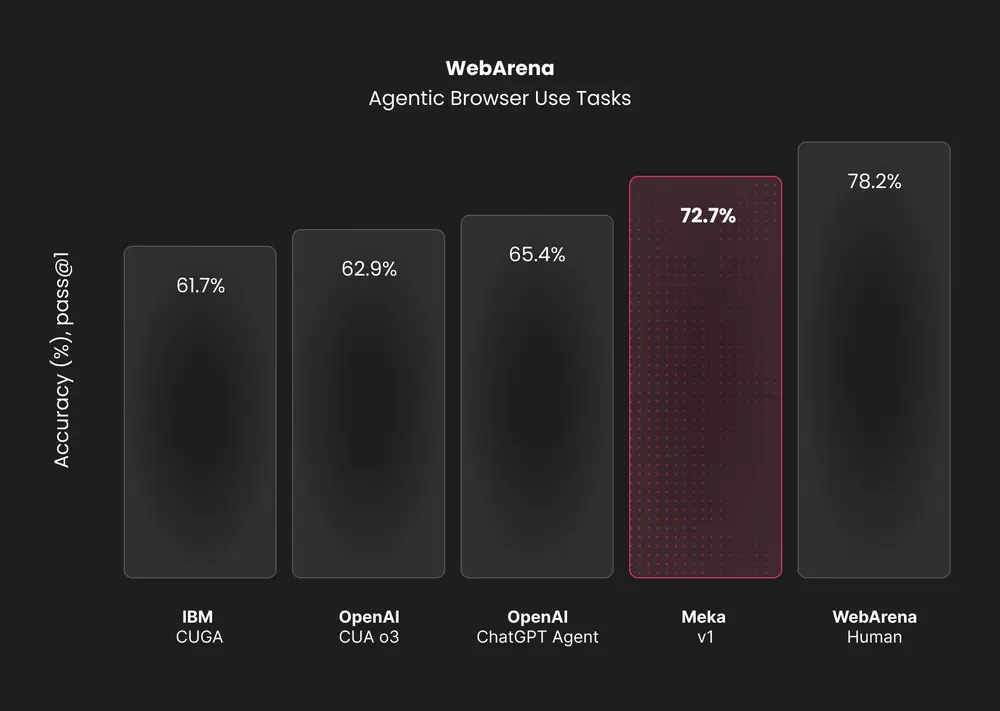
The evaluation was conducted with a pass@1 setting, meaning the agent had one attempt to complete each task.
To ensure accuracy, the Meka team made minor configuration changes to the tests and excluded 161 tasks that were impossible to complete due to broken environment elements or incorrect expected answers.
This transparent and rigorous testing demonstrates the agent’s robust capabilities across a wide range of real-world scenarios
Use Cases
- QA Testing Automation: Run comprehensive website testing scenarios, filling forms, navigating complex user flows, and validating functionality across different pages.
- Data Collection Tasks: Extract information from multiple websites, compile research data, and organize results into structured formats for analysis.
- Administrative Workflows: Automate repetitive office tasks like updating spreadsheets, managing email campaigns, and processing form submissions.
- E-commerce Operations: Monitor product listings, update inventory information, and track competitor pricing across multiple platforms.
- Content Management: Schedule social media posts, update website content, and manage publication workflows across various platforms.
How To Use It
1. Install the necessary packages for the core agent, an AI provider (like Vercel’s), a specific AI model (like OpenAI’s), and a computer provider.
npm install @trymeka/core @trymeka/ai-provider-vercel @ai-sdk/openai @trymeka/computer-provider-anchor-browser playwright-core2. Create a .env file in your project’s root directory. You’ll need API keys for your chosen large language model and the infrastructure provider. Anchor Browser is recommended for its OS-level controls.
OPENAI_API_KEY=your_openai_key_here
ANCHOR_BROWSER_API_KEY=your_anchor_browser_key_here
3. Import the necessary functions in your TypeScript file, create providers for your AI and computer, and then initialize the agent.
import { createOpenAI } from "@ai-sdk/openai";
import { createVercelAIProvider } from "@trymeka/ai-provider-vercel";
import { createAnchorBrowserComputerProvider } from "@trymeka/computer-provider-anchor-browser";
import { createAgent } from "@trymeka/core/ai/agent";
// Setup AI and Computer providers
const o3AIProvider = createVercelAIProvider({
  model: createOpenAI({ apiKey: process.env.OPENAI_API_KEY })("o3"),
});
const computerProvider = createAnchorBrowserComputerProvider({
  apiKey: process.env.ANCHOR_BROWSER_API_KEY,
});
// Create the agent
const agent = createAgent({
  aiProvider: o3AIProvider,
  computerProvider,
});
// Run a task
const session = await agent.initializeSession();
const task = await session.runTask({
  instructions: "Summarize the top 3 articles",
  initialUrl: "https://news.ycombinator.com",
});
await session.end();
console.log("Task Result:", JSON.stringify(task.result, null, 2));
Pros
- Open Source: Full access to source code means you can modify, extend, and deploy without licensing restrictions or vendor lock-in.
- Benchmark Performance: 72.7% WebArena success rate demonstrates real-world effectiveness compared to other automation solutions.
- Flexible Model Integration: Support for multiple AI providers lets you choose the best model for your specific use case and budget.
- System-Level Access: Goes beyond browser automation to handle OS-level interactions that other tools can’t reach.
- Extensible Architecture: Modular design allows adding custom tools and providers without major framework changes.
- Active Development: Regular updates and community contributions keep the tool current with the latest AI capabilities.
Cons
- Setup Complexity: Requires multiple API keys and infrastructure providers, making initial configuration more involved than simple tools.
- Cost Dependencies: Relies on paid AI model APIs and computer provider services, so usage costs can accumulate with heavy automation.
- Learning Curve: TypeScript framework and computer vision concepts require technical knowledge to implement effectively.
- Infrastructure Requirements: VM-based browser execution needs reliable hosting and may have latency issues for time-sensitive tasks.
- Model Limitations: Performance depends heavily on the chosen vision model’s capabilities and current API availability.
Related Resources
- WebArena Benchmark: https://webarena.dev – Standard benchmark for evaluating web automation agents and comparing performance.
- Anchor Browser Documentation: https://anchorbrowser.io/docs – Infrastructure provider setup and API reference for browser automation.
- Vercel AI SDK: https://sdk.vercel.ai – Underlying AI framework documentation for model integration and advanced usage.
- Computer Use Research: https://arxiv.org/abs/2410.14509 – Academic paper on computer-using agents and benchmark methodologies.
FAQs
Q: What makes Meka Agent different from tools like Playwright or Selenium?
A: Tools like Playwright and Selenium automate browsers by interacting with the web page’s code (the DOM). Meka Agent is different because it uses computer vision to see and interact with the screen, just like a human. This makes it more resilient to website code changes and allows it to interact with elements that aren’t easily accessible via code, like native dropdown menus.
Q: What is the “mixture of models” approach?
A: Meka allows you to use different AI models for different parts of a task. For example, you could use a powerful and expensive vision model like Claude 4 Opus for analyzing the screen but a faster, cheaper model like Gemini Flash for evaluating whether a step was successful. This can optimize both performance and cost.
Q: How much does it cost to run Meka Agent?
A: The agent itself is free and open source, but you’ll pay for AI model API calls (OpenAI, Anthropic, etc.) and computer provider services like Anchor Browser. Costs vary based on usage frequency and chosen models, typically ranging from $0.01 to $0.10 per task.
Q: What programming knowledge do I need to use Meka Agent?
A: You’ll need TypeScript/JavaScript experience to write automation scripts and configure the framework. Basic understanding of async programming and API integration is helpful for more complex implementations.