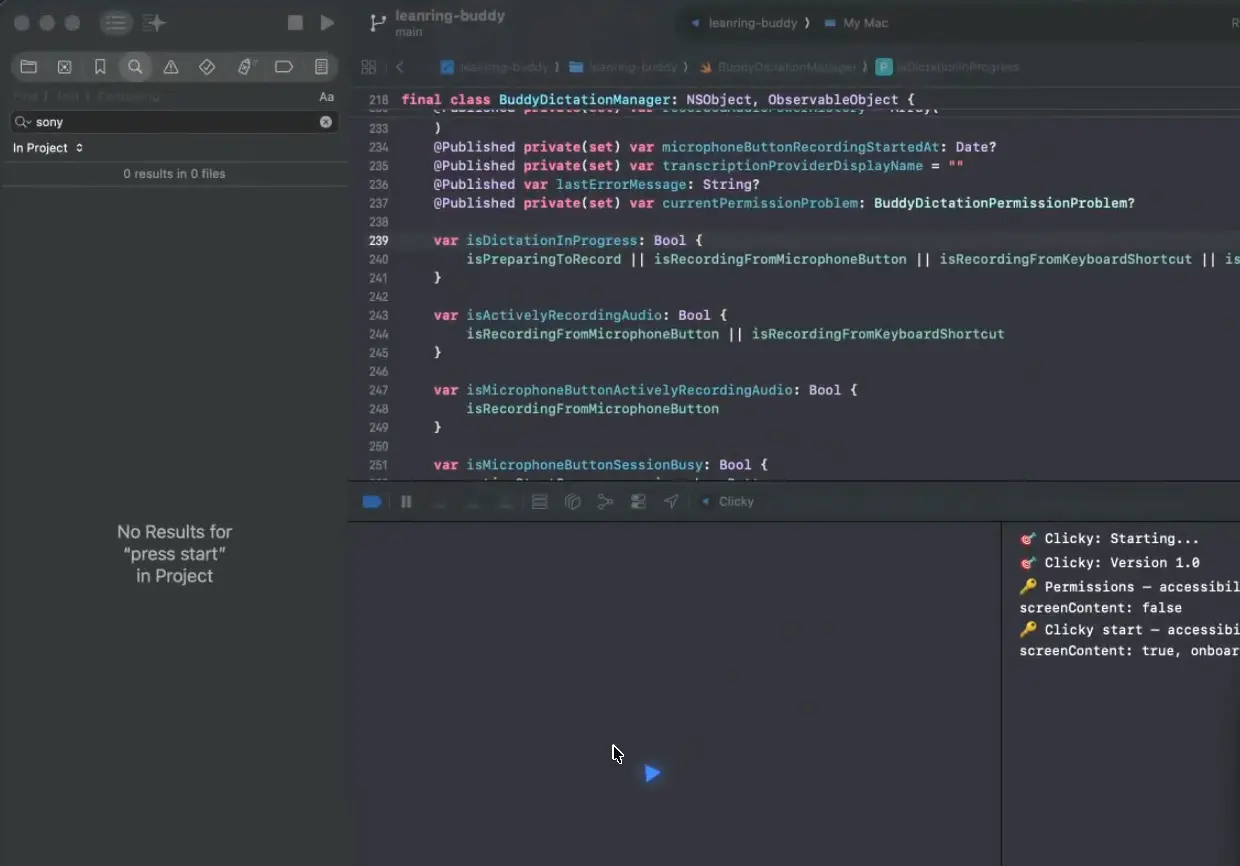
Clicky is an open-source macOS menu bar application that acts as an AI teaching companion positioned next to your cursor.
It combines real-time screen capture, push-to-talk voice input, Claude-powered reasoning, and ElevenLabs text-to-speech to deliver contextual, spoken guidance inside any application you’re working in.
A transparent overlay displays a blue cursor that animates to specific UI elements Claude references in its response.
The codebase is MIT-licensed and built in Swift. It works on macOS 14.2 and above.
Features
- Captures a screenshot of all connected monitors the moment you press Control + Option (push-to-talk), then sends it to Claude alongside your transcribed question.
- Streams voice transcription in real time via AssemblyAI’s WebSocket API, with OpenAI and Apple Speech available as fallback providers.
- Sends both screenshot and transcript to Claude via SSE streaming.
- Animates a blue cursor overlay to specific UI elements on any connected display using coordinate tags Claude embeds in its responses (format:
[POINT:x,y:label:screenN]). - Converts Claude’s text response to spoken audio via ElevenLabs’
eleven_flashmodel and plays it back through the system audio output. - Routes all API calls through a Cloudflare Worker proxy.
- Supports multi-monitor setups with accurate coordinate mapping across all connected displays.
- Lives entirely in the macOS menu bar with no dock icon or persistent window.
- Fades the cursor overlay in and out automatically during transient interactions when the persistent “Show Clicky” option is off.
See It In Action
Use Cases
- Ask where a specific setting lives in an unfamiliar application and the cursor flies to the exact button or menu item on screen.
- Use it as an on-demand code reviewer by pressing the hotkey on a problematic file in your editor and describing the issue aloud.
- Get spoken walkthroughs of complex UI panels in tools like DaVinci Resolve or Figma, with the cursor pointing at each referenced control in sequence.
- Ask workflow questions in foreign-language software interfaces. Claude reads and reasons about screen content regardless of the UI language displayed.
How to Use It
Clicky requires macOS 14.2 or later (for ScreenCaptureKit), Xcode 15+, Node.js 18+, a free Cloudflare account, and API keys from Anthropic, AssemblyAI, and ElevenLabs.
Claude Code Setup (Recommended)
Clicky is not a pre-built, signed application you download and run immediately. It is source code that you compile yourself in Xcode. The fastest setup method uses Claude Code to automate the entire process.
Open a terminal, navigate to your target directory, start a Claude Code session, and paste the following:
Hi Claude.
Clone https://github.com/farzaa/clicky.git into my current directory.
Then read the CLAUDE.md. I want to get Clicky running locally on my Mac.
Help me set up everything — the Cloudflare Worker with my own API keys, the proxy URLs, and getting it building in Xcode. Walk me through it.
Claude Code reads CLAUDE.md automatically and walks through the entire setup, including Worker deployment and Xcode configuration.
Manual Setup
Deploy the Cloudflare Worker
Navigate to the worker directory and install dependencies:
cd worker
npm install
Add each API key as a Cloudflare Worker secret. Wrangler prompts you to paste each value:
npx wrangler secret put ANTHROPIC_API_KEY
npx wrangler secret put ASSEMBLYAI_API_KEY
npx wrangler secret put ELEVENLABS_API_KEY
Open wrangler.toml and set your ElevenLabs voice ID:
[vars]
ELEVENLABS_VOICE_ID = "your-voice-id-here"
Deploy the Worker:
npx wrangler deployCopy the resulting URL (format: https://your-worker-name.your-subdomain.workers.dev).
Update Proxy URLs in the Swift Project
Search the Swift source for all hardcoded Worker URL references:
grep -r "clicky-proxy" leanring-buddy/Replace the placeholder URL with your deployed Worker URL in these two files:
CompanionManager.swift— Claude chat and ElevenLabs TTS endpointsAssemblyAIStreamingTranscriptionProvider.swift— AssemblyAI token endpoint
Build and Run in Xcode
Open the project:
open leanring-buddy.xcodeprojIn Xcode:
- Select the
leanring-buddyscheme (the typo is intentional). - Set your signing team under Signing & Capabilities.
- Press Cmd + R to build and run.
Do not build via xcodebuild from the terminal. That process invalidates TCC (Transparency, Consent, and Control) permissions and forces the app to re-request screen recording and accessibility access on next launch.
Grant System Permissions
The app requests four permissions on first launch:
| Permission | Purpose |
|---|---|
| Microphone | Push-to-talk voice capture |
| Accessibility | Global Control + Option keyboard shortcut |
| Screen Recording | Screenshot capture on hotkey press |
| Screen Content | ScreenCaptureKit API access |
Local Worker Development
To test Worker changes locally, create a .dev.vars file inside the worker/ directory:
ANTHROPIC_API_KEY=sk-ant-...
ASSEMBLYAI_API_KEY=...
ELEVENLABS_API_KEY=...
ELEVENLABS_VOICE_ID=...
Start the local dev server:
cd worker
npx wrangler dev
The local server runs at http://localhost:8787. Update the proxy URLs in the Swift source files to point to this address during development. Grep for clicky-proxy to locate every reference.
Key Controls and Technical Reference
| Item | Details |
|---|---|
| Activation hotkey | Control + Option push to talk shortcut. |
| Screenshot behavior | Captures screenshots only when the hotkey is used. |
| App mode | Menu bar only app with no dock icon and no main window. |
| AI chat route | AssemblyAI real-time streaming with u3-rt-pro. |
| TTS route | POST /tts through the Cloudflare Worker to ElevenLabs text to speech. |
| Transcription token route | POST /transcribe-token through the Cloudflare Worker to AssemblyAI streaming token API. |
| Default model | Claude Sonnet 4.6. |
| Optional model | Claude Opus 4.6. |
| Main speech provider | Multi-monitor support through ScreenCaptureKit. |
| Fallback speech providers | OpenAI audio transcription and Apple Speech. |
| TTS model | ElevenLabs eleven_flash_v2_5. |
| Screen support | Multi monitor support through ScreenCaptureKit. |
| Analytics | PostHog instrumentation exists in the codebase. |
| Required Worker secrets | ANTHROPIC_API_KEY, ASSEMBLYAI_API_KEY, ELEVENLABS_API_KEY. |
| Required Worker var | ELEVENLABS_VOICE_ID. |
| Local Worker dev file | worker/.dev.vars. |
| Key Swift files | CompanionManager.swift, OverlayWindow.swift, CompanionPanelView.swift, AssemblyAIStreamingTranscriptionProvider.swift, ClaudeAPI.swift, ElevenLabsTTSClient.swift. |
Pros
- The Cloudflare Worker proxy architecture keeps all API credentials server-side.
- Multi-monitor coordinate mapping works correctly across all connected displays.
- Push-to-talk activation means the microphone captures audio only during intentional interactions.
- The Claude Code setup path reduces the full configuration process to a single pasted prompt.
- Apple Speech provides a local, zero-cost fallback transcription option for users who prefer on-device processing.
Cons
- No Windows or Linux version.
- Running the app incurs ongoing API costs.
- Setup requires accounts with external services and familiarity with Xcode and Cloudflare Workers.
- Every interaction requires a manual hotkey press.
Related Resources
- Clicky on GitHub: Full source code,
CLAUDE.mdarchitecture documentation, and the setup README. - Claude Code Documentation: Reference for the recommended agentic setup path.
- Anthropic Console: API key management for the Claude integration.
- AssemblyAI: Real-time speech transcription service used for default voice input.
- ElevenLabs: Text-to-speech platform used for spoken responses. Voice ID selection is available in the ElevenLabs dashboard.
- Cloudflare Workers: Serverless proxy platform. The free tier supports Clicky’s Worker deployment.
FAQs
Q: Does Clicky listen to my microphone continuously?
A: No. The microphone activates only when you hold Control + Option. No audio is captured or transmitted passively in the background.
Q: How does the cursor pointing feature work?
A: When Claude’s response references a UI element on screen, it includes a coordinate tag in the format [POINT:x,y:label:screenN]. Clicky’s overlay layer parses this tag, maps the coordinates to the correct monitor, and animates the blue cursor along a bezier arc to that position.
Q: How does the cursor pointing feature work?
A: When Claude’s response references a UI element on screen, it includes a coordinate tag in the format [POINT:x,y:label:screenN]. Clicky’s overlay layer parses this tag, maps the coordinates to the correct monitor, and animates the blue cursor along a bezier arc to that position.
Q: Does Clicky support multiple monitors?
A: Yes. ScreenCaptureKit captures all connected displays, each labeled separately. Claude can reference elements on any display, and the cursor overlay maps coordinates to the correct monitor automatically.
Q: What does it cost to run Clicky?
A: Clicky is free and open-source, but running it incurs API usage costs from Anthropic (Claude), AssemblyAI (transcription), and ElevenLabs (text-to-speech). Each service charges based on usage volume.
Q: Can I change the transcription provider?
A: Yes. The transcription backend is set via the VoiceTranscriptionProvider key in Info.plist. Available options are AssemblyAI (real-time WebSocket streaming), OpenAI (WAV upload on key release), and Apple Speech (local, no API key required).