ApplyPilot is a free, open-source AI job application agent that automates the entire job search process from discovery to form submission.
It scrapes five major job boards, 48 Workday employer portals, and 30+ direct company career sites, scores each listing against your resume with AI, rewrites your resume per job, generates cover letters, and submits applications autonomously through a browser agent.
Most job seekers run the same loop: open multiple boards, copy-paste contact info into ATS forms, adjust resume bullets per listing, and still miss opportunities spread across platforms they don’t regularly check. ApplyPilot addresses this at the pipeline level.
The project’s creator documented submitting 1,000 applications in two days using it. The tool runs as a Python CLI, uses Google’s free Gemini API for scoring and tailoring, and uses the Claude Code CLI for browser automation. It targets any job site, any form, not just LinkedIn Easy Apply.
Features
- Scrapes job listings from Indeed, LinkedIn, Glassdoor, ZipRecruiter, Google Jobs, and Workday employer portals.
- Extracts complete job descriptions using a three-tier cascade of structured data, CSS selectors, and AI.
- Rates every job on a ten-point scale against your personal profile and preferences.
- Rewrites your resume for each specific role to emphasize relevant experience.
- Generates custom cover letters that map your background directly to company requirements.
- Fills application forms autonomously using Claude Code to upload documents and answer screening questions.
See It In Action
Use Cases
- Apply to highly specific roles across forty-eight preconfigured Workday portals automatically.
- Generate customized resumes for hundreds of listings concurrently using multithreaded workers.
- Filter out low-quality job postings using strict AI scoring thresholds.
- Submit applications continuously in the background using the headless browser mode.
How to Use It
1. Start with the base package:
pip install applypilot2. python-jobspy requires a separate install. It pins a specific numpy version in its package metadata that conflicts with pip’s resolver, so the install uses --no-deps to skip that metadata check:
pip install --no-deps python-jobspy3. Install the runtime dependencies that --no-deps skipped:
pip install pydantic tls-client requests markdownify regex4. The auto-apply stage requires Node.js 18+ because the Playwright MCP server runs via npx. Get Node.js at nodejs.org, then install the Claude Code CLI from claude.ai/code.
5. Get your Gemini key at aistudio.google.com. The Gemini API free tier supports 15 requests per minute and 1 million tokens per day.
6. Run the Setup Wizard. The wizard generates three configuration files: profile.json (your contact info, work authorization, compensation details, experience, skills, resume_facts, and EEO defaults), searches.yaml (target job titles, locations, and boards), and .env (API keys and model settings).
applypilot initPay close attention to the resume_facts section of profile.json. This is where you lock in the specific companies, project names, metrics, and credentials that the AI must preserve verbatim during resume tailoring. The AI rewrites structure and emphasis — it does not modify anything listed in resume_facts.
7. Verify Your Setup. This checks that all required components are present and flags anything missing before you start the pipeline.
applypilot doctor8. Run the Pipeline:
applypilot runThis executes stages 1 through 5: discover, enrich, score, tailor, and cover letter generation. Add --workers for parallel processing:
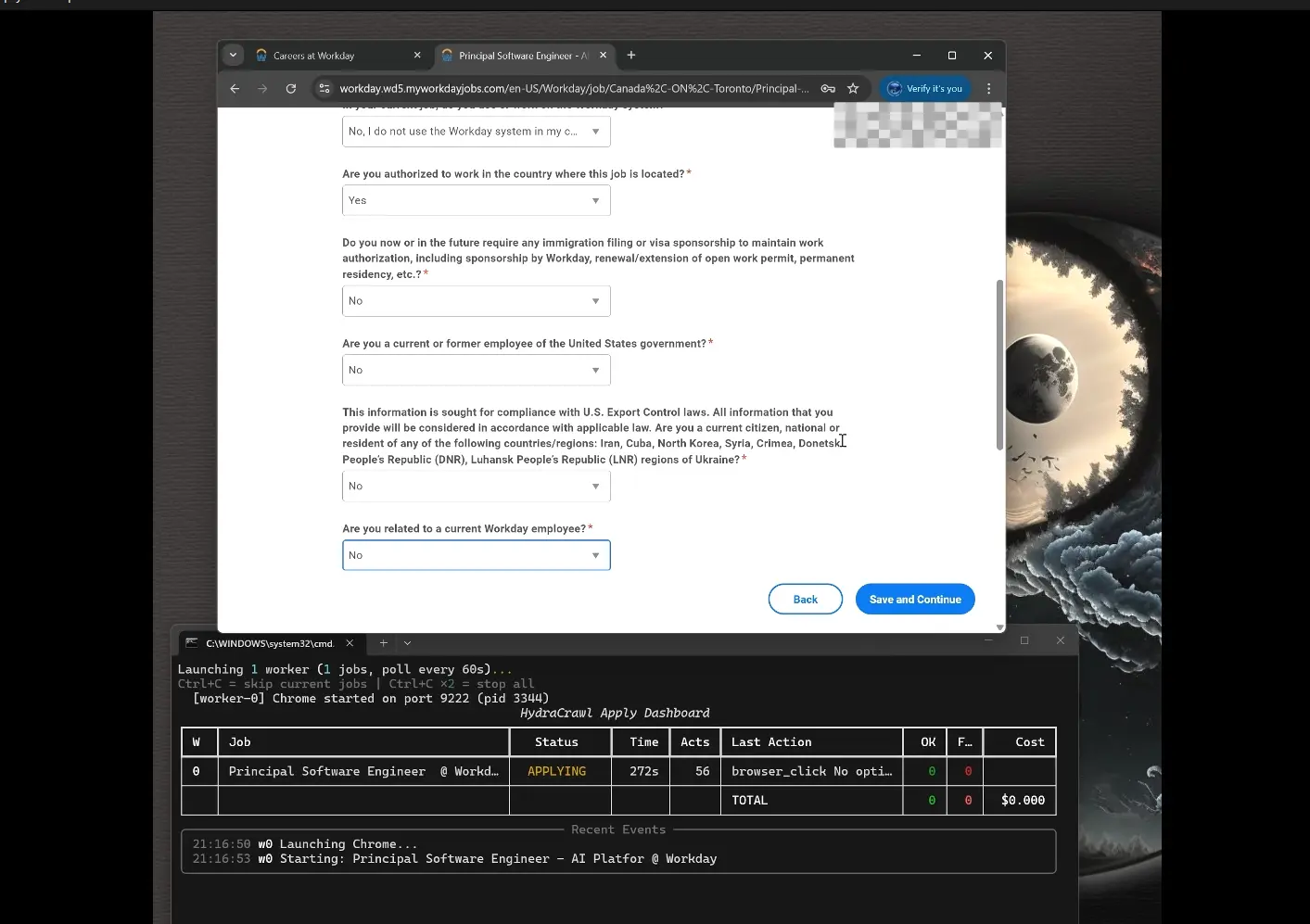
applypilot run --workers 49. Launch Auto-Apply. Claude Code launches a Chrome instance, navigates to each queued application, fills the form, uploads the tailored resume and cover letter, answers screening questions, and submits.
applypilot applyYou can also run multiple Chrome instances in parallel:
applypilot apply --workers 3Confirm form-filling behavior before going live:
applypilot apply --dry-runCLI Command Reference
| Command | What It Does |
|---|---|
applypilot init | First-time setup wizard |
applypilot doctor | Verify setup and diagnose missing requirements |
applypilot run | Run all pipeline stages |
applypilot run [stages...] | Run specific named stages only |
applypilot run --workers 4 | Parallel discovery and enrichment (4 threads) |
applypilot run --stream | Run stages concurrently in streaming mode |
applypilot run --min-score 8 | Override the default fit score threshold |
applypilot run --dry-run | Preview pipeline steps without executing |
applypilot run --validation lenient | Relax output validation (recommended for Gemini free tier) |
applypilot run --validation strict | Strictest validation with retries on banned words |
applypilot apply | Launch autonomous form submission |
applypilot apply --workers 3 | Run 3 Chrome instances in parallel |
applypilot apply --dry-run | Fill forms and skip final submission |
applypilot apply --continuous | Poll for new jobs and apply continuously |
applypilot apply --headless | Run Chrome in headless mode |
applypilot apply --url URL | Apply to one specific job URL |
applypilot apply --mark-applied URL | Manually mark a job as applied |
applypilot apply --mark-failed URL | Manually mark a job as failed |
applypilot apply --reset-failed | Reset all failed jobs for retry |
applypilot apply --gen --url URL | Generate a prompt file for manual debugging |
applypilot status | View pipeline statistics |
applypilot dashboard | Open the HTML results dashboard |
Configuration File Reference
| File | Purpose |
|---|---|
profile.json | Contact info, work authorization, compensation, experience, skills, resume_facts, EEO defaults |
searches.yaml | Job search queries, target titles, locations, and boards |
.env | GEMINI_API_KEY, LLM_MODEL, CAPSOLVER_API_KEY |
config/employers.yaml | Workday employer registry (48 preconfigured entries) |
config/sites.yaml | Direct career sites (30+), blocked sites, base URLs, manual ATS domains |
config/searches.example.yaml | Example search configuration template |
Pros
- The Gemini free tier covers all AI scoring, resume tailoring, and cover letter generation at zero cost.
- Each pipeline stage runs independently, so you can stop after tailoring and apply manually with the prepared materials.
- The
resume_factssystem inprofile.jsonprotects actual employer names, credentials, and metrics from AI modification during tailoring. - The Playwright MCP server configures itself automatically at runtime per worker.
- OpenAI models and local models via Ollama or llama.cpp work as drop-in alternatives to Gemini.
Cons
- The system requires Node.js and the Claude Code CLI for the auto-apply stage.
- You need a paid CapSolver key to process applications blocked by complex CAPTCHAs.
- Auto-apply accuracy depends on Chrome’s ability to parse varied ATS form layouts.
Related Resources
- Google AI Studio: Get your free Gemini API key to power ApplyPilot’s scoring, tailoring, and cover letter generation.
- Claude Code CLI: Install the browser automation agent that ApplyPilot uses for its auto-apply stage.
- python-jobspy on GitHub: The job scraping library that powers ApplyPilot’s multi-board discovery stage.
- CapSolver: Optional CAPTCHA-solving service for unblocking form submissions during auto-apply.
- Playwright: The browser automation framework underlying ApplyPilot’s form navigation.
FAQs
Q: Does ApplyPilot cost anything to run?
A: The core tool is free and open-source. The Gemini API key is free at the usage tier ApplyPilot requires (15 RPM, 1M tokens per day). The Claude Code CLI is free to install and use. The only optional paid component is a CapSolver API key for CAPTCHA solving.
Q: Can ApplyPilot submit applications to any job website?
A: The discovery stage covers five major boards (Indeed, LinkedIn, Glassdoor, ZipRecruiter, Google Jobs), 48 preconfigured Workday employer portals, and 30+ direct company career sites. The auto-apply stage works on any site that presents a standard HTML application form. You can extend both the Workday list and the direct sites list through employers.yaml and sites.yaml respectively.
Q: Does ApplyPilot actually submit applications, or does it only prepare materials?
A: The applypilot apply command submits. It navigates the form, fills all fields, uploads the tailored resume and cover letter, handles screening questions, and clicks submit. Run applypilot apply --dry-run to watch the full form-filling sequence and skip the final submission step.
Q: Does the AI invent job history or fabricate credentials during resume tailoring?
A: No. The resume_facts field in profile.json locks in your actual employer names, titles, project names, and quantitative metrics. The tailoring stage rewrites structure, order, and keyword emphasis.
Q: Can I use a different AI model in place of Gemini?
A: Yes. Set your preferred model in the LLM_MODEL environment variable inside .env.
Q: What happens when an application fails during auto-apply?
A: Failed applications get flagged automatically. Review the full run summary with applypilot status, mark individual jobs manually with applypilot apply --mark-failed URL, and re-queue the entire failed batch with applypilot apply --reset-failed.