Roborev is a free, open-source code review tool that runs AI-powered analysis on your git commits automatically. It supports all major AI coding agents like Codex, Claude Code, Gemini CLI, GitHub Copilot, and OpenCode.
The CLI works as a background daemon that watches your Git activity. It triggers automatically via Git hooks when you commit code, or you can run it manually against specific branches.
Features
Automatic Post-Commit Reviews: Roborev installs a git hook that triggers reviews automatically after each commit. The daemon processes these reviews in the background without blocking your workflow. You can continue coding while reviews queue and process asynchronously.
Multiple AI Agent Support: Roborev auto-detects which agents you have installed and falls back through the list until it finds one. You can specify a preferred agent in your configuration file or via command flags.
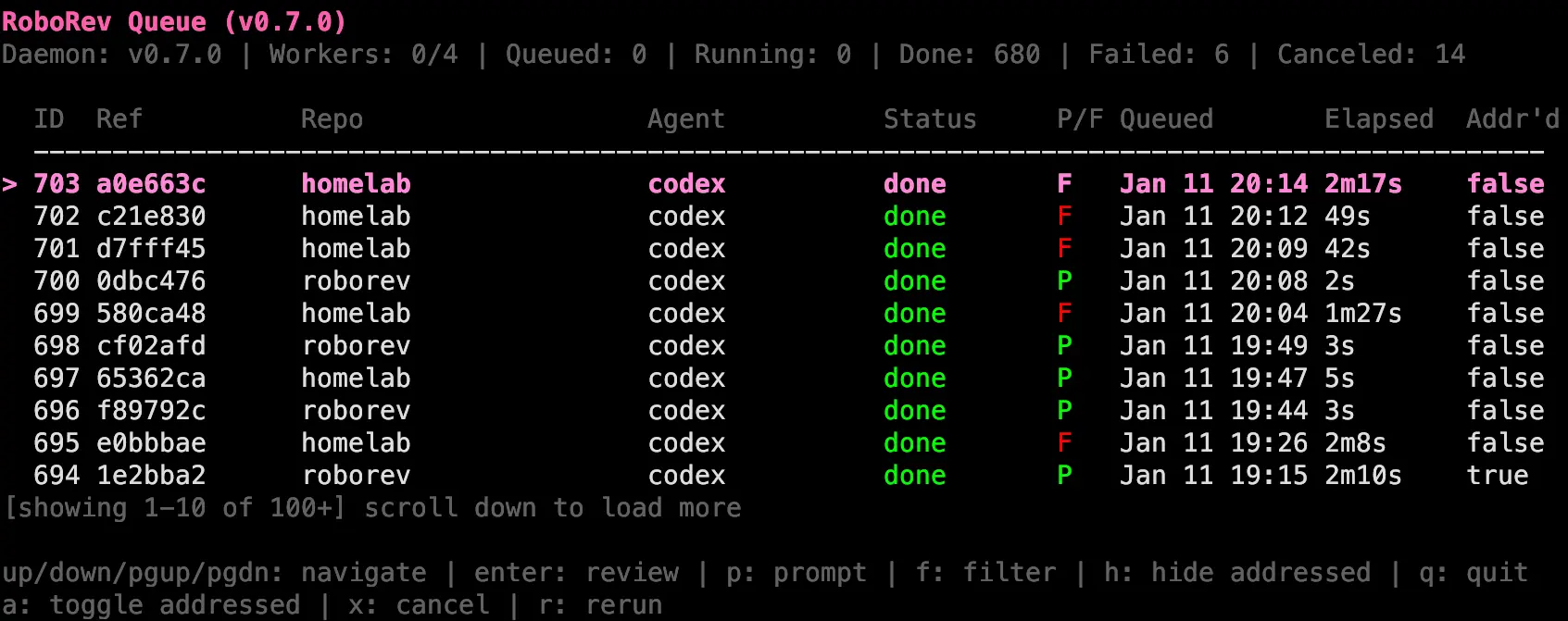
Interactive Terminal UI: The TUI provides real-time visibility into your review queue. Navigate through pending, running, and completed reviews with keyboard shortcuts. Filter by repository, hide addressed items, or focus on failed reviews that need attention. The interface displays verdicts color-coded as Pass or Fail for quick triage.
Branch and Commit Range Reviews: Review entire feature branches with a single command. The --branch flag reviews all commits since your branch diverged from main. For granular control, use --since to review commits from a specific point, or queue individual commit ranges.
Dirty Tree Reviews: Queue reviews of uncommitted changes before you commit them. The --dirty flag includes staged changes, unstaged modifications to tracked files, and untracked files. Combined with --wait, this becomes a pre-commit validation step that can block commits if reviews fail.
Auto-Fix Failed Reviews: The refine command uses AI agents to automatically address failed review findings. It processes commits oldest-first, making fixes, committing them, and waiting for re-review before moving to the next failed commit. The loop continues until all reviews pass or the maximum iteration limit is reached.
Repository Management: Track multiple repositories in a single roborev installation. Rename repositories for better organization in the TUI, merge duplicate entries from path changes, or remove old projects from tracking. The system stores reviews against the main repository path, so commits made in git worktrees share the same review history.
PostgreSQL Sync: Consolidate reviews from multiple machines into a central PostgreSQL database. Each review job has a UUID that prevents duplicates across machines. The local SQLite database remains the source of truth while PostgreSQL serves as a shared store. Sync happens automatically at configurable intervals.
Agent Skills and Slash Commands: Install Skills that let AI agents fetch reviews and fix findings directly. Commands like /roborev:address <job_id> pull the review, analyze the code, fix issues by severity, and offer to commit the changes. This creates a conversation loop where you can delegate fixes to the AI.
Customizable Review Guidelines: Define project-specific review criteria in .roborev.toml. Suppress warnings that don’t apply to your project, enforce coding conventions, or add domain-specific checks. The AI reviewer uses these guidelines as context when analyzing your code.
Reasoning Level Control: Three reasoning levels balance analysis depth with speed. Thorough mode performs deep analysis with extended thinking (default for reviews). Standard mode provides balanced analysis (default for refine). Fast mode gives quick responses for rapid feedback loops.
Ad-Hoc Prompts: Run arbitrary AI prompts beyond code review. Ask about codebase architecture, request refactoring suggestions, or have the agent explain specific functions. Prompts run in read-only review mode by default, or enable agentic mode with --agentic to allow file edits and bash commands.
Event Streaming: Stream review events in real-time as newline-delimited JSON. Subscribe to started, completed, failed, and canceled events. Filter by repository and pipe through tools like jq for custom processing or notifications.
Use Cases
Pre-Merge Quality Gates: Set up roborev to review entire feature branches before merging to main. The --branch flag reviews all commits since divergence. Combined with --wait, this blocks the merge if reviews fail. Run this as part of your PR process to catch issues before they hit the main branch.
Continuous Commit Validation: Install the post-commit hook in active development repositories. Every commit gets reviewed automatically in the background. You see review results in the TUI without any manual trigger.
Security Audit Automation: Use reasoning level thorough and custom review guidelines focused on security. Run reviews on commit ranges with --since to audit code added after a specific tag or date. The AI flags SQL injection risks, unsafe data handling, and deprecated security functions based on your guidelines.
Multi-Machine Development Sync: Enable PostgreSQL sync when you work across desktop, laptop, and cloud instances. Reviews run locally on each machine but sync to the central database. You can run refine on your laptop to fix issues found during a review that ran on your desktop. All machines see the same review history.
Automated Fix Loops: Run roborev refine on feature branches with failing reviews. The AI agent addresses findings, commits fixes, and waits for re-review automatically. This handles obvious issues like missing error handling or style violations. You review the AI’s commits and handle edge cases it couldn’t fix.
How to Use It
1. Install roborev using the installation script or Go. The script handles the binary placement and PATH configuration automatically.
curl -fsSL https://raw.githubusercontent.com/wesm/roborev/main/scripts/install.sh | bash2. For Go installations, run the install command and ensure your GOPATH bin directory is in your PATH.
go install github.com/wesm/roborev/cmd/roborev@latest
export PATH="$PATH:$(go env GOPATH)/bin"
3. Navigate to your repository and initialize roborev. This installs the post-commit hook that triggers automatic reviews.
cd your-repo
roborev init
4. Make commits as usual. Reviews happen automatically after each commit. The daemon starts in the background if it’s not already running.
git commit -m "Add user authentication"5. Open the interactive TUI to view review results. Navigate through the queue with arrow keys or vim keybindings. Press Enter on a job to view the full review.
roborev tui6. Review an entire feature branch before merging. The command compares against main by default but you can specify a different base branch.
roborev review --branch
roborev review --branch --base develop
7. Queue a review of uncommitted changes. The --wait flag blocks until the review completes and displays results.
roborev review --dirty --wait8. Run the refine command to automatically fix failed reviews. The AI agent processes each failed review, makes fixes, commits them, and moves to the next failure.
roborev refine
roborev refine --agent claude-code
9. Install agent skills for direct AI interaction with reviews. The skills become available as slash commands in your AI coding sessions.
roborev skills install10. Configure roborev by creating a .roborev.toml file in your repository root. Set the preferred agent, reasoning levels, and review guidelines.
agent = "codex"
review_reasoning = "thorough"
refine_reasoning = "standard"
review_guidelines = """
Prefer composition over inheritance.
All public APIs must have documentation.
Check for proper error handling in async functions.
"""
11. Stream review events for custom integrations or notifications. The events output as JSONL that you can process with jq or other tools.
roborev stream | jq -c 'select(.type == "review.completed")'Command Cheat Sheet
Core Workflow
| Command | Description |
|---|---|
roborev init | Initialize Roborev in the current repository and install hooks. |
roborev tui | Open the interactive Terminal UI to view and manage reviews. |
roborev status | Check the status of the background daemon and job queue. |
roborev update | Update Roborev to the latest version. |
roborev version | Display version information. |
Triggering Reviews
| Command | Description |
|---|---|
roborev review --dirty | Review uncommitted changes (working tree). |
roborev review --branch | Review all commits on the current branch (vs main). |
roborev review <sha> | Queue a specific commit for review. |
roborev review <start> <end> | Queue a range of commits (inclusive). |
roborev review --since <commit> | Review all commits since a specific point (exclusive). |
roborev show [sha] | Display the review result for a specific commit. |
roborev show --job <id> | Display a review by its specific Job ID. |
AI Interaction & Auto-Fixing
| Command | Description |
|---|---|
roborev refine | Auto-fix failed reviews on the current branch using AI. |
roborev prompt "<text>" | Run an ad-hoc prompt (e.g., “Explain this code”). |
roborev address <id> | Mark a specific review ID as addressed. |
roborev respond <id> [msg] | Add a note or response to a review. |
roborev skills install | Install agent skills (required for auto-fixing). |
Repository Management
| Command | Description |
|---|---|
roborev repo list | List all tracked repositories and their review counts. |
roborev repo show <name> | Show detailed stats for a specific repository. |
roborev repo rename <old> <new> | Rename a repository’s display name. |
roborev repo delete <name> | Stop tracking a repository. |
roborev repo merge <src> <dst> | Merge reviews from one repo entry to another. |
System & Sync
| Command | Description |
|---|---|
roborev sync status | Check PostgreSQL sync status. |
roborev sync now | Trigger an immediate sync to the database. |
roborev daemon start|stop|restart | Manually manage the background process. |
roborev install-hook | Manually install the git post-commit hook. |
roborev uninstall-hook | Remove the git post-commit hook. |
roborev stream | Stream review events as JSONL (useful for integrations). |
Common Flags
| Flag | Description |
|---|---|
--wait | Wait for the job to complete and show the result immediately. |
--agent <name> | Force a specific agent (e.g., claude-code, codex). |
--reasoning <level> | Set depth: fast, standard, or thorough. |
--agentic / --yolo | Enable “Agentic Mode” (allows file edits and commands). |
--no-context | Run a prompt without including the repository code context. |
Pros
- Local Workflow: The CLI lives in your terminal and integrates with Git hooks.
- Privacy Control: Data only leaves your machine to go to the specific AI provider you choose.
- Flexible Agent Choice: You can switch between Claude, OpenAI, and Google Gemini models.
- Worktree Support: Roborev handles Git worktrees correctly. It stores reviews against the main repository regardless of the active worktree.
- Offline Capability: The local daemon and SQLite database allow you to queue and manage reviews even when offline (sync happens later).
Cons
- Setup Complexity: The tool requires command-line knowledge and external dependencies (Go, Node.js for agents).
- API Costs: You must pay for your own API credits (Anthropic, OpenAI, etc.).
- Security Risks in Agentic Mode: Malicious code or hallucinated commands could potentially damage your system if you run it on untrusted code.
Related Resources
- Codex Installation: Install the OpenAI Codex CLI agent for roborev reviews.
- Claude Code Documentation: Set up Claude Code as your roborev AI agent.
- Go Installation Guide: Install Go to build roborev from source or use go install.
- Git Hooks Documentation: Learn how git hooks work and how roborev integrates with them.
- PostgreSQL Setup Guide: Configure PostgreSQL for multi-machine review sync.
More AI Tools for Git Commits
- DiffSense: Local Git Commit Message Generator with Apple Intelligence.
- git-rewrite-commits: Auto-Generate Better Git Commit Messages with AI.
- lazycommit: Automate Git Commit Messages with Free AI.
FAQs
Q: Does roborev send my code to external services?
A: That depends on which AI agent you use. Claude Code uses your Claude subscription by default (roborev ignores ANTHROPIC_API_KEY to avoid surprise API charges). You can configure it to use API credits instead. Codex, Gemini, and other agents use their standard authentication mechanisms. Your code goes to whichever AI service backs the agent you chose. Reviews store locally in SQLite on your machine.
Q: Can I use roborev with GitHub Actions or other CI systems?
A: Yes. The --wait flag makes commands block until completion and return appropriate exit codes. Pass/fail reviews exit with code 0, while failing reviews exit with code 1. You can run roborev review --dirty --wait --quiet in CI to validate changes before allowing merges. The tool works in any environment where git and your chosen AI agent are available.
Q: How does roborev handle monorepos with multiple projects?
A: Roborev treats the entire repository as one unit. Reviews run against commits regardless of which subdirectory changed. You can use excluded_branches in .roborev.toml to skip branches like scratch or experimental. For better organization, set a display_name to give the repo a friendly name in the TUI. The review guidelines can specify different rules for different parts of the codebase.
Q: What happens if a review fails or times out?
A: Failed reviews appear in the TUI with a fail verdict. You can view the full review to see what the AI flagged. Rerun the review with r in the TUI or use roborev review <sha> from the command line. Jobs that timeout get marked as failed. The default timeout is 10 minutes but you can adjust this with job_timeout in your global config. The refine command automatically retries fixes that fail review up to the iteration limit.
Q: Can I review code from other people’s pull requests safely?
A: Review mode is safe for untrusted code since it’s read-only. The AI can inspect code but can’t modify files or run commands. Agentic mode (used by refine and --agentic prompts) is dangerous for untrusted code. The AI runs without sandboxing and can execute arbitrary commands. Review PRs from strangers in a container, VM, or disposable cloud instance if you plan to use auto-fix features. The risk matches running claude --dangerously-skip-permissions or codex --dangerously-bypass-approvals-and-sandbox manually.