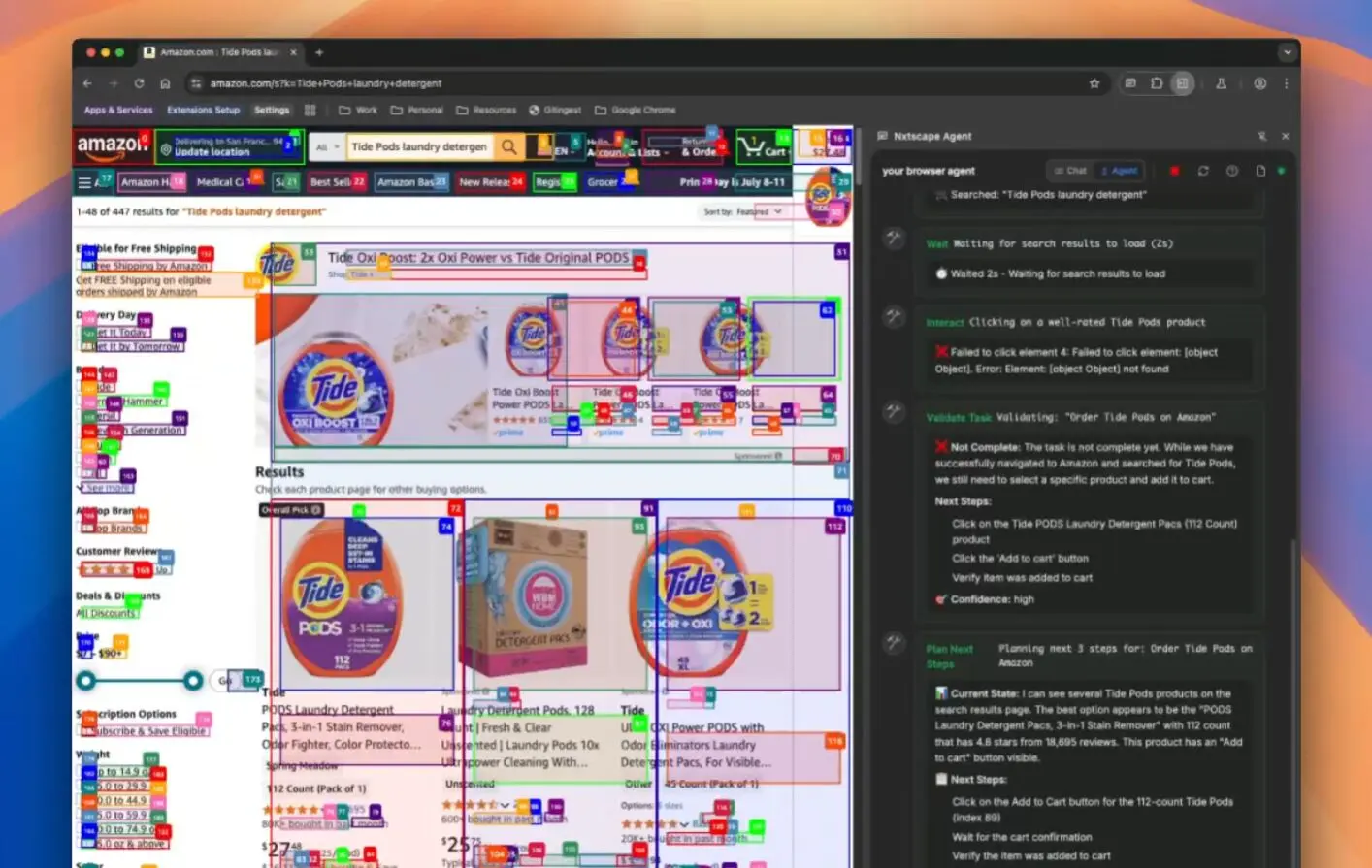
Nxtscape is a free, open-source agentic browser that runs AI agents locally on your computer to automate routine web tasks.
It combines the familiar Chrome UI with powerful AI capabilities that handle everything from form filling to complex research tasks while keeping your data completely private.
Features
- Local AI Agents – Run browser automation tasks using AI agents that operate entirely on your machine, no cloud processing required
- Privacy-First Architecture – Use your own API keys (OpenAI, Anthropic) or run completely offline with Ollama local models
- Chrome Compatibility – Built on Chromium, so all your Chrome extensions work out of the box
- Native Productivity Tools – Built-in highlighter and AI-powered bookmarking system
- Semantic Search – Search through your browser history and bookmarks using natural language
- Open Source – Released under AGPL-3.0 license, allowing community contributions and transparency
- AI Ad Blocker (Coming Soon) – LLM-based ad blocking that works more effectively than traditional filters
- MCP Store (Coming Soon) – One-click installation of popular Model Context Protocols
Use Cases
- Form Automation – Let AI agents fill out repetitive forms, job applications, or survey responses based on your preferences and saved information
- E-commerce Tasks – Automate reordering products from your purchase history, comparing prices across sites, or tracking order statuses
- Research and Data Collection – Have agents browse multiple sites, compile information, and create comprehensive reports on topics you’re researching
- Meeting Scheduling – Automate the back-and-forth of finding meeting times by having agents check calendars and send appropriate responses
- Content Discovery – Program agents to scan social media platforms like LinkedIn and Twitter to find posts worth engaging with, saving you from endless scrolling
- Workflow Automation – Set up agents to handle routine business processes like updating spreadsheets, sending follow-up emails, or monitoring project statuses
How to Use It
1. Visit the official website and download the installer for your operating system. The installation process is identical to installing Chrome.
2. If you’re switching from Chrome, you can import your bookmarks, passwords, and browsing history during the initial setup.
3. Choose your preferred AI provider:
- For cloud-based AI: Add your OpenAI or Anthropic API keys in the settings
- For local AI: Install Ollama on your system and select your preferred local model
- The browser will guide you through the setup process for either option
4. Access the AI agent features through the browser toolbar. You can either:
- Use natural language to describe tasks you want automated
- Set up recurring automations for routine workflows
- Let the browser suggest automations based on your browsing patterns
5. Configure which sites the agents can access, set up privacy boundaries, and customize the level of automation you’re comfortable with.
Pros
- Complete Privacy Control – Your browsing data stays on your machine, with options for local AI models that require no external connections
- Familiar Interface – No learning curve if you’re coming from Chrome; all extensions work immediately
- Open Source Transparency – Full access to source code means you can verify privacy claims and contribute improvements
- Powerful Local Automation – AI agents can handle complex multi-step tasks without sending data to external servers
- Flexible AI Integration – Works with multiple AI providers or completely offline with Ollama
Cons
- Early Development Stage – Some promised features like the AI ad blocker and MCP store aren’t available yet
- Technical Setup Required – Configuring local AI models through Ollama requires some technical knowledge
- Resource Intensive – Running AI agents locally can consume significant CPU and memory resources
- Potential Compatibility Issues – As a Chromium fork, updates might lag behind the main Chrome branch
FAQs
Q: Is Nxtscape completely free to use?
A: Yes, Nxtscape is completely free and open source under the AGPL-3.0 license. You only pay for AI API usage if you choose cloud providers like OpenAI or Anthropic. Local models through Ollama are completely free.
Q: How does Nxtscape compare to Arc or other modern browsers?
A: Unlike Arc, D,ia or other browsers that may send your data to external servers, Nxtscape keeps everything local. It’s built on the same Chromium foundation as Chrome but adds AI agent capabilities that run on your machine. The key difference is privacy and local execution.
Q: Can I run Nxtscape without any internet connection?
A: Yes, if you use local AI models through Ollama, Nxtscape can function completely offline for AI features. You’ll still need internet for regular web browsing, but the AI agents can work without external API calls.
Q: Will my Chrome extensions work with Nxtscape?
A: Yes, because Nxtscape is built on Chromium, all Chrome extensions are compatible. You can install them from the Chrome Web Store just like in regular Chrome.
Q: Do I need a powerful computer to run local models?
A: It depends on the model. Smaller models can run on most modern computers without a high-end GPU. Larger, more capable models will require more system resources, particularly RAM and a decent graphics card.