WebLens is an free AI tool designed to spark ideas for A/B testing and website optimization.
It uses large language models (LLMs) and optimization best practices to scan your website, analyze its content, and generate hypotheses to increase user engagement and performance.
This means no more struggling for A/B testing inspiration – WebLens provides fresh, data-driven ideas.
I tested WebLens on my own website, ScriptByAI.Com. After analyzing my homepage, the AI generated eight distinct hypotheses.
One suggestion focused on improving my H1 tag. WebLens proposed changing it from “Free AI Tools & Resources” to “Discover Free AI Tools to Simplify Your Life.” This change aims to make the heading more specific, highlighting the site’s value proposition for increased engagement.
Another hypothesis targeted my sub-heading. WebLens recommended changing it from “Latest free AI-powered online tools & apps to make life easier” to “Discover AI tools that will save you time and boost your productivity.” This alteration emphasizes the website’s benefit to the user, potentially increasing engagement.

WebLens goes beyond simply generating these hypotheses; it allows you to preview the A/B test in real time.
Clicking the ‘Preview’ button on each hypothesis will open a new browser tab displaying your website with a floating preview tool. This tool showcases the hypothesis and allows you to toggle between the original (Control) and suggested (Variant) versions.

How to use it:
1. Visit the WebLens AI website, enter your website URL and click the “Analyze” button.

2. Allow time for the AI to analyze your website. If you prefer to receive the results later, click “Email My Results” in the upper right corner.

3. Review the generated hypotheses. Each hypothesis includes a summary of the proposed change, its goal, and the ‘Control’ and ‘Variant’ versions. You can then preview these changes in real-time on your website using the ‘Preview’ button.
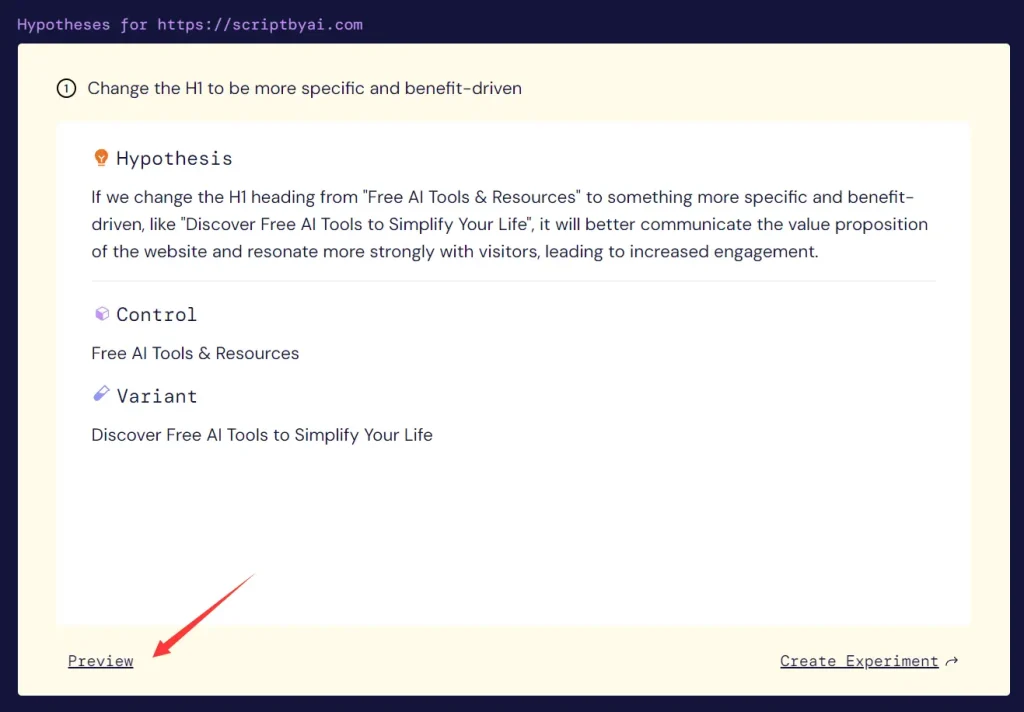
4. Click “Create Experiment.” This step directs you to register with Growthbook, an open-source A/B testing platform that allows you to implement and track your A/B tests based on WebLens’ suggestions.
FAQs:
Q: What is A/B testing?
A: A/B testing compares two versions of a webpage to see which performs better. It helps make data-driven decisions about website changes.
Q: Why is A/B testing important for my website?
A: A/B testing helps improve user experience, increase conversions, and optimize site performance based on real user data rather than guesswork.