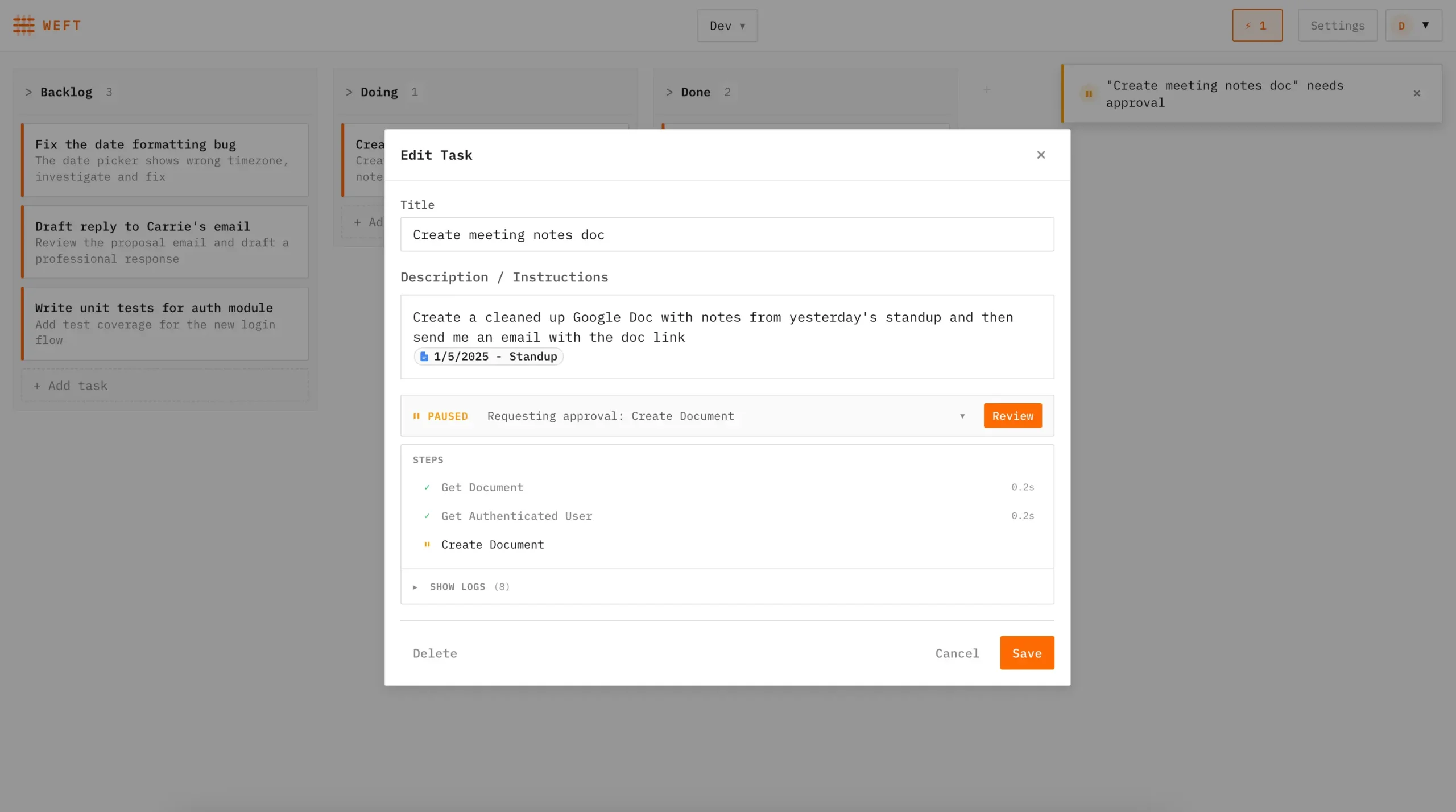
Weft is a free, self-hosted task management system that deploys AI agents to complete your tasks autonomously.
You can create tasks on a personal board, assign them to AI agents, and the agents get to work reading your emails, drafting responses, updating spreadsheets, creating GitHub pull requests, and writing code.
The entire system runs on Cloudflare’s platform using Workers for HTTP routing, Durable Objects for state persistence and WebSocket updates, and Workflows for the durable agent execution loop with automatic checkpointing and retry logic.
Features
- Multi-Agent Task Execution: Run unlimited agents in parallel across different tasks. Each agent operates independently and can handle its assigned work without manual intervention between steps.
- Built-In Service Integrations: Connect Gmail for reading, drafting, and sending emails. Use Google Docs to create and edit documents. Access Google Sheets for data updates. Integrate GitHub for managing issues, creating pull requests, and writing code.
- Cloudflare Sandbox Code Execution: Agents execute code in isolated Cloudflare containers.
- MCP Support: Add custom tools through MCP servers.
- Approval-Based State Management: All operations that modify state pause for your approval.
- Real-Time Progress Tracking: WebSocket connections provide live updates on agent status.
- Self-Hosted Privacy: Your credentials, task data, and agent actions stay within your infrastructure.
Use Cases
Automated Email Management: An agent monitors your Gmail inbox for specific types of messages like customer inquiries or support requests. It reads the emails, understands the context, drafts appropriate responses, and queues them for your review. You approve the drafts that look good and edit or reject others.
GitHub Issue Resolution: Point an agent at an open GitHub issue. The agent reads the issue description, examines the relevant code, writes a fix, creates a new branch, commits the changes, and opens a pull request. You review the PR like you would from any contributor.
Spreadsheet Data Processing: An agent can read data from multiple sources, process it according to your instructions, and update a Google Sheet with the results. This works for recurring reports where the format stays consistent but the data changes regularly.
Document Generation: Assign an agent to create a Google Doc based on structured input like meeting notes or project updates. The agent formats the content, adds sections, and produces a draft you can refine.
Cross-Platform Workflow Automation: Chain multiple integrations into a single task. An agent could read a GitHub issue, gather additional context from a Google Sheet, draft a status update in Google Docs, and send a notification email. All these steps happen autonomously with approval checkpoints where you specify them.
How to Use It
1. You must have Node.js (18+) and Docker installed on your device. Docker is necessary for the Cloudflare Sandboxes feature. You also need a Cloudflare account with the Workers Paid plan (required for Durable Objects).
2. Clone and install Weft:
git clone https://github.com/jonesphillip/weft.git
cd weft
npm install
3. Weft uses a .env file for local development. Copy the example file:
cp .env.example .envYou need to generate an encryption key for stored credentials. Run openssl rand -base64 32 in your terminal and paste the result into the ENCRYPTION_KEY field in your .env file. Add your Google and GitHub OAuth credentials here as well if you plan to use those integrations.
# OAuth Credentials
# Copy this file to .env and fill in your values

# GitHub OAuth App credentials
# Create at: https://github.com/settings/developers
GITHUB_CLIENT_ID=your_github_client_id
GITHUB_CLIENT_SECRET=your_github_client_secret

# Google OAuth credentials
# Create at: https://console.cloud.google.com/apis/credentials
GOOGLE_CLIENT_ID=your_google_client_id
GOOGLE_CLIENT_SECRET=your_google_client_secret

# Encryption key for stored credentials (min 32 characters)
# Generate with: openssl rand -base64 32
ENCRYPTION_KEY=your_encryption_key_min_32_chars
4. Start the development server and visit http://localhost:5174 in your browser. You will see the task board interface.
npm run dev5. Create a board in the UI. Navigate to Settings and enter your Anthropic API key. Each board can have its own API key if you need separation.
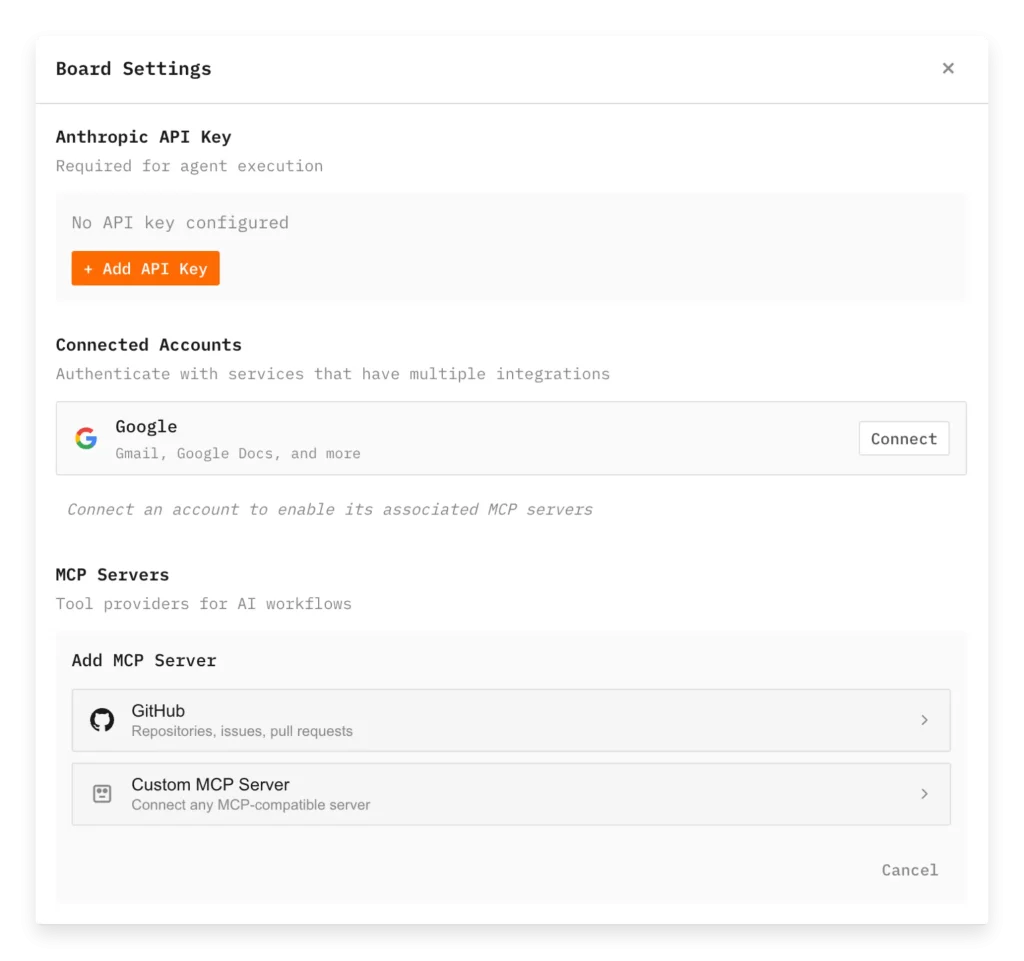
6. Connect the integrations you need through the board settings. Click the connect button for Google to authenticate with OAuth. The same process applies to GitHub and Custom MCP Servers. Once connected, agents on that board can use those integrations.
7. Create a task by clicking the new task button. Write a clear description of what you want the agent to do. The more specific you are, the better the agent can execute. Assign the task to an agent and it begins working immediately.
8. Monitor agent progress through the real-time updates. When an agent needs approval for an action, you’ll see a notification. Review the proposed change, approve it if it looks correct, or reject it if something needs adjustment. The agent continues from where it paused.
9. You can deploy Weft to your Cloudflare account for permanent access. You must upload your secrets to Cloudflare first:
npx wrangler secret put ENCRYPTION_KEY --env production
# Repeat for other secrets like GOOGLE_CLIENT_ID, etc.
10. Deploy the application to Claudeflare. The deployment URL follows the pattern https://weft.<your-subdomain>.workers.dev.
npm run deploy:prod11. Authentication defaults to none for single-user deployments. To enable multi-user access with login protection, configure Cloudflare Access. Create a self-hosted application in your Zero Trust dashboard, set access policies, and grab the Application Audience tag and team name. Set these as secrets with npx wrangler secret put ACCESS_AUD --env production and npx wrangler secret put ACCESS_TEAM --env production. Change AUTH_MODE to "access" in your production environment configuration in wrangler.jsonc.
Pros
- Data Privacy: Your data is not stored on third-party servers.
- Cost Control: You pay only for your own infrastructure usage and API calls.
- Safety Mechanisms: The approval requirement prevents AI agents from making unauthorized changes or sending accidental emails.
- Extensibility: The registry-driven architecture allows you to add custom tools via the MCP.
Cons
- Technical Barrier: The setup process requires developer skills and command-line usage.
- API Costs: You must bring your own Anthropic API key.
Related Resources
- Cloudflare Workers Documentation: Learn about the platform Weft runs on.
- Cloudflare Durable Objects Guide: Understand how Weft manages persistent state.
- Cloudflare Workflows Overview: Explore the durable execution system that powers agents.
- Model Context Protocol Specification: Read about MCP for building custom integrations.
- Anthropic API Documentation: Reference for the Claude models that power Weft agents.
- Google OAuth 2.0 Setup Guide: Configure Google service authentication.
- GitHub OAuth Apps Documentation: Set up GitHub integration authentication.
FAQs
Q: Can I use Weft without paying for Cloudflare’s Workers Paid plan?
A: No, Weft requires Durable Objects and Workflows which are only available on the Workers Paid plan. The free tier doesn’t support these features. You’ll need at least the $5/month plan plus usage charges.
Q: Can I add integrations beyond Gmail, Google services, and GitHub?
A: Yes, through MCP servers. Weft supports any remote MCP server. You can write your own MCP server in the worker/ directory following the pattern in worker/google/GmailMCP.ts and register it in worker/mcp/AccountMCPRegistry.ts.
Q: What happens if an agent makes a mistake before I can approve it?
A: All state-changing operations require approval before execution. An agent can’t send an email, create a pull request, or modify a document without your explicit approval.
Q: How do I debug tasks when agents fail to complete them?
A: Check the agent’s execution log in the task view. Cloudflare Workflows provide checkpointing, so you can see where the agent stopped.
Q: Does Weft work with LLM providers other than Anthropic?
A: Not currently. The system is built specifically for Claude models through the Anthropic API.
Q: How do I back up my Weft data?
A: Weft stores data in Cloudflare Durable Objects within your account. You can export data through the Cloudflare dashboard or write a script to query the Durable Objects and save their state.