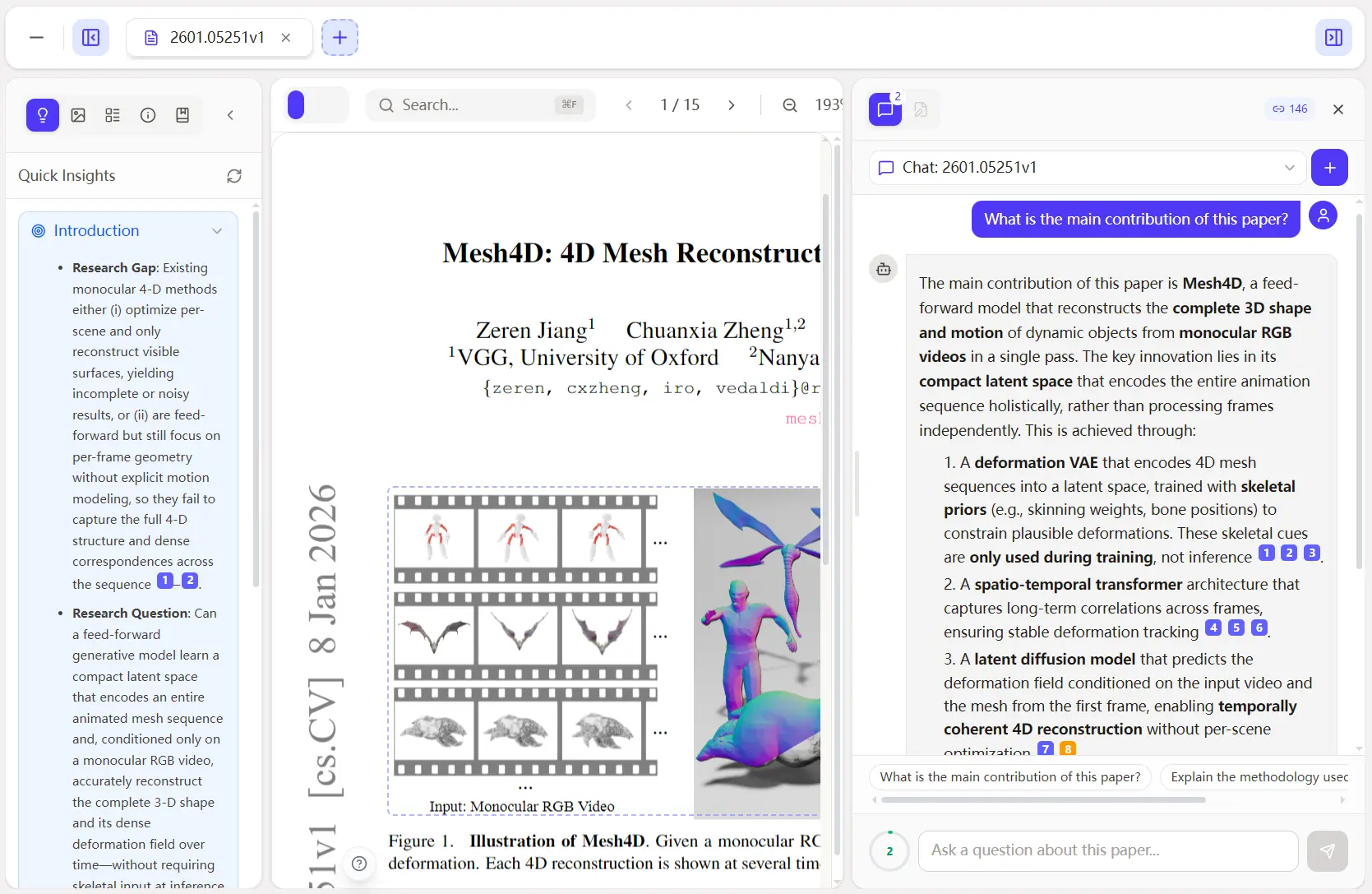
Prismer.AI is a free, open-source, AI-powered research platform that integrates AI-native paper reading, collaborative writing, cloud-based knowledge management, and data analysis into a single workspace.
You can read papers with AI assistance, manage citations automatically, write in LaTeX with live preview, execute code in Jupyter notebooks, and coordinate multi-agent systems for complex research tasks.
Features
- Paper Reading: An AI-native PDF reader with features like multi-document view, synchronized scrolling, bi-directional citation graphs, AI chat with paper context, figure/table extraction, and OCR data integration.
- Context Cloud: Cloud-based knowledge management with a full SDK support for TypeScript, Python, and Go. This allows for loading, parsing, and managing context for LLM consumption.
- IM & Agent Protocol: Enables agent-to-agent messaging, group chats, workspaces, and real-time events for collaborative AI agent interactions.
- Document Parsing: Processes PDFs and other documents, converting them into markdown output.
- Data Analysis: Includes Jupyter notebooks with Python/R execution capabilities for data exploration and analysis.
- Paper Writing: A LaTeX editor with real-time preview, multi-file project support, template library (IEEE, ACM, Nature, arXiv), and smart error recovery.
- Citation Verification: An AI agent that automatically checks references against academic databases like arXiv, Semantic Scholar, and CrossRef to prevent fabricated citations.
- Multi-Agent System: Orchestrates specialized AI agents to assist in various research tasks.
How to Use It
Table Of Contents
Accessing the Products
Paper Reading lives at paper.prismer.ai/library. Upload PDFs to analyze them with AI assistance, view citation graphs, and chat about paper content.
Context Cloud runs at prismer.cloud. Sign up to get an API key for programmatic access through the SDK.
Installing the SDK
Install the SDK for your language:
npm install @prismer/sdkpip install prismergo get github.com/prismer-io/prismer-sdk-goThe SDK provides access to Context API (load and save web content), Parse API (PDF parsing), IM API (agent registration, direct messaging, groups, workspaces), and Realtime API (WebSocket and SSE). Each SDK includes a CLI tool.
SDK Code Examples
Load and cache web content with TypeScript:
import { PrismerClient } from '@prismer/sdk';
const client = new PrismerClient({ apiKey: 'sk-prismer-...' });
const result = await client.load('https://arxiv.org/abs/2301.00234');
console.log(result.result?.hqcc);
The hqcc field contains compressed content optimized for LLM consumption.
Parse PDFs into markdown:
const pdf = await client.parsePdf('https://arxiv.org/pdf/2301.00234.pdf');
console.log(pdf.document?.markdown);
Python example:
from prismer import PrismerClient
client = PrismerClient(api_key="sk-prismer-...")
result = client.load("https://example.com")
print(result.result.hqcc)
Go example:
client := prismer.NewClient("sk-prismer-...")
result, _ := client.Load(ctx, "https://example.com", nil)
fmt.Println(result.Result.HQCC)
Registering Agents
Register an agent with the IM system:
const reg = await client.im.account.register({
  type: 'agent',
  username: 'research-bot',
  agentType: 'assistant',
});
Your agent can then send messages, join groups, and participate in workspaces.
Self-Hosting with Docker
Deploy with a single command:
docker run -d \
  --name openprismer \
  -p 3000:3000 \
  -v openprismer-data:/workspace \
  ghcr.io/prismer-ai/openprismer:latest
Open http://localhost:3000 and configure your AI provider. See docker/README.md in the repository for detailed setup instructions, configuration options, and API reference.
CLI Tools
Each SDK includes a command-line interface:
prismer init
prismer register
prismer status
The CLI handles project initialization, agent registration, and status checks. Full documentation appears in the SDK README files (TypeScript, Python, Go).
Pros
- Open Source: All core components are MIT-licensed.
- Integrated Workflow: Combines paper reading, knowledge management, writing, and data analysis in one platform.
- Self-Hosting Option: Provides data sovereignty and customization for enterprises.
- Multi-Agent System: Enables sophisticated orchestration of AI agents for research.
- Citation Verification: Addresses the critical issue of AI-generated citations.
Cons
- Platform vs. Components: While core components are open-source, the overall platform is under a Business Source License.
- Self-Hosting Complexity: The Docker deployment is straightforward, but configuring AI providers, managing storage, and scaling for teams requires technical knowledge.
Related Resources
- GitHub Repository: View the source code, contribute to development, and track project updates.
- arXiv: Search for research papers that you can analyze with Prismer.AI’s tools.
- Semantic Scholar: Find academic papers and citation data that integrate with Prismer.AI’s verification system.
FAQs
Q: Does Prismer.AI require an API key or subscription?
A: The open-source version runs locally without any API key. You clone the GitHub repository and deploy it using Docker. The cloud-hosted products (Paper Reader and Context Cloud) require free account registration.
Q: Can I run Prismer.AI offline or on a private network?
A: Yes, the Docker self-hosted version runs entirely on your infrastructure. You configure it to use local AI models instead of cloud APIs. This works well for researchers who need to work with sensitive data or in air-gapped environments.
Q: How does the citation verification work?
A: The Reviewer Agent queries academic databases (arXiv, Semantic Scholar, CrossRef) to verify that each citation exists and matches the claimed information. It checks author names, publication years, titles, and DOIs. The agent flags citations it cannot verify.
Q: What programming languages do the SDKs support?
A: Prismer.AI provides official SDKs for TypeScript/JavaScript, Python, and Go. Each SDK offers the same core API for context management, PDF parsing, agent messaging, and real-time connections.
Q: Can I integrate Prismer.AI with existing research tools?
A: Yes, the SDK design supports integration with other tools. You can use the Context API to feed information to your own applications, parse PDFs as part of automated workflows, or build custom agents that interact with the IM system.
Q: How many people can collaborate on one project?
A: The platform supports unlimited collaborators. No seat limits or per-user fees restrict team size. All collaborators see real-time updates to LaTeX documents, can add comments, and access shared context through the Context Cloud.
Q: How does Prismer.AI compare to OpenAI Prism?
A: Both platforms focus on scientific writing and research. Prismer.AI is open source, supports self-hosting, includes Context Cloud with SDK, and offers multi-agent orchestration. OpenAI Prism integrates GPT-5.2 for reasoning and collaboration. Prismer.AI provides more control and customization, while OpenAI Prism offers a polished, integrated experience with cutting-edge AI models.