LinkedIn Post Quality Analyzer is a free AI-powered tool that evaluates your LinkedIn posts across five critical metrics and reveals the specific problems hurting your reach.
The tool analyzes your hook strength, authenticity, viral potential, algorithm compatibility, and expert positioning in 30 seconds. Paste your post, get scored on each dimension, and receive actionable fixes that preserve your voice.
LinkedIn Post Quality Analyzer was built by YouScan’s AI team. They analyzed 10,000+ high-performing LinkedIn posts and applied insights from their social listening platform (which processes millions of conversations for Fortune 500 brands) to individual post evaluation. The result is an analysis that accounts for both algorithm mechanics and human psychology.
Features
- Hook Power Analysis: The tool examines your opening line to determine if it creates curiosity, uses specifics, and triggers emotion.
- Authenticity Detection: The analyzer identifies corporate jargon, AI-generated patterns, and generic phrases that make posts sound robotic.
- Viral Potential Scoring: The tool evaluates your post structure, CTA placement, and emotional resonance to predict engagement likelihood.
- Algorithm Compatibility Check: The analyzer flags technical mistakes that cut reach in half. External links, excessive post length, poor formatting, and other algorithm penalties get called out with specific fixes.
- Expert Status Evaluation: The tool looks for proof points, unique insights, and thought leadership signals that separate authoritative voices from generic commentary.
- Voice Preservation: The tool doesn’t rewrite your content into generic marketing speak. It identifies problems and suggests fixes that maintain your tone and style.
- Instant Feedback: Analysis completes in 30 seconds. You get specific scores (0 to 100) for each metric plus detailed explanations of what’s not working.
- Neuropsychology-Based Recommendations: Feedback draws from research on how brains respond to content, not just generic writing tips.
- Multi-Language Support: The analysis works identically across languages. You can evaluate posts created for any market.
- Free Access: No trial period, no credit card requirement, no premium upsell.
Case Study
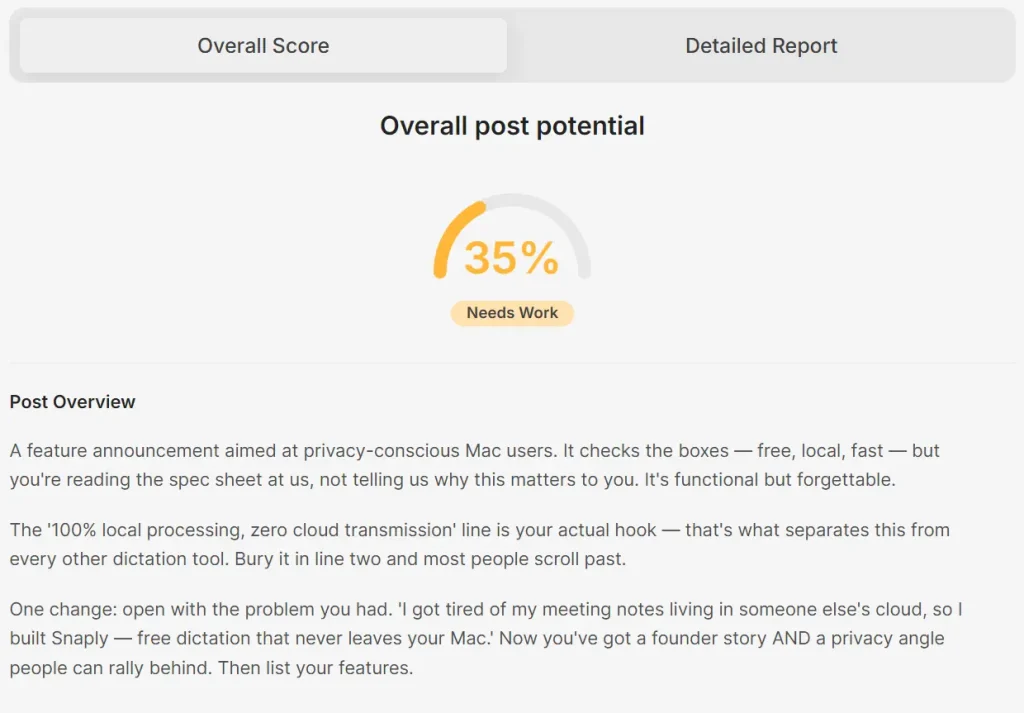
I tested the LinkedIn Post Quality Analyzer using a social media post generated by Gemini 3 Pro for a product called Snaply (a free AI dictation tool for Mac). The original post scored 35% overall with major weaknesses across all five metrics. Here’s what the detailed analysis revealed and how the optimized version compared.
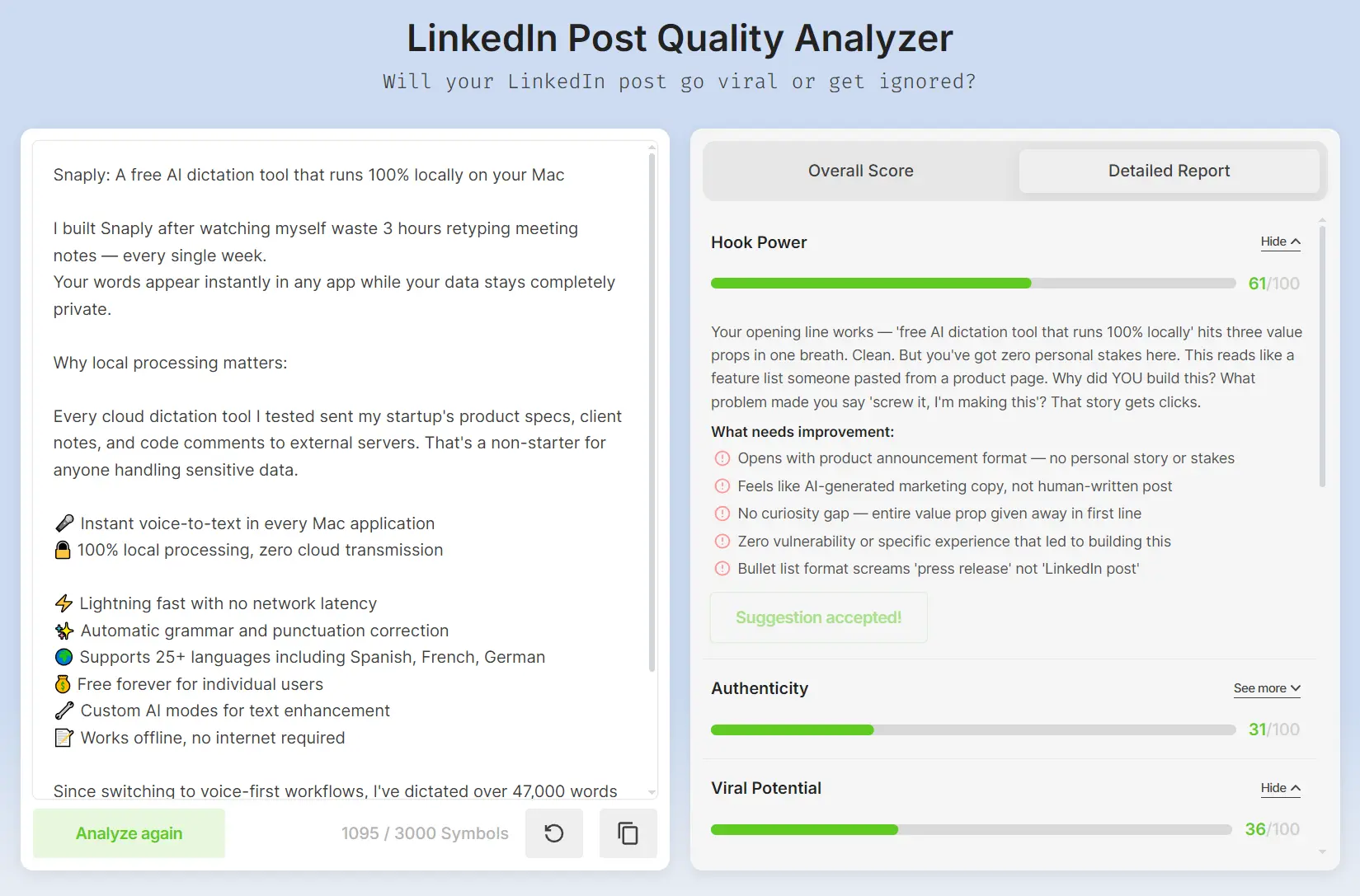
The original post opened with “Snaply: A free AI dictation tool that runs 100% locally on your Mac” followed by a bullet list of eight features. The tool identified multiple critical problems. The Hook Power scored 61/100 because the opening gave away the entire value proposition in one line with no curiosity gap or personal stakes. The post read like a feature list pasted from a product page rather than human-written content.

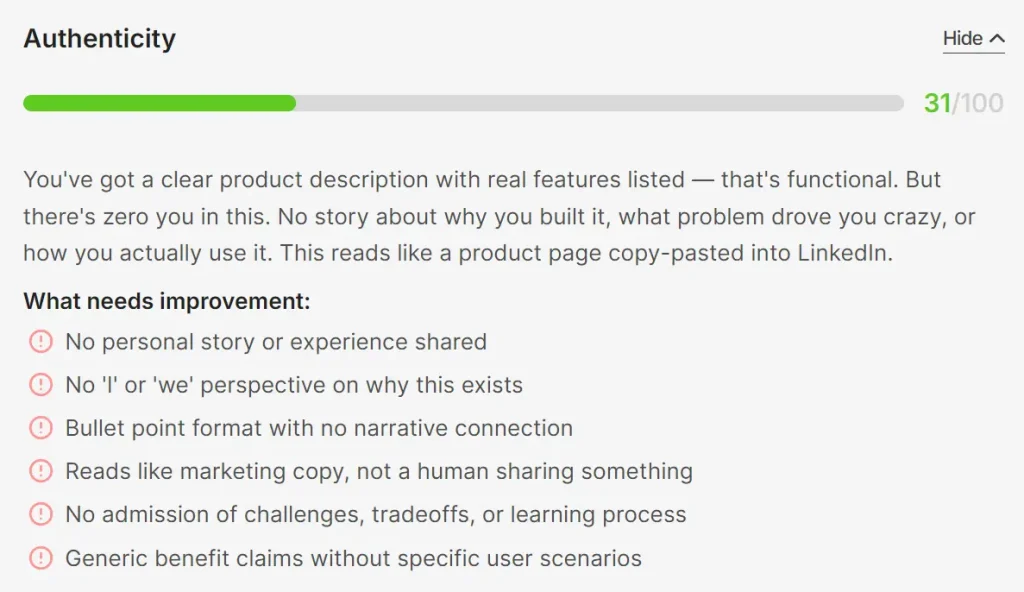
Authenticity scored 31/100. The analyzer found zero personal story, no perspective on why this exists, and bullet point formatting that screamed “press release” instead of genuine recommendation. The lack of “I” or “we” perspective combined with generic benefit claims made the post feel automated.
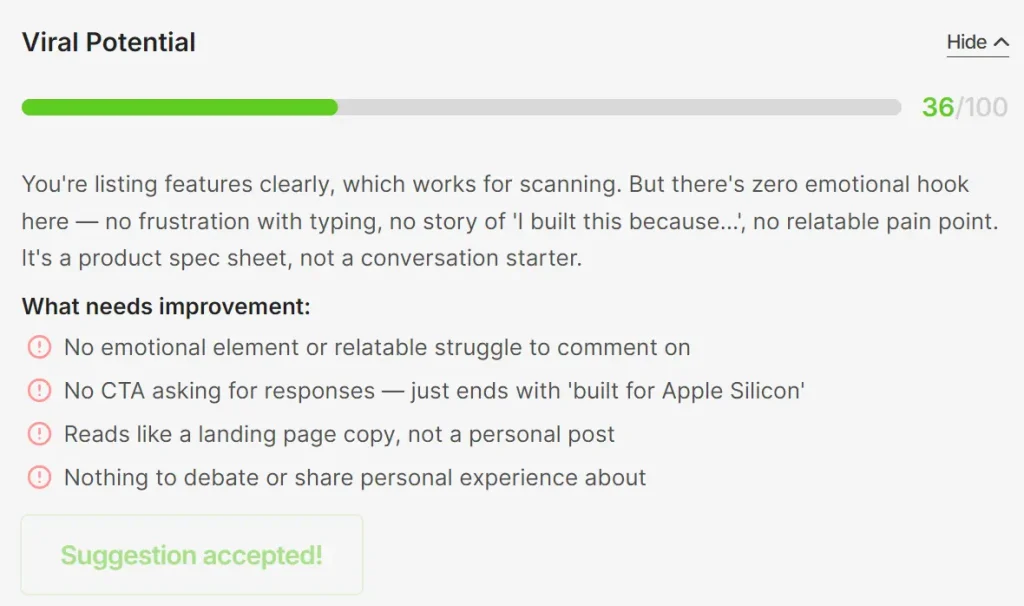
Viral Potential hit 36/100. The tool noted there was no emotional element, no relatable struggle, and no CTA asking for responses. The post ended with a technical specification (“Built for Apple Silicon Macs”) rather than creating conversation opportunities.
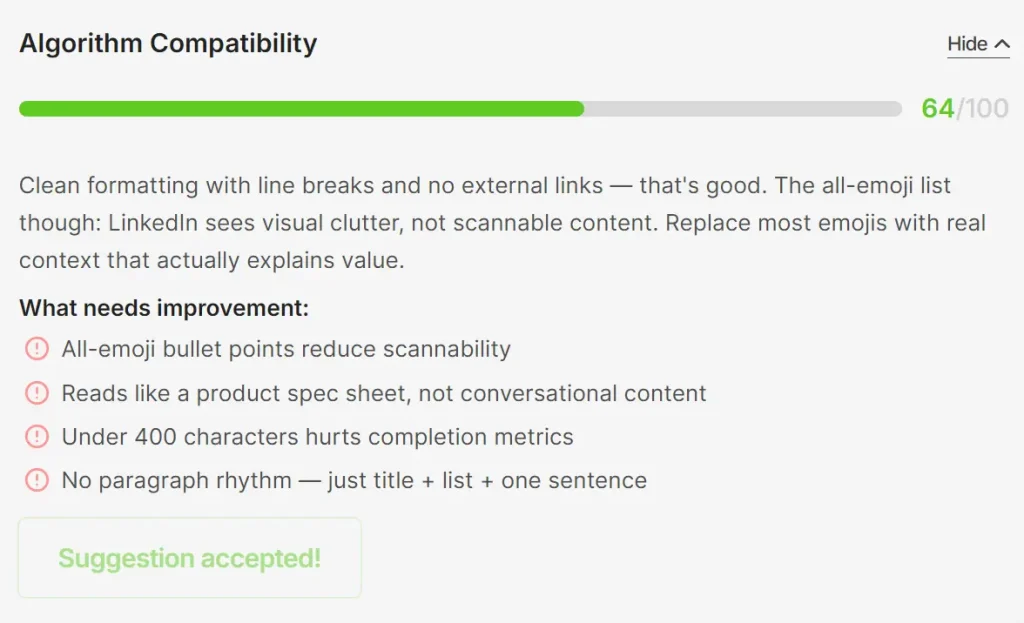
Algorithm Compatibility scored 64/100. The formatting was clean with proper line breaks and no external links, but the all-emoji bullet points reduced scannability. More critically, the post was under 400 characters which hurts completion metrics.
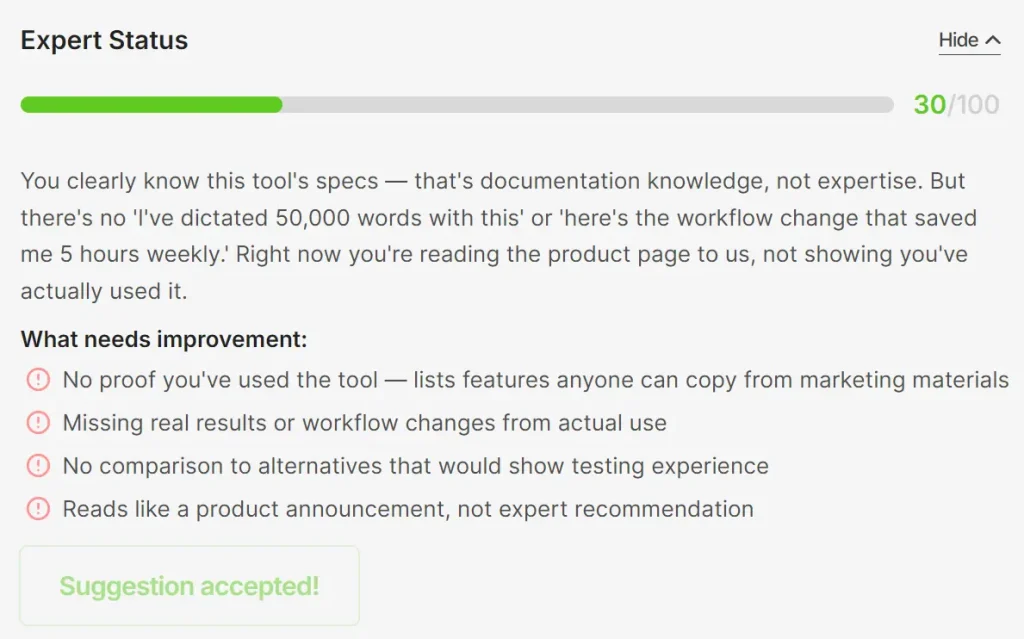
Expert Status scored 30/100. The post listed features anyone could copy from marketing materials without demonstrating actual use. There were no real results, workflow changes, or comparisons to alternatives that would prove testing experience.
The optimized version restructured the entire post around a personal story: “I built Snaply after watching myself waste 3 hours retyping meeting notes — every single week.” It added context about why local processing matters (cloud tools send sensitive data to external servers) and included a concrete result: “I’ve dictated over 47,000 words across Notion, Slack, and VSCode — cutting my documentation time from 12 hours to 4 hours weekly.”
The key transformation came from adding human stakes, specific numbers, and ending with a question (“What’s one app where you’d want instant dictation most?”) that invites engagement. The bullet list remained but now supported a narrative instead of replacing one.
How to Use It
1. Visit the LinkedIn Post Quality Analyzer and paste or type your LinkedIn post into the text field. The tool requires a minimum of 200 characters to run analysis.
2. Click the “Analyze post” button. The analysis takes approximately 30 seconds to process your content through the five evaluation metrics.
3. Review your Overall Post Potential score. This percentage (0 to 100) gives you immediate feedback on whether your post is ready to publish.
4. Click “Show Me How to Improve” to access your detailed report. This section breaks down your performance across Hook Power, Authenticity, Viral Potential, Algorithm Compatibility, and Expert Status. Each metric includes specific explanations of what’s not working.
5. Read the “What needs improvement” sections under each metric. These point out exact problems like “no curiosity gap,” “reads like marketing copy,” or “missing CTA.”
6. Click “Rewrite with AI” next to any metric that needs work. The tool generates alternative versions that address the identified problems while attempting to preserve your voice. You decide which suggestions to implement.
7. Make your revisions based on the feedback and run the revised post through the analyzer again. This confirms your edits actually improved the metrics.
8. Post your optimized content to LinkedIn. The analysis has given you data-backed confidence about what will perform.
Pros
- Fast Analysis Speed: ~30-second processing time .
- Voice Protection: The tool flags problems without forcing generic rewrites.
- Specific Problem Identification: You get concrete explanations.
- No Cost Barrier: Full functionality stays free permanently.
- Algorithm Transparency: The tool demystifies which technical choices actually hurt reach.
- Multi-Metric Approach: Five separate scores prevent you from fixating on one dimension while ignoring others.
Cons
- Minimum Character Requirement: The 200-character minimum excludes very short posts.
- No Automatic Posting: You must manually copy optimized content back to LinkedIn.
- Authentication After Free Uses: You’ll eventually need to log in with LinkedIn or Google credentials.
FAQs
Q: Does LinkedIn Post Quality Analyzer store or share my posts?
A: No. Your writing stays yours. The company explicitly states they discard analyzed posts immediately after processing.
Q: How is this different from ChatGPT or other AI writing tools?
A: ChatGPT gives generic writing tips and often rewrites content into something that sounds artificial. LinkedIn Post Quality Analyzer identifies specific problems in your actual post (like weak hooks or algorithm penalties) and suggests targeted fixes while protecting your voice.
Q: Will using this tool make my posts sound generic or templated?
A: The opposite. The tool’s Authenticity metric specifically detects generic corporate language and AI patterns. It pushes you toward more personal, human writing rather than marketing speak.
Q: Why do I need to authenticate after several free uses?
A: Authentication with LinkedIn or Google credentials helps prevent click spam from bots. This ensures fair use and keeps the service sustainable for real users.
Discover More Social Post Analyzers
- Syndy AI: Create LinkedIn Posts That Sound Like You.
- Hook Analyzer: Write Better Social Media Hooks.