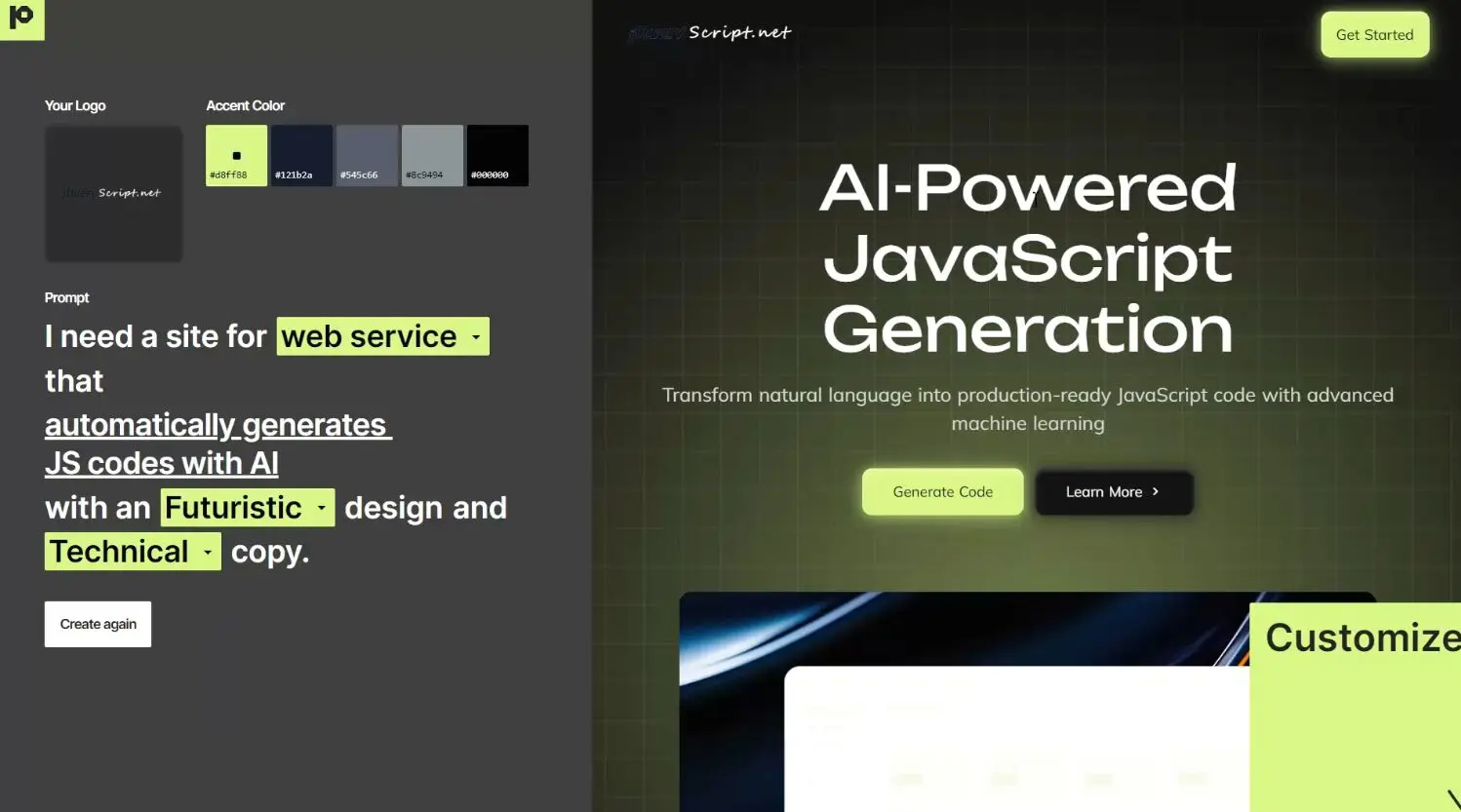
Pablo.Design transforms the website creation process by taking a completely different approach from traditional website builders. Instead of starting with templates or blank canvases, Pablo starts with your logo—using AI to extract your brand identity and create a fully designed website that captures your visual style.
The free AI tool analyzes your logo’s visual language (colors, shapes, typography) and extends it into a complete site structure. You’re not picking fonts or tweaking padding; you’re reacting to AI-generated options that already align with your brand.
Features
- Logo-to-Site AI: You upload your logo, and Pablo’s AI gets to work.
- AI-Generated Copy: It doesn’t just design; it writes draft copy for your site.
- Automated Design System: Based on your logo, it establishes a consistent design language – colors, typography, spacing, and layout hierarchy. The goal is a site that feels like your brand.
- Interactive “Vibe” Customization: Once the initial site is generated, you’re not stuck. You can tap, shuffle, and scroll through variations.
- Free Publishing with Custom Domain: You can publish your site with a unique
pablo.designsubdomain or connect your own custom domain by changing an A record.
Use Cases
- Rapid Landing Page for Startups: Got an idea and need to test the waters with a simple page? Upload your logo, get a base, tweak the copy, and you’re live.
- Basic Portfolio for Freelancers: If you need a straightforward online presence to showcase who you are and what you do, this can get you there without a huge time investment.
- Initial Site for Small Businesses: For a local shop or service provider who just needs an online brochure with contact info and basic service descriptions.
- Quick Site for a Side Project: Launching a new app or small project? A quick site from Pablo can serve as your initial web presence.
- Placeholder or “Coming Soon” Page: If your main site is under development, this can be a good-looking temporary solution that’s still on-brand.
How to use it:
1. Visit Pablo.Design and upload your logo. Cleaner, simpler logos (like vector-based ones, or high-res PNGs with clear distinctions) tended to give the AI more to work with for color palettes and overall feel. A very complex or low-quality logo might not yield the best results.
2. Complete the guided prompts to tell Pablo about your business.
3. Click “Create” and wait about 60 seconds while Pablo generates your website or application.
4. Log in to Pablo.Design to make further customizations to your website or app.
5. When satisfied, click “Publish” to make your site live. Pablo provides a unique URL (‘yourname.pablo.design’) where you can access your site immediately, or you can connect your own domain by updating your DNS settings to point to Pablo’s servers
Pros
- Blazing Fast Initial Build: From logo upload to a live, shareable site can genuinely be just a few minutes.
- Genuinely Free for Core Use (Including Custom Domain): No obvious upselling or feature-gating for publishing with your own domain. This is a standout point.
- Brand-First Approach: Starting with the logo ensures the site feels like yours from the get-go, not a generic template.
- Low Barrier to Entry for Non-Designers: It automates many design decisions (color harmony, font pairing, spacing) that can be tricky.
- Simple, Uncluttered Interface: You’re not overwhelmed with tons of menus and options.
- Iterative “Vibe” Customization: It’s a fun, almost playful way to explore design options without needing formal design skills.
Cons
- No Obvious Way to Export Code: If you wanted to take the generated design and host it elsewhere or develop it further yourself, that doesn’t seem to be an option currently. You’re publishing within their ecosystem.
- Limited Fine-Grained Control: If you need to nudge an element 2px to the left, this probably isn’t your tool. Customization is more about selecting from generated options.
- Best for Simpler Websites: Don’t expect to build a complex e-commerce store, a sprawling blog with categories and tags, or a site requiring deep integrations. It’s geared towards landing pages and simple brochure-style sites.
- AI Copy Needs Human Touch: The generated text is a starting point. You’ll absolutely need to edit and refine it to match your brand’s voice and specific messaging. Sometimes it can be a bit generic.
- Logo Quality Matters: The better your logo, the better the starting point for the AI. A blurry or overly intricate logo might confuse it.
- “Experiment01”: It’s new. Features may change, evolve, or (in a worst-case scenario for any new tool) disappear. That’s the nature of experimental projects.
FAQs:
Q: What if I don’t like the first design it generates?
A: That’s exactly what the “tap, shuffle, scroll” customization is for. You iterate. Pablo will offer different layouts, color emphasis, and typographic styles. You keep clicking through options until you land on something that resonates. It’s not about tweaking one element at a time, but more about cycling through complete “vibes.”
Q: How much real design control do I have?
A: It’s less “control” in the traditional sense (like in Figma or Photoshop) and more “guidance” or “curation.” You’re influencing the AI and selecting from its proposals rather than directly manipulating every design aspect. If you need pixel-perfect precision or highly unique, unconventional layouts, this might feel a bit restrictive. But for a clean, professional, brand-aligned site, it’s surprisingly effective.