FireRed-OCR is a free, open-source AI model that converts complex document images into structured Markdown output with pixel-precise accuracy. It’s trained for structural document parsing, such as tables, formulas, multi-column layouts, and dense text.
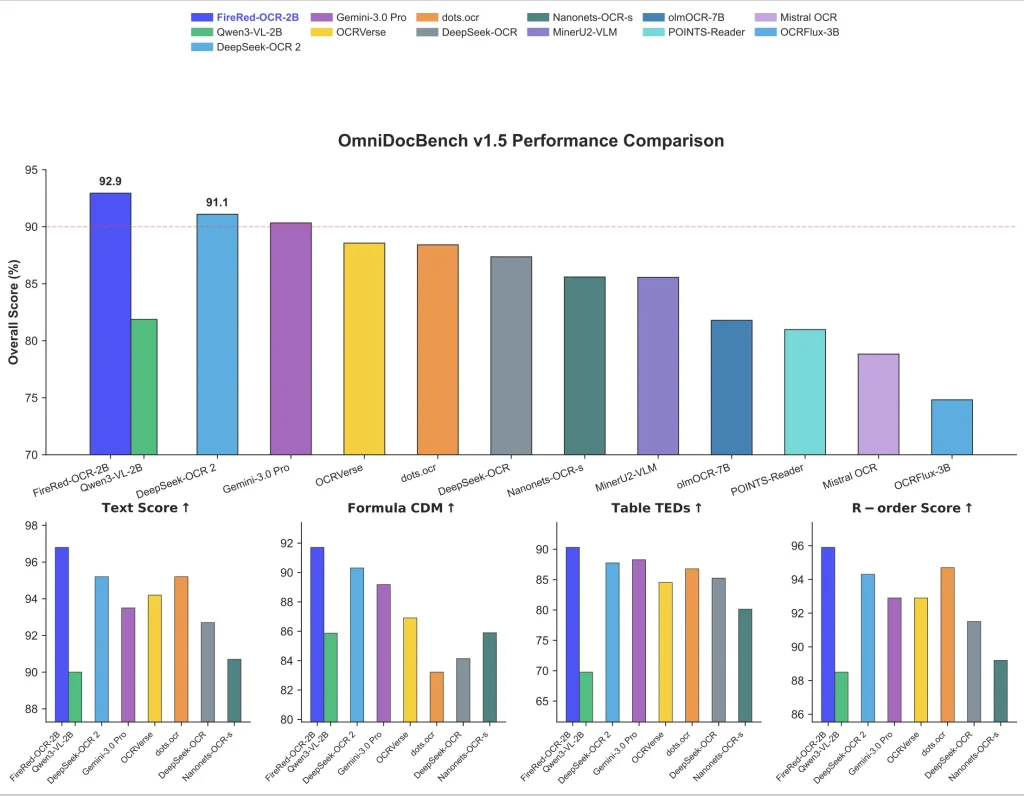
The model runs on Qwen3-VL-2B-Instruct, a 2-billion parameter vision-language backbone. On the OmniDocBench v1.5 benchmark, FireRed-OCR-2B scores 92.94% overall, ahead of Gemini 3.0 Pro (90.33%), DeepSeek-OCR 2 (91.09%), and the 235-billion parameter Qwen3-VL-235B (89.15%).
Features
- Structural Hallucination elimination: A three-stage training pipeline targets unclosed tables, invalid LaTeX, and disordered reading sequences at the model level.
- Format-Constrained GRPO: Reinforcement learning enforces specific reward signals for formula syntax, table integrity, hierarchical closure, and text accuracy.
- Geometry + Semantics Data Factory: A novel data engine uses geometric feature clustering and multi-dimensional tagging to build balanced training datasets covering long-tail layouts.
- Full Markdown output: Produces complete structured Markdown from a single document image, including heading hierarchy, tables, and inline LaTeX.
- Flash Attention 2 support: Optionally uses
flash_attention_2for faster inference and lower memory usage in multi-image scenarios. - Apache 2.0 license: Weights and code are fully open-source and commercially usable.
Use Cases
- Academic Paper Parsing: Extract LaTeX formulas and nested section hierarchies from PDF scans for research knowledge bases.
- Financial Report Digitization: Convert quarterly earnings PDFs (with dense tables spanning multiple pages) into queryable Markdown.
- Handwritten Note Transcription: Process meeting whiteboards or lecture notes where print and cursive mix.
- Legacy Document Archival: Digitize scanned books or newspapers with mixed print quality, multi-column layouts, and embedded images.
- Invoice Data Extraction: Pull line items from vendor invoices where table formats vary wildly.
How to Use It
Try the Hosted Demo
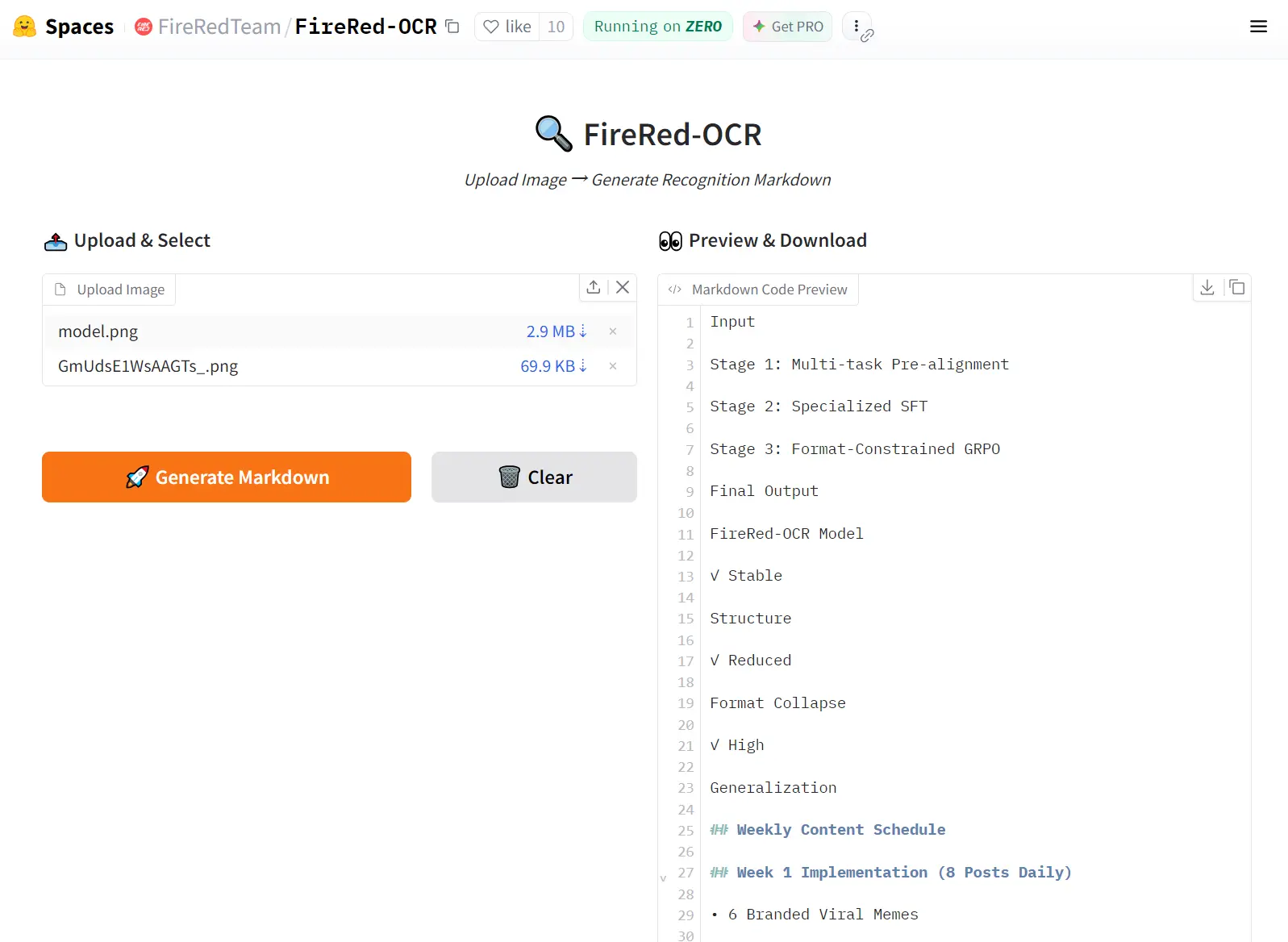
Go to the FireRed-OCR Hugging Face Space. Upload a document image and get Markdown output instantly. This is the fastest way to evaluate the model against your own documents before committing to a local deployment.
Option 2: Run It Locally
Install dependencies:
pip install transformers
pip install qwen-vl-utils
git clone https://github.com/FireRedTeam/FireRed-OCR.git
cd FireRed-OCR
Load the model and run inference:
import torch
from transformers import Qwen3VLForConditionalGeneration, AutoProcessor
from conv_for_infer import generate_conv
# Load model — bfloat16 recommended for memory efficiency
model = Qwen3VLForConditionalGeneration.from_pretrained(
    "FireRedTeam/FireRed-OCR",
    torch_dtype=torch.bfloat16,
    device_map="auto",
)
processor = AutoProcessor.from_pretrained("FireRedTeam/FireRed-OCR")
# Point to your document image
image_path = "./examples/complex_table.png"
messages = generate_conv(image_path)
# Tokenize and prepare input
inputs = processor.apply_chat_template(
    messages,
    tokenize=True,
    add_generation_prompt=True,
    return_dict=True,
    return_tensors="pt"
)
inputs = inputs.to(model.device)
# Generate structured Markdown output
generated_ids = model.generate(**inputs, max_new_tokens=8192)
generated_ids_trimmed = [
    out_ids[len(in_ids):] for in_ids, out_ids in zip(inputs.input_ids, generated_ids)
]
output_text = processor.batch_decode(
    generated_ids_trimmed,
    skip_special_tokens=True,
    clean_up_tokenization_spaces=False
)
print(output_text)
(Optional): Enable Flash Attention 2:
For multi-image workloads or memory-constrained environments, replace the model loading call with:
model = Qwen3VLForConditionalGeneration.from_pretrained(
    "FireRedTeam/FireRed-OCR",
    torch_dtype=torch.bfloat16,
    attn_implementation="flash_attention_2",
    device_map="auto",
)
Pros
- High Accuracy: The model scores above 92% on OmniDocBench v1.5.
- Hardware Efficiency: The 2B parameter size runs comfortably on consumer-grade GPUs.
- Syntax Enforcement: The GRPO training prevents broken LaTeX and malformed tables.
Cons
- Dependency Requirements: You must install specific versions of transformers and qwen-vl-utils.
- Hardware Constraints: The model requires a dedicated GPU for acceptable inference speeds.
- Context Limits: Extremely dense multi-page documents require chunking or high token limits.
Related Resources
- FireRed-OCR on Hugging Face: Download model weights and read the full model card.
- FireRed-OCR GitHub Repository: Access the source code, inference scripts, and
conv_for_infer.py. - FireRed-OCR Technical Report (PDF): Full methodology covering the data factory, training pipeline, and benchmark analysis.
- OmniDocBench Dataset: The primary benchmark used to evaluate FireRed-OCR against competing models.
- Qwen3-VL-2B-Instruct Model Page: Documentation for the base vision-language model FireRed-OCR builds on.
FAQs
Q: Is FireRed-OCR completely free to use?
A: Yes. The model weights and code are released under Apache 2.0, which covers personal, research, and commercial use. There are no usage fees, API keys, or rate limits for local inference.
Q: What document types does it handle best?
A: It performs strongest on structured documents with tables, mathematical formulas, and multi-level headings — research papers, financial reports, and technical manuals. Scanned documents work too, though image resolution affects output quality.
Q: Does it require a GPU to run locally?
A: A CUDA-compatible GPU is strongly recommended. The model runs in bfloat16 by default. CPU inference technically works but is too slow for practical use on full-page documents. Flash Attention 2 support further improves GPU performance for multi-image workloads.
Q: How does FireRed-OCR differ from a general vision-language model like Qwen3-VL?
A: The base Qwen3-VL-2B-Instruct model scores 81.87% on OmniDocBench v1.5. FireRed-OCR-2B — trained on the same backbone — scores 92.94%. The gap comes from three specialized training stages: spatial grounding pre-alignment, Markdown-focused supervised fine-tuning, and Format-Constrained GRPO reinforcement learning. General VLMs hallucinate structure; FireRed-OCR is trained not to.
Q: Can it handle handwritten text or low-quality scans?
A: The benchmark results are based on digitally printed and scanned documents. OCRBench text recognition scores (93.5%) suggest strong general text accuracy, but performance on heavily degraded or handwritten documents is not benchmarked in the current release.
Q: What output format does it produce?
A: FireRed-OCR produces structured Markdown with inline LaTeX for mathematical formulas and standard Markdown table syntax for tabular data. It does not produce plain text or PDF output directly.
Q: Is it safe for processing confidential documents locally?
A: Local inference means no data leaves your machine, which suits confidential document workflows. The hosted Hugging Face demo should not be used for sensitive documents.