Free AI-powered Calorie Estimator – Cal Counter
Quickly estimate food calories with Cal Counter's free AI tool. Analyze food photos and descriptions for instant results.

Cal Counter is a free AI calorie estimation platform that offers a fast and efficient solution for tracking calories.
It enables you to quickly estimate the calorie count and nutritional details of your food through AI-powered photo recognition and text analysis capabilities.
Features
- Calorie Counter: Analyzes uploaded food images to provide calorie estimates. Includes a breakdown of individual ingredients and serving sizes.
- Food Calorie AI: A comprehensive food calorie database enhanced with AI. Provides detailed macronutrient information (carbohydrates, protein, fat) alongside calorie estimates.
- Photo Recognition: Quickly identifies food from images without manual entry.
- Real-Time Calculation: Delivers instant calorie and macronutrient estimations.
- Multiple Mixed Foods Analysis: Accurately assesses dishes with various ingredients.
Use Cases
- Tracking Daily Intake: Quickly log meals throughout the day to monitor calorie consumption.
- Meal Planning: Estimate the nutritional content of planned meals to manage dietary goals.
- Recipe Analysis: Determine the caloric value of new recipes.
- Restaurant Choices: Make informed decisions when dining out by estimating the calories of menu items.
- Dietary Awareness: Gain a better understanding of the caloric and macronutrient composition of different foods.
Case Studies
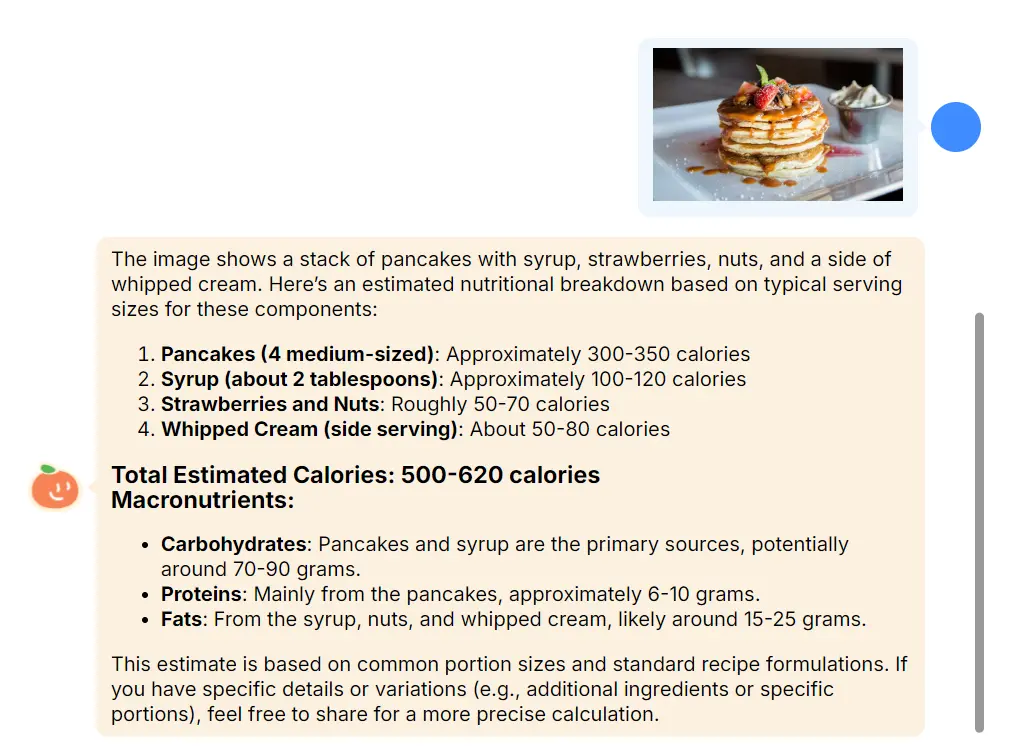
I tested Cal Counter’s capabilities using both image and text input. First, I uploaded a picture of pancakes with syrup, strawberries, nuts, and whipped cream. The tool accurately identified the components and provided a calorie range of 500-620, along with a macronutrient breakdown.
Next, I entered “McDonald’s Big Mac” into the text input. Cal Counter quickly returned the estimated calorie count (550) and detailed macronutrient information. This confirmed the tool’s ability to analyze various foods and provide consistent results.

How to Use It
1. Visit the Cal Counter website and click the “Chat Now” button.
2. Upload a Picture or Enter Text: Start by either uploading an image of your meal or typing a description. For instance, you could upload a picture of a homemade sandwich or enter “Caesar Salad with Chicken.”
3. Analyze the Food Items: Click “Send,” and the AI will analyze the image or text, identifying each food component to generate a calorie estimate.
4. Review Calorie and Macronutrient Breakdown: Within moments, Cal Counter will display a detailed calorie estimate, along with a breakdown of macronutrients like carbs, protein, and fat. The tool’s database provides ranges based on average servings, so if you have more precise measurements, you can enter them for greater accuracy.
5. Save and Track Your Meals: For returning users, Cal Counter saves previous meal data, providing a more customized experience as it learns your dietary preferences and regularly eaten items.
Pros
- Free: No cost to use.
- Fast and Convenient: Provides quick calorie estimates.
- Comprehensive Database: Covers a wide range of foods.
- Detailed Macronutrient Information: Offers insights beyond calories.
- Image and Text Input: Supports multiple input methods.
Cons
- Estimates: Calorie values are estimations and may not be perfectly accurate.
- Reliance on Image Quality: Image clarity impacts accuracy.
FAQs
Q: How accurate are the calorie and macronutrient estimates provided by Cal Counter?
A: Cal Counter’s AI-powered algorithms are highly accurate, utilizing advanced computer vision and a comprehensive food database. However, the platform’s estimates may not be 100% precise, especially for homemade or specialized dishes. Users are encouraged to double-check the results and adjust as needed.
Q: What if my food isn’t in the database?
A: Cal Counter’s AI can still analyze images and provide estimates even if the specific food isn’t recognized.
Q: Is my data private?
A: Yes, Cal Counter maintains user privacy.