AI agents have moved far beyond simple question answering. Today, they write code, design interfaces, analyze data, and coordinate multi-step workflows across tools and files.
As these agents take on more responsibility, one limitation becomes obvious: long, carefully written prompts do not scale. Instructions get copied, tweaked, forgotten, or rewritten from scratch. Over time, the agent’s behavior becomes inconsistent, even within the same project.
This is where Agent Skills come in. Instead of relying on ad-hoc prompts, Agent Skills package expert instructions into reusable files that an agent can load and follow whenever needed. The result is more predictable behavior, clearer workflows, and far less prompt repetition.
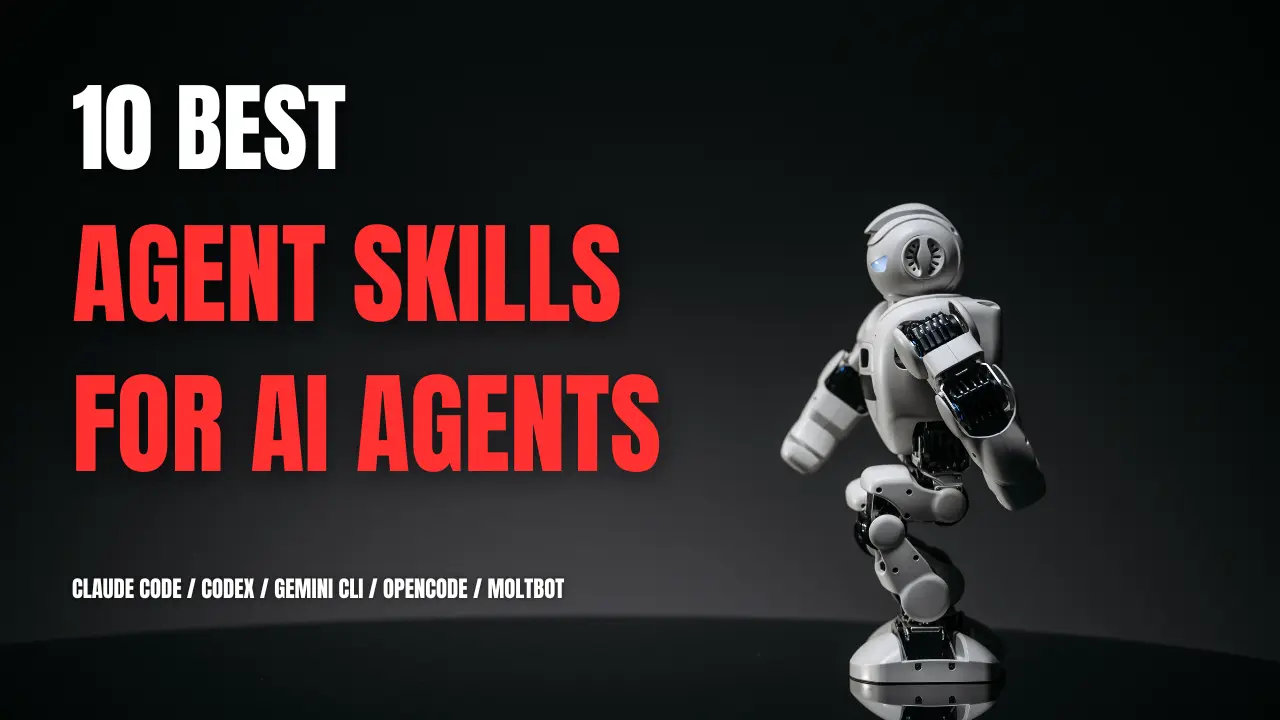
In this article, I’ll list the ten best Agent Skills for Claude Code and similar AI agents like Gemini CLI, CodeX, and Moltbot.
Get started with the quick reference table below to find Agent Skills for your use case, then read the detailed breakdowns to understand what each does and whether you need it.
Quick Reference: Top 10 Agent Skills
| Skills | Best For |
|---|---|
| Superpowers | Planning-first software development |
| ui-ux-pro-max | Design system generation |
| agent-skills | React/Next.js optimization |
| planning-with-files | Persistent task tracking |
| context-engineering | Building custom agent systems |
| obsidian-skills | Obsidian vault integration |
| scientific-skills | Scientific computing workflows |
| marketingskills | CRO and copywriting |
| dev-browser | Visual browser testing |
| humanizer | Remove AI writing patterns |
What Are Agent Skills?
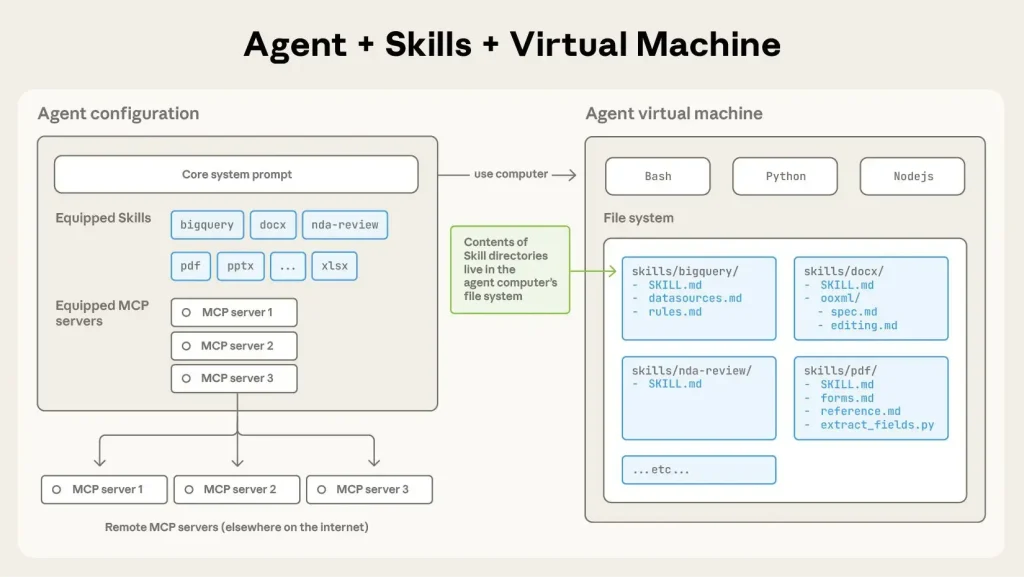
Agent Skills are instruction packages that define how an AI agent should handle specific types of tasks. A Skill is a folder that contains one or more markdown files describing step-by-step procedures for a given task.
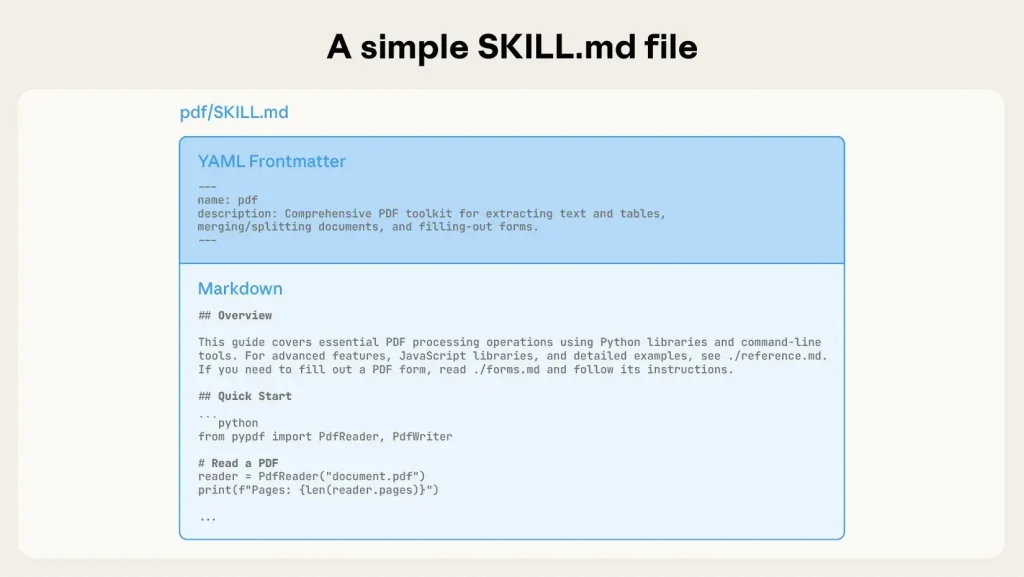
When you ask your agent to do something like optimize a React component or write landing page copy, the agent checks if it has a relevant skill. If it does, the agent loads those instructions and follows them. If not, it uses general knowledge.
Agent Skills are plain files, not hosted services. They require no servers, no APIs, and no authentication. You install once and use them across projects. Each skill contains metadata (name and description) plus step-by-step instructions.
The agent reads basic information about all installed skills at startup but only loads full instructions when it needs them. This keeps responses fast while giving your agent access to specialized knowledge on demand.
The format originated at Anthropic and is now an open standard supported by Claude Code, Cursor, and other agent platforms.
Top 10 Best Agent Skills in 2026
Table Of Contents
1. Superpowers
Superpowers is a complete software development workflow for coding agents. It forces the agent to step back, plan, and follow a strict engineering process rather than jumping straight into coding. It includes modules for brainstorming, test-driven development (TDD), and systematic debugging.
Use Cases
- Brainstorming: Refines rough ideas through Socratic questioning before code is written.
- Test-Driven Development: Enforces a Red-Green-Refactor cycle where tests are written before implementation.
- Systematic Debugging: Uses a 4-phase root cause analysis process to fix bugs reliably.
- Code Review: conducting pre-review checklists and responding to feedback.
Why This Skill Matters
Most coding agents rush to write code, leading to bugs and poor architecture. Superpowers forces the agent to act like a senior engineer, prioritizing planning and testing. This results in higher quality code and fewer hallucinations.
Installation / Setup
/plugin marketplace add obra/superpowers-marketplace
/plugin install superpowers@superpowers-marketplace
GitHub Repo: https://github.com/obra/superpowers
2. ui-ux-pro-max-skill
This skill provides design intelligence for building professional UI/UX. It features a “Design System Generator” that analyzes project requirements and automatically creates a tailored design system, including color palettes, typography, and component patterns. It includes reasoning rules for specific industries (e.g., Fintech, Healthcare).
Use Cases
- Design System Generation: Automatically generating a
MASTER.mddesign file for a new project. - Landing Page Design: Creating conversion-optimized layouts based on product type.
- Dashboard Creation: Selecting appropriate chart types and data visualization styles.
- Stack-Specific Implementation: Generating code for React, Vue, SwiftUI, or Tailwind based on best practices.
Why This Skill Matters
Developers often struggle with design decisions. UI UX Pro Max automates the subjective parts of frontend development, ensuring that the output is not just functional code, but also visually professional and accessible.
Installation / Setup
npm install -g uipro-cli
uipro init --ai claude
GitHub Repo: https://github.com/nextlevelbuilder/ui-ux-pro-max-skill
3. agent-skills
A collection of high-quality coding skills maintained by Vercel Labs. It focuses on framework-specific best practices, particularly for React, Next.js, and React Native. It also includes tools for deploying directly to Vercel.
Use Cases
- Performance Optimization: Auditing React components for re-renders and bundle size issues.
- Accessibility Audits: Checking web interfaces against 100+ rules (aria-labels, focus states).
- Deployment: Deploying apps to Vercel directly from the conversation.
- React Native: Applying platform-specific patterns for iOS and Android.
This skill brings engineering standards from Vercel directly into the agent’s context. It prevents the agent from writing outdated or non-performant React code.
Installation
npx add-skill vercel-labs/agent-skillsGitHub Repo: https://github.com/vercel-labs/agent-skills
4. planning-with-files
This skill implements the “Manus” workflow, which uses persistent markdown files (task_plan.md, findings.md, progress.md) to manage complex tasks. It forces the agent to write its plan and findings to disk, solving the problem of context window limits and memory loss.
Use Cases
- Long-running Tasks: Projects that span hundreds of tool calls or multiple sessions.
- Research: Storing findings in a dedicated file rather than stuffing the context window.
- Session Recovery: Resuming work after clearing the context window (
/clear).
Why This Skill Matters
Standard agents suffer from “goal drift” and forgetfulness during long tasks. By offloading memory to the filesystem, this skill allows Claude Code to handle projects that would otherwise cause it to fail or hallucinate.
Installation
claude plugins install OthmanAdi/planning-with-filesGitHub Repo: https://github.com/OthmanAdi/planning-with-files
5. Agent-Skills-for-Context-Engineering
This collection focuses on “Context Engineering”. The art of managing the language model’s attention budget. It includes skills for designing multi-agent architectures, optimizing context usage, and building memory systems.
Use Cases
- Agent Architecture: Designing orchestrator or peer-to-peer agent systems.
- Context Optimization: Strategies for compressing information to fit in the context window.
- Evaluation: Building frameworks to test agent performance (LLM-as-a-Judge).
- Hosted Agents: Creating background coding agents with sandboxed execution.
Why This Skill Matters
As workflows grow complex, context management becomes the primary bottleneck. These skills teach the agent (and the user) how to structure information so the model remains accurate and efficient.
Installation
/plugin marketplace add muratcankoylan/Agent-Skills-for-Context-Engineering
/plugin install context-engineering-fundamentals@context-engineering-marketplace
GitHub Repo: https://github.com/muratcankoylan/Agent-Skills-for-Context-Engineering
6. obsidian-skills
This skill enables agents to interact effectively with Obsidian vaults. It teaches the agent the specific syntax for Obsidian Flavored Markdown, Callouts, and JSON Canvas files.
Use Cases
- Knowledge Management: Organizing notes and documentation within an Obsidian vault.
- Canvas Creation: Generating visual diagrams and flowcharts using the
.canvasformat. - Vault Maintenance: Refactoring or linking notes programmatically.
Why This Skill Matters
For users who rely on Obsidian for their “second brain,” this skill bridges the gap between their AI agent and their personal knowledge base, ensuring the agent respects the specific formatting requirements of the tool.
Installation
/plugin marketplace add kepano/obsidian-skills
/plugin install obsidian@obsidian-skills
GitHub Repo: https://github.com/kepano/obsidian-skills
7. claude-scientific-skills
A massive collection of 140+ skills transforming Claude into a scientific research assistant. It provides integrations for bioinformatics, chemistry, and clinical research, including access to databases like PubMed and ChEMBL, and libraries like RDKit and PyTorch.
Use Cases
- Drug Discovery: Virtual screening, molecular docking, and ADMET prediction.
- Genomics: Single-cell RNA-seq analysis and variant annotation.
- Literature Review: Searching OpenAlex and PubMed for relevant papers.
- Data Visualization: Creating publication-quality scientific figures.
Why This Skill Matters
General-purpose agents often lack the specific API knowledge and library syntax required for scientific computing. This skill pack provides the specialized context needed to execute rigorous scientific workflows.
Installation
/plugin marketplace add K-Dense-AI/claude-scientific-skills
/plugin install scientific-skills@claude-scientific-skills
GitHub Repo: https://github.com/K-Dense-AI/claude-scientific-skills
8. marketingskills
Designed for technical marketers and founders, this skill pack helps with conversion rate optimization (CRO), copywriting, SEO, and analytics. It allows the agent to recognize marketing tasks and apply proven frameworks.
Use Cases
- Copywriting: Writing landing page or email sequence copy.
- SEO Audits: Diagnosing technical SEO issues and schema markup.
- Conversion Optimization: Improving signup flows and pricing pages.
- Launch Strategy: Planning product launches and feature announcements.
Why This Skill Matters
It bridges the gap between coding and marketing. Developers can use these skills to ensure their projects are not just technically sound but also positioned correctly for growth.
Installation
npx skills add coreyhaines31/marketingskillsGitHub Repo: https://github.com/coreyhaines31/marketingskills
9. dev-browser
Dev Browser gives Claude Code the ability to control a web browser. Unlike standard text-based tools, this allows the agent to navigate websites, click elements, fill forms, and take screenshots to verify its work. It includes a “persistent session” feature so the agent doesn’t have to log in repeatedly.
Use Cases
- End-to-End Testing: Verifying that a web application works as expected by clicking through it.
- Visual Debugging: Taking screenshots of a UI to check for layout issues.
- Localhost Navigation: allowing the agent to see the app it is currently building.
Why This Skill Matters
Without a browser, coding agents are “blind”. They write code but cannot see the result. Dev Browser closes the feedback loop, allowing the agent to validate its own work visually.
Installation
/plugin marketplace add sawyerhood/dev-browser
/plugin install dev-browser@sawyerhood/dev-browser
GitHub Repo: https://github.com/SawyerHood/dev-browser
10. humanizer
Humanizer is a skill designed to remove the tell-tale signs of AI-generated writing. It detects 24 specific patterns common in LLM output, such as “significance inflation,” “sycophantic tone,” and “chatbot artifacts”, and rewrites the text to sound natural.
Use Cases
- Content Polish: Refining blog posts or documentation to remove “AI voice.”
- Email Writing: Ensuring communication sounds personal rather than robotic.
- Wiki Cleanup: Fixing text that violates Wikipedia’s “Signs of AI writing” guidelines.
Why This Skill Matters
As AI-generated content becomes ubiquitous, “sounding like an AI” can damage credibility. This skill helps users produce high-quality, human-sounding text without manually rewriting every sentence.
Installation
git clone https://github.com/blader/humanizer.git ~/.claude/skills/humanizerGitHub Repo: https://github.com/blader/humanizer
Which Skills Should You Install?
Software developers should consider Superpowers (enforces planning before coding), agent-skills (React and Next.js performance patterns), and planning-with-files (prevents losing context during long projects).
Frontend developers and designers benefit from ui-ux-pro-max (generates complete design systems with colors, fonts, and layouts) and dev-browser (lets your agent see the UI it builds).
Scientific researchers need claude-scientific-skills (provides syntax for RDKit, PyTorch, and scientific database APIs like PubMed and ChEMBL).
Marketers and founders should install marketingskills (applies CRO frameworks, writes landing page copy, and audits SEO issues).
Obsidian users require obsidian-skills to generate properly formatted Obsidian markdown with wiki-links and frontmatter that works in your vault.
Content creators use humanizer to remove AI writing patterns like “Additionally,” excessive em dashes, and generic phrases from generated text.
Advanced users building custom agents need Agent-Skills-for-Context-Engineering, which focuses on context window management and multi-agent coordination.
Agent Skills vs MCP
The core difference is simple: MCP connects agents to live systems such as APIs, databases, and external services, while Agent Skills provide static knowledge and predefined workflows. MCP requires a running server and active connections, whereas Agent Skills are local files that load only when the agent needs them.
Use MCP when you need live data from APIs or databases, authentication for external services, or real-time connections to tools like Slack or GitHub.
Use Agent Skills when you need domain knowledge and best practices, reusable workflow templates, task-specific procedures, or shareable standards across teams.
In practice, many workflows benefit from both. An agent might use an MCP server to fetch data from a CRM system, then use an Agent Skill to analyze that data according to company-specific methodologies. The MCP server handles the connection while the Agent Skill provides the analytical framework.
What’s the difference between Agent Skills and prompts?
Prompts are instructions you write each time you need something. Agent Skills are pre-written instruction sets that your agent loads automatically when relevant.
Think of it this way: Every time you want your agent to optimize a React component, you could write “check for unnecessary re-renders, optimize bundle size, fix accessibility issues…” OR you install the agent-skills package once and just say “optimize this component.” The skill contains all those instructions.
Skills save time on repeated tasks. If you find yourself explaining the same concepts to your agent multiple times per week, you need a skill.
Final Thoughts
Agent Skills package expert knowledge into reusable instructions. Install one and your agent can do tasks it could not do before. No coding required.
Do not install all ten. Start with one that solves a problem you have today. For example, if you are building React apps, install agent-skills. If your agent forgets plans, install planning-with-files. Add more only when you need them.
Related Resources
- Agent Skills Specification: The official spec for creating Agent Skills. Essential reading if you want to build your own skills or understand the format in depth.
- Claude Code Documentation: Official guide to Claude Code, the primary AI agent for using Agent Skills.
- Anthropic Agent Skills Announcement: Original announcement from Anthropic introducing Agent Skills as an open standard.
- Agent Skills Template Repository: Official template for creating new Agent Skills. Includes boilerplate, examples, and testing setup.
- Awesome Claude Code: A curated list of 100+ free agents, skills, plugins, and more. Hand-picked and verified for pragmatic developers.
- Best AI Coding Agents: Discover the best AI CLI coding agents.
FAQs
Q: Are these skills free to use?
A: Yes. All 10 skills listed in this article are open-source projects available on GitHub. You can install them freely, though some (like the scientific skills) may require you to have your own API keys for external databases.
Q: What is the difference between a System Prompt and an Agent Skill?
A: A System Prompt is global. It is always active and takes up context window space. An Agent Skill is dynamic. The agent only loads the skill’s instructions when it detects a relevant task.
Q: Can I write my own Agent Skills?
A: Absolutely. You just need to create a folder with a SKILL.md file. The file needs a simple YAML header (name/description) and then standard Markdown instructions. It is much easier than writing Python code for tools.